
Tech stacks for high availability
medium 30 minThe products that do the jobs of high availability, layer by layer: DNS and CDN, load balancers, application replicas, caches and databases.
Video lesson · Chapter 1 of 6
Build a complete path before copying parts
Five layers in 85 seconds
1:25Reel coming soon
Theory
Read or listen first. About 2 min.
What it is
A stack is the set of products a request passes through: a name lookup, perhaps a cache near the user, a load balancer, your application, a cache and a database. Each layer needs its own way to survive a failure.
Some layers hold no data, so they are easy: run several and share the traffic. Others hold data, so copies must be kept in step and one of them chosen as the primary. Products differ mostly in how they solve that second problem.
Why it exists
The principles of high availability do not change, but you do not build them from zero. Knowing which tool does which job, and where its promise ends, saves months.
It also prevents a common mistake: buying one very available product and placing it behind a part that is not. Layers multiply, so the whole is worse than the weakest.
A short history
2001
HAProxy is released by Willy Tarreau. Software starts to replace expensive balancing hardware.
2004
Igor Sysoev releases nginx, a web server that soon also works as a reverse proxy and load balancer.
2010
Amazon RDS adds Multi-AZ deployments: a standby database in another zone with automatic failover, as a checkbox.
2014
Google opens the source of Kubernetes, which restarts and spreads containers over machines.
2017
Cloud Spanner becomes available on Google Cloud, a relational database spread over regions.
Words to know
- Layer 4
- Balancing by address and port (TCP, UDP), without reading the content.
- Layer 7
- Balancing by content (HTTP): path, header, cookie.
- Zone (AZ)
- One or more data centers with their own power and network, inside a region.
- Managed service
- The provider runs, patches and fails it over.
- Replica
- A copy that follows a primary.
- Consensus store
- A small cluster such as etcd that agrees, by majority, on facts like who is the leader.
- Pod
- The unit Kubernetes runs: one or more containers on one node.
How it works
Step through the idea, or press Play.
List the layers. Every product a request needs, from DNS to disk
Understand it
Start here
The superhero team
Imagine a school play with a superhero team. Every hero has one power, and together they keep the website from falling: the traffic cop (HAProxy or Nginx), the memory keeper (PostgreSQL), the cloud guardian (AWS or Google Cloud) and the team manager (Kubernetes).
Powers are the products. The stand-in is the high availability.
The stack
Five layers of protection
A request through the layers
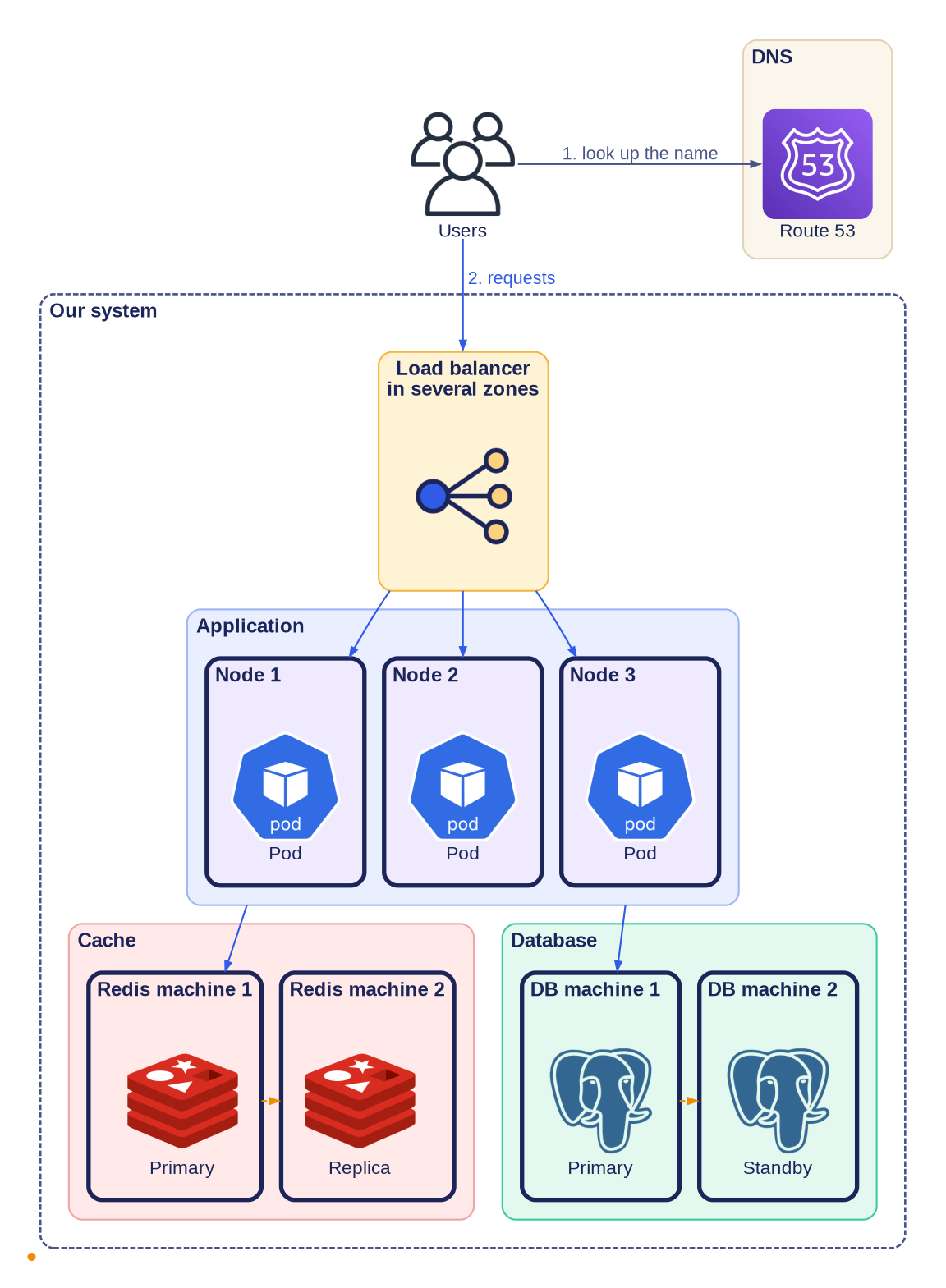
| Layer | Job | Products | How it survives a failure |
|---|---|---|---|
| DNS and CDN | Find the site, serve copies near users | Route 53, Cloudflare, Cloud CDN | Many locations, health-checked records |
| Load balancer | Share traffic | HAProxy, Nginx, ALB, NLB, Traefik | A pair with one address, or a managed service in several zones |
| Application | Your code | Kubernetes pods, ECS tasks | Replicas in several zones |
| Cache | Fast copies of data | Redis, Memcached | Redis: replica and promotion. Memcached: lose it and refill |
| Database | Keep the data | PostgreSQL, Aurora, CockroachDB, Spanner | Replication and a new primary, or consensus |
Four shelves of tools
Load balancers
HAProxy (open source), Nginx (versatile), AWS ALB and NLB (managed), Traefik (made for containers).
Databases
PostgreSQL with Patroni (self-hosted), Aurora (managed), CockroachDB (distributed), Cloud Spanner (99.999% across regions).
Cloud services
Multi-AZ deployments (redundancy), global balancing (latency), managed databases (less work), auto scaling groups (elastic).
Orchestration
Kubernetes (the standard), Docker Swarm (simple), ECS and EKS (on AWS), HashiCorp Nomad (lightweight).
Load balancers
Layer 4 or layer 7
Two ways to look at a request
| Layer 4 | Layer 7 | |
|---|---|---|
| Sees | IP address and port | Path, headers, cookies |
| Can do | Forward connections very fast | Route by content, end TLS, cache, retry a request |
| Good for | Databases, games, anything not HTTP | Web and APIs |
| Cost | Cannot choose by content | More work per request |
Four load balancers
| Product | Layers | Strong at | Mind | Best for |
|---|---|---|---|---|
| HAProxy | 4 and 7 | Very fast, reliable, free | You write the configuration and must pair it yourself (keepalived) | Busy sites, TCP services |
| Nginx | 7, and 4 with the stream module | Web server, proxy and cache in one, large ecosystem | Free version has passive checks only; active HTTP checks are in Plus | Web apps, API gateways |
| AWS ALB / NLB | 7 / 4 | Managed, scales and spans zones | Tied to AWS, price per use | AWS workloads |
| Traefik | 7 and 4 | Finds services in Kubernetes and Docker by itself, dashboard | Own concepts to learn | Containers and microservices |
Databases
One primary, and copies that follow
Replication
Four ways to run a relational database
| Product | Kind | Copies | Failover | Strong at | Mind |
|---|---|---|---|---|---|
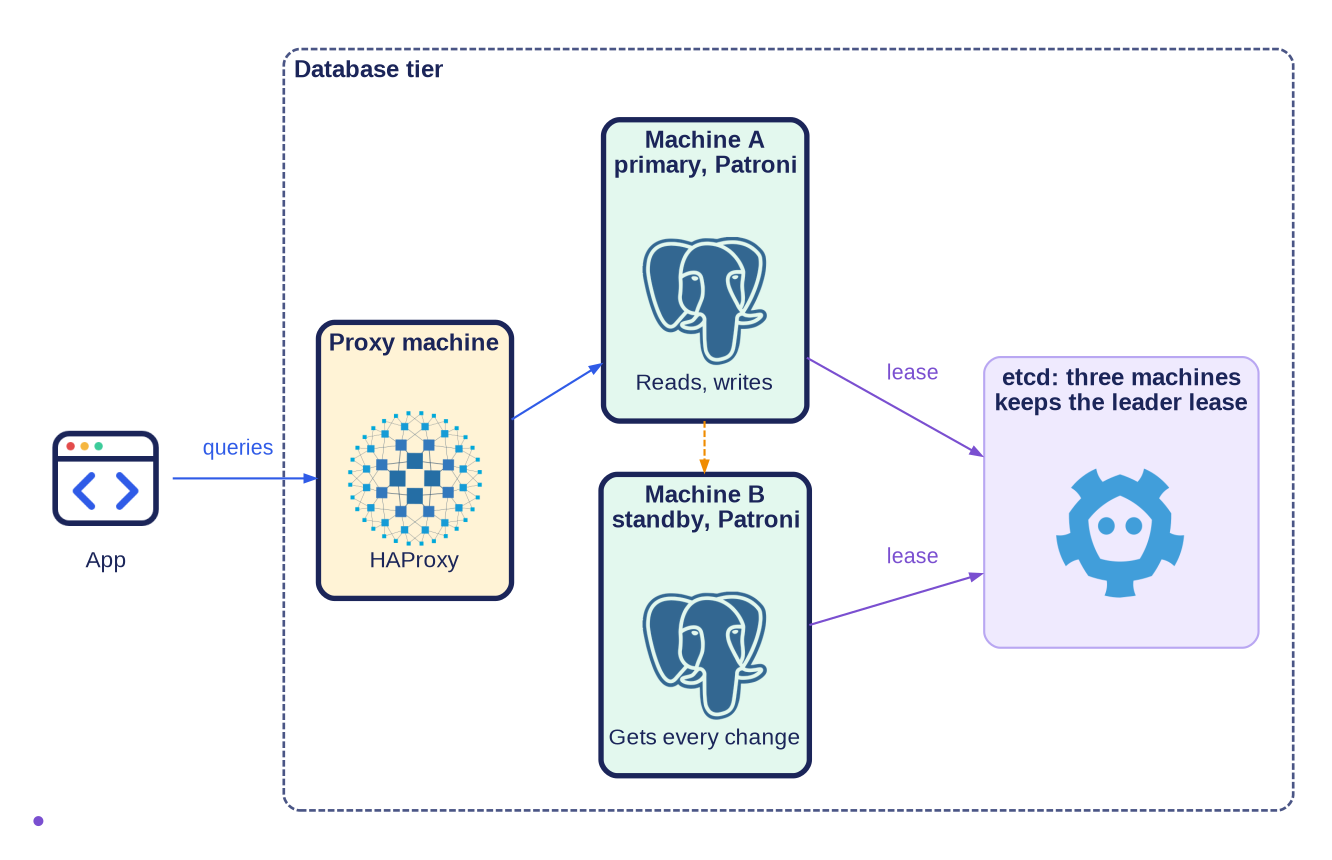
| PostgreSQL + Patroni | Self-managed | As many as the primary can feed | Automatic, leader lease in etcd, Consul or ZooKeeper | Full control, open source | You run it, and etcd too |
| Amazon Aurora | Managed | Up to 15 readers, storage copied over 3 zones | Typically under 60 s, often under 30 s | 99.99% SLA for Multi-AZ, storage grows | AWS only, price |
| CockroachDB | Distributed SQL | 3 copies of each range by default | Built in, by consensus | Every node takes reads and writes, multi-region | Higher write latency, needs several nodes |
| Cloud Spanner | Managed, distributed | Several zones or regions | Built in, by consensus | 99.999% multi-region, strong consistency | Google only, price, schema advice |
PostgreSQL with Patroni
Synchronous or asynchronous replication
| Synchronous | Asynchronous | |
|---|---|---|
| Order | Write, wait for a replica, then commit | Write, commit, replicate afterwards |
| If the primary dies | Committed data is on a replica | The last moments may be lost |
| Price | Every write waits for the network; needs a reachable replica | Fast writes |
| Use | Money, orders, between zones | Read replicas, between regions |
Cache
Redis and Memcached
| Setup | Survives | Mind |
|---|---|---|
| Memcached, several nodes | Loss of a node: those keys are read from the database again | No replication. Can the database take the extra reads? |
| Redis primary and replica + Sentinel | Loss of the primary: Sentinel promotes the replica | Run at least three Sentinels. Replication is asynchronous |
| Redis Cluster | Loss of a master that has a replica | Data is split. Acknowledged writes can be lost in a failover |
Cloud
Managed services in three clouds
| Job | AWS | Google Cloud | Azure |
|---|---|---|---|
| Load balancing | ELB: ALB, NLB | Cloud Load Balancing | Azure Load Balancer |
| Relational database | RDS Multi-AZ, Aurora | Cloud SQL HA | Azure SQL |
| Global database | Aurora Global, DynamoDB global tables | Cloud Spanner | Cosmos DB |
| DNS and CDN | Route 53, CloudFront | Cloud DNS, Cloud CDN | Traffic Manager, Front Door |
| Object storage | S3 (11 nines durability) | Cloud Storage | Blob Storage |
What the contracts promise per month (checked November 2026)
| Service | AWS | Google Cloud | Azure |
|---|---|---|---|
| Virtual machines, several zones | 99.99% | 99.99% | 99.99% |
| One virtual machine | 99.5% | 99.9% | Depends on the disk |
| Load balancer | 99.99%, several zones | 99.99% | 99.99%, Standard |
| Managed database | RDS Multi-AZ 99.95%, Aurora 99.99% | Cloud SQL HA 99.95%, Enterprise Plus 99.99% | Azure SQL 99.99% |
| Object storage | S3 Standard 99.9% | 99.9% regional, 99.95% multi-region | Blob hot reads 99.9% |
| Global database | DynamoDB global tables 99.999% | Spanner multi-region 99.999% | Cosmos DB multi-region 99.999% |
Multi-AZ
Kubernetes
Settings that keep pods available
| Feature | What it does | Example | Saves you from |
|---|---|---|---|
| ReplicaSet (by a Deployment) | Keeps the wanted number of pods | replicas: 3 | A crashed pod |
| PodDisruptionBudget | Limits voluntary evictions | minAvailable: 50% (2 of 3) | A node upgrade that evicts too many. Not from crashes |
| Pod anti-affinity | Spreads pods over nodes | topologyKey: kubernetes.io/hostname | A lost node |
| Topology spread | Spreads pods evenly over zones | maxSkew: 1, zone key | A lost zone |
| HorizontalPodAutoscaler | Changes the number of pods by load | CPU target 70% | Traffic growth, if it has minutes to react |
| Readiness probe | Takes a pod out of traffic | GET /ready | Requests to a pod that is starting or busy |
| Liveness probe | Restarts a container | GET /healthz | A hung process |
A rolling update of three pods
How the percentages round
Add it up
What can the whole stack promise?
A standard stack
Choose by the target
Decide
Managed or self-hosted?
Managed fits when
- The team is small
- The default setup is enough
- Failover at night must work without you
- The bill is smaller than an engineer
Self-hosted fits when
- You need a setting or extension they do not offer
- The scale makes the bill larger than a team
- Data must stay in your own building
- You already run it well, with practice
Before you call it done
- 1
Kill a pod, then a node
Watch errors. The service should keep answering.
- 2
Fail over the database
Time it, and check that the application reconnects by itself.
- 3
Empty the cache
See if the database survives the extra reads.
- 4
Cut a zone
Is there room in the other two?
Summary
The whole topic in one minute.
Go layer by layer: DNS and CDN, load balancer, application, cache, database. Run stateless layers in several copies across zones. Give stateful layers replicas, a safe way to choose the primary, and a replication mode that fits what you may lose.
Managed services trade control and money for failover you do not have to build. Multiply the promises of the layers to see what the whole can offer, and remember that an SLA is a refund, not a guarantee.
- Five layers: DNS and CDN, load balancer, application, cache, database.
- Layer 4 forwards connections, layer 7 reads requests.
- Patroni needs a consensus store; its leader lease is 30 seconds by default.
- A PodDisruptionBudget covers voluntary disruptions only. Liveness must not check the database.
- Multiply the layers. The weakest stateful one usually decides.