
Amazon S3
medium 30 minAmazon S3 stores objects, whole files with a key and metadata, in buckets that you reach over HTTP.
Video lesson · Chapter 1 of 5
A photo becomes an object
Amazon S3 in 90 seconds
1:30Reel coming soon
Theory
Read or listen first. About 2 min.
What it is
Amazon Simple Storage Service (S3) is a managed object store. You put bytes under a name, the key, into a bucket, and get them back by the same name. There are no disks to choose and no size to plan.
An object is written as a whole and read as a whole or in byte ranges. You do not open it and change the middle, as you would with a file. The slashes in a key look like folders, but they are only part of the name.
Everything happens over HTTP requests that are signed and checked against policies.
Why it exists
Files that users upload, logs, backups and data sets grow without end. Keeping them on the disks of your own servers means resizing, copying, replacing drives and worrying about a lost data center. S3 turns that into a service with one simple interface.
The trade is latency and flexibility. A first byte takes roughly 100 to 200 milliseconds for small objects, and there is no locking or partial update. That is fine for images and archives, and wrong for the pages of a database.
A short history
14 March 2006
Amazon announces S3.
1 December 2020
All reads, writes and listings become strongly consistent, at no extra cost.
5 January 2023
Every new object is encrypted at rest by default.
August and November 2024
Conditional writes arrive: first "only if the key is new", then "only if the object is unchanged".
2 December 2025
The largest object grows from 5 TB to 50 TB.
Words to know
- Bucket
- A container for objects in one region, with its own settings and policy.
- Object
- Data plus metadata, under one key and, with versioning, one version ID.
- Key
- The object's full name, up to 1,024 bytes.
- Prefix
- The beginning of keys, such as logs/2026/. Used to list and to spread load.
- Storage class
- A price and access profile of an object.
- Presigned URL
- A link that carries a signature and an end time for one operation.
- ETag
- A tag that changes when the object changes; not always a checksum of it.
- Availability Zone
- One or more separate data centers of a region.
- Delete marker
- A placeholder that hides an object in a versioned bucket.
How it works
Step through the idea, or press Play.
PUT a key. Signed, checked, stored across at least three zones, then 200
Understand it
Start here
The seed vault
Imagine a seed vault. Every packet has a drawer number, a keeper has the list, and the drawers are kept in three mountains.
The number is the only thing a gardener needs. Mountains and drawers are the vault's business.
The idea
Buckets, objects and keys
| Part | What it is | Worth knowing |
|---|---|---|
| Bucket | Container in one region | Names have 3 to 63 characters and are shared with all accounts, unless you use your account's own regional namespace |
| Key | Flat name | users/123/photo.jpg is one string; consoles draw folders from it |
| Object | Bytes plus system and own metadata | Up to 50 TB (48.8 TiB); replaced as a whole |
| Version ID | Identifies one version | Only when versioning is on |
Durable
Designed for eleven nines. Data is checked and repaired all the time.
No capacity planning
Any number of objects in a bucket. Request rates grow with prefixes.
Classes by use
Eight classes, and rules that move or delete objects.
Consistent
A GET or LIST after a successful PUT or DELETE sees it.
Guarded
Private by default, encrypted by default, policies, locks, versions.
Connected
Events, Athena, EMR, Lambda, CloudFront and many other services read it.
The general ideas, and how to build such a store, are in object storage and blob store design.
What eleven nines mean
Inside
How a request is served
Front end, namespace, storage
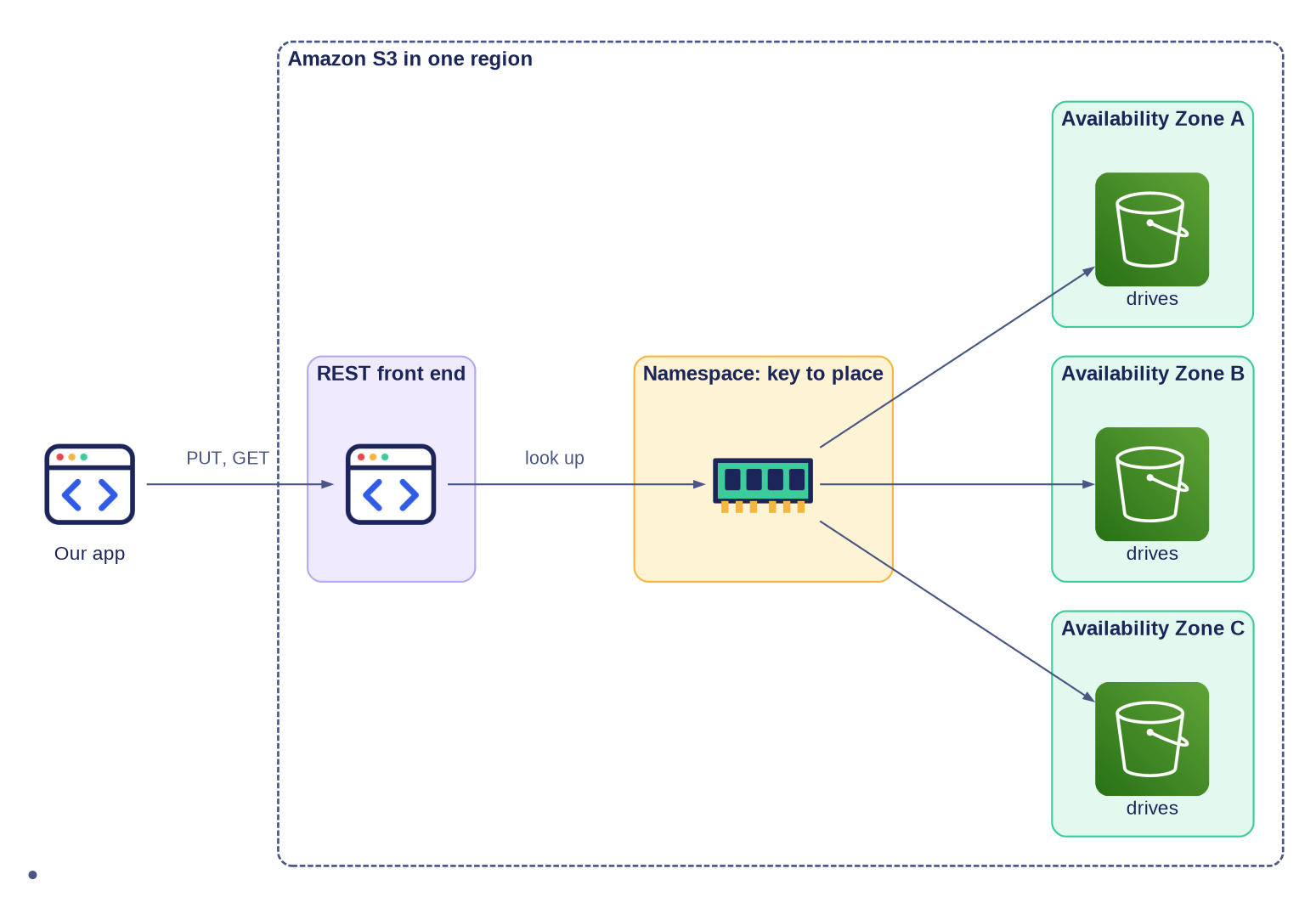
- 1
Resolve
bucket.s3.region.amazonaws.comresolves to one of many front-end servers. - 2
Check
Signature Version 4 proves the caller. IAM, bucket policy, access points and Block Public Access are evaluated together; an explicit deny always wins.
- 3
Find
The namespace maps bucket and key to places and metadata.
- 4
Write
Data goes to several devices in at least three zones, with checksums. Only then is the new object visible and the answer 200.
- 5
Read
Pieces are fetched, slow or broken drives are worked around, and the bytes are returned.
- 6
Repair
Integrity checks run all the time; lost redundancy is rebuilt on other devices.
AWS has written that S3 uses plain copies for some data and erasure coding for the rest: an object becomes data shards plus parity shards, and any of them are enough. It also spreads each customer's data over very many drives, so that one busy customer does not heat up a few of them.
Erasure coding, as an example with 4 + 2
Consistency
What readers see
Read after write, and two writers
To avoid lost updates use conditional writes. If-None-Match: * creates only if the key is new. If-Match with an ETag replaces only the version you read. A failed condition returns 412; a race can return 409, and you retry. This gives you a safe way to create a file once, or to swap a small pointer object. There are still no transactions over several keys.
Coordinating writers
| Need | Use |
|---|---|
| Keep both results | Different keys, or versioning |
| Create once | If-None-Match: * |
| Change only what I read | If-Match with the ETag, then retry |
| Change several objects together | Write all data first, then swap one pointer object, or keep the truth in a database |
Speed
Prefixes, ranges and parallel work
AWS states at least 3,500 writes (PUT, COPY, POST, DELETE) or 11,000 reads (GET, HEAD) a second for each partitioned prefix. Many teams still quote the earlier figure of 5,500 reads. S3 splits busy prefixes by itself, but gradually; until then you may see 503 Slow Down.
How many prefixes?
Spreading keys
| Key | Effect |
|---|---|
avatars/u123.jpg | All under one prefix until S3 splits it |
7/avatars/u123.jpg | One of 16 prefixes by a hash of the name |
7f/avatars/u123.jpg | One of 256 |
2026-11-23/log-0001 | Every day starts with a cold prefix; avoid at high rates |
Multipart upload
Parts of 5 MiB to 5 GiB, up to 10,000, in parallel, each retried alone. Advised from 100 MB; a single PUT ends at 5 GB.
Byte ranges
Fetch parts of an object in parallel, or only the first kilobytes.
Transfer Acceleration
Enter at a nearby CloudFront location and travel on AWS's network. Extra price; test whether it helps.
S3 Express One Zone
Single-digit milliseconds in one zone, in directory buckets. Supports appends.
A multipart upload
Access
Presigned URLs
Files go around the app
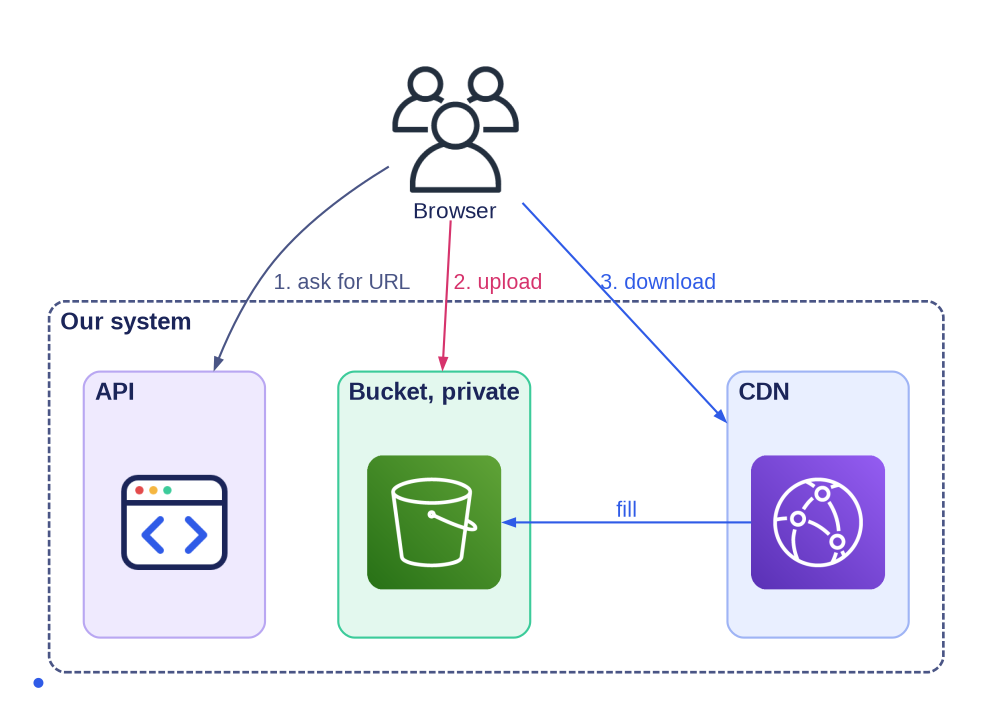
A presigned URL holds the operation, bucket, key, end time and a signature. Whoever has it can use it, as often as they like, until it ends. Keep uploads to about 15 minutes. The longest life is 7 days with an IAM user's key; with a role it ends with the role's session.
- 1
Ask
The client tells the app the name, type and size. The app checks the user and the quota.
- 2
Sign
The app chooses the key itself, never the client, and signs a PUT with the content type, or a POST policy with a size range.
- 3
Upload
The client sends the file to S3.
- 4
Confirm
An event or a call from the client makes the app check the object, scan it and mark it ready.
A presigned PUT cannot limit the size by itself unless you sign the exact length; a presigned POST can, with content-length-range. More in file upload APIs. Events are delivered at least once, so make the handler idempotent.
Classes
Storage classes and lifecycle rules
Classes by design, November 2026
| Class | For | Availability, zones | Minimum | Read |
|---|---|---|---|---|
| Standard | Often read | 99.99%, 3 or more | none | Milliseconds |
| Intelligent-Tiering | Unknown pattern | 99.9%, 3 or more | none; monitoring fee per object | Milliseconds, unless archive tiers are on |
| Express One Zone | Lowest latency | 99.95%, 1 | none | Single-digit ms |
| Standard-IA | About monthly | 99.9%, 3 or more | 30 days, 128 KB | Milliseconds, fee per GB |
| One Zone-IA | Can be made again | 99.5%, 1 | 30 days, 128 KB | Milliseconds, fee per GB |
| Glacier Instant Retrieval | About quarterly | 99.9%, 3 or more | 90 days, 128 KB | Milliseconds, fee per GB |
| Glacier Flexible Retrieval | About yearly | 99.99% after restore, 3 or more | 90 days | 1-5 min expedited, 3-5 h standard, 5-12 h bulk |
| Glacier Deep Archive | Less than yearly | 99.99% after restore, 3 or more | 180 days | Within 12 h standard, 48 h bulk |
Which class?
{ "Rules": [ { "ID": "archive-old-logs", "Status": "Enabled", "Filter": { "Prefix": "logs/" }, "Transitions": [ { "Days": 30, "StorageClass": "STANDARD_IA" }, { "Days": 90, "StorageClass": "GLACIER" } ], "Expiration": { "Days": 365 }, "AbortIncompleteMultipartUpload": { "DaysAfterInitiation": 7 } } ]}aws s3api put-bucket-lifecycle-configuration. Objects below 128 KB are not moved by default, because the move costs more than it saves.Is the rule worth it? An example with assumed prices
Protection
Versions, locks and copies
Delete and get back
| Tool | Protects from | Limits |
|---|---|---|
| Versioning | Overwrites and deletes by mistake | Old versions cost; add a rule for them |
| MFA delete | Deleting versions with stolen credentials | Set by the root user, awkward to automate |
| Object Lock, governance | Most users | Some may override with a special permission |
| Object Lock, compliance | Everyone, root included, until the date | Cannot be shortened: test first |
| Cross-Region Replication | Loss of a region, distance | Asynchronous, needs versioning on both sides, new objects only |
| Replication Time Control | Unknown lag | Designed for 99.9% of objects within 15 minutes |
Security
Private by default, and keep it so
Encryption at rest
| Kind | Keys | Notes |
|---|---|---|
| SSE-S3 (default) | S3 manages them | No extra work |
| SSE-KMS | In AWS KMS | Key permissions and key use in CloudTrail; KMS request costs and limits |
| SSE-C | You send the key on each request | Blocked by default for new buckets since April 2026 |
| Client-side | You encrypt before upload | S3 never sees plain data |
{ "Version": "2012-10-17", "Statement": [ { "Sid": "PartnerRead", "Effect": "Allow", "Principal": { "AWS": "arn:aws:iam::123456789012:role/reader" }, "Action": "s3:GetObject", "Resource": "arn:aws:s3:::my-bucket/shared/*" }, { "Sid": "PartnerList", "Effect": "Allow", "Principal": { "AWS": "arn:aws:iam::123456789012:role/reader" }, "Action": "s3:ListBucket", "Resource": "arn:aws:s3:::my-bucket", "Condition": { "StringLike": { "s3:prefix": "shared/*" } } } ]}Block Public Access is on for new buckets; leave it on, and serve public files through a CDN that alone may read the bucket. Log access, and give each program only its prefix.
Data
Analytics and what is new
Data lake
Raw files in Parquet, read by Athena, EMR, Spark or Redshift Spectrum. Keep many rows in each file: thousands of tiny objects are slow and dear.
S3 Tables
Buckets made for Apache Iceberg tables, with maintenance included.
S3 Vectors
Vector storage and search on S3.
S3 Select
Closed to new customers. Use Athena or read ranges of Parquet files instead.
Decide
When to choose it, and when not
Choose S3 for
- Images, videos, documents, logs, backups
- Written once and read many times
- Data lakes and training data
- Static sites behind a CDN
- Archives with lifecycle rules
- Collecting logs of many systems
Not for
- Look-ups below 10 ms: DynamoDB or a cache (Express One Zone narrows this)
- Frequent small changes in a file
- POSIX locks, appends and seeks: EFS
- Transactions over several items
- Counters and sessions: Redis or DynamoDB
- Disks of a database: EBS
Neighbours
| Product | Alike | Different | Choose it for |
|---|---|---|---|
| Amazon EBS | AWS storage, encryption | A disk for an instance, up to 64 TiB, low latency; some types attach to several instances | Databases, boot disks |
| Amazon EFS | Grows by itself, many readers | NFS, POSIX permissions and locks | Shared files, older apps |
| Google Cloud Storage | Objects, classes, strong consistency | BigQuery close by, other classes | Systems on Google Cloud |
| Azure Blob Storage | Objects, tiers | Microsoft identity and tools | Systems on Azure |
What the bill is made of
| Item | Grows with | Keep it small by |
|---|---|---|
| Storage | GB and class, old versions, unfinished uploads | Lifecycle rules |
| Requests | PUT, LIST and GET counts | Larger objects, fewer listings |
| Retrieval | GB read from cold classes | Right class |
| Transfer out | GB to the internet or other regions | A CDN, computing in the same region |
Strengths
- Durability without work
- No capacity planning
- Classes and rules against cost
- Strong consistency
- Understood by nearly every tool
Costs
- Roughly 100 to 200 ms for small objects
- Objects replaced as a whole
- One key at a time: no transactions
- Not a file system
- Transfer out is charged
Summary
The whole topic in one minute.
S3 is the place for whole files of any size: written once, read many times, kept safely. Keys are flat names, reads see the last completed write, and durability comes from spreading data over at least three zones and repairing it all the time.
Good designs let clients talk to it directly with presigned URLs, put a CDN in front, spread hot keys, use versions against mistakes and lifecycle rules against cost. Remember what it lacks: file locks, small edits and transactions over several objects.
- Bucket, key, object: flat names over HTTP.
- Eleven nines by design, three zones or more, strong consistency per key.
- 3,500 writes or 11,000 reads a second per partitioned prefix, growing gradually.
- Presigned URLs for clients, multipart for large files, a CDN for readers.
- Versions against mistakes, lifecycle against cost, conditions against lost updates.
Sources
- AWS: what is Amazon S3 (consistency, concurrency)
- AWS: optimizing performance
- AWS: storage classes
- AWS: multipart upload limits
- AWS: conditional writes
- AWS: presigned URLs
- AWS: strong read-after-write consistency (2020)
- AWS: 50 TB objects (2025)
- Andy Warfield: building and operating a pretty big storage system
- Dropbox: Magic Pocket