
Inside a blob store
hard 30 minHow a blob store is built: a gateway, a metadata service that knows where each piece is, data nodes that hold pieces, and background jobs that repair, move and delete.
Video lesson · Chapter 1 of 5
A large photograph becomes visible only at the end
Theory
Read or listen first. About 2 min.
What it is
Inside a blob store, a file is cut into chunks. Chunks live on many ordinary machines called data nodes. A separate metadata service remembers which chunks make up which file and where each one is.
Around these two parts runs a set of jobs. One keeps enough copies or parity for every chunk. One moves old data to cheaper disks. One deletes what nobody needs any more. Users see none of them, and the promises of the store depend on them.
Why it exists
One disk cannot hold a petabyte, one network card cannot serve it, and every disk fails one day. Spreading pieces over many machines solves size and speed. Redundancy with fast repair solves failure.
Names and bytes are separated because they are so different. Names are tiny, numerous and change in small transactions. Bytes are huge and never change after they are written. Each part can use the storage that suits it.
A short history
1960
Irving Reed and Gustave Solomon publish the code that bears their names. It later protects compact discs, and today it protects stored chunks.
2003
The Google File System paper describes a file system on inexpensive hardware, with large chunks and replication.
2010
At OSDI, Facebook describes Haystack, its store for photos.
2012
Microsoft's paper on Local Reconstruction Codes in Azure Storage shows how to read fewer pieces during a repair.
2014
Facebook describes f4, a store for warm blobs. It lowers the effective replication factor from 3.6 to 2.8 or 2.1.
Words to know
- Chunk
- A fixed-size piece of a blob, for example 64 MB.
- Data node
- A machine with disks that stores pieces and checks them.
- Manifest
- The ordered list of chunks that make up one version of a blob.
- Erasure coding
- Storing parity calculated from the data, so lost pieces can be computed again.
- Scrubbing
- Reading stored pieces regularly and comparing checksums.
- Garbage collection
- Finding pieces that no manifest mentions and deleting them.
How it works
Step through the idea, or press Play.
Cut into chunks. Pieces go to data nodes on separate machines and zones
Understand it
Start here
A dragon too long for one rack
The theatre owns a dragon costume that no rack can hold. Noor stores it in pieces and keeps a plan of which rack holds which. That plan is the heart of a blob store.
Losing the plan is as bad as losing the pieces: without it nobody knows what belongs together.
Goals
What the design has to achieve
The promises come from the requirements: eleven nines of durability, high availability across zones, cost efficiency through tiers, and low latency for data in use. The difficulties are large files, constant hardware failure, and very different access patterns in one system.
The whole store
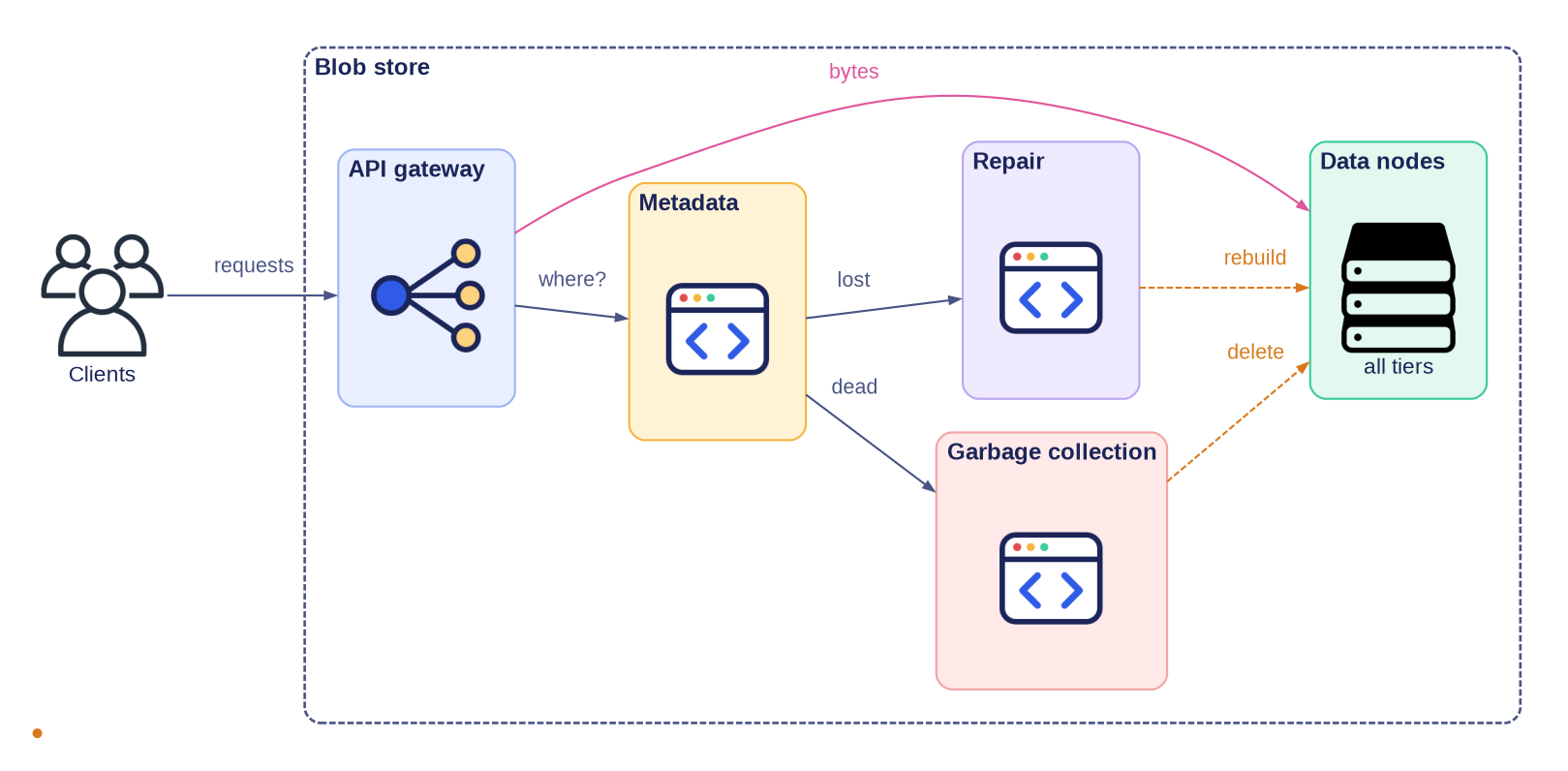
Parts
Four components
API gateway
Authentication, authorization, rate limits, routing, signed URLs. Stateless, many copies behind a load balancer.
Metadata service
Blob to chunk mapping, chunk locations, quotas, access lists, the namespace. Sharded and strongly consistent per key.
Data nodes
Keep pieces on disks, check their integrity and send heartbeats to a cluster manager.
Replication manager
Watches redundancy, rebuilds lost pieces, copies to other zones and regions, handles failover.
How a read finds its bytes
Data model
Two records
{ "blob_id": "b-71", "bucket": "user-uploads", "key": "photos/img.jpg", "size": 134217728, "content_type": "image/jpeg", "storage_class": "STANDARD", "created_at": "2026-11-01T09:00:00Z", "etag": "version-tag", "state": "committed", "chunks": ["c-900", "c-901"]}{ "chunk_id": "c-900", "blob_id": "b-71", "sequence": 0, "size": 67108864, "checksum": "sha256:...", "locations": ["node1:disk3", "node5:disk1", "node9:disk2"]}Why two kinds of storage
| Metadata | Bytes | |
|---|---|---|
| Size of one item | About 1 KB | Up to 64 MB |
| Changes | Every put, delete, move | Never, only written and deleted |
| Needs | Atomic commit, sorted listing | Throughput, cheap space |
| Lives on | Sharded database, several replicas | Many disks, append-only files |
| If lost | Everything is unreadable | One chunk is rebuilt |
A wide-column database can hold this metadata, but check one thing first: committing a new version must be one atomic step, and a listing in key order must see it. Split the namespace by ranges of keys if listings matter, by hash if they do not. See sharding.
How many records?
Write
Upload in parts
- 1
Initiate
The client asks. The API checks permission and returns an upload id and a signed URL for each part.
- 2
Upload parts
Parts travel in parallel straight to the storage front end, so the application servers carry no file bytes.
- 3
Track parts
Every part returns a tag. The client keeps part number and tag, and can resume after a break.
- 4
Complete
The client sends the full list. The store verifies that every part is there and unchanged.
- 5
Finalize
One metadata commit creates the manifest. No bytes need to be copied together: the manifest is the file.
Signed URLs keep bytes away from the application
Parts give three things: parallel transfer, retry of one part and very large files. On S3, 10,000 parts of up to 5 GiB make 48.8 TiB, sold as 50 TB. For ordinary links, parts of 64 to 100 MB are a sensible start.
Durability
Copies or parity
Three full copies survive two losses and triple the disks. Erasure coding splits a chunk into data pieces and computes parity pieces. Any of the pieces rebuild the chunk, so any may be lost.
Reed-Solomon 6 + 3 over three zones
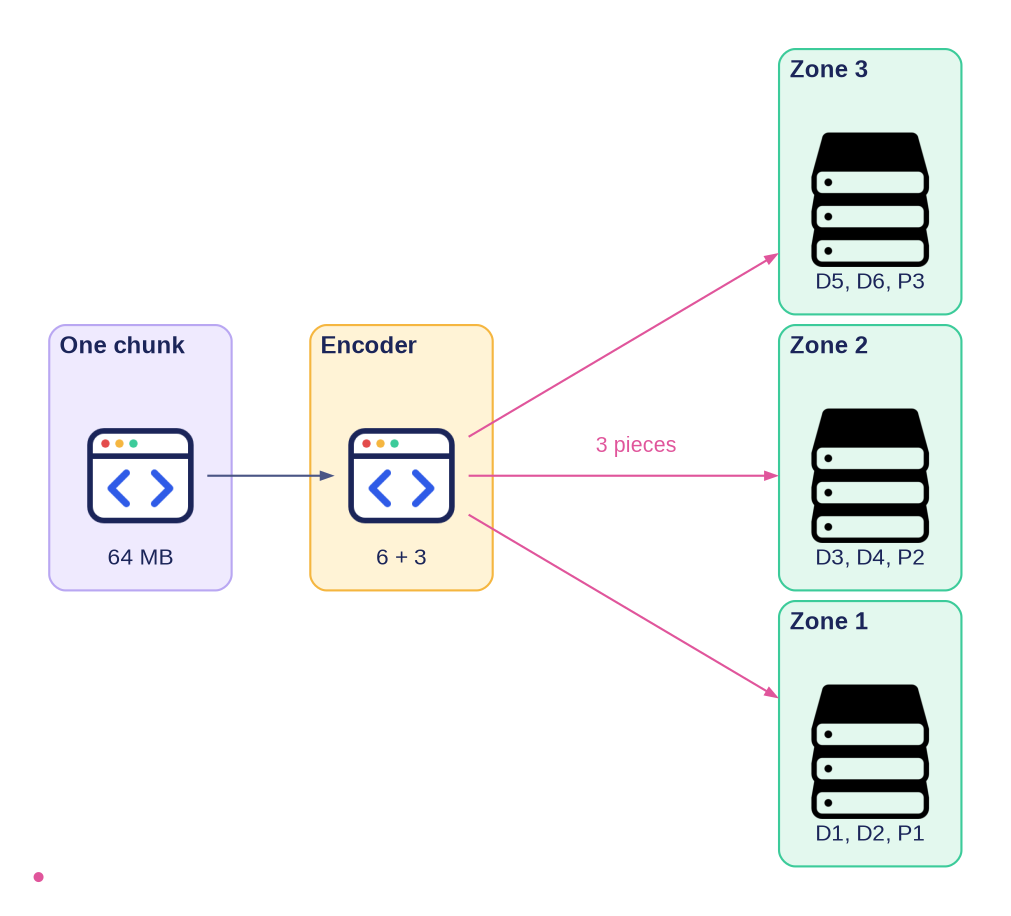
Space overhead
Chance of loss, if each piece fails independently with p = 1% before repair
Pick the scheme
| 3 copies | 6 + 3 | |
|---|---|---|
| Space | 3x | 1.5x |
| Survives | 2 losses | 3 losses |
| Rebuild one lost 64 MB copy | Read 64 MB | Pieces are 10.7 MB: read 6, 64 MB in all |
| Rebuild a full 16 TB disk | Read 16 TB | Read 96 TB over the network |
| Small objects | Simple | Pack many into one chunk first |
| Good for | Hot, small, new | Large, warm, cold |
A node dies
Other regions
Synchronous here, asynchronous there
Within a region, the write waits until enough zones have the pieces. To another region, a background job copies later, so a regional disaster can lose the last seconds or minutes. Writing to two regions before answering removes that gap and adds the distance to every upload. Decide by storage class: it is a price, not a default.
Tiers
Hot, warm, cold, archive
Tiers with Amazon S3 classes as examples
| Tier | Read how often | First byte | For |
|---|---|---|---|
| Hot: Standard | More than once a month | Milliseconds | Active files, new uploads |
| Warm: Standard-IA | About once a month | Milliseconds, with a retrieval fee | Backups, older media |
| Cold: Glacier Flexible Retrieval | Rarely | Minutes to 12 hours | Compliance archives |
| Archive: Glacier Deep Archive | Hardly ever | Within 12 to 48 hours | Legal holds, long-term records |
A lifecycle rule
Space
Four ways to save
- 1
Deduplication
Name a chunk by the hash of its content. An equal chunk is stored once, with a count of users. The gain depends entirely on your data, so measure it. Across customers it can reveal that a file exists, and encrypted data does not deduplicate.
- 2
Intelligent tiering
Watch access and move objects nobody reads.
- 3
Compression
Zstd or LZ4 for text, logs and configuration. Photos and video are compressed already: test a sample and store as is if it does not shrink.
- 4
Erasure coding
1.5x instead of 3x for large objects.
Versions of one large file can also be stored as differences (delta encoding). Reading an old version then needs the base and every step to it, so keep the chain short.
Read
Making reads fast
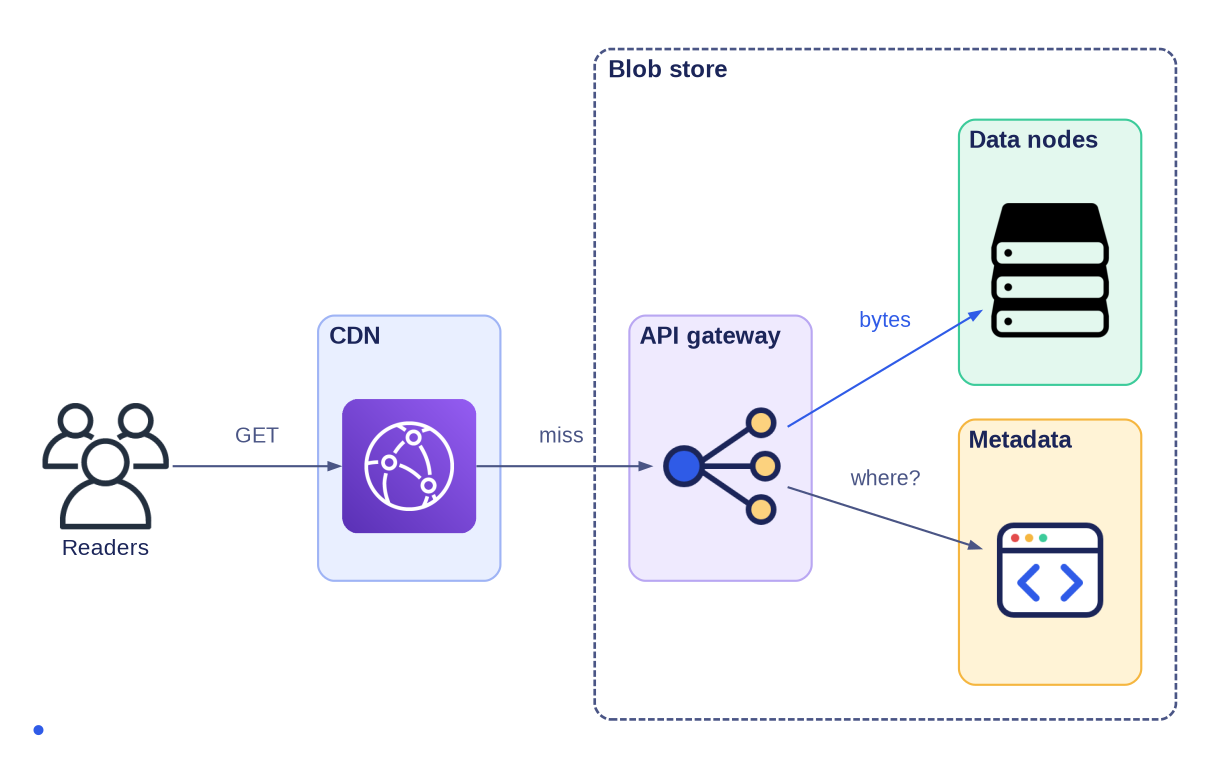
The CDN answers most reads
- 1
Cache popular blobs at the edge
Use a new key for new content, so a cached copy is never wrong.
- 2
Read ahead
When a client reads chunks in order, fetch the next one early.
- 3
Reuse connections
Keep pools of open connections between gateway and data nodes.
- 4
Ask for spares
With 6 + 3, request seven or eight pieces and use the first six that arrive. One slow disk no longer decides the latency.
Delete
Garbage collection
Delete removes the name at once. The bytes go later: versions, snapshots or shared chunks may still need them. Orphans also appear when an upload dies between storing pieces and committing the manifest.
May this chunk be deleted?
Summary
The whole topic in one minute.
A blob store separates names from bytes. The gateway checks and routes, metadata maps a key to a manifest of chunks, and data nodes keep the pieces. Writing stores the pieces first and commits the manifest last, so a reader never sees half a file.
Durability comes from redundancy plus repair. Erasure coding such as 6 + 3 survives three lost pieces at 1.5 times the space, at the price of more work to rebuild. Tiering, deduplication and garbage collection then decide what the store costs.
- Separate names (metadata) from bytes (data nodes).
- Store the pieces first, commit the manifest last.
- 6 + 3 survives three lost pieces at 1.5x; repair reads six pieces for each one lost.
- Durability is redundancy plus detection plus fast repair.
- Tier by access, and know the time and fee of getting data back.
- Delete slowly: manifests, grace time, quarantine.