
API design introduction
easy 24 minAn API is a contract: it says what a program may ask for and what it gets back, and it hides how the work is done.
Video lesson · Chapter 1 of 5
Search the catalogue
What an API is
1:21Reel
Theory
Read or listen first. About 2 min.
What it is
API stands for Application Programming Interface. An application is any piece of software with its own job. Programming means that other software uses it, through code. The interface is the line between the two: what you may ask, how you ask, and what comes back.
A web API puts that line on the network. One program sends a request over HTTP, another sends a response. The caller never sees the code, the database or the language behind it. It only sees the contract.
API design is the work of choosing that contract: which things exist, what can be done to them, what can go wrong, and how all of that is written down.
Why it exists
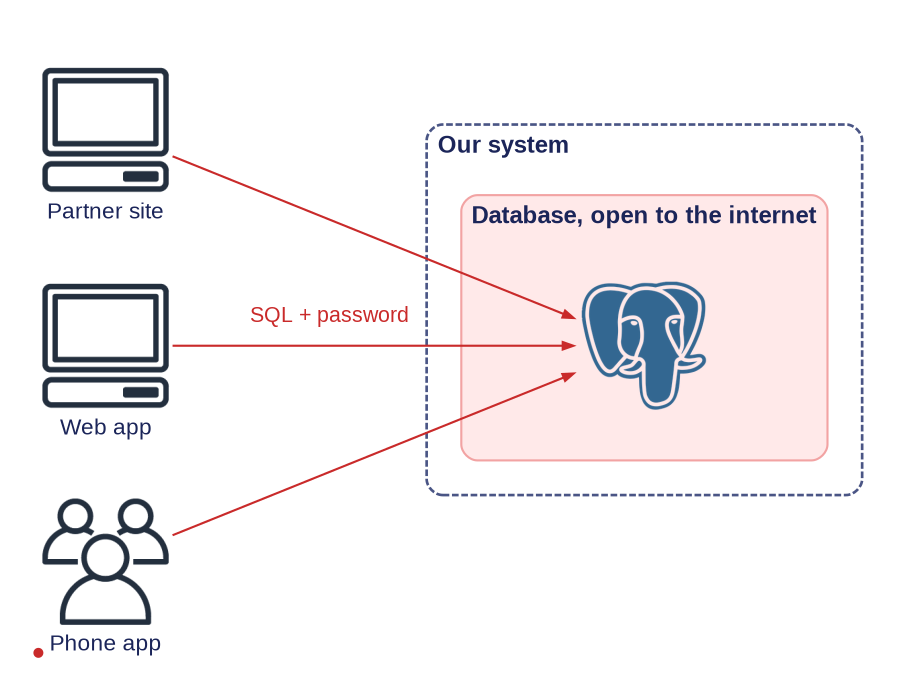
Without an API, every app would reach into the database itself. Each one would carry the password, know the table layout, and break whenever a table changed. An API gives one guarded door with rules behind it.
A contract is also hard to take back. Once strangers have built on it, every name you chose is in their code. That is why the design deserves thought before the code does.
A short history
1991
HTTP, as the World Wide Web software first uses it, has a one-line request: the word GET and a document address. The reply is a page of HTML.
May 1996
RFC 1945 describes HTTP/1.0, with methods, headers and status codes.
January 1997
RFC 2068 standardises HTTP/1.1, including PUT, DELETE and cache rules.
2000
Roy Fielding, one of the HTTP authors, describes REST in a doctoral thesis: the design rules behind the web, written down as an architectural style.
June 2022
RFC 9110 gathers the meaning of methods, headers and status codes into one document shared by HTTP/1.1, HTTP/2 and HTTP/3.
Words to know
- Client and server
- The program that asks and the program that answers.
- Endpoint
- One method on one address, such as GET /products.
- Resource
- A thing with an address: a product, a cart, an order.
- Representation
- The form a resource takes in a message, for example JSON.
- Stateless
- Each request carries everything the server needs to understand it.
- Safe
- The client asks for no change. GET is safe.
- Idempotent
- Sending it twice is meant to have the same effect as sending it once.
- Payload
- The body of a request or response.
How it works
Step through the idea, or press Play.
Name the resources. Nouns with addresses: products, carts, orders
Understand it
Start here
The waiter
Imagine a restaurant. You are hungry, but you cannot walk into the kitchen and cook. A waiter takes your order, gives it to the kitchen and brings back your meal. In software, that waiter is called an API.
The kitchen can buy a new oven or hire another cook, and the menu stays the same.
Restaurant and API, side by side
| Restaurant | API | Meaning |
|---|---|---|
| Menu | Documentation | What you can order |
| Order | HTTP request | What you want |
| Waiter | Endpoint | Carries messages both ways |
| Kitchen | Server | Does the actual work |
| Dish | HTTP response | What you get back |
| Reservation | Authentication | Who you are |
The idea
Why not talk to the database directly?
Without an API
With an API
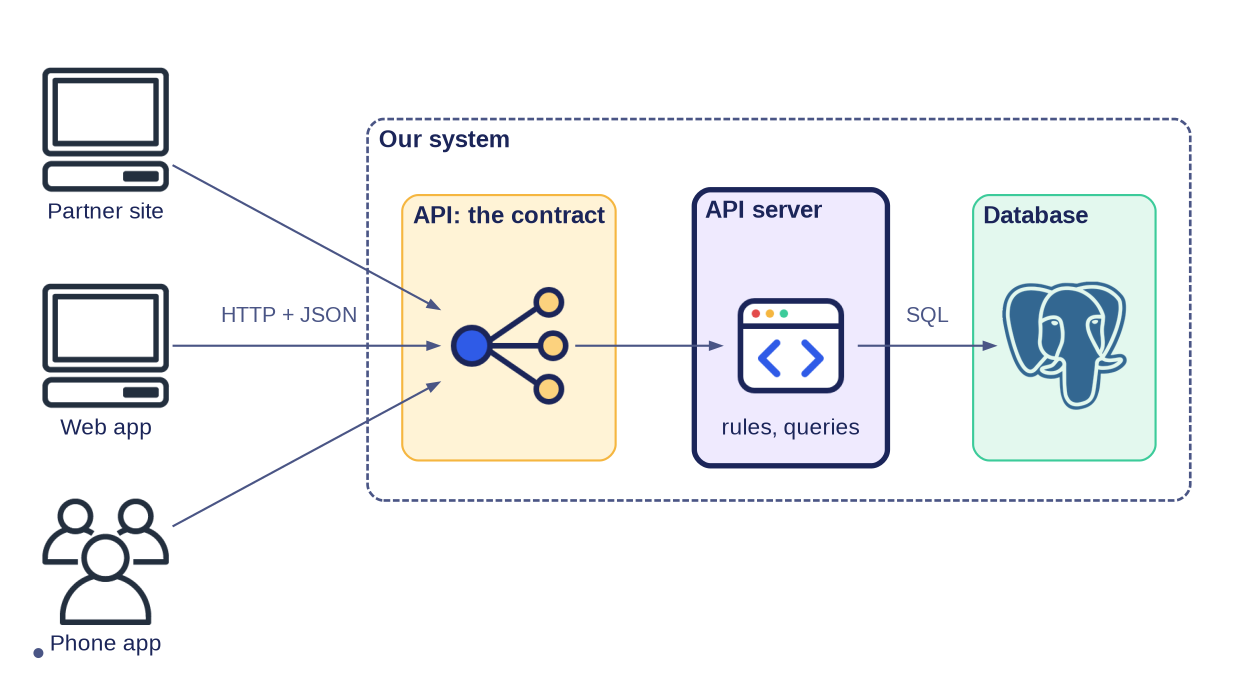
With an API
- Secure: the API checks who is asking and what they may do.
- Flexible: tables and code can change inside.
- Efficient: the server runs and tunes the queries.
- Maintainable: one place to fix a rule.
Without
- Insecure: database credentials in every app.
- Inflexible: apps are tied to the table layout.
- Inefficient: complex queries written in each app.
- Unmaintainable: change the database, change every app.
Kinds
Four kinds of API
Web APIs
Called over HTTP: Stripe, Google Maps, GitHub. This topic is about these.
Library APIs
Functions and classes you import: React, NumPy, jQuery.
Operating system APIs
How a program asks for files, memory and windows: Windows API, POSIX, macOS.
Hardware APIs
How code drives a device: graphics cards, sensors, USB.
HTTP
What HTTP gives you
Request and response
The client sends a request, the server sends a response. The server does not speak first.
Stateless
Each request stands alone. HTTP itself does not remember the previous one.
Readable model
Methods, paths and headers are words. HTTP/1.1 sends them as text; HTTP/2 and HTTP/3 send the same words in binary frames.
Reliable transport
Runs over TCP, or over QUIC for HTTP/3. Bytes arrive complete and in order, or the connection fails. It may fail after the server did the work.
POST /api/v1/orders HTTP/1.1 <- method, path, protocolHost: api.shopeasy.example <- headersContent-Type: application/jsonAuthorization: Bearer fake-token-for-docsAccept: application/json <- empty line{ "product_id": "PROD-001", "quantity": 2 } <- body (optional)HTTP/1.1 201 Created <- protocol, status code, status textContent-Type: application/json <- headersLocation: /api/v1/orders/ORD-789X-RateLimit-Remaining: 99{ "order_id": "ORD-789", "status": "confirmed", "total": 159.98 }HTTP
Methods
| Method | Use | Safe | Idempotent | Memory |
|---|---|---|---|---|
GET | Read | Yes | Yes | Get me data |
POST | Create, or run an action | No | No | Post new content |
PUT | Replace the whole thing | No | Yes | Put it all back |
PATCH | Change a part | No | Not by itself | Patch one hole |
DELETE | Remove | No | Yes | Delete it |
Methods are practised one by one in API design examples.
HTTP
Status codes and headers
The first digit tells the story
| Family | Meaning | Common codes |
|---|---|---|
| 2xx | It worked | 200 OK, 201 Created, 202 Accepted, 204 No Content |
| 3xx | Look elsewhere, or you already have it | 301, 304 Not Modified, 308 |
| 4xx | The request is the problem | 400, 401, 403, 404, 409, 422, 429 |
| 5xx | The server is the problem | 500, 502, 503, 504 |
Headers you meet every day
| Header | Direction | Purpose |
|---|---|---|
Host | Request | Domain name of the server |
Content-Type | Both | Format of the body, such as JSON or XML |
Authorization | Request | Credentials: a token or a key |
Accept | Request | Format wanted in the response |
User-Agent | Request | Which client program is calling |
Location | Response | URL of the created resource, with 201 |
Cache-Control | Response | May it be stored, and for how long |
X-RateLimit-* | Response | Quota left (a custom name, not a standard) |
Retry-After | Response | When to try again, with 429 or 503 |
REST
REST and its six constraints
REST means REpresentational State Transfer. It is an architectural style, not a protocol: a set of constraints that make web systems scale and evolve. Most APIs called REST follow some of them, usually not all.
- 1
Client and server are separate
The user interface and the data live apart and can change apart. Example: a phone app and an API server.
- 2
Stateless
Each request holds all the information needed. Example: the token travels with every request.
- 3
Cacheable
Responses say whether they may be stored. Example: Cache-Control: max-age=3600. See API caching.
- 4
Uniform interface
Resources have addresses, methods mean the same everywhere, messages describe themselves and may link to the next step. Example: GET /products, POST /orders.
- 5
Layered system
The client cannot tell whether it talks to the server or to something in between. Example: client, gateway, server, database.
- 6
Code on demand
The server may send code to run. Example: JavaScript for a browser. This is the only optional one.
Why statelessness helps scaling
Design
Think in nouns
REST thinks in resources (nouns), not actions (verbs). The method is the verb, the URL is the noun.
| Avoid | Prefer | Why |
|---|---|---|
/getAllProducts | GET /products | GET already says get |
/createNewProduct | POST /products | POST to a collection creates an item |
/updateProductById | PUT /products/{id} | PUT on one address replaces it |
/deleteProductFromCatalog | DELETE /products/{id} | DELETE removes it |
Resources of a shop
| Resource | What it is |
|---|---|
/products | The catalogue |
/products/{id} | One product |
/categories | Product categories |
/users | User accounts |
/users/{id}/cart | One user's cart |
/users/{id}/orders | One user's order history |
/orders | All orders, for staff only |
/orders/{id} | One order |
From a requirement to an endpoint
Process
One request, from tap to screen
A shopper types "wireless headphones" and taps search. A moment later, 47 matching products appear, 20 of them on the first page.
- 1
User action
The shopper taps the search button in the app.
- 2
Request formation
The app builds method, URL, headers and body:
GET /api/v1/products?search=wireless%20headphones&limit=20. The space becomes %20. - 3
Network transit
DNS lookup, TCP connection, TLS handshake. A connection that is already open skips all three.
- 4
Server processing
The server authenticates, authorizes, validates and queries the database.
- 5
Response formation
Rows become JSON, headers are added, the response is sent.
- 6
UI rendered
The app parses the JSON and draws the product cards.
Search products
Inside the server
GET /api/v1/products?search=wireless%20headphones&limit=20 HTTP/1.1Host: api.shopeasy.exampleAuthorization: Bearer fake-token-for-docsAccept: application/jsonX-Device-ID: ios-exampleHTTP/1.1 200 OKContent-Type: application/jsonX-Response-Time: 45ms{ "data": [ { "id": "PROD-001", "name": "Wireless Headphones", "price": 149.99, "rating": 4.8 } ], "pagination": { "total": 47, "page": 1, "has_more": true }}Where the time goes
Traffic for one endpoint
Two more flows
A write, and a refusal
Create an order
| Step | Action | Result |
|---|---|---|
| 1 | POST /orders | The app asks for an order |
| 2 | Check the cart | Every item is in stock |
| 3 | Process the payment | The payment provider confirms the charge |
| 4 | Create the record | INSERT INTO orders |
| 5 | 201 Created | Confirmation and a Location header |
No token: 401
Trade-offs
REST: good and bad
Strengths
- Simple to understand and to try
- Uses HTTP caching as it is
- Stateless, so easy to scale out
- Tools and frameworks everywhere
- Readable URLs and payloads
Weak spots
- Over-fetching: more data than the screen needs
- Under-fetching: several requests for one screen
- No built-in push from the server
- Versioning needs a plan
- No single error format that everybody uses
Other styles answer some of these: REST, GraphQL and gRPC. Changing a published API: API versioning. For error bodies there is now a standard, RFC 9457, that you can choose to follow.
Checklist
Seven questions for any endpoint
- 1
Who calls it?
Our app, partners, the public? Strangers need more stability.
- 2
Which resource?
One noun, one address.
- 3
Which method?
Safe? Can it be repeated?
- 4
What goes in and out?
Required fields, types, limits, examples.
- 5
What can go wrong?
One status and one error code per case.
- 6
How much can it return?
Never an endless list: API pagination.
- 7
How often may it be called?
Summary
The whole topic in one minute.
An API is the contract between programs. It hides the kitchen: callers see the menu, send an order and receive a dish, while storage, code and servers can change behind it.
With HTTP, the URL names a resource, the method says what to do, the headers describe the message and the status code says how it ended. REST adds design rules, above all statelessness and a uniform interface. Design the resources first, then methods, then errors, then limits, and treat everything you publish as a promise.
- API means Application Programming Interface: the waiter between client and server.
- REST uses resources (nouns) and HTTP methods (verbs).
- HTTP is stateless: each request stands alone.
- 2xx success, 4xx the request, 5xx the server.
- GET reads, POST creates; the Authorization header carries credentials.
- A published contract is a promise. Design it before the code.