
AWS Cloud Map
easy 26 minAWS Cloud Map is a managed registry: services and other cloud resources are registered under a name with attributes, and callers find them through an API or through DNS.
Video lesson · Chapter 1 of 5
One new order desk enters a private directory
AWS Cloud Map in 80 seconds
1:20Reel coming soon
Theory
Read or listen first. About 2 min.
What it is
Containers and functions get new addresses each time they start. Something has to answer the question "where is orders now?". AWS Cloud Map is Amazon's managed answer: a registry where each running copy, or any other resource, is entered under a service name with a set of attributes. The general idea is explained in service discovery.
There are two ways to read it. An API call, DiscoverInstances, returns matching entries with all their attributes. And if the namespace was made for it, DNS answers with addresses, because Cloud Map writes the records into Amazon Route 53 for you. Cloud Map is a list. It does not carry traffic, balance load or run a proxy.
Why it exists
Without a registry, teams keep addresses in settings, or put a load balancer before every service. The first is wrong after each deployment. The second costs an extra hop and an extra bill for each of them. Cloud Map keeps the list current with no servers to run.
It can also name things that are not programs. A queue, a table or a web address can be registered under a stable name, with attributes such as the stage, so that the same code finds the right one in test and in production.
A short history
2017, December
Amazon Route 53 Auto Naming is released on 5 December: names for IP addresses only, through DNS.
2018, March
Amazon ECS announces service discovery on 22 March. Tasks are entered and removed automatically.
2018, November
AWS Cloud Map is announced on 28 November. It adds an API, attributes, and any resource with a URL or ARN. Auto Naming entries move into it.
2022, November
Amazon ECS Service Connect is announced. It uses Cloud Map namespaces and adds a managed proxy to each task.
2024 and 2025
Service-level attributes arrive in December 2024, and sharing a namespace with other accounts in August 2025.
2026, September
AWS App Mesh, a mesh that could use Cloud Map for discovery, reaches its end of support on 30 September. AWS points ECS users to Service Connect.
Words to know
- Namespace
- The outer name, such as shop.local. It also decides how entries can be found: API only, DNS in private networks, or public DNS.
- Service
- A named group inside a namespace, with its DNS and health settings. It is the template for its entries.
- Instance
- One entry: a container, a machine, a queue, a table. It has an ID and attributes.
- Attribute
- A key and a value on an entry. Some keys are reserved, such as AWS_INSTANCE_IPV4; the rest are yours.
- Custom health check
- You, or ECS, tell Cloud Map the state. Cloud Map does not test the entry itself.
- Revision
- A number that grows when entries are added or removed, so that a client can ask cheaply whether anything changed.
How it works
Step through the idea, or press Play.
Register. ECS or your program adds an entry with attributes
Understand it
Start here
Coat pegs with picture labels
Picture a nursery. The children cannot read, so each has a picture: a duck, a star, a boat. Every room has a row of pegs by the door. A label on the peg says who is inside.
The pegs tell you where to go. You still walk there yourself.
The model
Namespace, service, instance
Three levels
Three kinds of namespace
| Kind | Found with | Entries | What is created |
|---|---|---|---|
| HTTP | API only | Anything: IPs, URLs, ARNs | Only the namespace |
| Private DNS | API, and DNS inside chosen VPCs | DNS needs IP addresses | A private hosted zone in Route 53 |
| Public DNS | API, and DNS on the internet | DNS needs IP addresses | A public hosted zone in Route 53 |
What an entry can hold
Address
AWS_INSTANCE_IPV4, AWS_INSTANCE_IPV6 and AWS_INSTANCE_PORT become A, AAAA and SRV records.
Load balancer
AWS_ALIAS_DNS_NAME makes an alias record. Set through the API or CLI, with weighted routing.
Your own facts
Up to 30 custom attributes: version, zone, weight, a queue URL. All together at most 5,000 characters.
First state
AWS_INIT_HEALTH_STATUS sets the state at the start. Without it, a custom check begins as HEALTHY.
Architecture
Where it sits
A registry beside the traffic
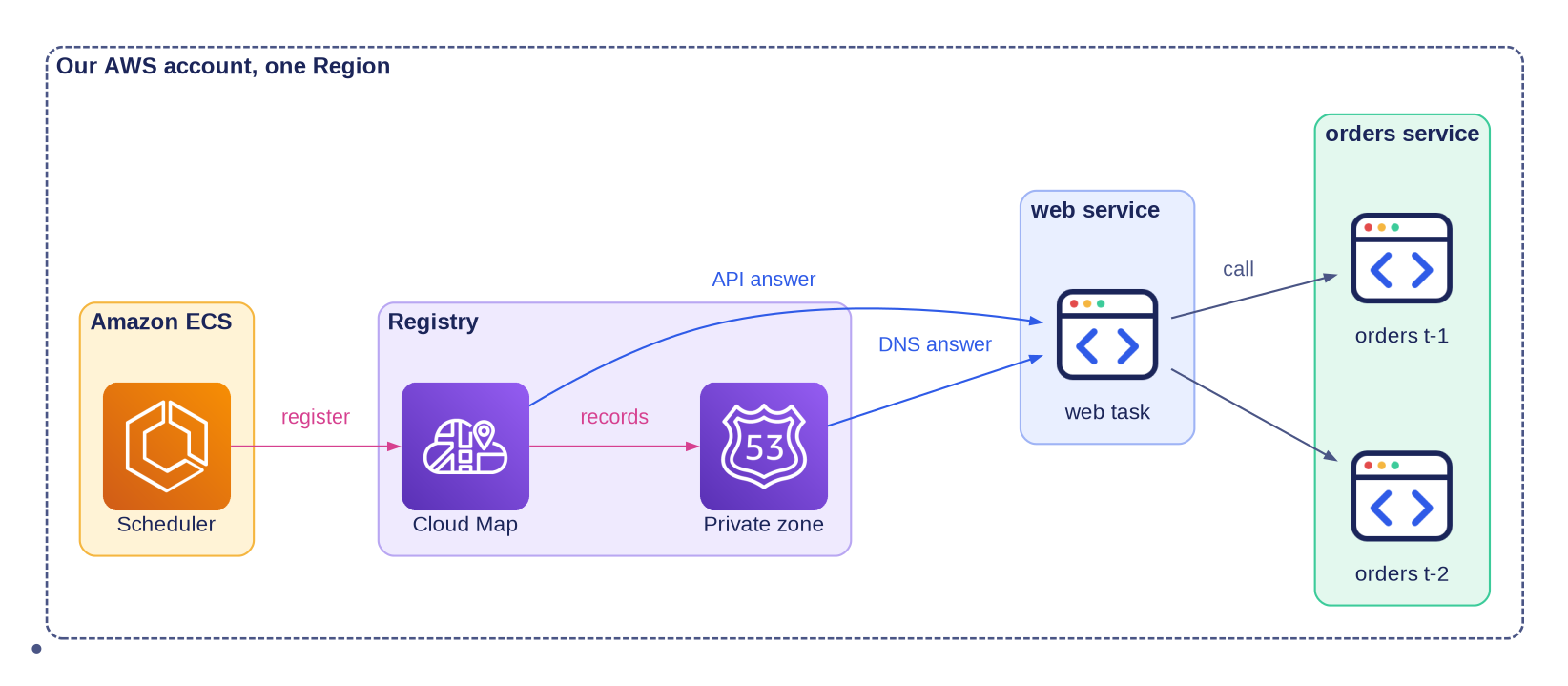
Cloud Map does
- Keeps entries and attributes, with nothing to run
- Answers API calls, filtered by attribute and health
- Writes and removes Route 53 records
- Takes health reports
- Uses IAM for who may read and write
- Shares a namespace with other accounts
Cloud Map does not
- Carry or encrypt traffic
- Balance: the caller chooses among the answers
- Retry, time out or break circuits
- Test private addresses for you
- Span Regions by itself
- Offer locks or leader election
Register
Three ways in
| Who registers | How | Watch out for |
|---|---|---|
| Amazon ECS | Service discovery or Service Connect on the service | Tasks with container health checks wait until they pass |
| Kubernetes | ExternalDNS with the AWS Cloud Map provider | Extra controller; inside a cluster its own Services are enough |
| Your program or pipeline | RegisterInstance and DeregisterInstance | A crash leaves the entry behind |
Registering is asynchronous: the call returns an operation ID, and GetOperation says when it is finished. Use the same instance ID to replace an entry. A program that registers itself must also remove itself, and something must clean up after a crash, which is why letting the platform register is safer.
An ECS task joins and leaves
Discover
API or DNS?
| DiscoverInstances (API) | DNS | |
|---|---|---|
| Returns | All attributes: IP, port, URL, ARN, your own | IP addresses; ports with SRV |
| Filter | Health and attributes | None |
| Freshness | Changes within about 5 seconds | Plus the TTL, plus whatever the program caches |
| How many | 100 by default, up to 1,000 | Up to 8 (multivalue) or 1 (weighted) |
| Caller needs | The AWS SDK and IAM rights | Only a name |
| Limit | 1,000 per second steady, burst 2,000, per account and Region | The resolver's: 1,024 packets per second per network interface |
| Billing | Per call | Route 53 query prices |
Which one?
Routing policy decides the DNS answer. With *multivalue*, up to eight healthy addresses come back. With *weighted*, one is chosen at random, and all have the same weight, so you cannot send less traffic to one. Alias records to a load balancer need weighted. Eight addresses out of fifty are fine when many callers look up often, since the answers differ.
Will the API limit hold?
Freshness
How long can a dead address live?
Worst case with DNS and a custom check
A cached answer outlives its entry
Health
Two kinds of check, one trap
| Check | Works for | How |
|---|---|---|
| Route 53 health check | Public DNS services, and API namespaces with reachable addresses | Checkers in several Regions, each every 30 s; a threshold of 1 to 10 results. Separate charge |
| Custom health check | Anything, also private addresses | Your checker, or ECS, calls UpdateInstanceCustomHealthStatus |
| None | Anything | Every entry counts as healthy |
After a first report of UNHEALTHY, Cloud Map waits about 30 seconds. If no HEALTHY report arrives in that time, the entry is out. Sending the same report again does not shorten the wait.
HealthStatus in DiscoverInstances
| Value | Returns |
|---|---|
| HEALTHY | Only healthy entries: may be an empty list |
| HEALTHY_OR_ELSE_ALL | Healthy ones; if there are none, all of them (failing open) |
| UNHEALTHY | Only unhealthy entries, for a dashboard |
| ALL | Everything |
On ECS
Service discovery or Service Connect
| ECS service discovery | ECS Service Connect | |
|---|---|---|
| What it is | Entries and DNS names for tasks | The same names plus a managed proxy in each task |
| Balancing | Whatever the caller does with the DNS answer | Round robin in the proxy, with outlier detection |
| Who can resolve | Anything in the VPC | Tasks in the same namespace that use Service Connect |
| Metrics | None of its own | Traffic metrics in ECS and CloudWatch |
| Cloud Map cost | No charge for the entries; lookups are charged | No charge for Cloud Map |
# A private name for tasks, answered inside one VPCaws servicediscovery create-private-dns-namespace \ --name shop.local --vpc vpc-0exampleaws servicediscovery create-service \ --name orders --namespace-id ns-example \ --dns-config 'RoutingPolicy=MULTIVALUE,DnsRecords=[{Type=A,TTL=10}]' \ --health-check-custom-config FailureThreshold=1# ECS then keeps the entries:aws ecs create-service --cluster shop --service-name orders \ --task-definition orders:7 --desired-count 2 --launch-type FARGATE \ --network-configuration 'awsvpcConfiguration={subnets=[subnet-0example]}' \ --service-registries registryArn=arn:aws:servicediscovery:eu-west-1:111122223333:service/srv-exampleUses
More than addresses
- 1
A queue by name
Register the queue URL as an attribute under events. Code asks for stage = test or stage = prod, and the URL is never written into the build.
- 2
Two versions side by side
Entries carry version = 1 or 2. A caller passes version = 2 in QueryParameters for a canary. OptionalParameters are a wish: they are ignored if nothing matches.
- 3
Stay in the zone
ECS adds AVAILABILITY_ZONE to each entry. Ask for your own zone as an optional parameter to save cross-zone traffic.
- 4
Settings for a service
Service attributes, since December 2024, hold values such as a timeout or a weight once, and need not be repeated on every entry.
Operate
Limits, safety and cost
Default quotas per Region
| What | Default | Can be raised |
|---|---|---|
| Namespaces | 50 | Yes |
| Instances per namespace | 2,000 | Yes |
| Instances per service | 1,000 | No |
| Custom attributes per instance | 30 | No |
| DiscoverInstances per account | 1,000 per second, burst 2,000 | Yes |
| DiscoverInstancesRevision per account | 3,000 per second | Yes |
When the limit is passed, calls fail with RequestLimitExceeded. Keep the last good list, wait longer after each failure, and add some randomness; see retries. The limit is a token bucket, described in rate limiter algorithms.
Run it well
- 1
Rights
Let callers discover, and let only the platform register. An attacker who can register can send your traffic elsewhere.
- 2
Private path
Use an AWS PrivateLink endpoint so that API calls do not need the internet.
- 3
Clean up
Alert on entries that fail for an hour. Deregister before stopping, then wait one TTL.
- 4
Accounts
Share a namespace through AWS Resource Access Manager. For private DNS, the other account's network must also be joined to the hosted zone, and it needs a network path.
- 5
Cost
You pay per registered resource and per discovery call, plus Route 53 for zones, queries and checks. Polling is usually the largest part, so poll the revision or use DNS.
Decide
When to choose it, and when not
Choose Cloud Map
- Services on ECS that call each other
- Several AWS accounts sharing names
- You need attributes: version, zone, stage
- Functions and machines must find the same resources
- Nobody wants to run a registry
Choose something else
- Public traffic: use a load balancer
- All inside one Kubernetes cluster: use its Services
- Other clouds or your own data centre as equals
- You need encryption and permission by service: use a mesh
- Failover within a second or two by DNS alone
Neighbours
| Option | Same | Different | Choose it when |
|---|---|---|---|
| Load balancer | One stable name | Carries traffic, checks targets, one extra hop | Public entry, or callers that cannot balance |
| Consul | Registry with DNS and API | You run it; any platform, locks, mesh | Mixed clouds and machines |
| Kubernetes Services | Names for copies | Built into one cluster | Everything is in it |
| Amazon VPC Lattice | Service names across accounts | Carries the traffic, with access policies | You want routing and permission with no proxy to run |
| Parameter Store | Names for values | No health, no DNS | The value changes rarely |
Summary
The whole topic in one minute.
Cloud Map stores entries in namespaces and services. Callers read them with DiscoverInstances, which is fresh and can filter by attribute, or with DNS, which needs no code and may be cached. Health comes from Route 53 checks for public names, or from your own reports.
Use it for services on AWS, above all on ECS, when direct calls between copies are wanted. Add timeouts, retries and balancing in the caller or in a proxy, because a list can always be a little old.
- Namespace, service, instance: a managed list with attributes.
- The API is fresh and can filter; DNS needs no code and may be cached.
- Private entries need custom health reports, and UNHEALTHY takes about 30 seconds.
- Poll the revision number to stay under 1,000 calls per second.
- A dead address can live for detection plus 30 seconds plus the TTL, so callers retry.
- On ECS, Service Connect adds the proxy that balances.