
Cloud load balancing
medium 25 minA cloud load balancer is a load balancer you rent.
Video lesson · Chapter 1 of 5
Find the global door and the regional worker
Theory
Read or listen first. About 2 min.
What it is
A cloud load balancer is a load balancer offered as a service. You do not buy a box or install a program. You describe what you want: which port to listen on, which certificate to use, which servers may receive work. The provider creates it and keeps it running.
Behind the one name you get there are many machines, in several separate buildings called zones. When traffic grows, the provider adds more of them. When one breaks, the provider replaces it. This is what managed means.
Each large cloud offers a small family of balancers: one that reads web requests (layer 7), one that only forwards connections (layer 4), and one that spreads users over regions. Learning the family is learning the topic.
Why it exists
Running your own balancers means at least two of them, a way to move an address from one to the other, operating system updates, certificates, capacity planning and somebody awake at night. A small team would rather build its product.
A rented balancer also knows about the other things you rent. A new virtual machine or container can join its target group by itself, a certificate can renew by itself, and its logs go to the same place as the rest.
The price is less control. You accept the limits of the service, its way of counting money, and the work of moving if you change provider.
A short history
Spring 2009
Amazon launches Elastic Load Balancing, together with Auto Scaling and CloudWatch.
August 2016
The AWS Application Load Balancer: routing by the content of the request, with target groups.
September 2017
The AWS Network Load Balancer: layer 4, one fixed address per zone, millions of requests per second.
November 2020
The AWS Gateway Load Balancer, for fleets of firewalls and similar appliances.
September 2025
Microsoft retires the Basic tier of Azure Load Balancer in favour of the Standard tier.
April 2026
Microsoft retires version 1 of Application Gateway. Version 2 scales by itself and can span zones.
Words to know
- Managed
- The provider handles scaling, patching and availability. You handle the settings.
- Region and zone
- A region is a place. A zone is a separate part of it that should not fail together with the others.
- Listener
- The port and protocol where the balancer accepts traffic.
- Rule
- If the host or path looks like this, send the request there.
- Target group
- The machines, containers or functions that may receive the traffic, with one health check. Google calls it a backend service, Azure a backend pool.
- Cross-zone balancing
- A balancer node may send work to targets in other zones as well as its own.
- Anycast
- One address announced from many places. The network takes each user to a near one.
- Capacity unit
- The measure the provider bills by, such as the LCU on AWS.
Understand it
Start here
A marquee that grows with the party
Noor still chose the garden, the number of chairs and the menu. A managed service does not decide those.
| At the party | In the cloud |
|---|---|
| Hire company | Cloud provider |
| Marquee with staff | Managed load balancer |
| Tents in two corners of the garden | Nodes in two zones |
| Chairs and food | Your servers, which you must still size |
| Bill | Hourly price plus usage |
The idea
What managed means, and what it does not
Four benefits
Managed service
No hardware to buy, rack, patch or replace.
Automatic scaling
The balancer itself grows and shrinks with traffic.
Distribution
Over zones always, over regions with the global kinds.
Pay per use
A price per hour and a price for usage.
Who does what
| Task | Provider | You |
|---|---|---|
| Balancer machines, patches | Yes | No |
| Size of the balancer | Yes | Choose the kind, know its quotas |
| Zones to use | Offers them | Choose at least two |
| Health check path and limits | Runs it | Design it |
| Enough healthy servers | No | Yes, or an auto scaler you set up |
| Certificates | Can renew its own | Ask for them, prove the domain is yours |
| Rules, firewall, logging | Offers them | Switch them on |
How a balancer picks a server belongs to load balancing. Layers are explained in layer 4 and layer 7. This page is about renting one.
Parts
The same five parts in every cloud
- 1
Front end
The name or address that clients use.
- 2
Listener
A port and protocol, with a certificate if it ends TLS.
- 3
Rules
Host and path decide which group gets the request. Layer 4 balancers have only the port.
- 4
Target group
The servers, containers, addresses or functions. On AWS an application balancer can also target a Lambda function.
- 5
Health check
How the balancer learns which targets may receive traffic.
One managed balancer over two zones
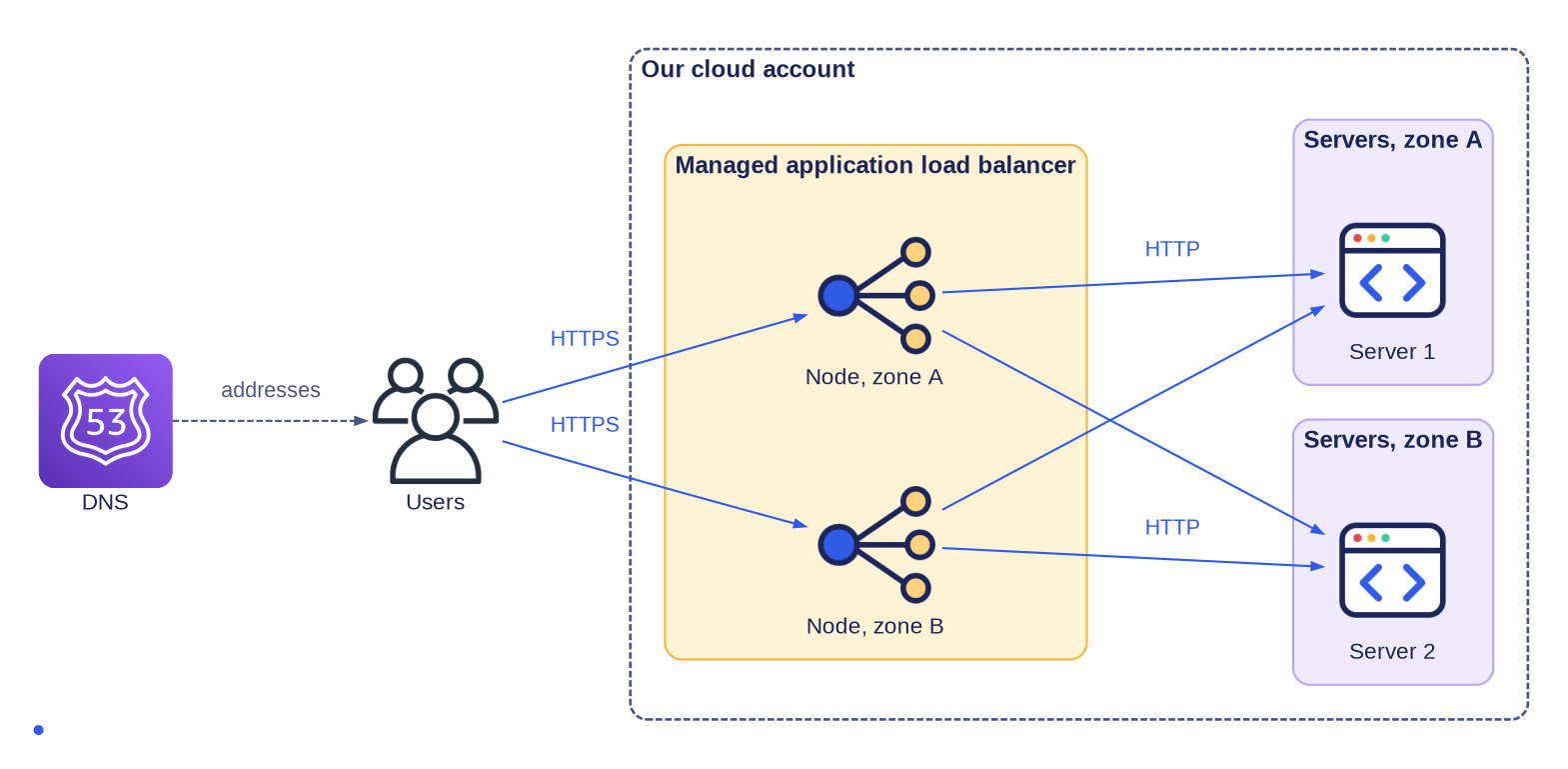
From a name to a server
lb = aws.lb.LoadBalancer("app-lb", load_balancer_type="application", security_groups=[security_group.id], subnets=[s.id for s in subnets], # one per zone enable_deletion_protection=True, access_logs={"bucket": logs.bucket, "prefix": "alb-logs", "enabled": True})group = aws.lb.TargetGroup("app-tg", port=80, protocol="HTTP", target_type="ip", vpc_id=vpc.id, health_check={"path": "/health", "healthy_threshold": 2, "unhealthy_threshold": 3, "interval": 30, "timeout": 5})aws.lb.Listener("https", load_balancer_arn=lb.arn, port=443, protocol="HTTPS", certificate_arn=certificate.arn, default_actions=[{"type": "forward", "target_group_arn": group.arn}])subnets are defined elsewhere.AWS
Elastic Load Balancing
| Kind | Layer | Use it for | Remember |
|---|---|---|---|
| Application (ALB) | 7 | HTTP, HTTPS, gRPC; rules by host and path | Targets can be instances, IP addresses or Lambda |
| Network (NLB) | 4 | TCP, UDP, TLS; very low latency, sudden traffic | One static address per zone |
| Gateway (GWLB) | 3 | Fleets of firewalls and other virtual appliances | Sends packets on with GENEVE, port 6081 |
| Classic (CLB) | 4 and 7 | Nothing new | AWS calls it the previous generation |
Four features that interviews ask about:
- Cross-zone balancing: always on at the balancer level for ALB (a target group can switch it off), off by default for NLB and GWLB.
- Target groups: EC2 instances, containers (by IP address), Lambda functions.
- Sticky sessions: with a cookie on ALB. See sticky sessions for what they cost you.
- Health checks: HTTP or HTTPS, also in gRPC form on ALB, and plain TCP on NLB. ALB defaults for instances: every 30 seconds, 2 failures to remove, 5 successes to return.
Google Cloud
Cloud Load Balancing
| Kind | Layer | Use it for |
|---|---|---|
| Global external Application | 7 | Web traffic for the world on one anycast address |
| Regional external Application | 7 | Web traffic that must stay in one region |
| Proxy Network | 4 | TCP that the balancer ends and opens again |
| Passthrough Network | 4 | TCP, UDP and others, client address preserved |
| Internal (Application or Network) | 7 or 4 | Traffic inside your private network |
What stands out:
- Global anycast: a single address in front of backends in many regions. Users reach a nearby Google location first.
- HTTP/2 and gRPC to clients and to backends.
- Cloud Armor: filtering and protection against floods, attached to the external application balancer.
- Cloud CDN: caching switched on at the balancer. Google also says its balancers need no warming before a peak.
Azure
Four services with four jobs
| Service | Layer | Scope | Use it for |
|---|---|---|---|
| Application Gateway | 7 | Regional | Web traffic, TLS, path rules, web firewall |
| Azure Load Balancer | 4 | Regional or cross-region | TCP and UDP, zone-redundant front end |
| Front Door | 7 | Global | Content delivery and global balancing together |
| Traffic Manager | DNS | Global | Choosing a region by DNS, any protocol |
Version 2 of Application Gateway scales by itself and can be zone redundant. Private Link gives private connections to services. Traffic Manager only answers DNS questions, so Microsoft warns that it cannot fail over as fast as Front Door: some resolvers keep old answers.
Side by side
Translate between the three clouds
| Need | AWS | Google Cloud | Azure |
|---|---|---|---|
| Layer 7, one region | ALB | Regional Application LB | Application Gateway |
| Layer 4, one region | NLB | Network LB | Load Balancer |
| One entry for the world | Global Accelerator (layer 4) or CloudFront | Global Application LB | Front Door |
| DNS-based | Route 53 | Cloud DNS policies | Traffic Manager |
| Web firewall | AWS WAF | Cloud Armor | WAF on App Gateway or Front Door |
| Servers behind it | Target group | Backend service | Backend pool |
Choose by three questions
A global entry over regional balancers
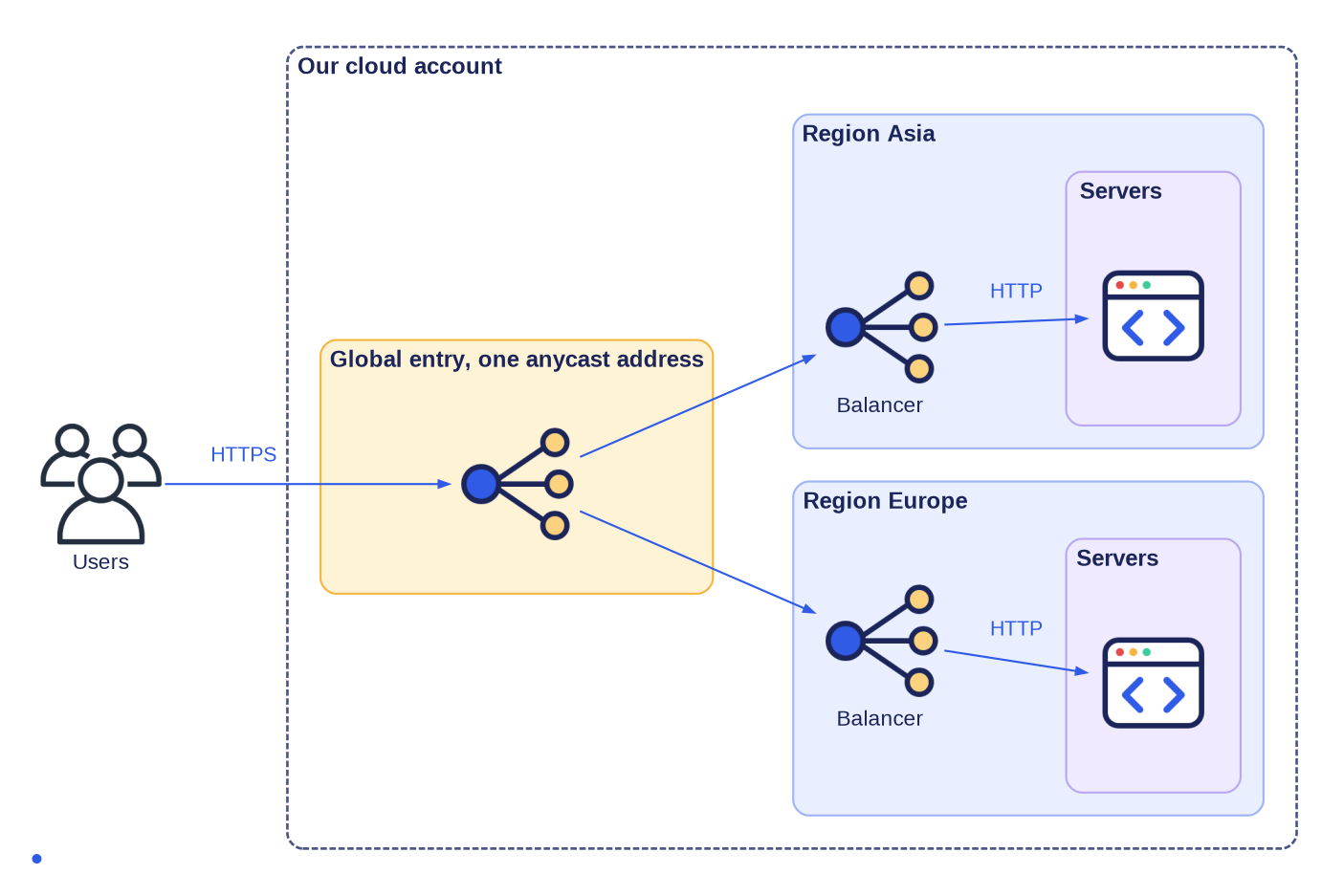
Choosing a region is the subject of global and local load balancing.
Zones
Cross-zone balancing and unequal zones
DNS spreads clients evenly over the zones. Suppose zone A has 1 target and zone B has 3. With cross-zone balancing off, each zone keeps its own half of the traffic.
Share per target, cross-zone off and on
Cross-zone traffic can cost money per gigabyte on some balancers and adds a little delay. That is the reason to switch it off on purpose, with equal zones.
A zone fails
Servers to buy so that a zone may fail
Health
How long a dead server still gets traffic
Detection time
Three settings go together with the check:
- Deregistration delay: before a target leaves, the balancer stops new requests and waits for running ones. The AWS default is 300 seconds. Match it to your longest normal request.
- Slow start: a new target receives a growing share instead of a full share at once, useful when caches are cold.
- All targets unhealthy: application balancers on AWS then fail open and use them all. Do not build alarms that assume traffic stops.
Life of a target
Money
You pay for the largest measure
Providers charge a price per hour plus capacity units. On AWS one unit of an application balancer (LCU) covers, each measured per hour or second, the amounts below. You pay for the dimension you use most, not for the sum.
| Dimension | One LCU covers | Example load | LCUs |
|---|---|---|---|
| New connections | 25 a second | 232 a second | 9.3 |
| Active connections | 3,000 a minute | 30,000 | 10 |
| Bytes processed | 1 GB an hour | 83 GB an hour | 83 |
| Rule evaluations | 1,000 a second | 0 above the free 10 rules | 0 |
The arithmetic: 100,000,000 / 86,400 = 1,157 requests a second on average. Times 20 KB is 23 MB a second, or 83 GB an hour. At a peak of 3 times the average it is 250 LCUs for those hours. Bytes decide here, so compressing responses or serving pictures from a CDN saves more than anything done to connections.
Own or rent
When renting is wrong
Rent it
- A small team, or traffic that jumps.
- Servers already in that cloud.
- Normal web rules, certificates and logs.
- Several zones without effort.
Run your own
- You need a rule or protocol the service lacks.
- Very high steady traffic where the bill beats a team.
- The same setup must run in several clouds or on your own site.
- Addresses or hardware that must be yours.
Between the two there is a common mix: a rented layer 4 balancer in front, your own proxies behind it for the rules.
Summary
The whole topic in one minute.
A managed balancer takes the machines, the patching and the growth off your hands. It does not take the design off your hands: you still choose the kind, the zones, the health check and the spare capacity.
Choose by three questions. Web requests or plain connections? One region or many? Must the address stay fixed? Then read how it is billed, because you pay for the largest of several measures.
- Managed means the provider scales, patches and replaces the balancer. Servers, checks and settings stay yours.
- AWS: ALB for layer 7, NLB for layer 4, GWLB for appliances. Google: global anycast. Azure: Application Gateway, Load Balancer, Front Door, Traffic Manager.
- Use the DNS name. The addresses behind it change.
- Know whether cross-zone balancing is on, and keep one zone of spare capacity.
- Detection takes interval times failures. Tune it.
- You pay for the largest measure. Often that is bytes.