
Requirements of a blob store
medium 24 minBefore building a store for photos, videos and backups, decide what it must do, how well, and how much of it.
Video lesson · Chapter 1 of 5
What exactly does an upload receipt promise
Theory
Read or listen first. About 2 min.
What it is
A blob is a binary large object: a photo, a video, a backup, a log file. A blob store keeps such objects under a name and gives the same bytes back later. It does not look inside them.
Its requirements are the agreement made before the design starts. Functional requirements say what people can do: store, fetch, list, delete. Non-functional requirements say how well: how durable, how available, how fast, how large, how safe.
Why it exists
The design follows from the requirements. A store for small private notes and a store for five-gigabyte videos have the same four operations, and need different machines, different networks and different APIs.
Most arguments in a design review are really about a requirement nobody wrote down. Is a lost file acceptable? May a read return the previous version? How big is the biggest file? Ten minutes of questions save weeks of rebuilding.
A short history
13 March 2006
Amazon announces S3: storage for the internet behind a simple web interface.
10 November 2010
S3 adds multipart upload, so large objects can be sent in parts, in parallel, with retries per part.
1 December 2020
S3 becomes strongly consistent: a read after a successful write returns that write, and listings are accurate.
20 August 2024
S3 adds conditional writes: create this object only if the name is not taken.
2 December 2025
S3 raises its largest object from 5 TB to 50 TB. A reminder that limits are requirements too, and they change.
Words to know
- Blob
- Any bytes, stored and returned as one thing.
- Bucket
- A named container for blobs. Some products say container.
- Key
- The name of a blob, unique inside its bucket.
- Durability
- The chance that stored data still exists after a year.
- Availability
- The share of time in which requests succeed.
- Non-goal
- Something you have decided not to build now, written down.
How it works
Step through the idea, or press Play.
Say what people do. Put, get, list and delete blobs by name
Understand it
Start here
Planning a costume store
A theatre wants one place for all its costumes. Before anyone buys a rack, Asha asks five questions. They are the same questions you ask about a blob store.
The racks come last. The inside of the store is the topic Inside a blob store.
Scope
Who uses it, and for what
Media
Images, video and audio. Large, written once, read often.
Backups
Database dumps and system images. Huge, rarely read, must not be lost.
Data lakes
Analytics data, logs and training sets. Read in parallel by many machines.
Static assets
Website files. The place a CDN fetches from.
Archives
Records kept for years. Price per gigabyte matters most.
User files
Uploads and attachments. Private, so access rules matter.
Ask which two or three of these matter. A store for backups can be slow to the first byte. A store behind a website cannot.
Inside the promise, outside the promise
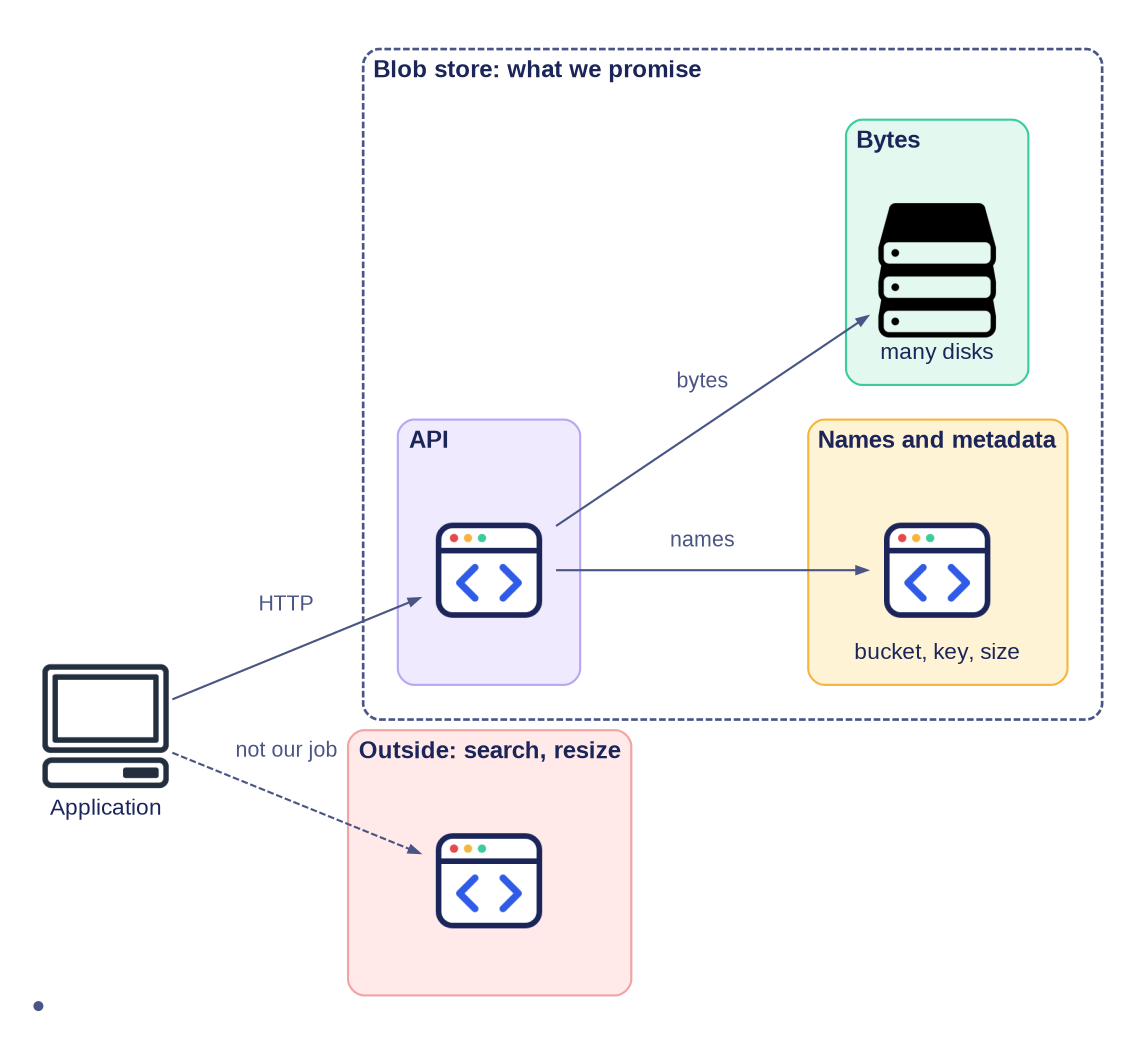
Choose
Is a blob store the right kind of storage?
| Blob or object | File | Block | |
|---|---|---|---|
| You see | Flat names and bytes | Directories and files | Raw numbered blocks |
| You use | HTTP API | POSIX calls over NFS or SMB | A file system on iSCSI or Fibre Channel |
| Change | Replace the object | Edit in place | Edit any block |
| Metadata | Attached to each object | Kept by the file system | None |
| Best for | Web content, backups | Shared file access | Databases, virtual machines |
Which storage fits?
Functional
What it must do
Core operations
| Operation | Request | Meaning |
|---|---|---|
| Put | PUT /bucket/key | Create or replace a blob |
| Get | GET /bucket/key | Fetch it |
| Head | HEAD /bucket/key | Fetch only the metadata |
| List | GET /bucket?prefix= | Names that begin with a prefix, page by page |
| Copy | PUT with a copy-source header | Copy to a new key without downloading |
| Delete | DELETE /bucket/key | Remove it |
Buckets need a few operations of their own: create (the name is globally unique), list the buckets of a user, delete (it must be empty first) and configure (access policy, CORS for browsers, logging).
Features to add when a use case asks for them
- 1
Multipart upload
Send a large file in parts. Parts travel in parallel, and only a failed part is sent again.
- 2
Range requests
Fetch some bytes of an object: seek in a video, continue a broken download.
- 3
Presigned URLs
A link that allows one operation for a limited time, so a client needs no account at the store.
- 4
Versioning
Keep earlier versions, so an overwrite or delete can be undone.
- 5
Lifecycle rules
Move old objects to cheaper storage, or expire them.
- 6
Server-side encryption
Encrypt the bytes before they reach a disk.
Promises
How well it must do it
Non-functional requirements, as numbers
| Quality | Target | What it means |
|---|---|---|
| Durability | 99.999999999% a year | Eleven nines: data survives failed disks and buildings |
| Availability | 99.99% | About 52.6 minutes of failed requests a year |
| Scale | Exabytes, billions of objects | No planned limit on the number of objects |
| Latency | About 100 to 200 ms to the first byte | The figure AWS gives for small S3 objects |
| Consistency | Read after write | After a successful write, every read sees it |
What eleven nines means
Durability
- Is the data still there?
- Copies or parity on separate hardware
- Checksums and repair
- A failure is permanent loss
Availability (a different promise)
- Can I reach it now?
- Spare servers, several zones
- Failover and retries
- A failure is a wait
Consistency
What a reader may see
With read-after-write consistency a successful put is visible to the next get. With eventual consistency a reader may see the previous bytes for a while, and every reader sees the new ones in the end. S3 was eventually consistent for overwrites and deletes until December 2020 and is strongly consistent now.
Read after write
Two writers to one key are a separate question. Without a condition, the last write wins and the other is lost. A conditional write (If-None-Match: *) says: only if the name is free. A cache or CDN in front can still show old bytes, whatever the store promises.
API
The requests, word for word
PUT /bucket-name/path/to/object HTTP/1.1Host: blob.example.comContent-Type: image/jpegContent-Length: 102400x-amz-meta-custom: valueAuthorization: <signature>[binary data]HTTP/1.1 200 OKETag: "version-tag-of-these-bytes"GET /bucket-name/path/to/object HTTP/1.1Range: bytes=0-1023GET /bucket-name?prefix=images/&max-keys=100&continuation-token=... HTTP/1.1DELETE /bucket-name/path/to/object HTTP/1.1Multipart upload in three calls
A presigned URL carries the permission in the link. Its query holds the algorithm, the credential scope, the date, the expiry in seconds and a signature. Changing any of them breaks the signature. Example, shortened and not valid:
https://bucket.s3.amazonaws.com/key ?X-Amz-Algorithm=AWS4-HMAC-SHA256 &X-Amz-Credential=... &X-Amz-Date=20240101T000000Z &X-Amz-Expires=3600 &X-Amz-Signature=...Limits
Constraints to write down
Amazon S3, as a worked example (checked November 2026)
| Limit | Value | Consequence |
|---|---|---|
| Largest object | 50 TB | Above 5 GB you must use multipart |
| Single PUT | 5 GB | Advice: multipart from about 100 MB |
| Parts per upload | 10,000, each 5 MiB to 5 GiB | The last part may be smaller |
| Key length | 1,024 bytes of UTF-8 | The prefix counts |
| Listing | Up to 1,000 keys a page | Callers must follow pages |
| Requests per partitioned prefix | At least 3,500 writes or 11,000 reads a second | Spread a hot workload over prefixes |
| Bucket name | 3 to 63 characters | Lowercase letters, numbers, periods, hyphens; starts and ends with a letter or number |
Smallest part size that fits
Security
Who may do what
- 1
Authentication
Who is asking? Signed requests, roles or keys. Roles with short-lived credentials are safer than long-lived keys.
- 2
Authorization
May they do this here? Bucket policies, user policies and, in older setups, access control lists.
- 3
Encryption
TLS on the way. At rest, S3 encrypts every new upload by default. Decide who holds the keys.
Numbers
How much: a capacity estimate
Our example is a school photo service. Assumptions: 10 million uploads a day, 2 MB each, 10 reads for each upload, about 1 KB of metadata for each object, peak 3 times the average.
| Question | Arithmetic | Answer |
|---|---|---|
| Uploads a second | 10,000,000 / 100,000 | 100, peak 300 |
| Reads a second | 100 x 10 | 1,000, peak 3,000 |
| Upload bandwidth | 300 x 2 MB | 600 MB/s at peak |
| Read bandwidth | 3,000 x 2 MB | 6 GB/s at peak, so a CDN |
| New bytes a day | 10,000,000 x 2 MB | 20 TB |
| New bytes a year | 20 TB x 365 | 7.3 PB before copies |
| On disk, 3 copies | 7.3 PB x 3 | 21.9 PB a year |
| On disk, 1.5x coding | 7.3 PB x 1.5 | 10.95 PB a year |
| Metadata a year | 3.65 billion x 1 KB | 3.65 TB |
Each number leads to a decision
Upload
What one upload must guarantee
Bytes first, name last
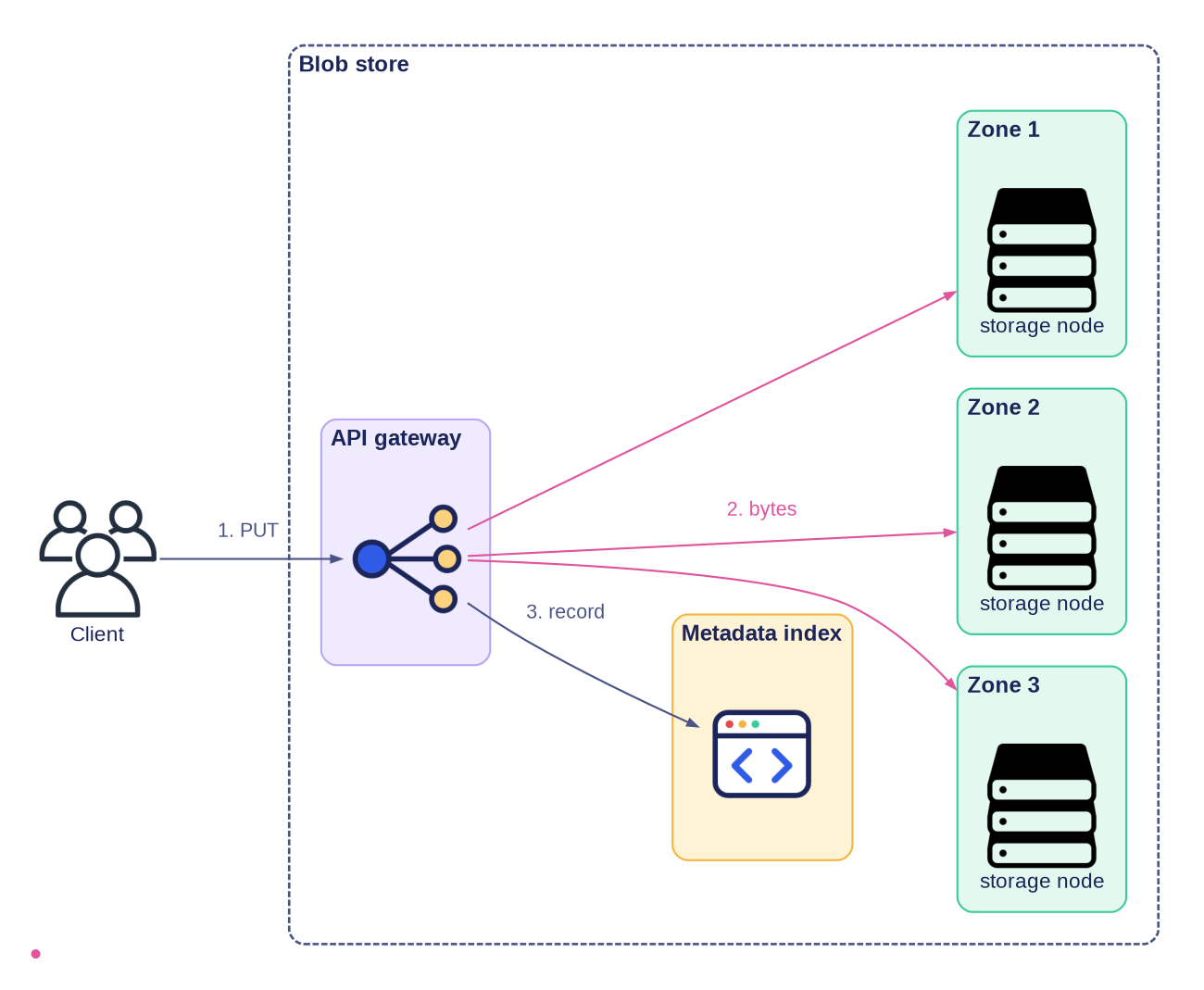
- 1
The client sends the object
A PUT with a key the client chose.
- 2
Check who asks
Credentials, permission, size limit. Reject before reading the body.
- 3
Give it an internal id
The key stays as the client wrote it; inside, a new id lets an overwrite coexist with the old bytes.
- 4
Split and spread
Cut into chunks and store them on several nodes in several zones, with checksums.
- 5
Record the metadata
One atomic step points the key at the new bytes. From here a read sees them.
- 6
Answer
200 OK and an ETag, only now.
Summary
The whole topic in one minute.
A blob store needs few operations: create a bucket, put, get, get part of it, head, list, copy and delete. Around them sit multipart upload, temporary links, versions, lifecycle rules and encryption, each added only when a use case needs it.
The hard part is the promises. Keep durability apart from availability, choose a consistency rule, write down the limits, and turn traffic into storage, request and bandwidth numbers. Those numbers decide the design.
- Operations are few: put, get, head, list, copy, delete, plus buckets.
- Durability (is it still there?) and availability (can I reach it?) are separate promises.
- Say the consistency rule out loud: read after write, last writer wins, conditions on request.
- Write the limits down and check them on the product's own page; they change.
- Turn traffic into storage, requests and bandwidth, and tie each number to a decision.
- Non-goals are requirements too.