
Introduction to data partitioning
easy 25 minData partitioning splits one large set of data into smaller parts by a rule, so that each part is easier to store, search and maintain.
Chapter mnemonic
Three ways to route a shard key
Read the shelf range, spin the hash wheel, or ask the desk.
You move a single tenant by editing a lookup entry. Which scheme is that?
Directory partitioning stores an explicit mapping from key to shard.
Video lesson · Chapter 1 of 5
When one directory fills its machine
Theory
Read or listen first. About 2 min.
What it is
Data partitioning means cutting one large set of data into parts and using a rule to say which part holds which row. Every row lives in exactly one part. Put all the parts together and you have the whole set again.
The parts may sit inside one database on one machine, or on several machines. When each part has a machine of its own, the parts are called shards and the method is called sharding.
Partitioning is different from replication. Partitioning gives each machine different rows. Replication gives several machines the same rows. Large systems usually do both.
Why it exists
A single table can outgrow its machine in four ways: the disk fills up, the indexes no longer fit in memory, the processor cannot answer all queries, or the network card is full. Smaller parts help with each of these, if they are placed on different machines.
Even on one machine, parts are useful. A question about March can skip the other months, and deleting an old month means dropping one small table instead of deleting millions of rows.
The price is a rule you must live with. Questions that follow the rule get faster. Questions that ignore it have to visit every part.
A short history
1983
Teradata delivers the first shared-nothing database system, where each node owns part of the data and nodes share neither memory nor disk.
1986
Michael Stonebraker uses the name shared nothing in a paper that argues for this design.
1997
The online game Ultima Online runs copies of its world called shards. This is one common account of where the word came from.
2006
Google describes Bigtable, which splits tables into ranges of rows called tablets.
2017
PostgreSQL 10 adds declarative table partitioning, so parts can be declared in the table definition.
Words to know
- Partition
- One part of the data, chosen by the rule.
- Shard
- A partition that lives on its own database server.
- Partition key or shard key
- The field the rule looks at, for example user_id.
- Cardinality
- How many different values a field can have. Two for yes or no, millions for user_id.
- Pruning
- Skipping the partitions that cannot hold the answer.
- Cross-shard query
- A question whose answer is spread over several shards.
- Skew
- When some partitions hold or serve much more than others.
How it works
Step through the idea, or press Play.
Choose a key. A field with many values that appears in your main query
Understand it
Start here
The jigsaw story
A giant jigsaw lies on one table, and finding a piece takes forever. Sorting the pieces into trays by colour makes every search shorter. The colour is the rule, and it decides which searches become easy and which stay hard.
Another everyday version: a pizza too big for one plate is sliced, and each slice gets a plate of its own. Each plate is a shard.
The idea
What partitioning does
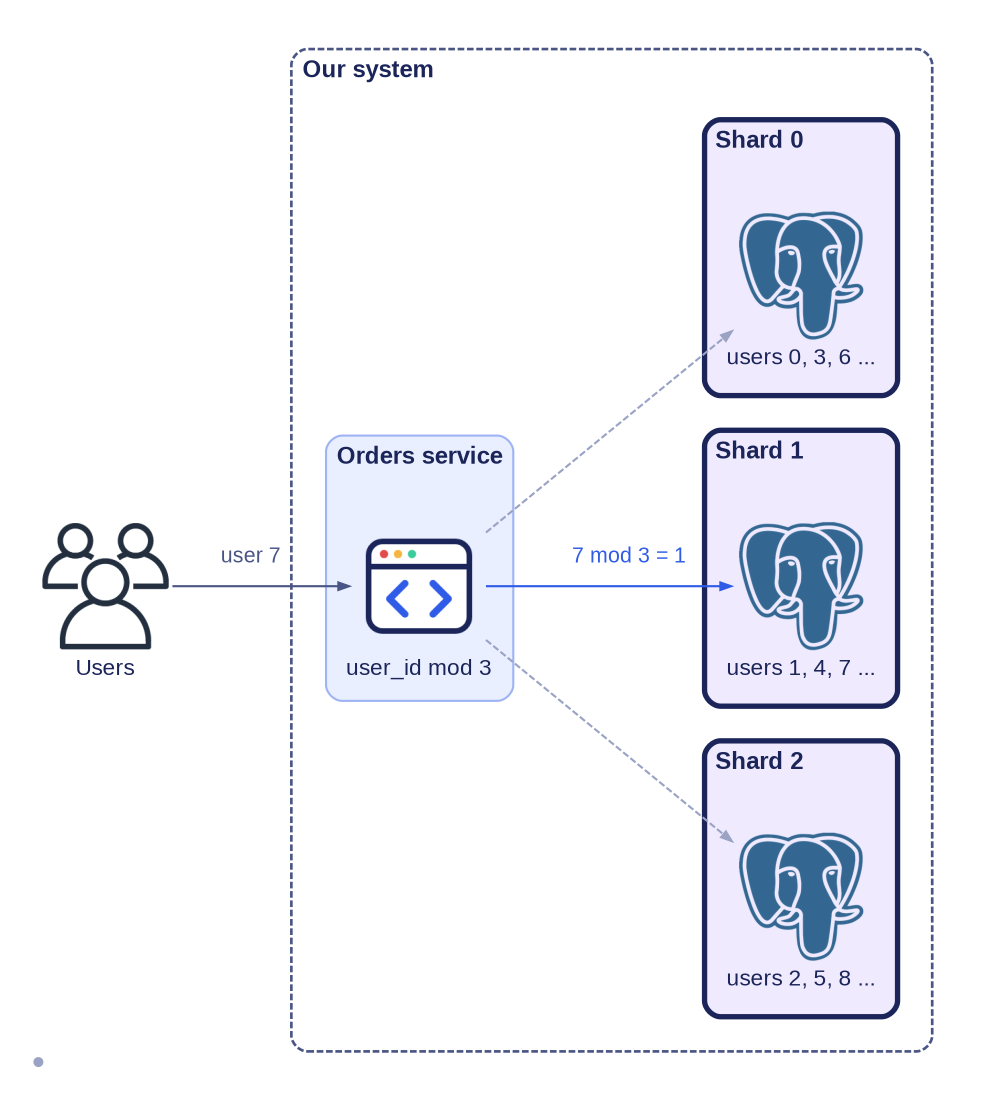
Take a table with 100 million users on one overloaded server. Apply the rule user_id mod 3. Each of three shards now holds about 33 million users, with its own disk, memory and processor.
Three machines, one rule
Horizontal scaling
Add servers to hold more data and take more writes.
Better performance
Each shard answers fewer queries over a smaller index.
Shard key
The field that decides where a row lives.
Data distribution
A good key spreads rows and work evenly.
Rows per shard
Why
The limits of one server
What runs out, and what a split gives you
| Limit | What you see | After splitting over machines |
|---|---|---|
| Storage | The disk fills up | Total space grows with each shard |
| Memory | Indexes no longer fit in RAM | Each shard holds only its own indexes |
| CPU | Too many queries a second | Queries are shared out |
| Network | One card carries all traffic | Each shard has its own card |
Three shards give at most about three times the capacity, when load is even and almost every query goes to one shard. Cross-shard work and skew take a share of that gain.
Scale out (partition)
- More servers of ordinary size
- Grows far beyond one machine
- Losing one shard affects only its rows
- Needs a rule, a router and care
Scale up (one bigger server)
- Simple, no code change
- Ends at the largest machine you can buy
- The very largest machines are costly
- Still one machine that can fail
Scaling up is covered in vertical scaling. Scaling out is powerful but not endless: coordination, cost and operations set a practical limit.
Types
Horizontal: split the rows
Horizontal partitioning keeps the same columns everywhere and puts different rows in each part. Spread over servers, this is sharding, and it is the usual way to scale writes.
Users table, split by rows
| Part | Rows | Columns |
|---|---|---|
| Shard 1 | users 1 to 1,000,000 | all |
| Shard 2 | users 1,000,001 to 2,000,000 | all |
| Shard 3 | users 2,000,001 to 3,000,000 | all |
Types
Vertical and functional: split columns or tables
Vertical partitioning keeps the same rows and splits the columns. Small, busy columns stay together. Large or rarely read columns move away, so each page read from disk holds more useful rows.
Users table, split by columns
| Part | Columns | Why together |
|---|---|---|
| Core | id, name, email | Read on almost every request |
| Profile | id, bio, avatar_url | Read when a profile is opened |
| Settings | id, settings_json | Large and rarely read |
Functional partitioning gives each business area its own database: orders in one, stock in another. Microsoft lists it beside horizontal and vertical partitioning. It is often the easiest first split, because tables from different areas are rarely joined.
Which kind of split?
One machine
Partitions without more machines
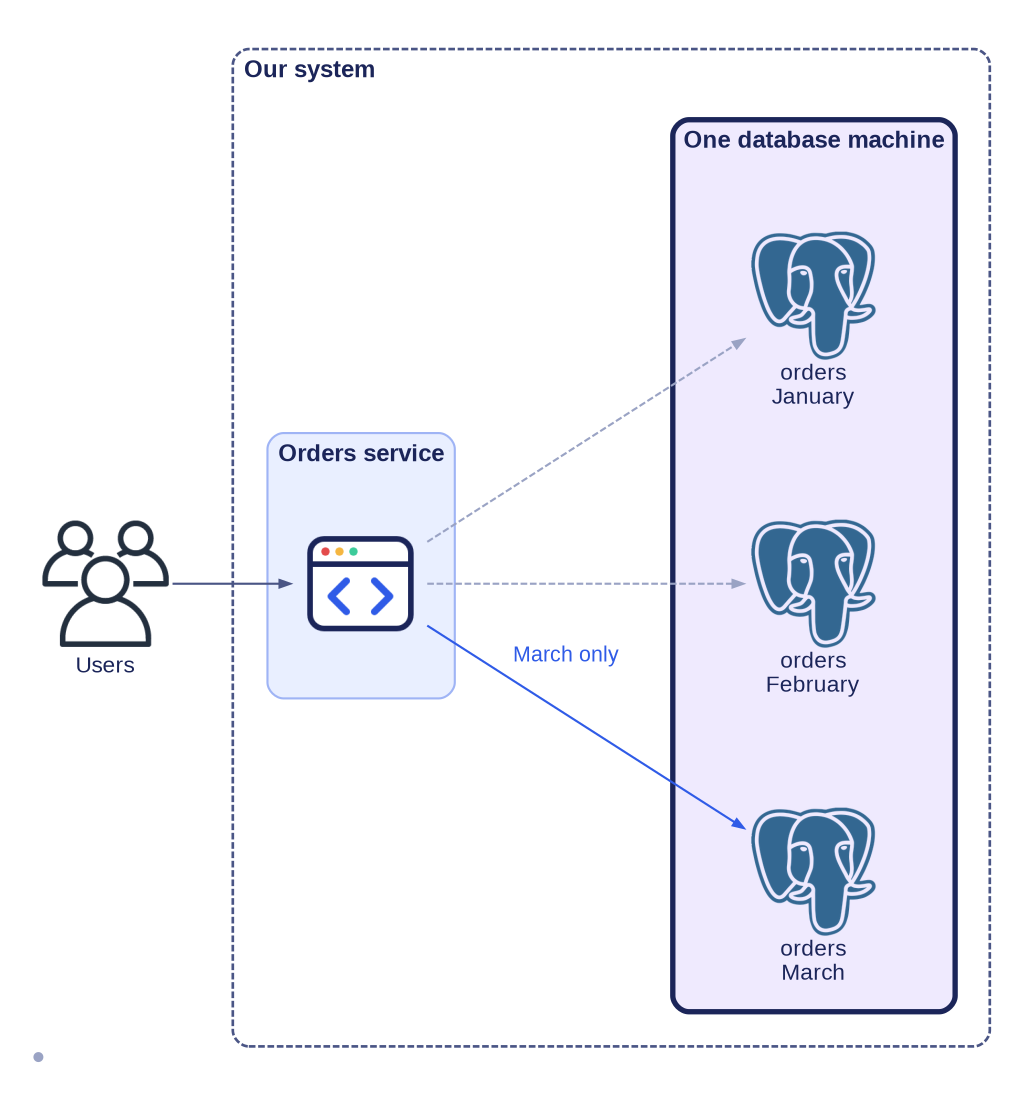
You can split a table and keep all parts on one server. The database sees one logical table. When the query names the key, it skips the other parts. This is partition pruning.
One machine, three parts
CREATE TABLE orders ( order_id bigint, user_id bigint, created_at date NOT NULL) PARTITION BY RANGE (created_at);CREATE TABLE orders_2026_03 PARTITION OF orders FOR VALUES FROM ('2026-03-01') TO ('2026-04-01');-- Removing an old month is one quick stepDROP TABLE orders_2025_03;Shard key
Choose the key well
Often good
- user_id: many values, and most queries are about one user
- tenant_id: keeps one customer's data together, if no customer is huge
- order_id: many values, spreads well when orders are looked up one by one
Often bad
- created_at with ranges: all new rows hit the newest shard
- country: very uneven, and few values
- status: a handful of values, so a handful of parts
A good key passes three tests: many values, no value far bigger than the rest, and present in the main query. The first two make an even spread possible. The third makes it useful.
Testing a shard key
Routing
How a request finds its part
One read that names the key
For text keys, turn the text into a number first with a stable hash. Do not use your language's built-in hash blindly. Python gives text a different hash in each process by default, so two servers would disagree about where a user lives.
Which rules exist, and when each fits, is the next topic: partitioning strategies. Rules that move little data when a machine is added are in consistent hashing.
Costs
Four challenges
Cross-shard joins
The rows to join may be on different shards. The query scatters, gathers and joins in the middle. Keep related rows on the same shard.
Automatic ids
Each shard counting 1, 2, 3 creates duplicates. Use UUIDs, or ids built from time, machine and sequence in the Snowflake style.
Rebalancing
Adding a shard means moving rows. With a plain remainder, most rows move.
Transactions
A change over two shards needs two-phase commit or a saga. Both are slower or harder than a local transaction.
Why a plain remainder moves so much
A count that does not name the key
Practice
Do and do not
Do
- Choose a key with many values
- Keep related rows on the same shard
- Plan for rebalancing from the start
- Use one connection pool per shard
Do not
- Use timestamps as a range shard key without a plan for the newest range
- Rely on cross-shard joins
- Forget about hot spots
- Skip testing the rebalancing
Decide
Do you need it yet?
Work down this list and stop when the target is met. Assume 500 GB of data and 3,000 writes a second at peak. One large server with a standby may well hold that, so measure before you split.
- 1
Fix queries and indexes
A missing index is the cheapest problem to solve.
- 2
Use a bigger machine
A resize takes minutes and changes no code.
- 3
Add a cache and read replicas
Both take reads away from the main database. Neither helps with writes.
- 4
Partition on one machine
Makes large tables easier to search and clean.
- 5
Split by business area
Move whole groups of tables to another server.
- 6
Shard the rows
When writes or data no longer fit on one machine.
Spreading data over machines also means living with broken networks between them. That trade is the subject of the CAP theorem.
Summary
The whole topic in one minute.
Partitioning divides rows, columns or whole tables into parts by a rule. Horizontal partitioning splits rows, vertical partitioning splits columns, and functional partitioning splits by business area.
It buys room and speed for questions that name the key, and charges for everything else: joins, transactions, unique numbers and moving data. Start with indexes, a bigger machine, replicas and partitions inside one machine. Spread parts over machines when one machine is no longer enough.
- Partitioning splits data by a rule. Each row is in exactly one part.
- Horizontal splits rows, vertical splits columns, functional splits by business area.
- Parts on one machine help searching and cleaning. Parts on many machines add capacity.
- A good key has many values, no giant value, and appears in the main query.
- Joins, ids, rebalancing and transactions get harder, so split late and on purpose.