
Design Google Docs
hard 55 minMany people type into one document at once and all of them must end with the same text.
Video lesson · Chapter 1 of 6
Follow one keystroke
Theory
Read or listen first. About 1 min.
What it is
A collaborative editor is a document that several people change at the same time. Each person sees their own typing at once, and everyone else's a moment later. A service like Google Docs, Notion or Word on the web does this.
The hard promise is convergence: after all edits have travelled, every screen shows the same text, and nobody's words are lost, even when two people typed in the same place at the same moment.
Why it exists
Mailing copies of a file around makes many versions of the truth. Locking the file lets only one person work. Editing together removes both problems, but only if the machine can merge edits without asking.
The same ideas return in whiteboards, design tools, spreadsheets and code editors: give edits an order, or make them mergeable in any order.
A short history
1968
Douglas Engelbart shows people working on one screen from two places in the Mother of All Demos.
1989
Ellis and Gibbs publish operational transformation with the GROVE outline editor.
2006
Google Docs appears, based on Writely, a web word processor from 2005.
2010
Google's blog explains its new editor: operational transformation, with one unconfirmed change per client at a time.
Words to know
- Operation
- A small change, such as insert a word at position 5.
- Revision
- The number of edits the server has put in order so far.
- Base revision
- The revision a person was looking at when they typed.
- Operational transformation (OT)
- Rewriting an edit so it has the same meaning after other edits.
- CRDT
- A data structure whose copies can be merged in any order with the same result.
- Convergence
- All copies become identical once they have seen the same edits.
- Presence
- Who is here, and where their cursor is.
- Snapshot
- The whole document at one revision, saved so that it opens quickly.
Solve it like an interview
New to it? Start with Approach. Revising? Go straight to the mock.
- 1ApproachWhat this question tests, where it gets hard, and how to spend the time.
- 2ScopeAsk what changes the design, then commit to a short list.
- 3NumbersWork out a number when the answer changes what you build.
- 4API and dataThe contract first, then the data that serves it.
- 5DesignStart with the smallest system that works. Change it only when something breaks.
- 6Deep divesCompare the options before you open them, then say which you would pick.
- 7Explain your choicesAnswer first. Then compare your reasoning.
- 8By levelThe same question is judged differently for mid, senior and staff.
- 9MockAnswer against the clock, then score yourself.
How it works
Step through the idea, or press Play.
Type. Shown locally at once, sent with a base revision
Understand it
Nobody had to stop knitting. They only had to agree which stitch came first.
Scope
What are we building?
A text editor in the browser, a service like Google Docs. Up to 100 people type in one document, see each other's cursors, share it with roles, go back to older versions and keep working without a network.
Edit together
Others see a change in under 100 ms inside a region.
Never lose words
An edit we confirmed is stored on several machines.
Go back
See who changed what, and restore any version.
Similar applications
| Service | Known for |
|---|---|
| Notion | Pages made of blocks |
| Confluence | Company wikis |
| Word on the web | Office documents edited together |
| Dropbox Paper | Simple shared documents |
| Coda | Documents that work like apps |
| Quip | Documents beside sales data |
The hard part
Two edits, one truth
Alice and Bob both look at Hello. Alice inserts X at position 2 and Bob inserts Y at position 4. Applied as written, one after the other, Y lands one letter too early. Shifting Bob's edit to 5 gives HeXllYo, which is what both wanted. Data versioning and causal IDs cover the general problem of concurrent change.
The finished system
Where the design ends up
The last version, not the first. The Design tab begins with one service and one database and shows what forces each extra box.
The whole system
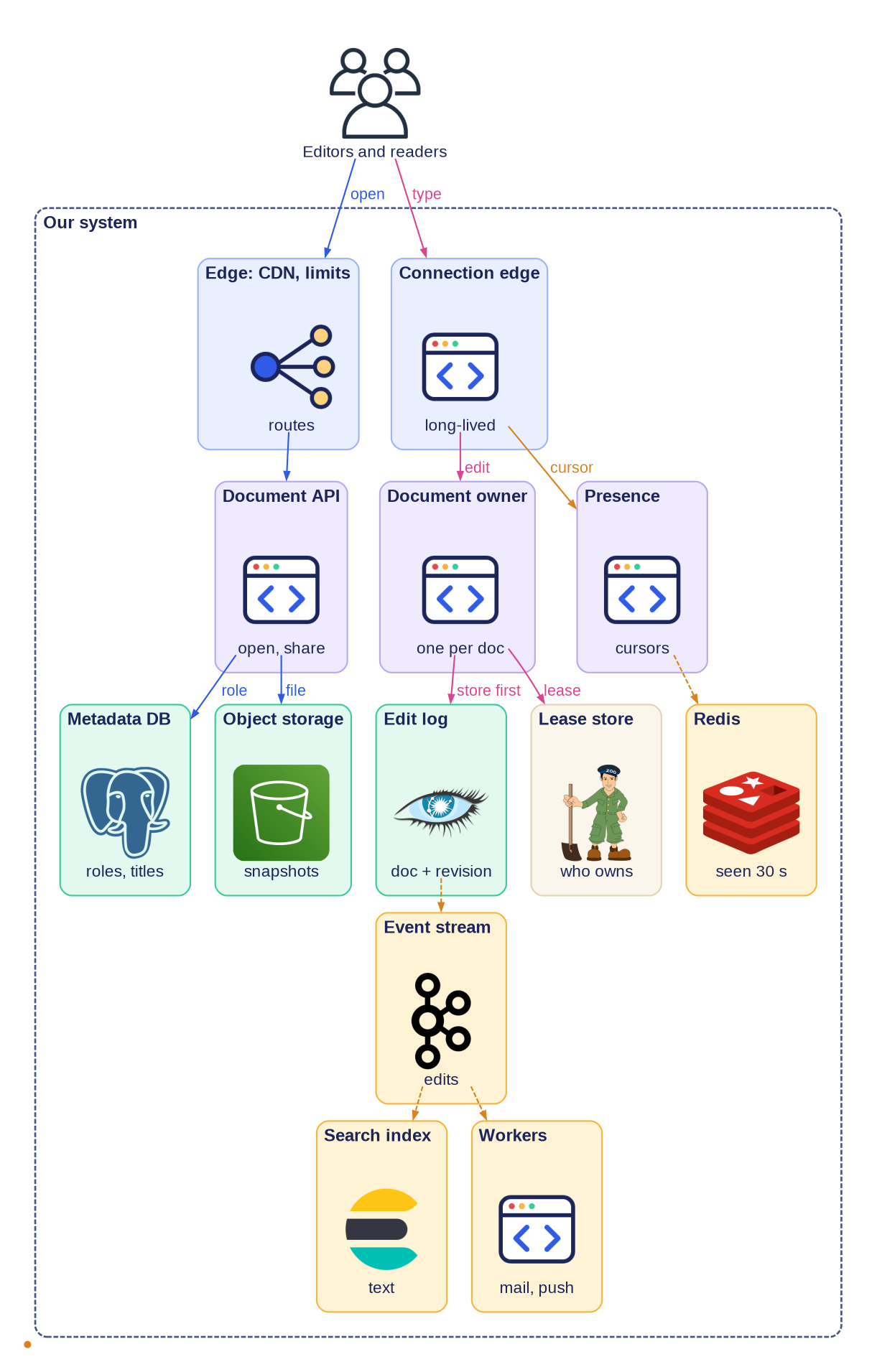
Where each idea lives
| Idea | Read |
|---|---|
| Long-lived connections | Real-time APIs, and group chat for connections at scale |
| One owner, and proving the old one is gone | Failure detection |
| Safe retries | Idempotency |
| Optimistic conflicts in databases | Concurrency control |
| How strict the order must be | Consistency models |
| Placing documents on servers | Consistent hashing |
| The interview, tab by tab | Approach, Scope, Numbers, API, Design, Deep dives, Choices, Levels, Mock |
Summary
The whole topic in one minute.
A collaborative editor sends small operations instead of documents. One owner per document orders them, transforms the late ones and stores each before confirming it. Clients show their own typing at once and use the same rules, so every screen ends equal.
Around that core sit cheaper promises: presence may be lost, readers may be a second late, search may be a minute late. Text may not.
- Send operations with a base revision, never whole documents.
- One owner per document gives every edit a place in one order.
- Transform late edits so each lands where its author meant.
- Store an edit on several machines before confirming it.
- Cursors are disposable. Text is not.