
Design Dropbox (File Sync)
medium 60 minKeep a folder the same on every device of a person and everyone they share it with.
Video lesson · Chapter 1 of 5
A small edit inside a large file
Theory
Read or listen first. About 2 min.
What it is
A file sync service like Dropbox keeps a folder in the cloud and a copy of it on each device. Save a file on the laptop and it appears on the phone seconds later. Folders can be shared, and older versions can be restored.
Inside are two very different systems. One stores contents: huge, cut into blocks, never changed after writing. The other stores metadata: names, folders, versions and permissions, small and strictly ordered. A file is a row that lists its blocks.
Why it exists
People edit a small part of a large file, on poor networks, on several devices. Sending whole files wastes hours. Cutting files into blocks with a fingerprint each means that only new blocks travel, that a broken upload continues where it stopped, and that equal blocks are stored once.
It is a good interview problem because the ideas are few and each has a sharp edge: fingerprints that reveal what others own, a change list that silently skips an entry, clean-up that deletes a block just as somebody needs it, and two edits that meet.
A short history
June 1996
Andrew Tridgell announces rsync, which sends only the differing parts of a file by comparing checksums.
2007 and 2008
Dropbox is founded in May 2007 and launched in 2008.
May 2016
Dropbox engineers describe Magic Pocket, their own store for blocks of up to 4 MB named by SHA-256.
March 2020
Dropbox engineers describe rewriting their desktop sync engine from scratch.
Words to know
- Block (chunk)
- A piece of a file, here up to 4 MB, stored once and never changed.
- Content hash
- A fingerprint such as SHA-256. Equal bytes give equal fingerprints.
- Block list
- The ordered fingerprints that rebuild one version of a file.
- Namespace
- A root folder with its own order of changes: a person's own files, or one shared folder.
- Journal
- The numbered list of changes in a namespace.
- Cursor
- How far a device has read, for each of its namespaces.
- Conflicted copy
- A second file that keeps the edit which came late.
- Deduplication
- Storing equal blocks once.
Solve it like an interview
New to it? Start with Approach. Revising? Go straight to the mock.
- 1ApproachWhat this question tests, where it gets hard, and how to spend the time.
- 2ScopeAsk what changes the design, then commit to a short list.
- 3NumbersWork out a number when the answer changes what you build.
- 4API and dataThe contract first, then the data that serves it.
- 5DesignStart with the smallest system that works. Change it only when something breaks.
- 6Deep divesCompare the options before you open them, then say which you would pick.
- 7Explain your choicesAnswer first. Then compare your reasoning.
- 8By levelThe same question is judged differently for mid, senior and staff.
- 9MockAnswer against the clock, then score yourself.
How it works
Step through the idea, or press Play.
Cut and fingerprint. The device finds which blocks changed
Understand it
Scope
What are we building?
A service like Dropbox for people and small teams: upload, download, folders, sync on all devices, sharing, version history. No editing together inside one document. This page is an exercise inspired by well-known products; where it mentions what a company does, it links that company's own page.
Similar applications
| Service | Known for |
|---|---|
| Google Drive | Storage with documents and sheets |
| OneDrive | Part of Windows and Office |
| iCloud Drive | Apple devices |
| Box | Companies and content rules |
| pCloud | Optional encryption on the device |
| Mega | End-to-end encryption |
The hard part
Move little, lose nothing
A person changes one paragraph of a 1 GB file. Sending 4 MB instead of 1 GB is 250 times less. But saving bytes must never cost an edit. Suppose a laptop and a phone both change the file while offline, and the server simply keeps the last upload. One edit disappears without a message.
Last upload wins: an edit is lost
The finished system
Where the design ends up
This is the last version. The Design tab starts with one service and one database and shows which number forces each extra box.
The whole system
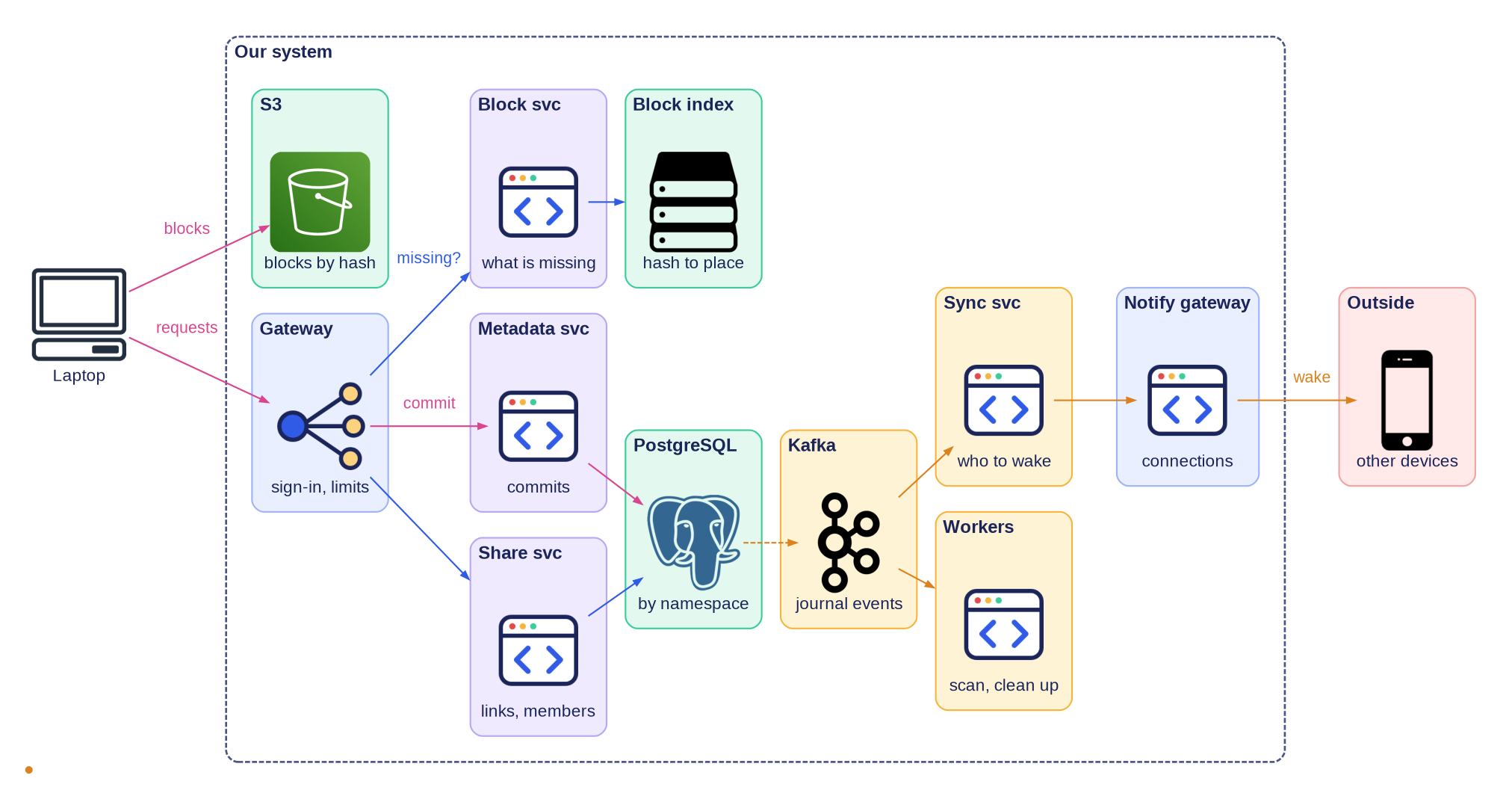
Four key ideas
A file is a list
Blocks are written once and named by their bytes. Copy, move and restore touch only the list.
Based on which version?
Every commit says it. A late one becomes a second file, never an overwrite.
A numbered journal
Each namespace numbers its changes in commit order. A cursor can then skip nothing.
Fingerprints are not secrets
Knowing a hash must not give you the bytes, nor tell you that somebody has them.
Where to go
The tabs and the concepts
| If you want | Open |
|---|---|
| What the interviewer looks for | Approach, By level |
| Targets and sums | Scope, Numbers |
| Endpoints and tables | API and data |
| Blocks, journal, conflicts, clean-up, keys | Deep dives |
| Practice against the clock | Mock |
| How blocks survive failed disks | Blob store design, object storage |
| Resumable uploads and signed links | File upload APIs |
| Versions and concurrent edits | Data versioning, concurrency control |
| Waking devices | Real-time APIs, push vs pull |
| Splitting metadata | Sharding |
Summary
The whole topic in one minute.
A device cuts a changed file into blocks, asks which are missing, uploads those straight to the store, and commits a new block list with the version it was based on. The commit writes the file row and one journal entry in the same transaction.
Other devices are woken, read the journal after their cursor and fetch the blocks they lack. If a commit is based on an old version, nothing is overwritten: the late edit becomes a conflicted copy.
- Contents and metadata are two systems. Contents never change; metadata is strictly ordered.
- Blocks travel straight to the store, only if missing, in any order, as often as needed.
- A commit is one transaction: check the base version, write the file, add one journal entry.
- The device moves its cursor only after it has applied the changes.
- When two edits meet, keep both. Let a person decide.
Sources
- Dropbox for developers: content hash
- Dropbox: Inside the Magic Pocket
- Dropbox: Rewriting the heart of our sync engine
- Dropbox help: conflicted copies
- Amazon S3: data durability
- Amazon S3: checking object integrity
- AWS KMS: GenerateDataKey
- Syncthing: understanding synchronization
- Pro Git: Git objects
- restic: references, content-defined chunking