
How Video Streaming Works
easy 45 minA film is far too large to send as plain pictures, so a codec keeps only what is new in each frame.
Video lesson · Chapter 1 of 5
A school play on a moving train
Adaptive video playback
1:27Reel
Parallel video transcoding
1:19Reel
Theory
Read or listen first. About 3 min.
What it is
Video streaming means watching a film while it is still arriving. The film is compressed, made in several qualities, and cut into short segments of a few seconds. A manifest lists them. The player downloads a little ahead of what you see and chooses a quality for every next segment. Choosing like this is called adaptive bitrate, or ABR.
This page follows one film all the way. Asha films a school play with a phone: 10 minutes, 1080p, 30 frames per second, a file of 400 MB. Later 300 parents watch it: 90 on trains, 150 on kitchen tablets and 60 on big TVs. Here 1 MB means 1,000,000 bytes and 1 Mbit/s means 1,000,000 bits per second.
Our system makes four qualities: 270p at 0.4, 540p at 1.2, 720p at 2.4 and 1080p at 4.8 Mbit/s. Each segment is 4 seconds, so there are 150. These numbers are ours, chosen so that you can compute with them. Real services choose their own.
Why it exists
Without compression the ten minutes would be 112 GB. Without several qualities, one size must fit a train and a TV, and it fits neither. Without segments, a viewer would need the whole file, or a server that remembers every viewer.
Segments over plain HTTP solve a surprising number of problems together. Every segment is an ordinary file, so any cache can keep it. The server needs no memory of who is watching. A player can jump to minute five by asking for another file name, and it can change quality at every border.
A short history
1995
ITU-T H.262 is published in July. The same video standard is known as MPEG-2.
2003
The first edition of ITU-T H.264, Advanced video coding, is dated May 2003.
2009
Apple's first Internet-Draft for HTTP Live Streaming is dated 1 May. It became RFC 8216 in August 2017.
2012
ISO ratifies MPEG-DASH in April, as the DASH Industry Forum tells it. The forum is incorporated in September.
2014
Researchers from Stanford and Netflix publish a buffer-based way to choose the bitrate at SIGCOMM in August, tested with real Netflix users.
2016
Media Source Extensions become a W3C Recommendation on 17 November: a web page may feed a video element itself.
2018
CMAF, one format of segments for HLS and DASH, has its first published edition. AOMedia releases the AV1 codec on 28 March.
2022
RFC 9317, from October, describes how streaming video loads networks, with caching, ABR and live latency.
Words to know
- Frame, frame rate
- One still picture, and how many are shown in a second. Ours: 30.
- Codec
- The method that compresses and decompresses, for example H.264 or AV1.
- Container
- The file that holds compressed video, sound and times, for example MP4.
- Keyframe
- A frame that can be decoded alone. Playing can start here.
- GOP
- Group of pictures: a keyframe and the frames that follow it until the next one.
- Rendition, rung, ladder
- One quality of the film, the same thing seen as a step, and all steps together.
- Segment
- A few seconds of one rendition as a file. Ours: 4 seconds.
- Manifest or playlist
- The text that lists renditions and segments. HLS says playlist, DASH says MPD.
- Buffer
- Seconds of film that were downloaded and not yet shown.
- Rebuffering or stall
- The buffer is empty while the viewer wants to watch, so the picture stands still.
- Origin, edge
- Where the files really live, and the cache near the viewer.
How it works
Step through the idea, or press Play.
Encode in parallel. One upload becomes many independent jobs, one per piece and quality. The transcoding reel shows nine from one 4K upload. Each result is recorded, so one failed job is repeated while the others stay.
Understand it
Start here
A comic strip and the courier ponies
Asha draws a long comic strip in a house on a hill. Lee reads it aloud to children far down the road, one page after another, without a break. Ponies carry the pages. The road is sometimes dry and sometimes deep in mud.
The house only draws and stores. The choice of size is made by the reader, page by page.
From zero
What a video is
A flip of a page in a notebook full of drawings looks like movement. A video is the same: still pictures, called frames, shown quickly. Asha's phone takes 30 of them in a second, so every picture stays for about 33 milliseconds.
A frame is a grid of pixels, tiny coloured points. 1080p usually means 1,920 pixels across and 1,080 down. A screen makes each colour by mixing red, green and blue light. With 8 bits, which is 256 steps, for each of the three, a pixel takes 24 bits.
How big is the play as plain pictures?
Asha's file has 400 MB. Something made it about 280 times smaller. That something is the rest of this half of the page.
First saving
Less colour than light: 4:2:0
When you colour a detailed pencil drawing with a thick crayon, it still looks sharp, because the pencil lines carry the detail. Eyes are like that: we see small differences of light better than small differences of colour.
So the picture is first rewritten. Instead of red, green and blue, every pixel gets one value for brightness, called luma or Y, and two for colour, called Cb and Cr. Then a block of 2 by 2 pixels keeps all four luma values, but shares one Cb and one Cr. This is called 4:2:0 chroma subsampling.
Why 8-bit 4:2:0 is 12 bits a pixel
The play at each step
| Form | Per second | Ten minutes |
|---|---|---|
| Red, green, blue, 24 bits | 1,493 Mbit/s | 111.97 GB |
| 4:2:0, 12 bits | 746.5 Mbit/s | 55.99 GB |
| Asha's file, picture and sound | 5.33 Mbit/s | 400 MB |
| Our 1080p rung, picture only | 4.8 Mbit/s | 360 MB |
| Our 270p rung, picture only | 0.4 Mbit/s | 30 MB |
Second saving
How a codec shrinks pictures
If you describe your room to a friend every minute, you do not start again each time. You say: the same as before, but the cat moved to the chair. A codec does this with blocks of pixels.
One block on its way
- 1
Cut into blocks
The frame is divided into squares. VP8, for example, uses macroblocks of 16 by 16 luma pixels. Newer codecs use larger squares and split them where there is detail.
- 2
Predict in space
A wall continues as a wall. The block is guessed from pixels above and to the left in the same frame. This is intra prediction.
- 3
Predict in time
The actor stood two pixels to the left a moment ago. The block is copied from another frame, moved by a motion vector. This is inter prediction.
- 4
Subtract
The encoder keeps only the residual: the real block minus the guess. With a good guess it is almost zero everywhere.
- 5
Transform
The residual is rewritten as a sum of patterns, from smooth to very fine. A discrete cosine transform, DCT, or a relative of it does this. Most of the content usually lands in a few numbers.
- 6
Quantise
Each number is divided by a step and rounded. Many become zero. This is the place where detail is lost, and the size of the step is the main quality knob.
- 7
Pack
The remaining numbers, the vectors and the choices are written with few bits for common values. Nothing is lost here.
The encoder decodes too
residual = [96, -23, 12, 6, -3, 2, 1, 0] # after the transform (invented values)for step in (4, 10, 30): stored = [round(v / step) for v in residual] # quantise: small numbers become 0 back = [v * step for v in stored] # what the decoder gets error = sum(abs(a - b) for a, b in zip(residual, back)) print("step", step, stored, "zeros:", stored.count(0), "error:", error)Frame types
I, P and B frames
I frame
Uses only itself. It is the largest, and decoding may start here if it is a real restart point. In H.264 that restart point is an IDR picture: nothing decoded later looks back past it.
P frame
Predicts from frames that were decoded earlier. Much smaller, but useless without them.
B frame
Can predict from two frames at once, usually one that is shown before it and one that is shown after it. Often the smallest.
GOP
From one keyframe up to the next. Ours has 60 frames, which is 2 seconds. The ten minutes have 300 groups.
One GOP of our 1080p rung, with invented sizes
| Frames | How many | Each | Together |
|---|---|---|---|
| I | 1 | 152 KB | 152 KB |
| P | 21 | 30 KB | 630 KB |
| B | 38 | 11 KB | 418 KB |
| All | 60 | 1,200 KB in 2 s |
Now a small puzzle. A B frame may need a frame that is shown later. The decoder must have that one first. So frames travel in decode order and are shown in show order, and each frame carries two times: when to decode and when to show.
Show order and decode order
| Order | 1st | 2nd | 3rd | 4th | 5th | 6th | 7th |
|---|---|---|---|---|---|---|---|
| Shown | I1 | B2 | B3 | P4 | B5 | B6 | P7 |
| Decoded | I1 | P4 | B2 | B3 | P7 | B5 | B6 |
Groups
Closed and open groups
In a closed GOP no frame looks outside its own group. In an open GOP, some B frames that are shown just before the next keyframe may look back into the group before. That can save some bits.
Closed GOP, for streaming
- Decoding can start at every group
- Cutting here is safe: each piece is complete
- The player may change rungs at the border
- Independent workers can encode the groups
Open GOP at a segment border
- After a jump, the frames that lean backwards cannot be decoded
- After a change of rung, the old group belongs to another rendition
- Some pictures must be skipped, so the border may show a hiccup
How far apart should keyframes be?
| Distance | Frames | Good | Price |
|---|---|---|---|
| 1 s | 30 | Quick jumps, fine thumbnails, short segments | More large I frames for the same quality |
| 2 s, ours | 60 | Two groups fit exactly into a 4 s segment | A compromise |
| 4 s | 120 | Fewer I frames | A jump may decode up to 119 frames that nobody sees |
| 10 s | 300 | Good compression of calm scenes | Segments of at least 10 s if each starts with a keyframe |
Two words
Container and codec
A lunch box says nothing about the language written on the paper inside it. MP4 is a box, H.264 is a language. The container holds tracks, times and an index. The codec is how the pictures inside are written. An .mp4 file can hold H.264, HEVC or AV1, so a file name does not say whether a device can play it.
The choice of codec
| Codec | Reach | Licence | Use it when |
|---|---|---|---|
| H.264 / AVC | All major browsers and very many devices, often in hardware | Patents. MDN says the licence pool asks no fee for internet video that is free for end users | You want one answer for everybody |
| HEVC / H.265 | Common on phones and TVs. In browsers it depends on version, system and hardware | Patents, several parties | 4K and high dynamic range on devices that have it |
| VP9 | Wide support in browsers | Open and free of royalties | Web delivery beside H.264 |
| AV1 | Browsers support it, but some, such as Safari, only on devices with an AV1 decoder in hardware | Designed to be free of royalties | Very popular films, where fewer bits repay the dearer encoding |
Hardware decoding means that a special part of the chip decodes. Without it the general processor must do the work, so a phone gets warm, the battery empties and frames may be dropped. navigator.mediaCapabilities.decodingInfo() answers three questions for a given size, rate and codec: supported, smooth, power efficient. A smaller file that a device decodes badly is not a win.
Is another codec worth it?
Rate control
Same bits, same quality, or a lid
Painting a blank wall needs little paint and a crowded market needs much. Should each get one pot of paint, or as much as it needs?
| Mode | Holds steady | Good for | Danger |
|---|---|---|---|
| Constant bitrate, CBR | Bits per second | Live lines of fixed size | Calm scenes waste bits, wild scenes look bad |
| Constant quality, for example CRF in x264 | Quality, roughly | Archives, masters | A wild scene can be many times larger than a rung allows |
| Capped quality | Quality, below a lid | Streaming rungs | The lid shows in the wildest scenes |
| Two-pass average | Total size | A promised file size | Reads the film twice |
maxrate with bufsize. Short peaks may pass the rate, the buffer limits for how long. In our bash run, a segment was 2.58 MB although 2.4 MB is the average under the lid.Our four numbers are lids: the rung never averages much above them. A quiet scene may need far less, so a player that knows real segment sizes can do better than one that only knows the advertised rate. In the simulations below every segment is exactly at its rung, to keep the arithmetic clean.
The ladder
Why several renditions
Our ladder
| Rung | Pixels | Mbit/s | One segment, 4 s | Ten minutes | Bits per pixel |
|---|---|---|---|---|---|
| 270p | 480 x 270 | 0.4 | 0.2 MB | 30 MB | 0.103 |
| 540p | 960 x 540 | 1.2 | 0.6 MB | 90 MB | 0.077 |
| 720p | 1280 x 720 | 2.4 | 1.2 MB | 180 MB | 0.087 |
| 1080p | 1920 x 1080 | 4.8 | 2.4 MB | 360 MB | 0.077 |
How to choose a ladder
- 1
The lowest rung keeps the story alive
It must fit through the worst network you want to serve. On our train, the tunnel still gives 0.5 Mbit/s, so 0.4 survives. With sound it is 0.528, a little too much. Good services therefore also think about the sound.
- 2
The highest rung stops at the source
Asha filmed 1080p at about 5.3 Mbit/s. A 4K rung, or 1080p at 10 Mbit/s, cannot contain detail that was never recorded.
- 3
The steps are clearly different
A factor of 1.5 to 3 is our rule of thumb. Smaller steps cost storage and make restless switching. Larger steps waste a good line.
- 4
Fewer bits, fewer pixels
At a low rate a smaller picture, enlarged by the screen, usually looks better than a large one full of tiles.
Per-title encoding. A drawing film and a football match do not need the same ladder. One can encode a title at many sizes and rates, plot quality against rate, and keep the points on the outer edge of all curves, the convex hull. Published research calls the complete search the most reliable way and also very costly, so people predict the hull instead. Some systems decide for every scene.
What a plainer title could save
Pipeline
From one upload to many small files
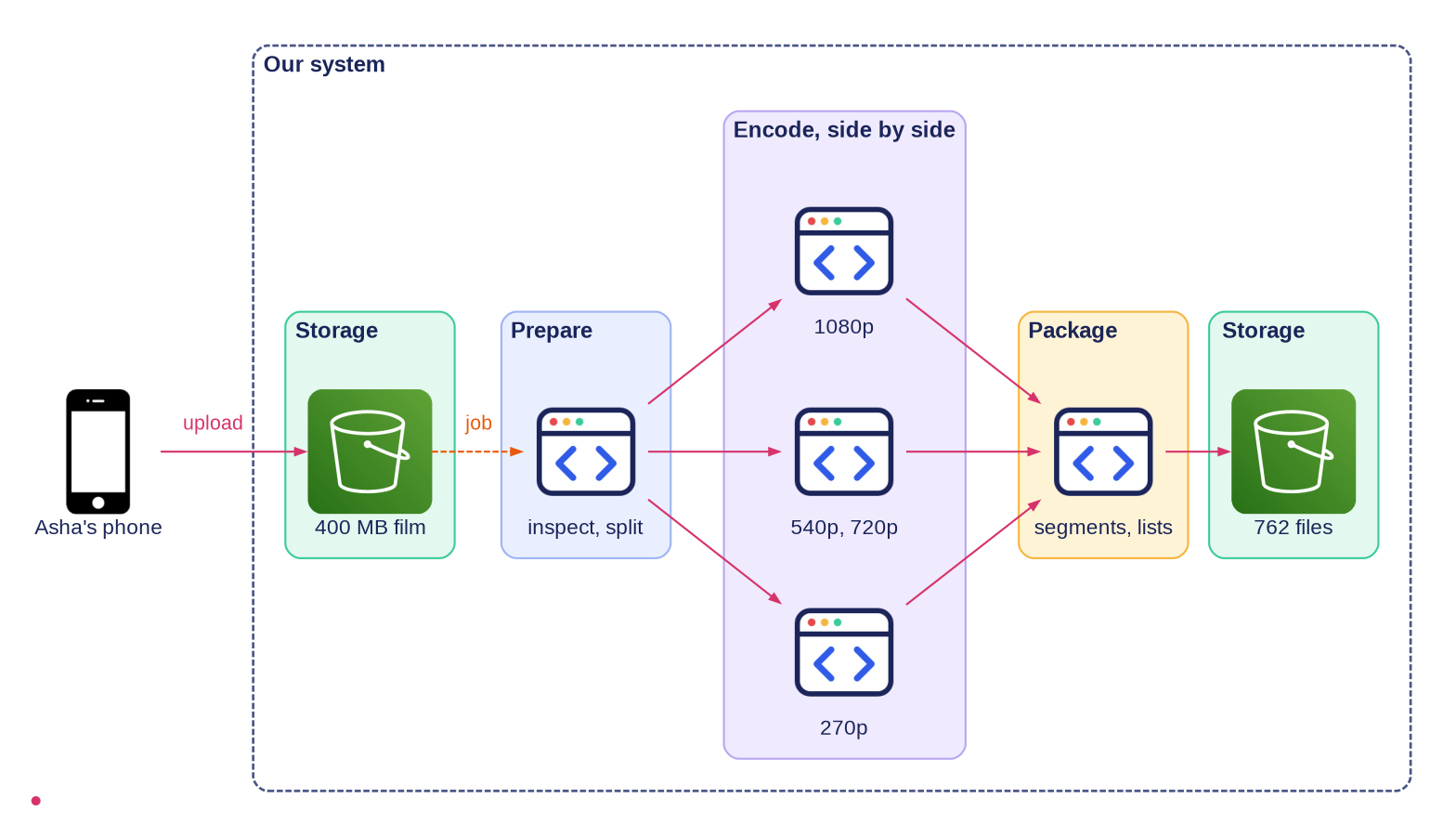
How the 400 MB reach storage safely is the topic of how large uploads work. It is even the same file. When the upload is finished, a job goes into a queue, and the pipeline begins.
From phone to files
The stations
- 1
Inspect
Read the box: codec, size, rotation, frame rate, sound, length. Phones often write a variable frame rate and a turned picture. Refuse what cannot be read, with a clear reason.
- 2
Split at keyframes
Cut the source where a frame stands alone. Our assumption: Asha's phone writes a keyframe every second, so cuts at every fourth second are possible without decoding. If it did not, the piece must be decoded from the keyframe before and trimmed.
- 3
Encode in parallel
150 pieces times 4 rungs are 600 tasks that do not need each other. All use the same settings and a fixed keyframe distance. The transcoding reel shows the same idea smaller: nine jobs from one 4K upload.
- 4
Sound, captions, thumbnails
Sound is encoded once as one track, because cutting sound into separately encoded pieces can leave clicks. Captions become WebVTT text. One small picture every 10 seconds makes 60 pictures on one sheet for the seek bar.
- 5
Check
Count frames, compare lengths, look for black or silent parts, and measure quality against the source.
- 6
Package
Write segments, init segments and manifests. The manifest is published last, so nobody sees a list of files that do not exist.
The graph of tasks
How long does it take?
A first playable version early. Nobody has to wait for 1080p. Do 270p and 540p first: 150 x (1 + 2) = 450 worker seconds, or 9 s on 50 workers. After 5 + 5 + 9 + 5 = 24 s parents can watch, and better rungs join the master playlist later. Viewers who come after that see all rungs.
One task fails, one task is repeated
Why is the split safe? Every piece starts with a closed group and every worker uses the same settings. Still, a rate lid knows nothing about the piece before it. Some systems give each worker a little of the neighbouring film, or plan the bits for all pieces first. YouTube went a step further for its scale: in 2021 Google described its own chips for video encoding, called VCU, and reported 20 to 33 times better efficiency than its earlier software system.
Quality
Is the copy good enough?
A judge who holds the original and the copy side by side sees more than one who only looks at the file size. A quality metric is such a judge, made of arithmetic.
What the numbers are
- PSNR compares pixel by pixel
- SSIM, from 2004, compares structure in small windows
- VMAF, from Netflix, combines several measures with a model trained on viewers' scores
What they are not
- Not a promise: a high average can hide one terrible second, so look at the lowest parts too
- Not comparable across different sources or models without care
- Blind to a missing sound track or wrong captions. Check those separately
Compare at the same size: first enlarge the 720p result to 1080p, then compare with the source, because that is what a TV shows. In our own run on a moving test picture, the 720p rung got a mean VMAF of 86.2 and an SSIM of 0.971. Those numbers belong to that test picture only.
Files
Segments and manifests
A manifest is a table of contents. In HLS there are two levels. The master playlist, which newer documents call the multivariant playlist, lists the renditions. Each has a media playlist that lists its segments.
#EXTM3U#EXT-X-VERSION:7#EXT-X-INDEPENDENT-SEGMENTS#EXT-X-MEDIA:TYPE=AUDIO,GROUP-ID="sound",NAME="English",DEFAULT=YES,AUTOSELECT=YES,URI="audio/list.m3u8"#EXT-X-STREAM-INF:BANDWIDTH=1628000,AVERAGE-BANDWIDTH=1328000,RESOLUTION=960x540,FRAME-RATE=30.000,CODECS="avc1.64001f,mp4a.40.2",AUDIO="sound"540p/list.m3u8#EXT-X-STREAM-INF:BANDWIDTH=628000,AVERAGE-BANDWIDTH=528000,RESOLUTION=480x270,FRAME-RATE=30.000,CODECS="avc1.640015,mp4a.40.2",AUDIO="sound"270p/list.m3u8#EXT-X-STREAM-INF:BANDWIDTH=3128000,AVERAGE-BANDWIDTH=2528000,RESOLUTION=1280x720,FRAME-RATE=30.000,CODECS="avc1.64001f,mp4a.40.2",AUDIO="sound"720p/list.m3u8#EXT-X-STREAM-INF:BANDWIDTH=6128000,AVERAGE-BANDWIDTH=4928000,RESOLUTION=1920x1080,FRAME-RATE=30.000,CODECS="avc1.640028,mp4a.40.2",AUDIO="sound"1080p/list.m3u8#EXTM3U#EXT-X-VERSION:7#EXT-X-TARGETDURATION:4#EXT-X-MEDIA-SEQUENCE:0#EXT-X-PLAYLIST-TYPE:VOD#EXT-X-MAP:URI="init.mp4"#EXTINF:4.000,seg000.m4s#EXTINF:4.000,seg001.m4s...#EXTINF:4.000,seg149.m4s#EXT-X-ENDLISTThe same ideas in two standards
| Idea | HLS | DASH |
|---|---|---|
| Table of contents | Master and media playlists, plain text | One MPD, in XML |
| A stretch of time | The parts between discontinuities | Period |
| Things that can replace each other | Variant streams | Adaptation set |
| One quality | Rendition in its media playlist | Representation |
| Start data | EXT-X-MAP | Initialization segment |
| Segment addresses | A line for each, or byte ranges | Often a template, for example seg$Number$.m4s |
Init segment
Data that a decoder needs before any picture: codec settings, track numbers, time scale. One small file per rendition, loaded once and again after a change of rung.
Aligned keyframes
Every rung starts a new group at 0, 2, 4 and 6 seconds and cuts at 0, 4 and 8. So the player can put the end of one rung next to the start of another.
Segment length
Short: quick reaction and less to lose. Long: fewer requests and fewer keyframes. All media playlists share one target duration, and times must match, says RFC 8216.
CMAF
One rule for fragmented MP4 pieces. The same segment files can be listed by an HLS playlist and a DASH MPD. Without it, two formats of the same film are stored and cached twice.
Counting files
A plain MP4 with byte ranges also works for small sites. Put its index at the front, with FFmpeg's -movflags +faststart. Otherwise the player may have to look for the index at the end before it can show anything.
Player
What happens in the browser
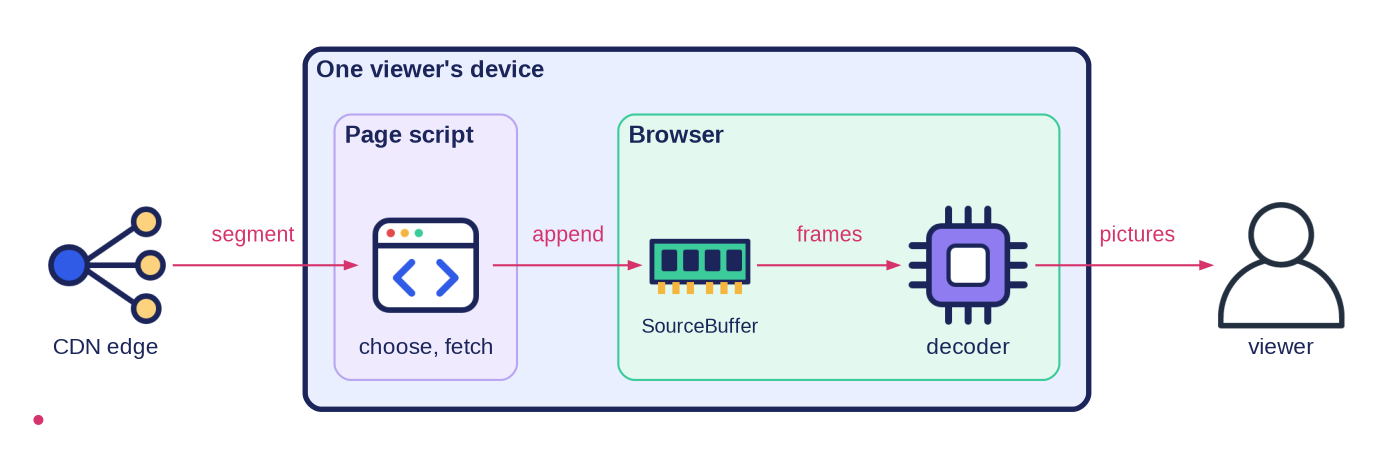
Press play on a web page. Safari can take an HLS address directly. In other browsers a script usually does the work through Media Source Extensions, MSE. The script fetches bytes and hands them to a SourceBuffer. The browser decodes and shows them.
Inside one player
From click to picture
A start on a good train
The rules of a SourceBuffer
- 1
One append at a time
appendBufferreturns at once and works in the background. The next call must wait forupdateend. - 2
It can be full
Then it throws
QuotaExceededError. The script removes film that was already shown and tries again. - 3
Order is free
A segment says itself where on the time line it belongs. So after a jump, pieces from the middle may be appended first.
- 4
New rung, new settings
Append the init segment of that rung before its first media segment.
- 5
Phones have their own wish
ManagedMediaSourcelets the browser say when it wants data and throw film away to save power. On Safari it needs remote playback to be off, or an AirPlay source.
Seeking. Lee drags the bar to 5:07, which is second 307. Segment number 307 / 4 = 76, counted from 0, starts at 304. It has keyframes at 304 and 306. The decoder starts at 306 and works silently through the 30 frames up to 307. The bytes of 304 to 306 were downloaded only because they are in the same file. If second 307 is not buffered, the player waits with the state HAVE_METADATA until new data comes.
Which segment holds second t?
The heart
Adaptive bitrate
You carry water to a garden that drinks one bucket every four seconds. A large bucket is nicer for the plants but slow to carry. Two things tell you which bucket to take: how fast you walked lately, and how much water still stands in the barrel.
Throughput
Bits of a segment divided by its download time. It is a fact about the past. Very small segments, waiting and the sharing of a line make it jump around.
Buffer
Seconds that are ready. It grows by 4 with each segment and shrinks by the download time. It is the time you have for being wrong.
Hysteresis
Going up needs more proof than staying. Otherwise a speed near a border makes the picture jump up and down.
Device cap
A phone screen with 540 rows gains little from 1080p. Do not fetch more rows than you can show, or a codec that the device cannot decode smoothly.
The buffer equation
Our buffer-aware rule
Worked trace
Two minutes on the train
The train gives 6 Mbit/s for 16 s, then 1.6 for 16 s, then a tunnel with 0.5 for 12 s, then 3.6 for 36 s, and 8 after that. We invented this ride. Four players fetch the same 30 segments. Playing starts when the first segment has arrived.
The ride, four players
| Player | Start | Stalls | Stalled | Rebuffer ratio | Mean rung | Switches |
|---|---|---|---|---|---|---|
| Fixed 1080p | 3.2 s | 8 | 26.7 s | 18.2% | 4.80 Mbit/s | 0 |
| Fixed 540p | 0.8 s | 0 | 0 s | 0% | 1.20 Mbit/s | 0 |
| Throughput only | 0.3 s | 2 | 9.3 s | 7.2% | 3.08 Mbit/s | 5 |
| Buffer aware | 0.3 s | 0 | 0 s | 0% | 2.27 Mbit/s | 8 |
The buffer-aware player, the interesting segments
| Segment | Starts at | Buffer before | Rung | Download | Speed seen | Buffer after |
|---|---|---|---|---|---|---|
| 1 | 0.0 s | 0 | 270p | 0.3 s | 6.0 | 4.0 s |
| 5 | 1.1 s | 15.2 s | 540p | 0.8 s | 6.0 | 18.4 s |
| 7 | 4.3 s | 20.0 s | 1080p | 3.2 s | 6.0 | 20.8 s |
| 10 | 16.3 s | 20.0 s | 1080p | 12.0 s | 1.6 | 12.0 s |
| 11 | 28.3 s | 12.0 s | 720p | 11.0 s | 0.9 | 5.0 s |
| 12 | 39.3 s | 5.0 s | 270p | 3.2 s | 0.5 | 5.8 s |
| 14 | 44.2 s | 8.0 s | 270p | 0.4 s | 3.6 | 11.6 s |
| 17 | 46.5 s | 17.8 s | 720p | 2.7 s | 3.6 | 19.1 s |
| 29 | 92.3 s | 20.0 s | 1080p | 2.4 s | 8.0 | 21.6 s |
The throughput-only player asked for 1080p while it had 7.3 s ready. Then the speed fell to 1.6 Mbit/s and the download took 12 s: 12 - 7.3 = 4.7 s of stall. It had no barrel, only a guess about the next walk.
Published ideas, in one line each
| Idea | Main signal | What the authors report |
|---|---|---|
| Buffer-based, BBA, 2014 | Buffer alone in steady state, speed only during start-up | 10 to 20% fewer rebuffers than Netflix's default of that time, in field tests with 4-second chunks |
| BOLA, 2016 | Buffer, with a proof of near-optimal utility | Needs no prediction of bandwidth. Part of the dash.js reference player |
| Pensieve, 2017 | A neural network learns from many observations | 12 to 25% better average quality of experience than the best compared method, in its tests |
The life of a player
CDN
Copies near the viewers
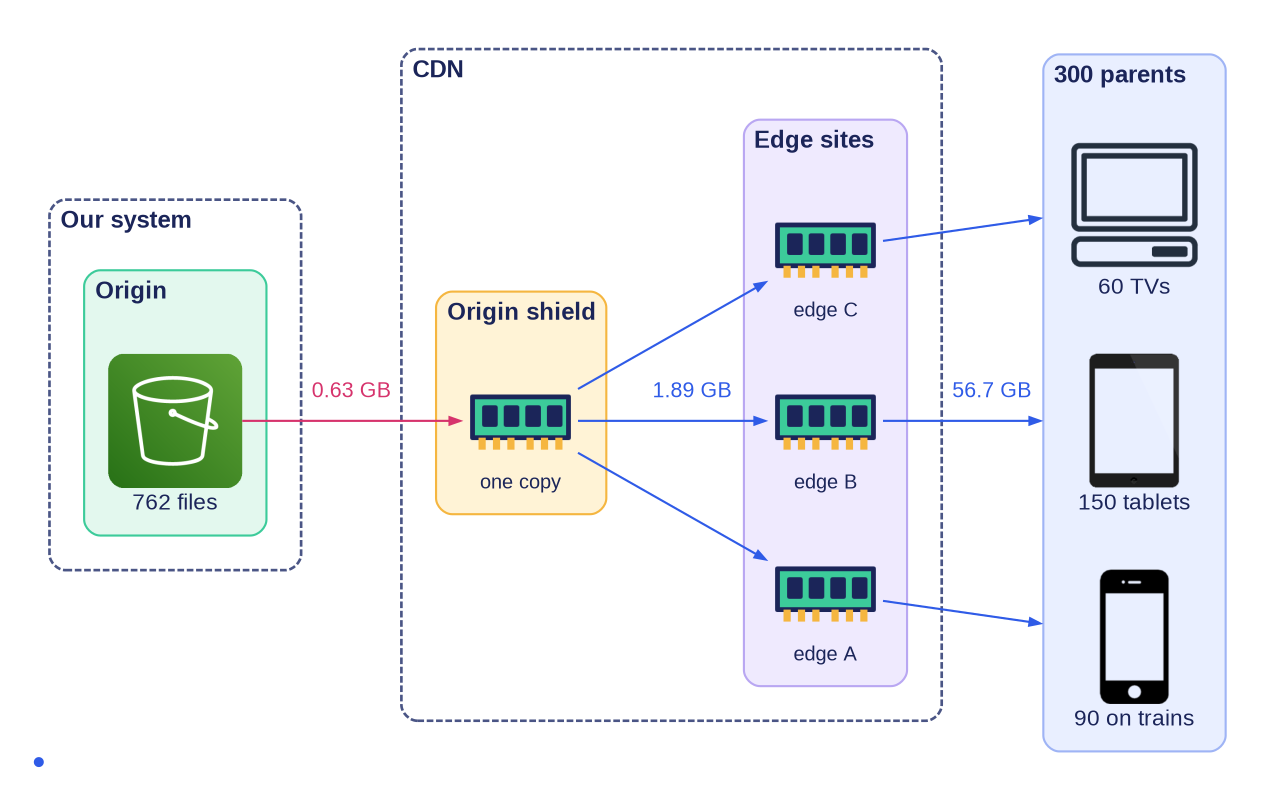
Segments never change and everybody gets the same bytes. That is the best case for a cache. How a CDN works inside is told in CDN. Here are the numbers for our film.
One film, 300 parents
Cache arithmetic
| Place | Requests in | Found there | Passed on | Bytes sent out |
|---|---|---|---|---|
| Three edge sites | 300 x 150 = 45,000 | 43,650, which is 97% | 3 x 450 = 1,350 | 56.7 GB |
| Origin shield | 1,350 | 900 | 450 | 1.89 GB |
| Origin | 450 | all | 0.63 GB |
Bytes to the parents
Two viewers, one miss
More ways to be near
- 1
Long life for segments
Put a version into the path and let caches keep segments for a year. The playlist of a live stream lives only for about a segment.
- 2
Boxes inside the internet provider
Netflix's Open Connect gives appliances to internet providers. It says it downloads most content updates to them during off-peak fill windows, because it can predict what members will watch.
- 3
Prefetch
The player loads ahead. An edge may also fetch segment 77 when 76 is asked for. Useful for a first viewer, wasteful when people leave early.
- 4
Know its limits
A CDN sees files, not viewers. It cannot tell from its logs that somebody's picture stands still. Players therefore report, and CMCD lets a player add facts such as buffer length to its requests.
Live
Live and on demand
A film in the archive is a finished book. A live stream is a book that is being written while you read, and you want to be close to the pen.
| On demand | Live | |
|---|---|---|
| Playlist | Complete, with ENDLIST | Grows or slides, must be loaded again and again |
| Time for encoding | Can be slower than real time | Must keep up with real time, always |
| Two-pass and per-title search | Possible | Hardly, or only in small windows |
| Buffer | Dozens of seconds | Limited by how far behind you may be |
| A failed task | Repeat it | The moment is gone. Run two encoders |
| Cache | Popular parts are warm | Everybody wants the newest piece at the same second |
Where live delay comes from
Low latency does not need tiny segments. A segment is published while it is still being made. In Low-Latency HLS it is listed as small partial segments, the server holds a playlist request until the next part exists, and it hints at the part that comes next. Low-latency DASH sends CMAF chunks of an unfinished segment, typically with HTTP chunked transfer. Keyframes stay far apart, so the compression stays good.
Less delay means less buffer, so every wobble of the network is closer to a stall. RFC 9317 calls under 1 second ultra low latency and under 10 seconds low latency. Chat with a streamer needs it, a lecture does not. A full live service is designed in Twitch.
Access
Signed URLs and DRM
Signed URL or cookie
Proof that this viewer may fetch until a certain time. Amazon's guide suggests signed cookies when many files belong together, as in HLS. The edge checks it. The cache key should not contain it, or every viewer misses.
Encryption
Segments are stored encrypted and the key is fetched separately. Alone, this does not stop a page from reading the key.
DRM
A licence server gives a key with rules to a protected module in the device. In a browser the page talks to it through Encrypted Media Extensions. EME itself does not define any DRM system.
Honest limit
Nothing stops a camera in front of a screen. DRM raises the cost of copying. For a school play, signed cookies are enough.
A licence, briefly
Money
Storage, compute, delivery
Baking costs once, the shelf costs rent every month, and the delivery boy costs for every cake. Which one hurts depends on how many cakes you sell.
Our film with invented prices
| Cost | Amount | Invented price | Result |
|---|---|---|---|
| Encoding, once | 2,250 worker seconds = 0.625 hours | 0.05 coins an hour | 0.031 coins |
| Storage, every month | 400 + 660 + 9.6 = 1,069.6 MB | 0.02 coins per GB | 0.021 coins |
| Delivery, 300 views | 56.7 + 2.88 = 59.58 GB | 0.05 coins per GB | 2.979 coins |
| Delivery, one 720p view | 0.1896 GB with sound | 0.05 coins per GB | 0.009 coins |
Popular titles
- Make all rungs, perhaps a second codec
- Push to the edges before the premiere
- Every saved bit is saved again at every view
Cold titles
- Keep the source and a small ladder, make the rest when somebody asks
- Move to cheaper storage. Some classes charge for reading and have a shortest storage time
- Edges will have thrown it away: expect misses and a slower start
Just-in-time packaging stores one form, for example CMAF pieces, and writes the HLS or DASH lists, and if needed another encryption, when a request comes. It saves storage for work at request time, and works best behind a shield. Just-in-time encoding goes further and makes a missing rung on demand, so the first viewer needs a worker that is faster than real time. Where the bytes rest: object storage.
Measure
What to watch
| Measure | How to compute it | A trap |
|---|---|---|
| Start time | From the click to the first picture | Count people who leave before it appears as well |
| Rebuffer ratio | Stalled time / (stalled + played time) | Do not count start, seeking and pause |
| Stalls per hour | Number of stalls / hours played | Many short stalls can annoy more than one long one |
| Mean bitrate | Weighted by time shown | More is not better on a small screen or for an easy film |
| Switches | Changes per minute, and how many rungs | A visible jump of two rungs feels worse than two steps |
| Error rate | Plays that ended with an error / plays | Split by device, codec, CDN, region and app version |
| Cache hit ratio | By requests and by bytes, for each layer | 97% at the edge can still mean a busy origin |
Trouble
Common failures
| You see | Often the reason | Look at |
|---|---|---|
| Stall at every change of rung | Keyframes are not aligned, or timestamps differ | Keyframe times of all rungs |
| Black picture, sound plays | The codec is not supported, or the init segment of the new rung is missing | CODECS, decoding info, the init request |
| Voice and lips drift apart | Variable frame rate, rounding of times, pieces with different lengths | Sum of segment lengths against the source |
| 404 in the middle | Manifest published before its segments, or an old list with deleted files | Publish order, versions in paths |
| Picture jumps up and down | No hysteresis, noisy speed | Buffer and choice per segment |
| Start is slow for everyone | First rung too high, too many requests one after another, cold cache | A waterfall of the first 10 requests |
| Only live viewers stall | Encoder slower than real time, or stale playlists in the cache | Age of the newest segment, cache time of the playlist |
| Everything fails after an hour | Signed addresses ran out during the film | Renewal of the token |
| Seek lands early | Keyframes too far apart | Distance of keyframes |
All together
The play, from stage to screens
| Step | Numbers |
|---|---|
| Film | 10 min, 1080p, 30 frames a second: 18,000 frames, 300 groups |
| Plain pictures | 112 GB, or 56 GB as 4:2:0 |
| Upload | 400 MB |
| Encode | 600 tasks, 2,250 worker seconds, first version after 24 s, all after 60 s |
| Store | 660 MB picture, 9.6 MB sound, 762 files |
| Deliver | 45,000 video requests, 56.7 GB, 450 requests at the origin |
| Watch | 270p first, then what speed, buffer and screen allow |
Whole products around this core: Design YouTube for uploads by everybody, Design Netflix for a catalogue that is known in advance, and Twitch for live.
Summary
The whole topic in one minute.
Video is a row of pictures. A codec predicts every block from its neighbours or from other frames and stores only a rounded difference. Keyframes stand alone, P and B frames lean on others, and a group from one keyframe to the next is a GOP. In streaming the groups are closed and the keyframes of all renditions are at the same times.
A pipeline inspects the upload, cuts it at keyframes, encodes pieces in parallel, checks quality, and packages segments, an init segment per rendition and manifests. One set of CMAF files can serve HLS and DASH. The player appends segments through Media Source Extensions, keeps a buffer, and uses measured speed and buffer together to choose the next rung.
A CDN keeps the segments near the viewers, so 45,000 video requests of our 300 parents become 450 at the origin. Storage is paid for every month, encoding once, and delivery for every view. Watch start time, rebuffer ratio, bitrate and errors together.
- Plain 1080p at 30 frames is 1,493 Mbit/s. 8-bit 4:2:0 halves it to 12 bits a pixel.
- A codec predicts blocks, transforms the difference and rounds it. Rounding is where detail is lost.
- I frames stand alone, P and B frames lean on others. Decode order is not show order.
- Closed groups and aligned keyframes make cutting, parallel work, seeking and switching safe.
- MP4 is a box, H.264 is a language.
- A ladder is several sizes of the same film. Our segments are 4 s, and 150 of them make ten minutes.
- Encode pieces as a graph of tasks. Repeat one task, publish a small ladder early, the manifest last.
- The player uses speed and buffer, goes up slowly, and respects the screen.
- Segments are ordinary files: 45,000 requests become 450 at the origin.
- Live trades buffer for closeness. Popular films pay for delivery, cold films for storage.
Sources
- RFC 8216: HTTP Live Streaming (2017)
- HLS 2nd edition draft (partial segments, hold-back)
- First HLS Internet-Draft, 1 May 2009
- Apple: HLS authoring specification for Apple devices
- Apple: enabling Low-Latency HLS
- Apple Developer: HTTP Live Streaming
- DASH-IF: timing model (MPD, period, adaptation set, representation)
- DASH-IF: about (MPEG-DASH ratification, 2012)
- DASH-IF: low-latency DASH
- MPEG: CMAF, ISO/IEC 23000-19
- W3C: Media Source Extensions Recommendation (2016)
- W3C: Media Source Extensions, current draft
- MDN: Media Source API
- MDN: SourceBuffer.appendBuffer
- MDN: ManagedMediaSource
- MDN: MediaCapabilities.decodingInfo
- MDN: video codecs
- MDN: video concepts (chroma subsampling)
- MDN: media containers
- W3C: Encrypted Media Extensions
- ITU-T H.264 editions
- ITU-T H.262 editions
- RFC 6386: VP8 data format (blocks, prediction, DCT)
- RFC 7798: HEVC payload (IDR, CRA, open GOP)
- AOMedia: AV1 release (2018)
- FFmpeg formats: HLS muxer
- FFmpeg codecs: libx264 options
- Netflix: VMAF
- SSIM (Wang, Bovik, Sheikh, Simoncelli, 2004)
- Huang et al.: a buffer-based approach to rate adaptation (SIGCOMM 2014)
- Spiteri, Urgaonkar, Sitaraman: BOLA
- Mao, Netravali, Alizadeh: Pensieve (SIGCOMM 2017)
- Convex hull prediction for bitrate ladders
- RFC 9317: operational considerations for streaming media
- YouTube: a new era of video infrastructure (VCU, 2021)
- Google Research: warehouse-scale video acceleration
- Netflix Open Connect
- Netflix: Open Connect overview (PDF)
- Amazon CloudFront: origin shield
- Amazon CloudFront: signed URLs or signed cookies
- AWS Elemental MediaPackage: just-in-time packaging
- Amazon S3: storage classes
- YouTube: recommended upload encoding settings