
Introduction to storage
easy 24 minHow a database keeps data: pages on disk, a buffer pool of pages in memory, indexes that find the right page, and a write-ahead log that makes a commit survive a crash.
Video lesson · Chapter 1 of 5
Why the second page read finishes sooner
Pages, buffer pool and log in 80 seconds
1:20Reel coming soon
Theory
Read or listen first. About 2 min.
What it is
Database storage is the set of mechanisms a database uses to keep data on disk, to find it again quickly, and to keep it correct even when the machine stops in the middle of work.
Almost every database is built from the same parts: fixed-size pages on disk, a buffer pool that holds copies of some pages in memory, indexes that point to the right page, and a log that records changes before they reach the pages.
Why it exists
Memory is fast but forgets everything when the power goes. A disk remembers but is thousands of times slower to reach. A database needs both, so it must decide all the time what to keep in memory and when to write it down.
Every storage design answers three questions. How does data survive a power cut? How do we find it without reading everything? How do we balance the speed of memory against the space of disk?
A short history
1956
IBM announces the RAMAC 305 with the IBM 350, the first disk drive. Programs can jump to a record instead of winding through a tape.
1970
Rudolf Bayer and Edward McCreight present the B-tree, an index built for storage that is read in blocks.
1992
The ARIES paper by Mohan and others describes recovery with write-ahead logging: repeat history, then undo what did not commit.
2011
Version 1.0 of the NVMe specification is released, an interface made for fast solid-state drives.
Words to know
- Page
- A fixed-size block, often 4 to 16 KB. The unit a database reads and writes.
- Buffer pool
- The memory area that holds copies of pages.
- Dirty page
- A page changed in memory but not yet written to its place on disk.
- Write-ahead log (WAL)
- An append-only file of changes, written before the changed pages.
- fsync
- The call that asks the operating system to push written data to the storage device.
- Checkpoint
- A point up to which all changes are on the data pages, so older log is not needed for recovery.
- Index
- A sorted or hashed structure that leads from a key to the page that holds it.
How it works
Step through the idea, or press Play.
Find the page. An index leads from the key to one page
Understand it
Start here
The kitchen story
A kitchen has three places for food. The worktop is within reach but small and wiped every night. The cupboard is a few steps away. The cellar is large and slow to reach. A toy box works the same way: a few toys on the desk, the rest in the closet.
The skill is not the shelves. It is deciding what stays on the worktop.
The big picture
The storage stack
Inside one database server
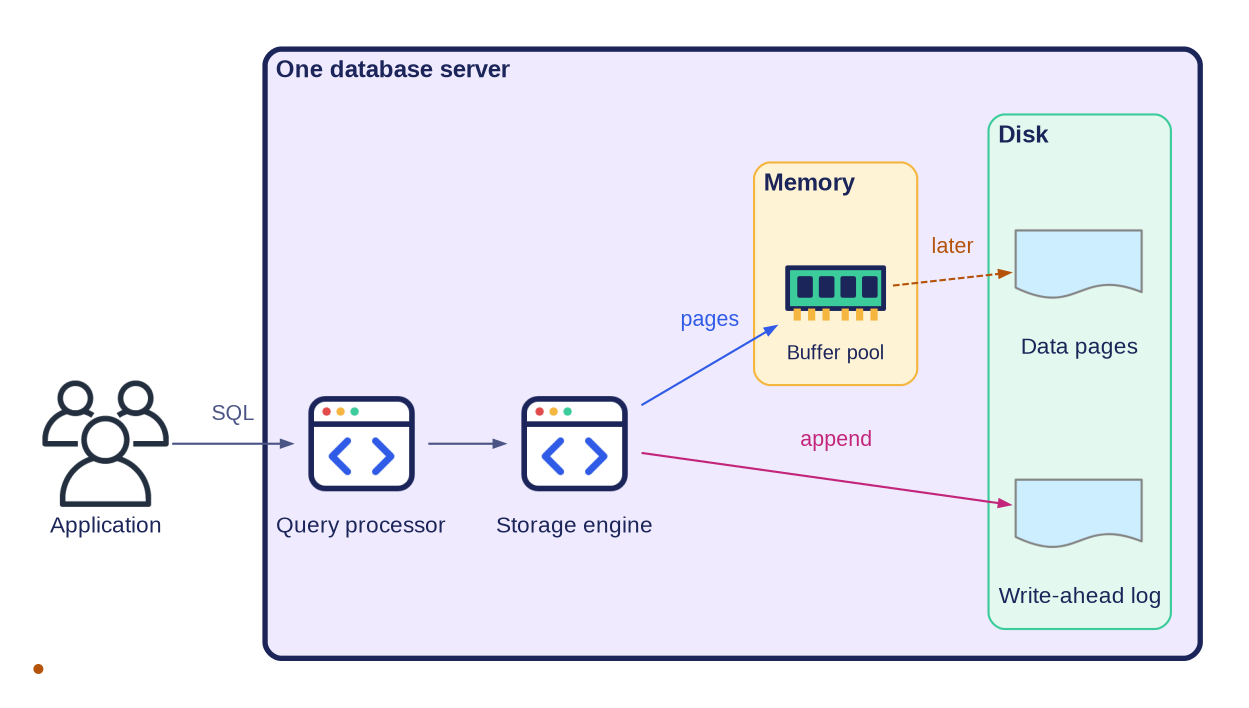
What each layer does
Four goals
Durability
Confirmed changes survive a crash.
Performance
Reads and writes finish fast.
Efficiency
As few disk reads and writes as possible.
Scalability
Data may grow far beyond memory.
Speed
Memory and disk
Memory is like a desk: quick, and cleared when you go home. Disk is like a filing cabinet: slower, and everything is still there tomorrow. The numbers below are rounded orders of magnitude for estimates, not promises about a product.
| Memory | SSD | Hard disk | |
|---|---|---|---|
| Random access | about 100 ns | about 100 µs | about 10 ms |
| Compared with memory | 1x | 1,000x | 100,000x |
| After a power cut | lost | kept | kept |
| Typical size in one server | 16 to 512 GB | 1 TB and up | 1 to 100 TB and up |
| Price per GB | highest | middle | lowest |
| Best pattern | any | batched, or many at once | sequential |
Average cost of one page
Pages
The unit of everything
Disks work in blocks, so reading one byte costs the same as reading its whole block. Databases therefore use pages. It is like reading a whole page of a book instead of one letter at a time.
Page sizes
| Database | Page | Note |
|---|---|---|
| PostgreSQL | 8 KB | Usual size; can be changed when compiling |
| MySQL InnoDB | 16 KB | Default; set when the instance is created |
| SQLite | 4 KB | Default since 3.12.0 (2016); any power of two from 512 to 65,536 bytes |
| SQL Server | about 8 KB | 96-byte header; one row uses up to 8,060 bytes of a page |
Inside a PostgreSQL page
- 1
Header, 24 bytes
Log position, checksum and where the free space starts and ends.
- 2
Slot array
4 bytes per row: offset and length. It grows from the start of the free space.
- 3
Free space
In the middle. The page is full when the two ends meet.
- 4
Rows
Placed from the end towards the front. A slot can keep its number while its row moves inside the page.
Kinds of pages
Data pages
The rows themselves.
Index pages
Nodes of a B-tree.
Overflow pages
Values too large for one page.
Free space map
Which pages still have room.
What pages give you
- One disk read fetches many neighbours
- Related rows often share a page
- Fixed sizes are easy to cache
- A checksum can cover one unit
What pages do not give you
- A small change still rewrites a whole page
- A page write is not always atomic: a crash can leave half of it
- Reading one row loads thousands of bytes
- Big values need extra pages
Memory
The buffer pool
The buffer pool holds copies of hot pages. Cold ones stay on disk only. With room for 8 pages and 16 on disk, 5 cached pages serve most reads if those 5 are the popular ones. When the pool is full, a rule such as least recently used (LRU) chooses what leaves.
One page request
Pure LRU has a weakness: one big scan reads thousands of pages once and pushes out the useful ones. Real systems use variations. InnoDB, for example, uses a variation of LRU that treats newly read pages more carefully.
Finding data
Indexes: the shortcut map
Suppose a book has 1,000 pages and you want the word zebra. You could read every page, or look in the index at the back, which says page 987. A database index is the same: a sorted table of keys that points to pages.
Scan or index
A million pages
Common index types
| Type | Used for | Best at |
|---|---|---|
| B-tree | The default in most SQL databases | Equality, ranges and sorting |
| Hash | Memory tables; optional in PostgreSQL | Exact match only |
| Bitmap | Data warehouses, such as Oracle's bitmap indexes | Columns with few distinct values |
| Full-text | Search | Words inside text; see full-text search |
An index buys
- Fast lookups by key
- Rows already in order
- Fewer pages read
An index costs
- Every write must update it
- Extra storage
- Maintenance, such as rebuilding a bloated one
Durability
Write the plan down first
Before painting a wall, write "I am going to paint the wall blue" in a diary. If somebody interrupts you, the diary says what was planned. The write-ahead log is that diary. The rules of a transaction belong to ACID; here is how the storage engine uses the log.
A commit
Why the log first
Sequential
The log only grows at its end, so one flush covers many transactions.
Durable
Once the record is flushed, the change survives a crash.
Recoverable
Replaying the log rebuilds pages that were not written.
Replication
The same log can be sent to another server; see data replication.
The same idea, different names
| Database | Name | Remark |
|---|---|---|
| PostgreSQL | WAL | Checkpoint every 5 minutes or near 1 GB of log, by default |
| MySQL InnoDB | Redo log | Separate from the binary log |
| Oracle | Redo log | Two or more files, reused in turn |
| SQLite | WAL | An option since 3.7.0; the default is a rollback journal |
| MongoDB | Journal | The oplog is a different thing: it feeds replicas |
Recovery
After a crash
Recovery in order
A checkpoint limits the work: only log written after it must be read. Frequent checkpoints mean quick recovery and more page writes. Rare ones mean the opposite.
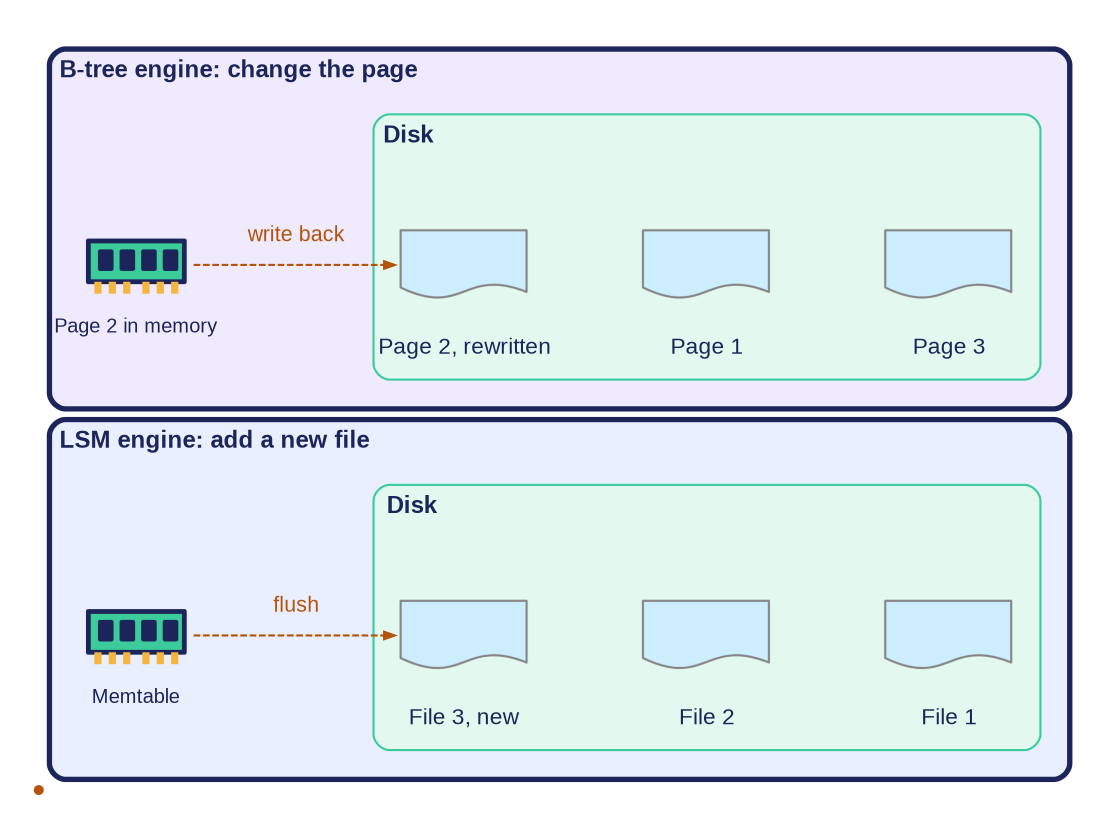
Two families
Change in place, or only append
Two ways to store changes
In practice
Read a slow database
Why is this query slow?
The kind of workload decides what matters: many tiny transactions in OLTP, large scans in OLAP. Systems that look up single keys are covered in key-value database.
Summary
The whole topic in one minute.
A database reads and writes whole pages, keeps the popular ones in a buffer pool, and uses indexes so that it touches few of them. One page in memory costs about 100 nanoseconds; one from an SSD costs about a thousand times more.
A commit is safe when its log record is on disk, not when the data page is. Pages follow later, at a checkpoint or an eviction, and after a crash the log brings them up to date.
- Databases read and write pages of about 4 to 16 KB.
- Memory is about 1,000 times faster than an SSD and 100,000 times faster than a hard disk for random access.
- The buffer pool keeps hot pages; the hit rate decides speed.
- An index turns thousands of page reads into a handful.
- A commit is safe when its log record is flushed; pages follow later.
- Recovery replays the log from the last checkpoint.