
Google Cloud Functions
medium 29 minGoogle Cloud Functions, called Cloud Run functions since August 2024, runs one piece of your code when a request or an event arrives.
Video lesson · Chapter 1 of 5
A field photographer publishes a cloud function
Cloud Run functions in 80 seconds
1:20Reel coming soon
Theory
Read or listen first. About 2 min.
What it is
A function as a service runs code for you without a server that you look after. You write one function, say which request or event starts it, and deploy the source. The platform starts a copy when work arrives and stops it afterwards. AWS Lambda is the best known example; this page is about Google's.
The product was Cloud Functions. Since August 2024 it is named Cloud Run functions, because a function is now a normal Cloud Run service that was built from source. Cloud Functions (2nd gen) became Cloud Run functions. The original lives on as Cloud Run functions (1st gen), with fewer features. Where this page says function, it means the current kind.
Why it exists
Much work in a system is glue: make a small picture when a photo is uploaded, check a webhook, load a row into a table each night. A server for it would wait most of the day. A function costs nothing in computing time while nothing happens, and needs no patching of machines.
Because a function is a container service underneath, you can keep the code when it outgrows the form: raise the memory, split traffic between revisions, or replace the generated container with your own, without moving to another platform.
A short history
2017, March
Google Cloud Functions enters beta, according to the product's release notes.
2018, July
Cloud Functions reaches general availability on 24 July, with new runtimes for Node.js 8 and Python in beta.
2022, August
The second generation becomes generally available. It is built on Cloud Run and Eventarc: longer runs, larger copies and several requests per copy.
2024, August
On 21 August Google announces the name Cloud Run functions and lets you deploy a function with gcloud run deploy.
2026, August
The tool that upgrades 1st gen functions to Cloud Run functions is generally available since 10 August.
2026, November
Runtimes for Python 3.15 and Node.js 26 become generally available on 23 November.
Words to know
- HTTP function
- Code that answers a web request.
- Event-driven function
- Code that receives a CloudEvent: something happened, such as a file was stored.
- Trigger
- The connection from a source of events to your function. Eventarc manages it.
- Instance
- One running copy of the container.
- Concurrency
- How many requests one instance may serve at the same time.
- Cold start
- The wait while a new instance starts and runs your setup code.
- Revision
- One deployed version of the service. Traffic can be divided between revisions.
- Idempotent
- Safe to run twice with the same result.
How it works
Step through the idea, or press Play.
Deploy source. Buildpacks make a container image
Understand it
Start here
The puppet booth
Picture a puppet booth in a park. There is no timetable. A coin opens the curtain.
You write the play. The park decides how many booths to open.
The name
What is it called now?
Old and new names
| Today | Was | Deploy with | Notes |
|---|---|---|---|
| Cloud Run functions | New since 2024 | gcloud run deploy with --function | Recommended. Managed as a Cloud Run service |
| Cloud Run functions, made with the Cloud Functions v2 API | Cloud Functions (2nd gen) | gcloud functions deploy | Works as before; can be detached to Cloud Run only |
| Cloud Run functions (1st gen) | Cloud Functions (1st gen) | gcloud functions deploy --no-gen2 | Still supported; an upgrade tool exists |
What the first generation lacks
| Cloud Run functions | 1st gen | |
|---|---|---|
| Requests per instance | Up to 1,000 | 1 |
| HTTP run time | Up to 60 minutes | Up to 9 minutes |
| Runs on | Cloud Run | A Google-internal platform |
| Traffic between versions | Can be split | Cannot |
| Address | run.app | cloudfunctions.net |
| Event format | CloudEvents in every language | Background functions in Node.js, Python, Go and Java |
Deploy
From source to a running service
What a deployment does
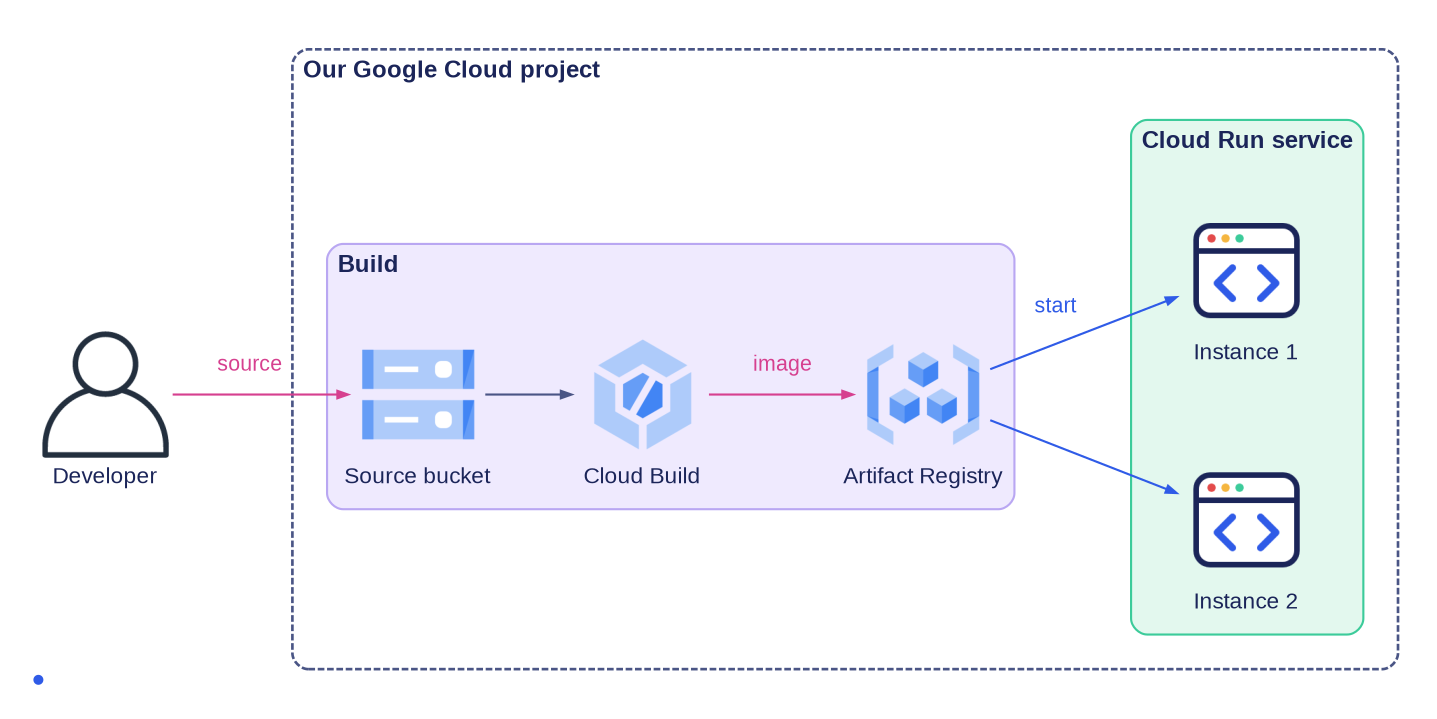
import functions_frameworkfrom google.cloud import storageclient = storage.Client() # global: made once per instance@functions_framework.httpdef hello(request): name = request.args.get("name", "world") return f"Hello {name[:40]}\n", 200, {"Content-Type": "text/plain"}@functions_framework.cloud_eventdef on_upload(event): data = event.data blob = client.bucket(data["bucket"]).blob(data["name"]) print(event["id"], blob.name)Because the result is an ordinary container with a web server, you can run it on your own computer with the Functions Framework, and test it with plain HTTP. With automatic base image updates, security patches of the language arrive without a rebuild.
Start it
Triggers
| Trigger | How it arrives | Typical use |
|---|---|---|
| HTTP | Directly, the caller waits | API, webhook |
| Pub/Sub topic | Through Eventarc as a CloudEvent | Messages between services |
| Cloud Storage | Through Eventarc: object stored, deleted | Pictures, imports |
| Firestore and other sources | Through Eventarc | React to a changed document |
| Audit log entries | Through Eventarc, for many Google services | Something was created |
| Cloud Scheduler, Cloud Tasks | They call it over HTTP | Timetable, controlled queue |
A picture is uploaded
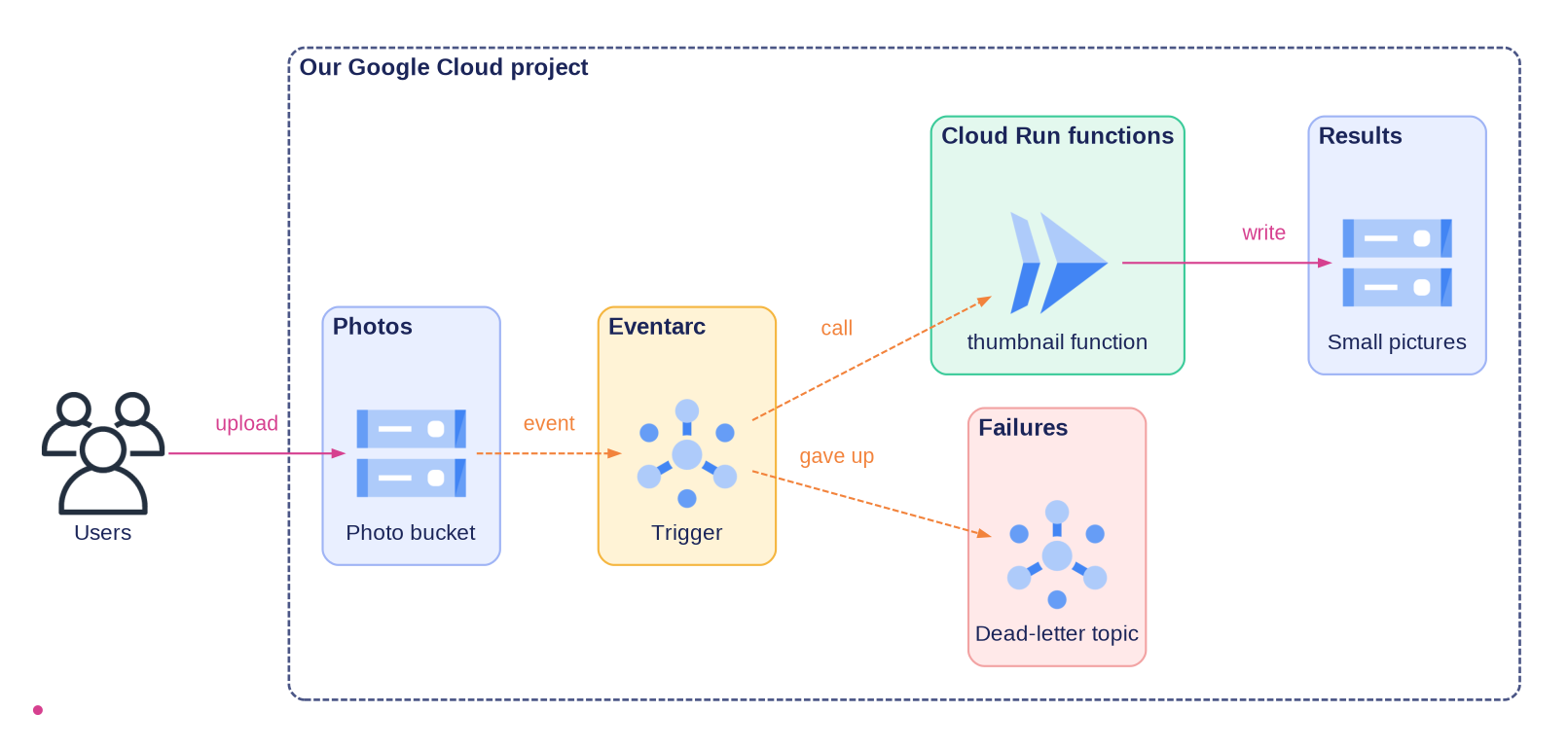
An event that is delivered twice
Delivery by Eventarc Standard
| Question | Answer |
|---|---|
| How often? | At least once, so duplicates happen |
| In order? | No guarantee |
| If the function fails? | Waits 10 s at first, growing to 600 s, for 24 hours by default |
| After that? | Lost, unless you set a dead-letter topic |
| Made in the Cloud Run console? | One attempt and no retries by default; with gcloud or Terraform retries are on |
Scale
Instances and concurrency
Cloud Run counts instances from two measures: the number of requests being served, and CPU use. Both aim at 60% by default. A warm instance stays idle for at most 15 minutes. Minimum instances keep some warm; maximum instances put a lid on the growth, 100 per revision unless you change it.
How many instances?
Settings that matter
Concurrency
Default 80 times the vCPUs, at most 1,000. Below one vCPU it must be 1. Lower it for heavy computing.
Maximum instances
Protects databases and your bill. It can be passed for a short while during a spike.
Minimum instances
Avoids most cold starts. You pay for the waiting ones.
Startup CPU boost
More CPU while an instance starts, so setup is shorter.
What slows a request
Protect
The database behind it
Connections at full scale
Functions grow in seconds and databases do not. Besides the limit, put a queue in between: Cloud Tasks and Pub/Sub smooth the rate, and the caller gets an answer before the work is done. See queues and asynchronous communication.
Life cycle
Start, work, idle, stop
The life of an instance
Four habits
- 1
Reuse in global scope
Create clients and pools once, outside the handler. Load rarely used parts only when needed.
- 2
Finish before you answer
With the default billing the CPU is taken away after the reply. Work left in the background stops and may wake up inside another request.
- 3
Clean the temporary folder
The file system is memory. Files you leave behind use up the memory of the instance.
- 4
Always answer
A handler that sends no reply runs, and is billed, until the timeout.
Operate
Limits, security and cost
Limits to know
| What | Value |
|---|---|
| HTTP request time | 5 minutes by default, up to 60 |
| Event-driven made with the v2 API | Up to 9 minutes |
| Memory and CPU | Up to 32 GiB and 8 vCPU |
| Request body | 32 MB |
| Event size (Eventarc Standard) | 512 KB |
| Instances per revision | 100 by default, can be raised by quota |
| Services per project and Region | 1,000, functions included |
| Start of a container | Must be ready within 4 minutes |
Run it safely
| Area | Do |
|---|---|
| Who may call | Require the invoker role; open to all only for public pages and webhooks, and check their signature |
| What it may do | Its own service account with few rights, and not the default one |
| Secrets | Secret Manager, never in source or plain settings |
| Network | Limit who can reach it; Direct VPC egress for private systems |
| Releases | A new revision with a small share of traffic, then more |
| Watching | Error rate, latency, instance count, age of undelivered messages |
Cost. With request-based billing, the default, you pay for CPU and memory while requests are served, plus a small price per request. With instance-based billing you pay for the whole life of an instance, and background work is allowed. A function that is busy all day is often cheaper in the second form, or as a committed container. Building, storing images, events and outgoing traffic are billed separately.
Decide
When to choose it, and when not
Choose a function
- Reacting to files, messages and documents on Google Cloud
- Webhooks and small APIs
- Uneven load with quiet times
- A scheduled job of a few minutes
- A team that wants to ship source only
Choose something else
- Steady heavy traffic: a plain service
- Hours of batch work: Cloud Run jobs, up to 7 days per task
- Long steps that depend on each other: Workflows
- Strict low delay for every request, with no warm copies
- Data kept in memory between requests
Compare
Function, service, job or workflow?
Pick the shape first
Neighbours
| Option | Same | Different | Choose it when |
|---|---|---|---|
| Cloud Run service | Platform, scaling, billing | You bring a container or a whole app | Several routes, own base image |
| AWS Lambda | Function per event | One request per environment by default, 15 minutes | On AWS |
| Azure Functions | Function per event | Bindings, durable orchestration in code | On Azure |
| Cloudflare Workers | Code per request | Isolates near the user, small limits | Short work at the edge |
| Kubernetes | Runs containers | You run the platform | Many services, special needs |
Summary
The whole topic in one minute.
You deploy source; Cloud Build and buildpacks make a container; Cloud Run starts as many instances as the requests need, up to a limit, and none when idle. HTTP requests and CloudEvents from Eventarc both arrive as HTTP. Each instance can serve many requests together.
Choose it for glue, webhooks and uneven work on Google Cloud. Make event handlers safe to repeat, cap the number of instances so that a database is not flooded, and move steady heavy load to plain containers.
- Cloud Functions is now Cloud Run functions; a function is a Cloud Run service built from source.
- One instance serves many requests: 80 per vCPU by default, up to 1,000.
- Eventarc delivers at least once, without order, for 24 hours by default. Check whether retries are on.
- Finish the work before the reply, and make it safe to repeat.
- Set maximum instances from what the database can bear.
- Zero when idle; minimum instances buy away most cold starts.
Sources
- Google Cloud: Cloud Functions is now Cloud Run functions
- Cloud Run functions: comparison of versions
- Cloud Run functions: overview
- Cloud Run: quotas and limits
- Cloud Run: concurrency
- Cloud Run: instance autoscaling
- Eventarc: retry events
- Cloud Run functions: best practices
- Cloud Run functions: release notes