
Cloudflare Workers
medium 30 minCloudflare Workers runs small programs in Cloudflare's data centres around the world, close to the user.
Video lesson · Chapter 1 of 5
A match preview travels to the edge
Cloudflare Workers in 85 seconds
1:25Reel coming soon
Theory
Read or listen first. About 2 min.
What it is
Cloudflare Workers is a platform for running code in the same data centres that Cloudflare uses for its content delivery network. You deploy a script once and it can run in any of them. A request is served in a location near the user, without a trip to a distant region.
The unit of running is a V8 isolate. V8 is the JavaScript engine of Chrome, where every tab must be kept apart from the others. Workers uses the same walls on a server: many customers' scripts share one process, each in its own isolate with its own memory. There is no machine or container per script.
Why it exists
A function in one region is far from most users, and a container takes time to start. For short work such as checking a token, choosing a version, or rewriting a page, the network trip and the start can be longer than the work. Isolates near the user remove most of both.
Sharing one runtime also makes tiny programs cheap. Cloudflare reported in 2018 that a Node process on its own used about 35 MB, and about 3 MB per isolate when the runtime is shared. That makes it possible to keep very many rarely used scripts ready.
A short history
2017, September
Cloudflare presents Workers on 29 September: JavaScript that handles requests at its edge.
2018, March
Workers opens to everyone on 13 March.
2020, September
Durable Objects are presented on 28 September: single places for coordination and consistent storage.
2022, September
The runtime workerd is published as open source on 27 September.
2025, June
On 12 June a failure in the storage under Workers KV stops many Cloudflare products for almost two and a half hours. The public report names a third-party provider below it.
2025, September
A post of 26 September describes sending requests for a script to a server that already runs it, with a consistent hash ring, to avoid more cold starts.
Words to know
- Isolate
- A separate memory space for one script inside a shared V8 process.
- Worker
- Your deployed script, with handlers such as fetch, scheduled and queue.
- Binding
- A named connection in env to a resource: a KV namespace, a database, another Worker.
- CPU time
- Time spent computing. Waiting for the network does not count.
- KV
- A key-value store copied to many locations, eventually consistent.
- Durable Object
- One named object that lives in one place, runs one thing at a time, and has its own storage.
- Placement
- Where a Worker runs: near the user, or near the systems it calls.
- Compatibility date
- The date whose runtime behaviour your Worker gets.
How it works
Step through the idea, or press Play.
Request. Arrives at a nearby Cloudflare location
Understand it
Start here
A shelf of snow globes
Picture a shelf of snow globes. Each holds a tiny world, closed off by glass. Shake one, and at once it snows there.
Globes are for showing. The book is for remembering.
The idea
Isolates instead of containers
What is shared
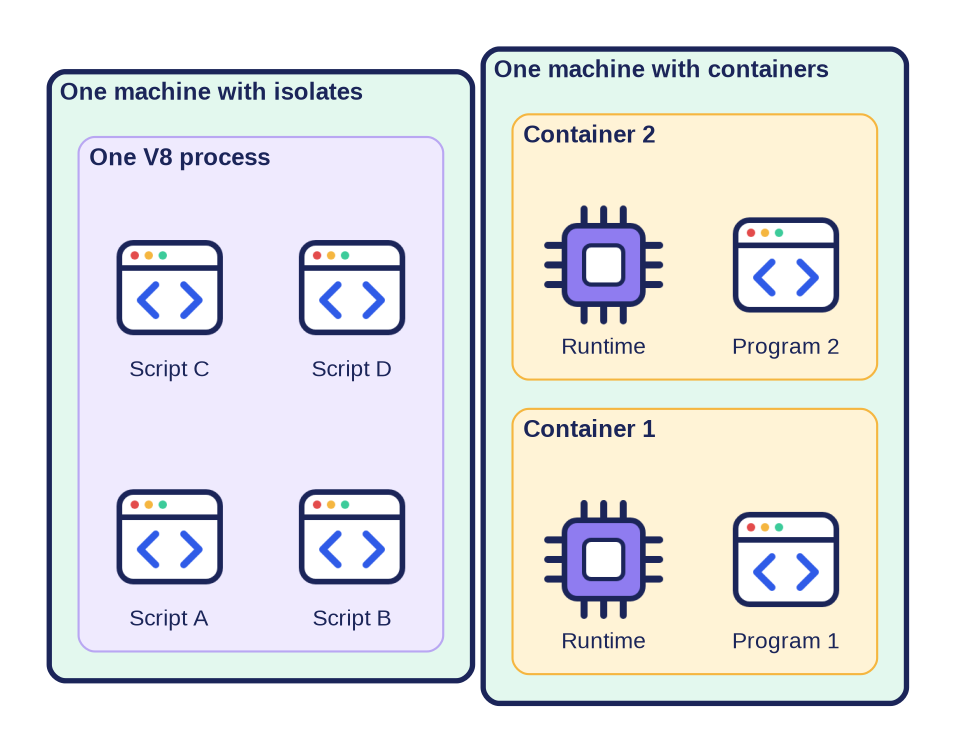
| Isolate (Workers) | Container (most functions) | Virtual machine | |
|---|---|---|---|
| Wall | Memory separation in V8, plus a sandbox around the process | Kernel features | Hardware support |
| Shared | Process, runtime, kernel | Kernel | Hardware |
| Start | Very short | Longer: start a process and a runtime | Longest |
| Languages | JavaScript, TypeScript, WebAssembly (Rust and others), Python | Any | Any |
| System access | Web APIs and many Node.js APIs | A file system and processes | Everything |
Why sharing matters
A request
From the user to the answer
The path of one request
Large scripts start more slowly, so since 2025 Cloudflare also sends a request inside a location to a server that already has the script, chosen with consistent hashing. A short hop inside the building is faster than a cold start.
export default { async fetch(request, env, ctx) { const url = new URL(request.url); const flag = await env.FLAGS.get("new-page"); // KV binding const target = flag === "on" ? "/v2" : "/v1"; const answer = await fetch(env.ORIGIN + target + url.pathname); ctx.waitUntil(env.LOG.send({ path: url.pathname })); // queue, after the reply return answer; },};What can start a Worker
HTTP request
The fetch handler, on a route, a custom domain or a workers.dev address.
Cron trigger
The scheduled handler, at fixed times.
Queue batch
The queue handler receives up to 100 messages at once.
Another Worker
A service binding: a direct call that does not go over the internet.
Rules
What an isolate may not assume
Do
- Keep request data in local variables
- Cache harmless things in globals, such as a parsed key
- Stream large bodies
- Use ctx.waitUntil for short work after the reply
- Set a timeout on every outgoing call
Do not
- Keep users or counters in globals
- Expect two requests to reach the same isolate
- Read a 100 MB body into memory
- Start work without awaiting it
- Measure CPU time with Date.now inside one computation
Limits to know
| What | Free | Paid |
|---|---|---|
| Requests | 100,000 per day | No limit |
| CPU time per HTTP request | 10 ms | 30 s by default, up to 5 min |
| Memory per isolate | 128 MB | 128 MB |
| Subrequests per call | 50 | 10,000, can be raised |
| Script size | 64 MiB | 64 MiB |
| Start of the script | 1 second | 1 second |
| Connections waiting for headers | 6 | 6 |
| Number of Workers | 100 | 500, can be raised |
| Cron, queue and alarm run time | 15 min | 15 min |
State
Where to keep data
| Store | Good at | Freshness | Limits to know |
|---|---|---|---|
| KV | Settings, flags, rarely changed pages | Eventually: other places may see the old value for 60 s or more | Value 25 MiB; one write per second to the same key |
| Durable Objects | Rooms, carts, counters, locks, per document | Strongly consistent in one place | About 1,000 requests per second per object; 10 GB |
| D1 | Relational data (SQLite) | One primary; read replicas if used | 10 GB per database |
| R2 | Files; see object storage | Strong | Large objects |
| Queues | Work for later | At least once | Message 128 KB; 5,000 per second per queue |
| Cache API | Copies in one location | Local only | Not shared between locations |
| Hyperdrive | Your own Postgres or MySQL | The database's | Keeps connections open for you |
Which store?
KV: a change that takes a minute to arrive
Coordination
Durable Objects
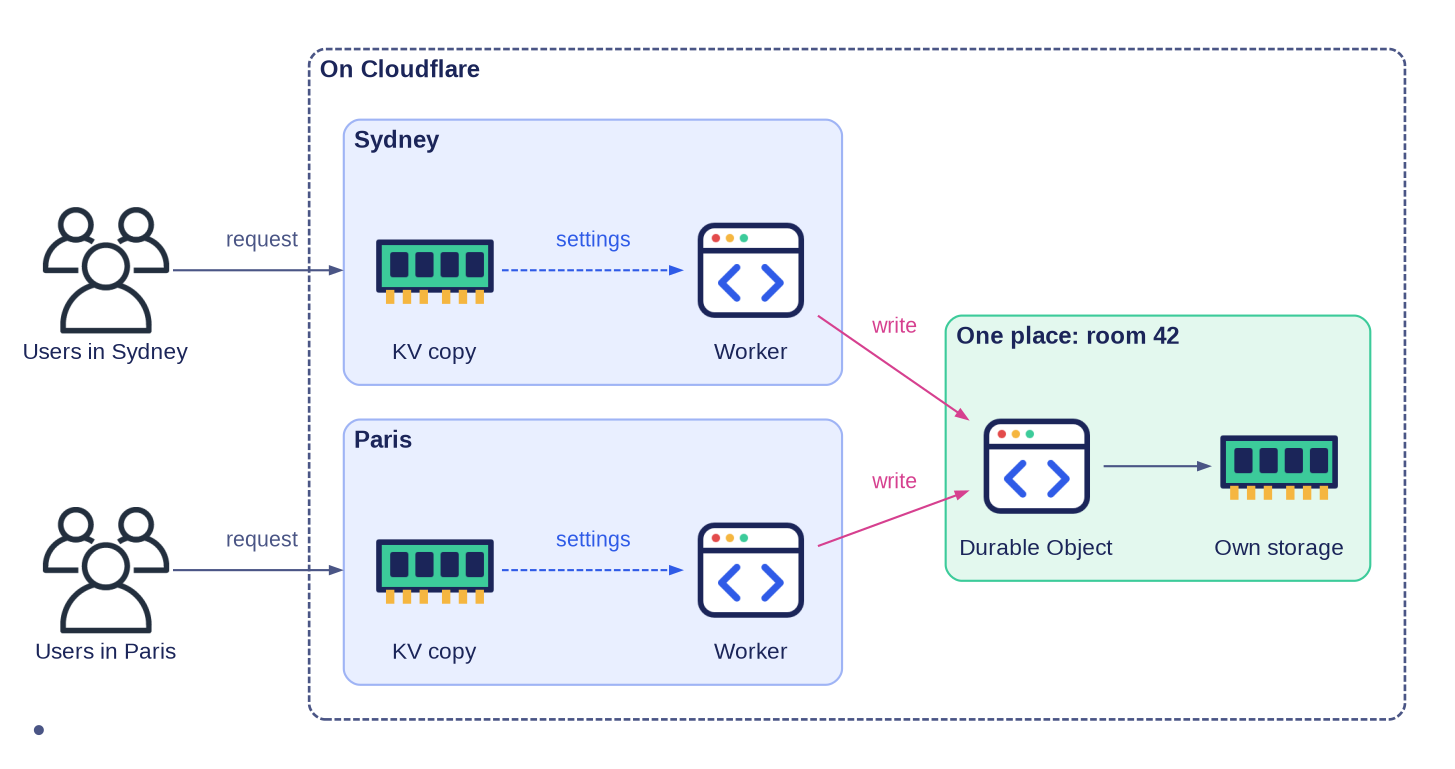
A Durable Object has a name. Every request for that name, from anywhere, goes to the same single object. It runs one piece of JavaScript at a time and has its own SQLite storage next to it. So there is no race between two users: the object is the lock. It can hold many WebSocket connections, which makes it a natural home for a chat room or a shared document.
Many Workers, one object per room
How many objects for a hot counter?
Placement
Near the user or near the data?
Three queries to a distant database
Where should it run?
Smart Placement measures this and moves the Worker when another location is clearly faster; it needs steady traffic from several places and up to 15 minutes. If you know the region of your database, name it. Either way the first answer is the same as always in distributed systems: fewer round trips.
Common designs
- 1
Guard
Check a signed token and refuse early. See API authentication.
- 2
Switch
A/B test or gradual move: choose the origin by cookie.
- 3
Compose
Fetch parts in parallel and stream the page. Six connections may wait for headers at once.
- 4
Cache with rules
Build a cache key that ignores marketing parameters. See CDN.
- 5
Whole app
Static files, API and database on the platform, with the code placed near the data.
Operate
Releases, watching, security and cost
| Area | How |
|---|---|
| Releases | Versions, and gradual deployments that send a share of requests to a new one |
| Runtime changes | Guarded by the compatibility date, so old Workers keep their behaviour |
| Node.js packages | On by default for compatibility dates from 4 August 2026; earlier dates need the nodejs_compat flag |
| Secrets | Secret bindings, never in the script |
| Watching | Logs, traces, errors by kind: exceeded CPU, exceeded memory, exceptions |
| At the daily free limit | Choose fail open (skip the Worker) or fail closed. Security checks must fail closed |
| Local tests | Wrangler runs your Worker in workerd, the same open-source runtime |
Cost. On the paid plan you pay per request and per millisecond of CPU, not for waiting and not for outgoing traffic of Workers. Each store is billed on its own. A spending limit can stop new calls at a threshold, which also stops your site, so choose it with care.
Failure
What breaks, and what to prepare
| Failure | What users see | Prepare |
|---|---|---|
| Memory above 128 MB | Current requests may finish; under great load some are cancelled | Stream, and keep big data outside |
| CPU limit | Error 1102 | Move work to a queue; raise the limit on purpose |
| Isolate replaced | Globals are empty | Treat globals as a cache only |
| Origin slow | Requests wait and pile up | Timeouts and fallbacks |
| KV unavailable | Missing flags and sessions | Defaults; last good value in the cache |
| One hot Durable Object | Errors for that name only | Split by key |
Decide
When to choose it, and when not
Choose Workers
- Short work on requests, near the user
- You already use Cloudflare
- Live rooms and documents, with one object each
- Very many small scripts, for example one per customer
- Uneven load from all over the world
Choose something else
- More than 128 MB or minutes of computing per request
- Software that needs a system, files or other processes
- Strict rules about the place of processing, unless you configure them
- All users and data in one city
- A team tied to another cloud's events
Neighbours
| Option | Same | Different | Choose it when |
|---|---|---|---|
| AWS Lambda | Code per request | An environment per request at a time, one region, more memory | Events and data on AWS |
| CloudFront Functions, Lambda@Edge | Code at a CDN | Small scripts, or Lambda near some edges; see CloudFront | You use CloudFront |
| Cloud Run functions | Serverless | Containers, regional, up to 60 minutes | On Google Cloud |
| Cloudflare Containers | Same platform | Full container, slower start | A library needs a system |
| NGINX | Rules on requests | Your own servers | One place, full control |
Summary
The whole topic in one minute.
Workers runs scripts in V8 isolates in Cloudflare's locations. Isolates share a process, so they start fast and use little memory, but they are limited to 128 MB, may vanish at any time, and serve many requests at once. Anything that must last goes into KV, Durable Objects, D1, R2 or your own database.
Use it for short work near the user and for coordination per room or per document. Place the code near the database when a request needs several queries. For heavy computing, large memory or full system access, use containers or a regional platform.
- Isolates share one process: quick to start, 128 MB, may vanish at any time.
- CPU time counts, waiting does not.
- KV is for data that may be a minute old; Durable Objects are for one truth per thing.
- Place the code near the data when a request needs several queries.
- Releases are global in seconds: roll out gradually.
- Globals are a cache, never a store.
Sources
- Cloudflare: How Workers works
- Cloudflare: Workers limits
- Cloudflare: security model
- Cloudflare: how KV works
- Cloudflare: Durable Objects limits
- Cloudflare: placement
- Cloudflare blog: Cloud Computing without Containers (2018)
- Cloudflare blog: Eliminating Cold Starts 2 (2025)
- Cloudflare: outage of 12 June 2025
- workerd, the open-source runtime