
Horizontal scaling
easy 25 minHorizontal scaling, or scaling out, means adding machines and sharing the load between them.
Video lesson · Chapter 1 of 5
A checkout machine vanishes
Horizontal scaling
1:08Reel
Theory
Read or listen first. About 2 min.
What it is
Horizontal scaling means running the same program on several machines at once and splitting the work between them. When there is more work, you add machines. When there is less, you remove some.
From the outside it still looks like one system. People use one address, and something in front decides which machine answers each request. Each machine is ordinary and can be replaced. The group is what has to stay up.
Why it exists
One machine has a largest size, stops when it fails, and must be paid for at its busiest size all day. Many smaller machines remove all three limits: you can keep adding them, one can fail while the others work, and the number can follow the traffic.
The price is coordination. Several machines have to agree on who is logged in, which version of the data is right and who does what. Most of the work in scaling out is making the program not care which machine it runs on.
A short history
1994
Engineers at NCSA describe a scalable web server: several identical machines behind one name, with DNS handing out their addresses in turn.
1997
Fox and colleagues at Berkeley publish Cluster-Based Scalable Network Services, showing Internet services built from many ordinary workstations.
2003
Google describes its search cluster in IEEE Micro: thousands of commodity PCs, with reliability provided by software instead of expensive servers.
2009
Amazon launches Elastic Load Balancing, Auto Scaling and CloudWatch. Adding machines can follow a metric.
2015
Kubernetes 1.0 is released. Copies of a program become a number you declare, and the platform keeps that many running.
Words to know
- Instance
- One running copy of the program, on its own machine or container.
- Replica
- Another word for a copy. In databases, a copy of the data.
- Load balancer
- The part that receives every request and picks an instance for it.
- Stateless
- Keeps nothing between requests that another instance would need.
- Scale out and scale in
- Add instances and remove instances.
- Cooldown
- A pause after a change, so the next decision uses fresh measurements.
- Draining
- Letting an instance finish its current requests before it stops.
How it works
Step through the idea, or press Play.
Make servers interchangeable. Move sessions, files and data out of the server, so any copy can answer any request
Understand it
Start here
Friends with backpacks
In vertical scaling one pupil bought bigger and bigger backpacks, until the shop had nothing bigger. Now imagine the pupil asks friends to help. Together they carry far more, and one friend can be ill without every book staying behind.
The bags stay ordinary. What changed is their number, the person who shares the books out, and the shared list.
The idea
What it is, and what it is not
Horizontal scaling is
- Adding more server instances
- Distributing load across machines
- Using a load balancer
- Running several replicas of the same program
- Scaling with demand (auto-scaling)
Horizontal scaling is not
- Making one server bigger
- Adding CPU or RAM to it
- Upgrading its hardware
- Running one powerful machine
- Keeping a single point of failure
Growing a fleet
| Stage | Servers | Capacity | Running at 70% |
|---|---|---|---|
| Start | 1 | 100 req/s | 70 req/s |
| Growing | 3 | 300 req/s | 210 req/s |
| Scaled | 6 | 600 req/s | 420 req/s |
Architecture
The whole picture
The old picture for this is a busy pizza shop. When orders pile up, the shop does not ask one chef to cook faster. It hires more chefs, and a manager gives each one orders. When it is quiet, some chefs go home.
One address, many interchangeable servers
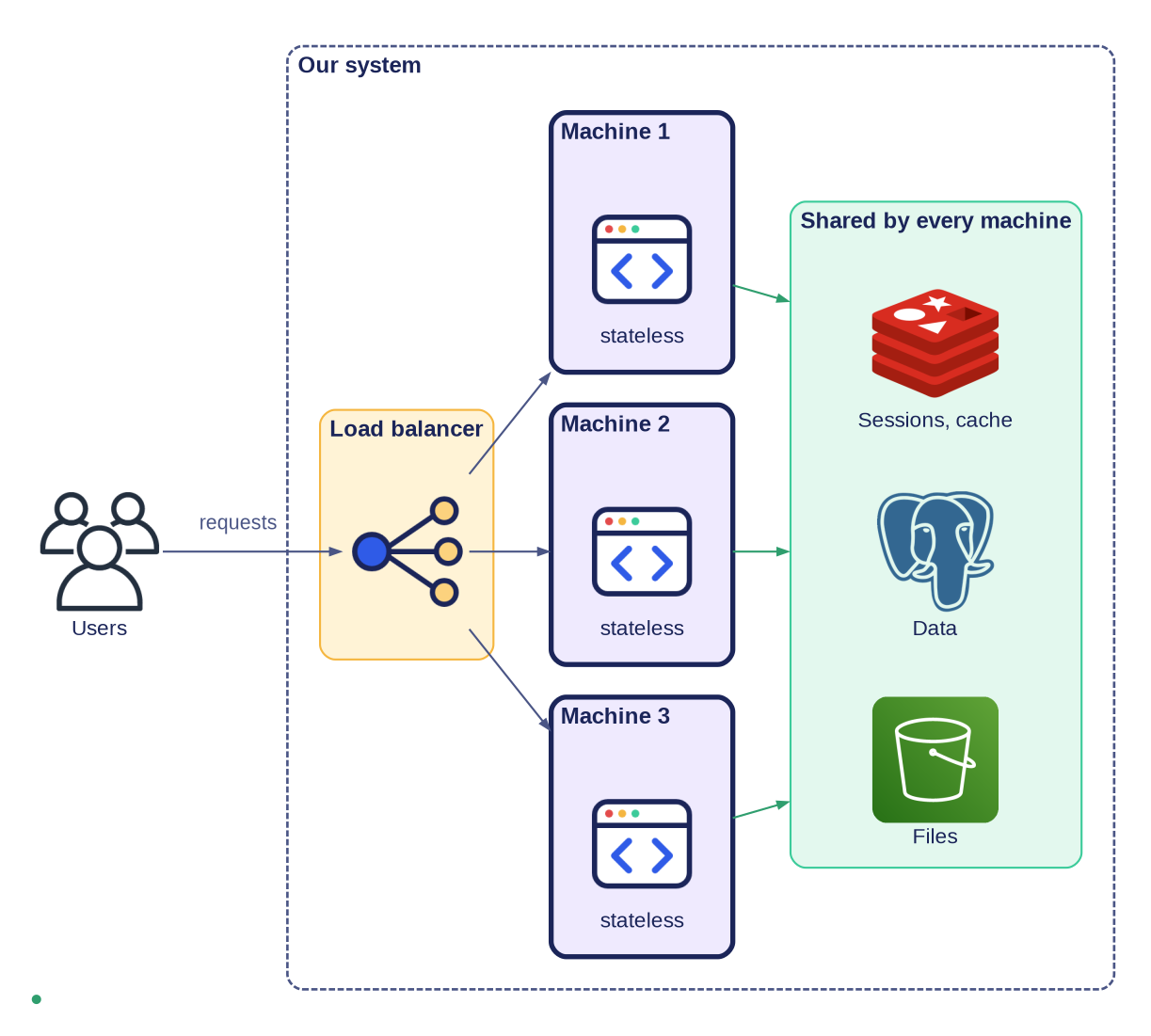
- 1
Load balancer
The traffic officer. It picks a server with a rule such as round robin or least connections, checks the servers' health continuously, and is often where TLS ends. Examples: NGINX, HAProxy, AWS ALB. See load balancing.
- 2
Auto-scaling
Watches CPU, memory or requests per server. Scales out above the target and in when traffic is low. A cooldown or stabilization window prevents constant adding and removing.
- 3
Stateless design
No session in local memory and no files on the local disk. Every request carries or looks up what it needs, so any server can handle it and servers are easy to add and remove.
- 4
Shared storage
A database for durable data, Redis for sessions and cache, and object storage such as S3 for files. Every server reads the same data.
Two requests, two servers, one user
Auto-scaling
How the number of servers is chosen
The simplest rule uses two thresholds: add a server above 80% CPU, remove one below 30%. Target tracking is usually better: name the level you want and let the formula say how many servers reach it.
Target tracking, as the Kubernetes autoscaler does it
Scale out, scale in, or wait
Auto-scaling is a control loop
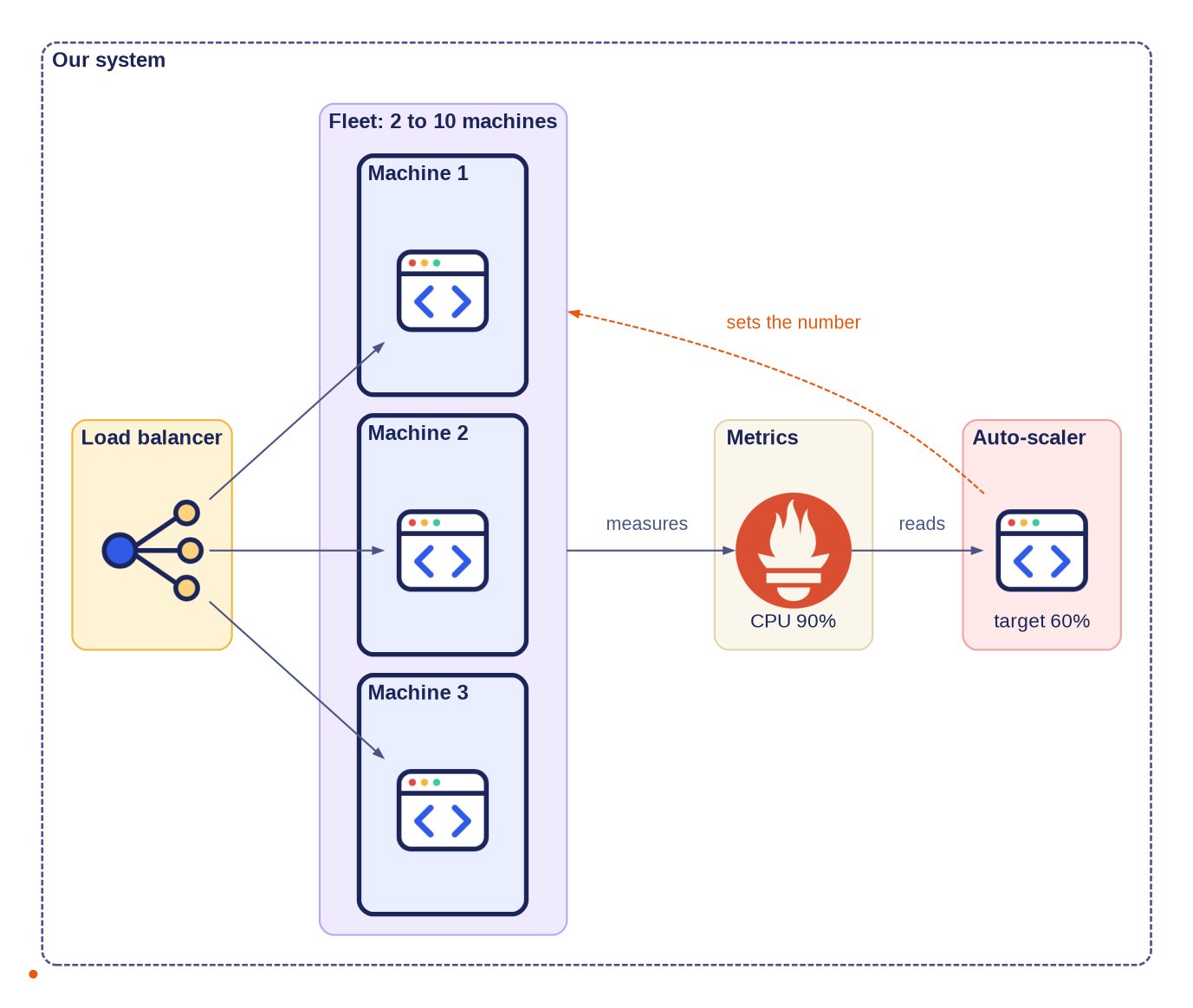
Which metric to follow
| Metric | Good when | Careful |
|---|---|---|
| CPU | Work is computation | Useless if servers wait on a database |
| Memory | Memory really follows load | Many programs never give memory back, so it blocks scaling in |
| Requests per server | Requests cost about the same | Needs a load-tested limit |
| Queue length or age | Background workers | Use backlog per worker, not the total |
| Schedule | Known peaks, such as 9:00 | Combine with a reactive rule |
Capacity
How many servers do you need?
Servers for a peak, with one to spare
From users to servers: a worked example
- 1
Requests a day
Assume 1 million people make 17 requests a day each: 17 million. Divided by 86,400 that is about 197 a second on average; dividing by 100,000 in your head gives 170.
- 2
Peak
Three times the average: about 590, say 600 a second.
- 3
Servers
At 70 useful requests a second each, 9 servers. Add one so that losing a server is not an incident: 10.
- 4
Cost
With an assumed 0.50 an hour, or $365 for a 730-hour month. At night, 3 servers may be enough.
Why ten times the servers is not ten times the work
Patterns
Ways to split the work
Think of a team in a video game. With stateless players nobody carries items; everything is in a shared chest. With sharding the map is split, and each player guards one zone. With read replicas several players can look at the map, but one draws it.
Stateless services
Any server handles any request. Easy to add servers, no sticky sessions, and a server's death loses no state.
Shared nothing
Each node owns its own CPU, memory and data. No shared bottleneck and little coordination, as long as a request needs one node.
Sharding
Split the rows, for example by
user_id % 3. Spreads writes and data. Queries across shards get hard. See sharding.Microservices
Scale only what is busy: auth x2, orders x5, payments x3. Deploy separately and choose technology per service. Calls that were local now cross a network.
Read replicas
Worked example: 10,000 queries a second of which 90% are reads. The primary keeps 1,000 writes. Three replicas share 9,000 reads, so 3,000 each, plus the 1,000 writes every one of them replays.
Challenges
What gets harder
Remember a group project at school. One person always knows which version is the latest. Five people need a rule for it. More helpers means more coordination.
| Challenge | What goes wrong | What to do |
|---|---|---|
| State | Request 1 logs in on server A. Request 2 lands on B: "Who are you?" | Sessions in Redis or Memcached, or a signed token |
| Consistency | Two servers read the same value and both write | Transactions, conditional updates, one owner per key |
| Network | Client, balancer, app, cache, database: every hop adds time and can fail | Connection pools, caching, async work, timeouts |
| Operations | More parts: metrics, logs, traces, alerts, perhaps a mesh and an orchestrator | Managed services first, then Kubernetes, Prometheus, Grafana as needed. See operability |
The race two servers can lose
-- The database decides in one step. If no row changes, there was not enough money.UPDATE accounts SET balance = balance - 50 WHERE id = 7 AND balance >= 50;Where the session lives
| Strategy | How | Good | Bad |
|---|---|---|---|
| Sticky sessions | The balancer sends a user to the same server each time | No code change | Uneven load, and the server's death logs people out |
| Central store | All servers share Redis or Memcached | Any server works. The usual choice | One more part, which must be available |
| Signed token (JWT) | The client carries its own state | No lookup | Hard to revoke before it expires, sent with every request, keep secrets out |
Availability
More servers, fewer outages?
Independent copies, then the parts in series
Copies in one rack, running one bad release, are not independent. Spread them over zones, release to a few first, and give the balancer and the database a spare too. Details: high availability and resilience.
What happens when a server dies
- 1
Detect
Health checks fail, for example 3 times, 5 seconds apart: up to about 15 seconds.
- 2
Stop sending
The balancer removes the server. Requests already there fail and must be retried safely.
- 3
Absorb
With n servers, each survivor gets n / (n - 1) of its old load. From 4 servers at 60% to 3 at 80%.
- 4
Replace
The auto-scaler starts a new one. Traffic returns when it is ready, not when it has booted.
Compare
Out or up?
| Aspect | Vertical (up) | Horizontal (out) |
|---|---|---|
| Scalability | Limited by the largest machine | Very high, limited by shared parts and coordination |
| Downtime to grow | Restart, or a switchover | None if servers drain properly |
| Complexity | One node | Distributed |
| Cost at scale | Special large machines | Ordinary machines, plus the cost of running many |
| Fault tolerance | Single point of failure | Redundancy, if every layer has it |
| Code changes | None | Stateless, safe to retry |
| Data consistency | Simple, one copy | Needs a design |
| Maintenance | One server | Automation, because nobody patches 50 by hand |
Scale out when
- You need high availability, such as 99.99%
- Traffic is variable or spiky
- You are outgrowing the biggest sensible machine
- Users are in several regions
- The services are already stateless
Stay vertical when
- You are starting out with an MVP
- Load is steady and predictable
- The work is database-heavy with one writer
- A simple architecture matters more
- You need a quick win this week
Decision
Checklist
Ready to scale out?
- 1
Nothing personal on the server
Sessions, uploads, scheduled jobs and in-memory counters have a shared home.
- 2
Start fast, stop politely
A readiness check before traffic, draining before a stop, and no work that must not be lost.
- 3
Retries are safe
The same request twice has the same effect as once.
- 4
The shared parts have room
Multiply database connections by the maximum number of servers: 40 servers with pools of 20 is 800 connections.
- 5
Limits both ways
A minimum that survives a failure, a maximum that protects the database and the bill.
Summary
The whole topic in one minute.
Horizontal scaling adds machines instead of making one bigger. A load balancer spreads requests, health checks take broken machines out, and an auto-scaler changes the number as traffic changes.
It works when servers are stateless and the shared data can keep up. The database, sessions and coordination become the new limits, so most systems scale the web tier out and the database up until the numbers say otherwise.
- Scaling out adds machines behind a load balancer.
- Stateless servers make it possible; shared sessions, files and data make it correct.
- Desired servers = ceil(current x metric now / metric wanted). Out fast, in slowly.
- Size for the peak plus a failure, then check the database and its connections.
- Growth ends at coordination: there is a point where one more machine does not help.