
Memcached
medium 30 minMemcached is a small, fast, shared cache for plain values.
Video lesson · Chapter 1 of 5
A profile page asks one cache server
Theory
Read or listen first. About 2 min.
What it is
Memcached is a server that keeps small values in memory under a name. You can set a value, get it, delete it, or add to a counter. A value is a run of bytes: the server does not know what is inside.
Several servers make one large cache, but they do not know about each other. The client library hashes each key and talks to the server that the hash points at.
Why it exists
Asking a database the same question a thousand times wastes a thousand queries. A cache beside the database answers the repeats from memory. That takes load off the database and makes pages quicker.
It does one job, so it can be simple: no data types, no replication, no tables. Simple operations that take constant time are easy to predict and easy to run on many cores.
A short history
2003
Brad Fitzpatrick develops Memcached for LiveJournal, according to the project's own page.
August 2004
Linux Journal describes it and names LiveJournal, Slashdot and Wikipedia among its users.
April 2013
Facebook engineers publish a paper on their use of it: billions of requests a second over trillions of items.
July 2017
Version 1.5.0 makes the segmented LRU and background clean-up the defaults.
February 2018
Version 1.5.6 turns UDP off by default after open servers are used in amplification attacks.
September 2019
Version 1.5.18 can keep its cache through a planned restart.
Words to know
- Item
- One key with its value, flags, expiry and bookkeeping.
- Page
- One megabyte of memory that is cut into chunks of one size.
- Slab class
- All pages with the same chunk size.
- Chunk
- One fixed-size place that holds one item.
- LRU
- Least recently used: the order in which items are evicted.
- CAS
- Check and set: store only if nobody changed the item since you read it.
- Multiget
- One request for several keys.
- Client-side sharding
- The client, not the server, chooses the server for a key.
How it works
Step through the idea, or press Play.
The client hashes the key. And picks one of the servers
Understand it
Start here
The egg trays
Imagine a farm kitchen with egg trays that have fixed cup sizes. Every egg goes into the smallest cup it fits. The trays are quick to use because nobody ever cuts a cup to measure.
Fixed sizes make it fast and predictable. The price is some wasted room and eviction inside each size.
The whole
Servers that do not know each other
Three independent servers, one cache
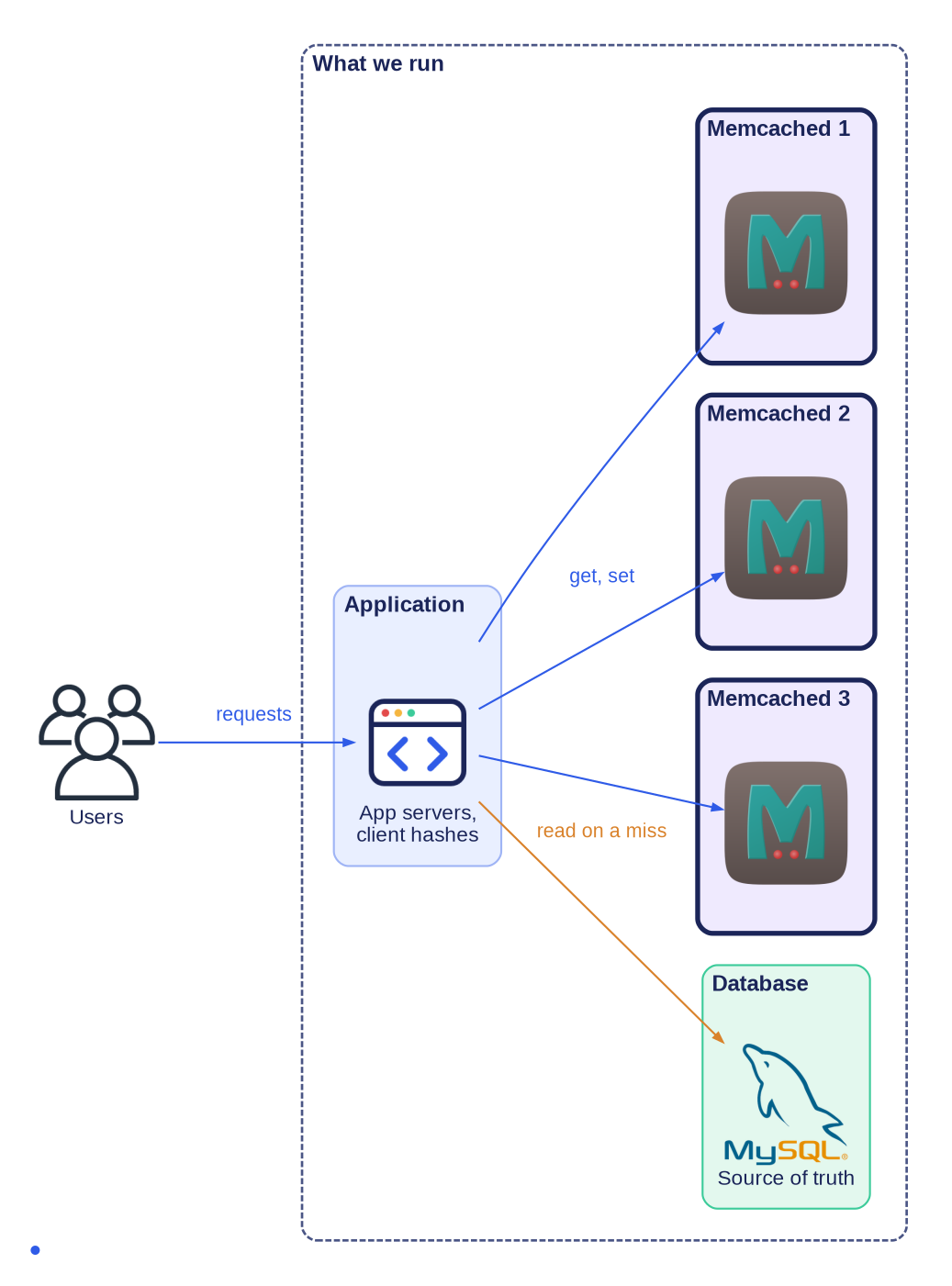
One read, from start to end
- 1
Hash
get user:42starts in the client. It hashes the key and picks a server. The same key always gives the same server while the list is unchanged. - 2
Send
The client keeps open connections to every server and sends the command to one of them, on TCP port 11211.
- 3
Look up
A worker thread finds the item in a hash table, checks that it has not expired, and marks it as used. Threads handle connections with libevent, 4 threads by default.
- 4
Hit
The value comes back with its 32-bit flags, and with a CAS number if you asked with
gets. The client turns the bytes back into an object. - 5
Miss
The server answers with nothing. The application reads the database and stores the value with a time to live.
- 6
Store
The server takes a chunk of the right class. If none is free it evicts an old item of that class.
Miss, then hit
Memory
Slab classes
If a server allocated exactly the bytes of each item, years of adding and removing would leave holes of awkward sizes. Memcached instead takes memory in pages of 1 MB and cuts each page into equal chunks. The first class has 96-byte chunks and each next class is about 1.25 times larger, rounded up to 8 bytes.
The first classes with default settings
| Class | Chunk | Chunks per 1 MB page |
|---|---|---|
| 1 | 96 B | 10,922 |
| 2 | 120 B | 8,738 |
| 3 | 152 B | 6,898 |
| 4 | 192 B | 5,461 |
| 5 | 240 B | 4,369 |
| 39, the last | 512 KB | 2 |
Which class, and how much is wasted?
Growth factor -f
1.25 by default. A smaller factor makes more classes and less waste per item.
Smallest item -n
48 bytes for key, value and flags by default. Lower it for millions of tiny items.
Largest item -I
1 MB by default, up to 1 GB. Large values are better split or kept elsewhere.
Memory -m
64 MB by default, almost always too small. It covers items, not connections or the hash table.
Where does a new item go?
Eviction
What leaves, and calcified memory
Each class keeps its own order of use. Since 1.5.0 that order has segments: new items start in HOT, items read again move to WARM, and the rest drift to COLD, where evictions happen. Items with a short life can have their own segment. A background crawler frees expired items, so they are not only found when somebody asks for them. The general idea is on cache eviction.
Sharding
The client decides
The simplest rule is the hash modulo the number of servers. It is fine until that number changes. Consistent hashing and distributed caching explain the better rules; here is the price of the simple one.
From 3 to 4 servers
Rules that clients use
| Rule | When a server is added | Note |
|---|---|---|
| Modulo | Almost every key moves | Never for a production cache |
| Ring (Ketama) | About 1 in N moves | Many points per server, often 100 or more, even out the load |
| Rendezvous | About 1 in N moves | What pymemcache's HashClient uses by default |
| Proxy | Set in one place | mcrouter, or the proxy built into Memcached |
One of five servers dies
Commands
The small set of operations
| Command | Does | Use it for |
|---|---|---|
get, gets | Read; gets adds the CAS number | Reads, and read before cas |
set | Store, replace what is there | Filling after a miss |
add | Store only if the key is absent | A short lock, the first count |
replace | Store only if the key exists | Refreshing |
append, prepend | Add bytes to a value | Small lists of ids |
delete | Remove | Invalidation |
incr, decr | Change a decimal number atomically | Counters; fails on a missing key |
cas | Store if unchanged since gets | Updates by several writers |
touch, gat | Set a new time to live, and read | Sessions |
# talk to a server by hand: command, then the value on its own line$ nc 10.0.0.11 11211set user:42 0 3600 4AshaSTOREDget user:42VALUE user:42 0 4AshaENDadd lock:home 0 10 11STOREDset hits 0 0 10STOREDincr hits 1010set user:42 0 3600 4: flags 0, 3,600 seconds, 4 bytes. Newer clients use the meta commands (mg, ms, md), which add options such as serving a stale value.import jsonfrom pymemcache.client.base import Clientfrom pymemcache.client.hash import HashClientclass JsonSerde: # never unpickle data others can write def serialize(self, key, value): if isinstance(value, (str, bytes)): return value, 1 return json.dumps(value), 2 def deserialize(self, key, value, flags): return json.loads(value) if flags == 2 else valueone = Client(("localhost", 11211), timeout=0.5, connect_timeout=0.5, default_noreply=False) # wait for the real answermany = HashClient([("mc1", 11211), ("mc2", 11211), ("mc3", 11211)], timeout=0.5, connect_timeout=0.5, use_pooling=True, max_pool_size=10, serde=JsonSerde(), default_noreply=False)many.set("user:42", {"name": "Asha"}, expire=3600)many.get_many(["user:42", "user:43"]) # missing keys are simply absentmany.set_many({"user:1": "a", "user:2": "b"}, expire=3600)many.delete_many(["user:1", "user:2"])def count(key): n = one.incr(key, 1) if n is not None: return n if one.add(key, "1", expire=60): # only one client wins return 1 return one.incr(key, 1)def update(key, change, tries=5): for _ in range(tries): value, token = one.gets(key) if value is None: return False if one.cas(key, change(value), token): # True only if nobody changed it return True return Falsenoreply, add always returns True, so a lock built on it never refuses. Switch it off wherever the answer matters.Many keys
The multiget hole
Asking for 100 keys in one request is cheap on one server. On ten servers the same request becomes about ten smaller ones. Adding servers does not reduce the number of requests each server handles: every server still sees one per page, only with fewer keys. That is the multiget hole.
One page, three servers
Helps
- Parallel requests in the client
- Keeping one user's small values in one key
- Hashing on part of the key, so one user's keys share a server
- A short local cache for very common keys
- Copies of the whole cache when requests, not memory, are the limit
Costs
- A busy user makes one server hot
- A joined value is larger to read and rewrite
- Copies need more memory and more invalidation
Freshness
Invalidation and stampedes
After a database write, delete the key and let the next read fill it. Deleting twice is harmless, and two writers cannot leave the older value behind by storing in the wrong order. A delete that gets lost leaves a stale value until the time to live ends, so always set one. Cache consistency covers the remaining race between a slow reader and a writer.
One rebuild after a popular key expires
import random, time, threadingclass Guarded: def __init__(self, cache, load): self.cache, self.load = cache, load def locked(self, key, ttl=3600): value = self.cache.get(key) if value is not None: return value if self.cache.add("lock:" + key, "1", expire=10): try: return self._fill(key, ttl) finally: self.cache.delete("lock:" + key) for _ in range(50): # at most 5 seconds time.sleep(0.1) value = self.cache.get(key) if value is not None: return value return self.load(key) def stale_ok(self, key, ttl=3600, grace=60): box = self.cache.get(key) # [value, fresh_until] if box is None: return self._fill(key, ttl, grace) value, fresh_until = box early = fresh_until - time.time() < ttl * 0.1 and random.random() < 0.1 if time.time() >= fresh_until or early: if self.cache.add("lock:" + key, "1", expire=10): threading.Thread(target=self._fill, args=(key, ttl, grace), daemon=True).start() return value def _fill(self, key, ttl, grace=None): value = self.load(key) life = ttl + random.randint(0, ttl // 10) # spread the expiry if grace is None: self.cache.set(key, value, expire=life) else: self.cache.set(key, [value, time.time() + life], expire=life + grace) return valuemg home t v N30 R30 gives exactly one client the win flag shortly before expiry or on a miss.import timeclass Breaker: """Skip the cache for a while after repeated failures.""" def __init__(self, threshold=5, rest=30): self.threshold, self.rest, self.failures, self.opened = threshold, rest, 0, None def allow(self): return self.opened is None or time.monotonic() - self.opened >= self.rest def record(self, ok): if ok: self.failures, self.opened = 0, None else: self.failures += 1 if self.failures >= self.threshold: self.opened = time.monotonic()def read(key, cache, db, breaker): if breaker.allow(): try: value = cache.get(key) breaker.record(True) if value is not None: return value except Exception: breaker.record(False) return db(key)Restart
What survives
| Event | What happens |
|---|---|
| Crash or plain restart | The cache is empty |
Planned restart with -e and SIGUSR1 | Items are kept in a RAM disk file and reused (1.5.18 and later). Changes made meanwhile are missed |
| Machine reboot | The cache is empty |
| Larger than memory | extstore keeps keys in memory and moves values to flash. Still a cache |
Operations
Running it
# Debian and Ubuntu: apt-get install memcached macOS: brew install memcachedmemcached -m 4096 -p 11211 -u memcache -l 10.0.0.11 -c 4096 -t 4# -m memory for items in MB (default 64) -c connections (default 1024)# -t worker threads (default 4) -l address to listen on# -f chunk growth (default 1.25) -n smallest item (default 48 B)# -I largest item (default 1m) -U UDP port (default 0, off)printf 'stats\r\nstats slabs\r\nstats items\r\nquit\r\n' | nc 10.0.0.11 11211Numbers to watch
| Stat | Tells you |
|---|---|
get_hits, get_misses | Hit rate = hits / (hits + misses). From 95% to 90% the database reads double |
evictions | Live items pushed out. A steady rise means too little memory, or a starved class |
bytes, limit_maxbytes | Memory in use against the limit |
curr_items | How many items are stored |
curr_connections | Close to -c means new clients wait |
cmd_get, cmd_set | Operations, from which you get rates |
Cost and speed. The project's documentation says a fast machine easily handles more than 200,000 requests a second, and much more with tuning. Memory is the main cost, then the network. Memcached is under the BSD licence.
Decide
When to choose it
Choose it for
- Plain get, set and delete of small values
- Very many small objects
- Many cores on one machine
- Simple scaling by adding servers
- Data that can always be rebuilt
Choose something else for
- Lists, sets, rankings, scripts
- Data that must survive
- Built-in replication and failover
- Messages between services
- Values above a megabyte
- Transactions beyond one key
| Alternative | Same | Different | Choose it when |
|---|---|---|---|
| Redis | Shared memory cache | Data types, persistence, replicas, its own cluster; one command thread per shard. See the comparison | You need any of those |
| Local cache (Caffeine) | Key-value, TTL, eviction | Inside one process, no network, not shared; a change is seen only there | Small, hot, rarely changing data |
| DynamoDB with DAX | Read load off a database | Managed, only for DynamoDB, same API | Your data is in DynamoDB |
The bill
| You get | You pay |
|---|---|
| Throughput on many cores | Only plain values |
| Low overhead and no crumbling memory | Some waste in each chunk |
| Predictable operations | No server-side logic |
| Servers that are easy to add | Clients that must hash, retry and agree |
| Long experience at large sites | Copies, failover and warming are yours to build |
Summary
The whole topic in one minute.
Memcached is a shared memory for values you can rebuild. Threads give it throughput, slab classes keep memory from crumbling, and simple commands keep every operation short.
What it leaves out is left to you: choosing servers, surviving a lost node, invalidating, and protecting the database from many misses at once. Choose it when get, set and delete are really all you need.
- Clients choose the server; servers never talk to each other.
- Items live in fixed chunks; eviction happens inside a class.
- Change the number of servers only with consistent hashing.
- Delete on write, TTL always, one rebuild per popular key.
- Plan for an empty server: the database must survive the misses.
- Private network only, and no data you cannot rebuild.