
Redis
medium 34 minRedis keeps its whole dataset in memory and runs commands one after another, so every command is atomic and most take well under a millisecond.
Video lesson · Chapter 1 of 5
Two fans tap the heart
Video lesson · Chapter 1 of 5
A bus at the wrong stop
Theory
Read or listen first. About 2 min.
What it is
Redis is a server that holds data structures in memory. A client sends a short command such as GET, INCR or ZADD over TCP and gets a short answer back. The data never has to be fetched from a disk first.
It is more than a key-value cache. A value can be a hash, a list, a set, a sorted set or a stream, and the server knows how to change each one. The program does not have to read the whole value, change it and write it back.
Why it exists
A database page that is not cached costs a disk read, and a popular row may be read thousands of times a second. Keeping the hot data in memory removes that cost. Redis is the usual place to keep it, shared by every application server.
Many small jobs need one shared, fast, correct number: how many requests did this user make, who is at the top, who holds the lock. Because Redis runs one command at a time, these need no extra locking.
A short history
2009
The Redis project starts, according to the Linux Foundation's account of its history.
November 2009
GitHub publishes Resque, a background job library that stores its queues in Redis lists.
February 2016
Martin Kleppmann publishes an analysis of Redlock and argues that a lock needs a fencing token. The debate is still a standard interview subject.
March 2024
After a licence change, the Linux Foundation announces Valkey, which continues from Redis 7.2.4 under the BSD licence.
May 2025
Redis 8 adds the AGPLv3 as a licence choice, so it is again available under an open source licence.
November 2026
Redis 8.12 is released, with a new encoding for large sorted sets and expiry for set members.
Words to know
- Key
- The name of a value, such as
user:42. Any bytes; people use colons to group names. - TTL
- Time to live. When it ends, the key is gone.
- Eviction
- Removing keys because memory is full, whether or not they have expired.
- RDB
- A snapshot file of the whole dataset at one moment.
- AOF
- Append-only file: a log of every write, replayed at start.
- Replica
- A copy that follows a primary, usually a little behind.
- Hash slot
- One of 16,384 groups of keys. In a cluster each slot belongs to one primary.
- Pipelining
- Sending several commands without waiting for each answer.
How it works
Step through the idea, or press Play.
A command arrives. Over TCP, from a pooled connection
Understand it
Start here
The pancake stand
Imagine a pancake stand with one very fast cook and labelled jars within reach. Nothing is fetched from a cellar, and nobody else touches the jars.
The cook is quick because the work is small and everything is at hand, not because there are many cooks.
Inside
How one server works
One Redis server and one replica
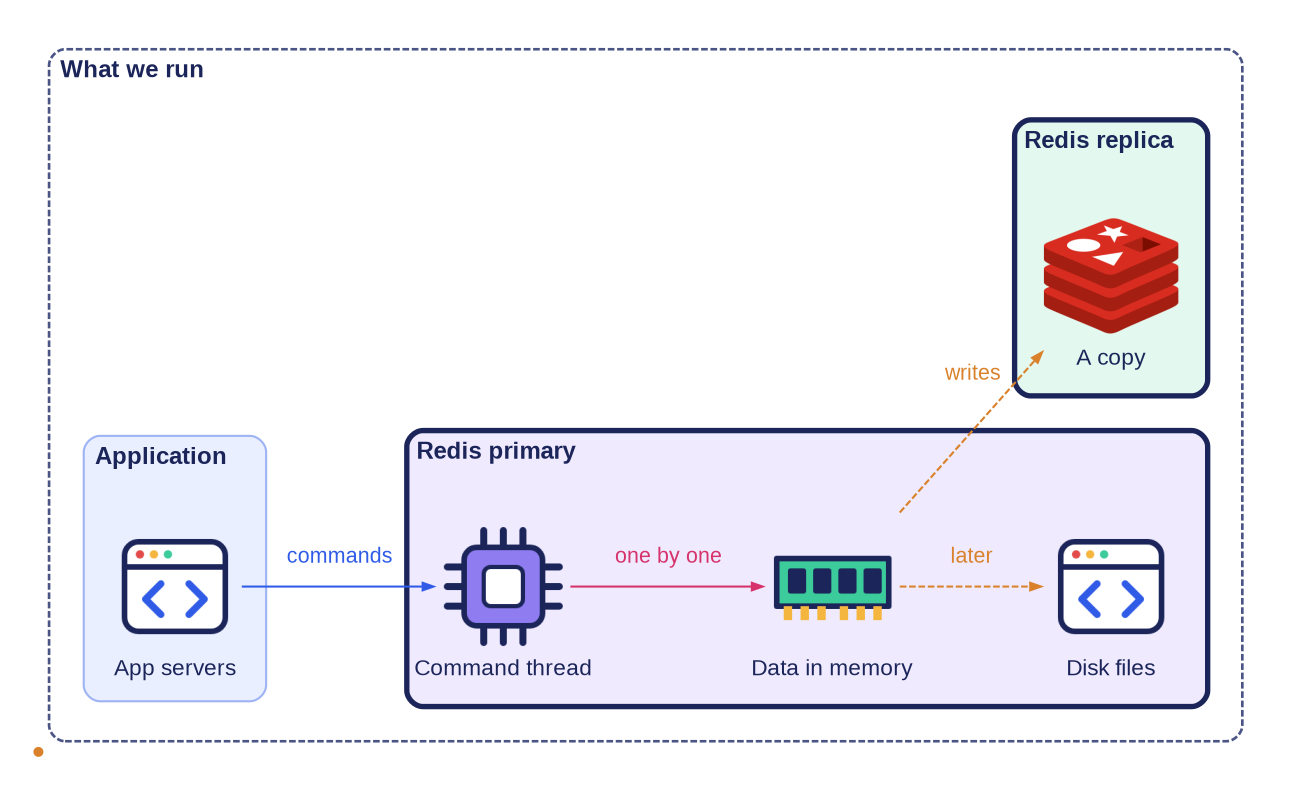
What happens to a command
- 1
Connect
Clients keep a pool of TCP connections and speak RESP, a simple protocol. The server watches thousands of sockets with epoll or kqueue; the default limit is 10,000 clients.
- 2
Queue and run
Commands run one at a time on the main thread. Since version 6, extra threads can read and write sockets (
io-threads), but they never run two commands together. - 3
Change memory
Small collections use a compact form called listpack, up to 512 hash fields or 128 sorted set members by default. Bigger ones switch to hash tables and ordered trees.
- 4
Check the limit
If a write would exceed
maxmemory, the policy evicts keys or refuses the write. - 5
Record
With the AOF on, the write is appended to the log. Snapshots are made by a forked child process.
- 6
Replicate
The write is streamed to replicas. The client's answer does not wait for them.
Data types
Match the structure to the job
The types you will use
| Type | Good for | Example |
|---|---|---|
| String | Cached values, counters | SET page:7 html EX 60, INCR hits |
| Hash | One object with fields | HSET user:42 name Asha |
| List | A simple queue | RPUSH jobs a, BLPOP jobs 30 |
| Set | Unique members, membership | SADD online 42, SISMEMBER online 42 |
| Sorted set | Ranking, time windows | ZADD board 250 max, ZRANGE board 0 9 REV |
| Stream | A log with consumer groups | XADD orders * item lamp |
| HyperLogLog | Approximate distinct count | PFADD visitors 42, PFCOUNT visitors |
| Bitmap | Many yes or no flags | SETBIT seen 42 1 |
# object with fields, and a time to liveHSET user:42 name "Asha" role "admin"EXPIRE user:42 3600HGET user:42 name# queue: add on the right, wait on the left for up to 30 secondsRPUSH queue:mail "job1" "job2"BLPOP queue:mail 30LLEN queue:mail# unique membersSADD online "u1" "u2" "u3"SISMEMBER online "u1"SCARD online# ranking: highest score firstZADD board 100 "asha" 250 "max" 80 "lee"ZINCRBY board 50 "asha"ZRANGE board 0 9 REV WITHSCORESZREVRANK board "max" # 0 is the topZSCORE board "asha" # 150ZRANGE ... REV replaces the older ZREVRANGE. SMEMBERS on a large set returns everything at once: use SSCAN.A leaderboard costs per score change and to read rows, with no sorting at read time. Design a leaderboard takes this to a full system.
Round trips
The network is usually the cost
100 commands, one by one or in a pipeline
Three commands in one trip
MULTI and EXEC or a script for that. Send batches, not a million commands at once, because the answers wait in memory.As a cache
Redis in front of a database
The most common job. The reading and writing patterns have their own pages: cache-aside, write-through, cache consistency and thundering herd. Here is how they look with Redis.
Cache-aside with a lock for the rebuild
import json, random, secrets, timeimport redisr = redis.Redis(host="localhost", port=6379, decode_responses=True, socket_timeout=0.5, socket_connect_timeout=0.5, max_connections=50)RELEASE = "if redis.call('get',KEYS[1])==ARGV[1] then return redis.call('del',KEYS[1]) end return 0"def ttl(base=3600): return base + random.randint(0, base // 10) # keys do not all end togetherdef get_user(user_id, load): key = f"user:{user_id}" for _ in range(20): cached = r.get(key) if cached is not None: return json.loads(cached) token = secrets.token_hex(16) if r.set(f"lock:{key}", token, nx=True, ex=10): try: cached = r.get(key) # somebody may have just filled it if cached is not None: return json.loads(cached) row = load(user_id) if row is not None: r.set(key, json.dumps(row), ex=ttl()) return row finally: r.eval(RELEASE, 1, f"lock:{key}", token) time.sleep(0.1) return load(user_id) # give up waiting, not foreverdef save_user(user, store): # write-through: database first store(user) r.set(f"user:{user['id']}", json.dumps(user), ex=ttl())def delete_user(user_id, remove): remove(user_id) r.delete(f"user:{user_id}", f"user:{user_id}:profile", f"user:{user_id}:settings")When Redis is the cache
Set a limit
maxmemoryis off by default on 64-bit systems. Without it Redis grows until the machine runs out.Choose a policy
The default, noeviction, refuses writes when full. A cache usually wants allkeys-lru or allkeys-lfu.
Expect it to be empty
After a restart or a failover the database must survive the misses. Warm it or limit the rebuilds.
Use short timeouts
A slow cache must not be worse than no cache. Fall back, and add a circuit breaker.
Memory
What leaves when memory is full
A write at the limit
Choosing a policy
| Policy | Use when |
|---|---|
allkeys-lru | Some keys are far hotter than others. The documentation's default advice. |
allkeys-lfu | Scans or bursts would push out keys that are popular over the long run. |
allkeys-lrm | Keep what is still being changed: evicts the least recently modified key. |
allkeys-random | Every key is about equally likely to be read. |
volatile-ttl | Your code gives short TTLs to the keys it can spare. |
volatile-lru, volatile-lfu, volatile-lrm, volatile-random | One server holds both cache keys with a TTL and keys that must stay. |
noeviction | Redis is the only copy. Alert before it fills. |
How much memory for the cache?
Durability
Snapshots and the append-only file
| RDB snapshot | AOF log | |
|---|---|---|
| What | The whole dataset, compact binary file | Every write, in order |
| How | A forked child writes it (BGSAVE) | Appended as commands run, rewritten in the background |
| Can lose | Everything since the last snapshot | About one second with everysec |
| Restart | Fast | Slower: the log is replayed |
| Cost | The fork can pause a large server | Larger files, disk writes |
| Default | On: after 3600 s with 1 change, 300 s with 100, 60 s with 10,000 | Off |
How often the log reaches the disk: appendfsync
- 1
always
Sync before answering. The safest and the slowest.
- 2
everysec
Sync once a second in the background. The default, and the usual choice.
- 3
no
Let the operating system decide. The fastest, with the largest window.
Availability
Replicas and Sentinel
A replica first receives a full snapshot, then a stream of writes. Replication is asynchronous by default: the primary answers the client before replicas confirm. A failover can therefore lose writes that were already acknowledged. WAIT and min-replicas-to-write make the window smaller; they do not make Redis strongly consistent. The theory is on cache replication.
Sentinel promotes a replica
Sentinel or Cluster?
| Sentinel | Cluster | |
|---|---|---|
| Gives you | Failover for one dataset | Sharding and failover |
| Memory and writes | One primary's worth | Grows with primaries |
| Needs | At least 3 Sentinels on separate machines | At least 3 primaries, plus replicas |
| Client | Asks Sentinel for the primary's address | Cluster-aware, keeps a slot map |
| Detection | down-after-milliseconds, for example 5 s | cluster-node-timeout, 15 s by default |
| Limits | No sharding | Multi-key commands need one slot |
Scaling
Redis Cluster and its slots
Three shards, 16,384 slots
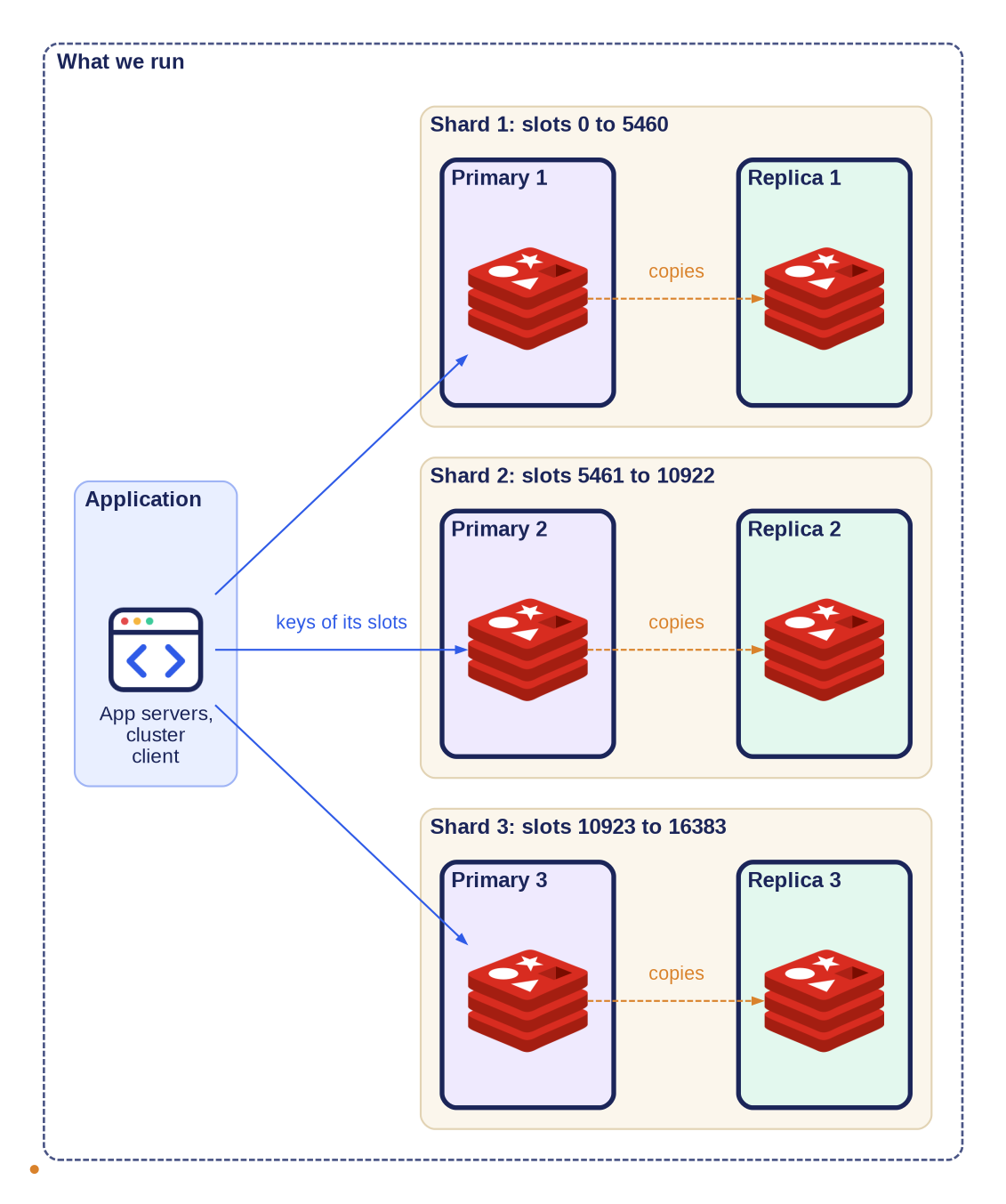
A key belongs to slot CRC16(key) mod 16384. If the name contains a part in braces, only that part is hashed: user:{123}:profile and user:{123}:settings both use 123, slot 5970. Without braces they land in slots 8490 and 9984, and a command that touches both fails with CROSSSLOT, even when one server owns both.
A wrong guess is corrected
Messages
Pub/Sub and streams
| Pub/Sub | Streams | |
|---|---|---|
| Stored? | No. A message with no listener is lost | Yes, until trimmed |
| Delivery | At most once | At least once with consumer groups |
| Who gets it | Every subscriber | One consumer per group |
| Replay | No | Yes, by ID |
| Use for | Live notices, telling servers to drop a local cache entry | Job queues, activity feeds, event logs that fit in memory |
# live notices: nothing is storedSUBSCRIBE cache:invalidatePUBLISH cache:invalidate "user:42"PSUBSCRIBE "user:*:events"# stream with a consumer group, reading from the start (0); use $ for new entries onlyXGROUP CREATE orders workers 0 MKSTREAMXADD orders MAXLEN ~ 10000 * product lamp qty 2XREADGROUP GROUP workers w1 COUNT 10 BLOCK 5000 STREAMS orders >XACK orders workers 1705123456789-0# what a dead worker left behindXPENDING orders workersXAUTOCLAIM orders workers w2 60000 0def work(r, stream="orders", group="workers", me="w1"): try: r.xgroup_create(stream, group, id="0", mkstream=True) except redis.ResponseError as e: if "BUSYGROUP" not in str(e): # the group already exists raise while True: # first take over what others left for a minute, then new entries stuck = r.xautoclaim(stream, group, me, min_idle_time=60_000, count=10)[1] fresh = r.xreadgroup(group, me, {stream: ">"}, count=10, block=5000) for entry_id, fields in stuck + (fresh[0][1] if fresh else []): handle(fields) # must be safe to run twice r.xack(stream, group, entry_id)def listen(r, local_cache): ps = r.pubsub() ps.subscribe("cache:invalidate") for m in ps.listen(): if m["type"] == "message": local_cache.pop(m["data"], None)Counting
Rate limits
The algorithms and their edge cases are on rate limiter algorithms. In Redis: a fixed window is INCR plus an expiry, a sliding window is a sorted set of timestamps, and a token bucket is a short Lua script. Anything with a check and a change belongs in one script, or two requests can both pass.
SLIDING = """redis.call('ZREMRANGEBYSCORE', KEYS[1], 0, ARGV[1] - ARGV[2])if redis.call('ZCARD', KEYS[1]) >= tonumber(ARGV[3]) then return 0 endredis.call('ZADD', KEYS[1], ARGV[1], ARGV[4])redis.call('PEXPIRE', KEYS[1], ARGV[2])return 1"""BUCKET = """local b = redis.call('HMGET', KEYS[1], 'tokens', 'at')local cap, rate, now = tonumber(ARGV[1]), tonumber(ARGV[2]), tonumber(ARGV[3])local tokens = math.min(cap, (tonumber(b[1]) or cap) + (now - (tonumber(b[2]) or now)) * rate / 1000)local ok = tokens >= 1if ok then tokens = tokens - 1 endredis.call('HSET', KEYS[1], 'tokens', tokens, 'at', now)redis.call('EXPIRE', KEYS[1], math.ceil(cap / rate) + 1)return ok and 1 or 0"""def fixed_window(r, user, limit=100, seconds=60): key = f"rate:{user}:{int(time.time()) // seconds}" with r.pipeline() as p: # MULTI and EXEC p.incr(key) p.expire(key, seconds * 2) return p.execute()[0] <= limitdef sliding_window(r, user, limit=100, ms=60_000): now = int(time.time() * 1000) member = f"{now}-{secrets.token_hex(4)}" # two requests in one millisecond differ return r.eval(SLIDING, 1, f"slide:{user}", now, ms, limit, member) == 1def token_bucket(r, user, capacity=100, per_second=10): return r.eval(BUCKET, 1, f"bucket:{user}", capacity, per_second, int(time.time() * 1000)) == 1Locks
A lock, and how far to trust it
SET lock:job <random> NX EX 30 takes the lock if nobody has it and lets it expire if the holder dies. Release only if the value is still yours: DELEX key IFEQ value since Redis 8.4, or the small script above on older versions.
Good enough for
- Avoiding duplicate work that is only wasteful
- One worker rebuilding a cache entry
- A scheduled job that is safe to run twice
Not enough alone for
- Moving money or stock
- Anything where two holders corrupt data
- Work that may run longer than the lock lives
Operations
Running it well
What to watch
| Look at | Command | Why |
|---|---|---|
| Memory and evictions | INFO memory, INFO stats | Evictions mean the cache is too small or keys live too long |
| Hit rate | keyspace_hits, keyspace_misses | Hits divided by both |
| Slow commands | SLOWLOG GET 10 | Anything over 10 ms is kept by default |
| Replica lag | INFO replication | How much a failover would lose |
| Clients | CLIENT LIST | Leaked connections, large buffers |
| Big keys | redis-cli --bigkeys | They block and they unbalance shards |
Do
SCANwith a smallCOUNTUNLINKfor large keys: memory is freed in the background- Pools sized for your concurrency
- ACL users, TLS and a private network
- TTLs with some random spread
Do not
KEYS *in productionMONITORon a busy server for long- Passwords typed on the command line
- An open port on the internet
- Hundreds of megabytes under one key
Licences
| Version | Licence |
|---|---|
| 7.2 and earlier | BSD 3-clause |
| 8.0 and later | Your choice of RSALv2, SSPLv1 or AGPLv3 |
| Valkey | BSD 3-clause, continues from 7.2.4 |
Decide
When to choose Redis, and when not
Choose it for
- Reads and writes that must take under a millisecond or so inside one zone
- Cached query results and sessions
- Leaderboards, counters, rate limits, live notices
- Light job queues
- Hot data that fits in memory
Choose something else for
- Data much larger than memory
- Joins and free-form reports
- Strong consistency across failovers
- The only copy of financial records
- Large files: use object storage
| Alternative | Same | Different | Choose it when |
|---|---|---|---|
| Memcached | Fast shared cache | Plain values, several worker threads, no replication. See the comparison | You only need get and set |
| DynamoDB | Key lookups at scale | Durable, managed, larger than memory, optional strong reads, higher latency | It is the system of record |
| Kafka | Streams, consumer groups | Disk based, long retention, more to run | Events must be kept and replayed |
The bill
| You get | You pay |
|---|---|
| Very low latency | Memory, the most expensive place to keep data |
| Atomic commands without locks | One core for commands per shard |
| Many structures in one tool | The temptation to make it do everything |
| Simple replication | Stale reads and lost writes in a failover |
| Optional persistence | Forks, disk traffic and a loss window |
| Easy to start | No ad-hoc queries: know the access paths first |
Summary
The whole topic in one minute.
Redis is fast because the data is in memory, the commands are small and one thread runs them without locks. That same thread is why one slow command delays everyone, and why more processor work means more shards.
Decide four things on purpose: what happens when memory is full, how much you may lose in a crash, how you survive a dead primary, and how keys are grouped in a cluster. The defaults for the first two are no memory limit and snapshots, which rarely fit a production cache.
- Memory, small commands and one command thread make Redis fast.
- One slow command delays everyone. Use SCAN, UNLINK and small values.
- Set maxmemory and a policy: the default never evicts.
- RDB loses minutes, AOF everysec about a second, replication a little more in a failover.
- Sentinel gives failover, Cluster gives sharding and failover over 16,384 slots.
- Braces in a key name put related keys in one slot.