
MinIO
medium 26 minMinIO is an object store with the S3 API that runs on your own drives and protects each object with erasure coding.
Video lesson · Chapter 1 of 5
Six drives store one object
MinIO in 90 seconds
1:30Reel coming soon
Theory
Read or listen first. About 2 min.
What it is
MinIO is a server program that turns the drives of one or many machines into an object store. Applications talk to it with the Amazon S3 API: buckets, objects, multipart uploads, signed URLs, versions.
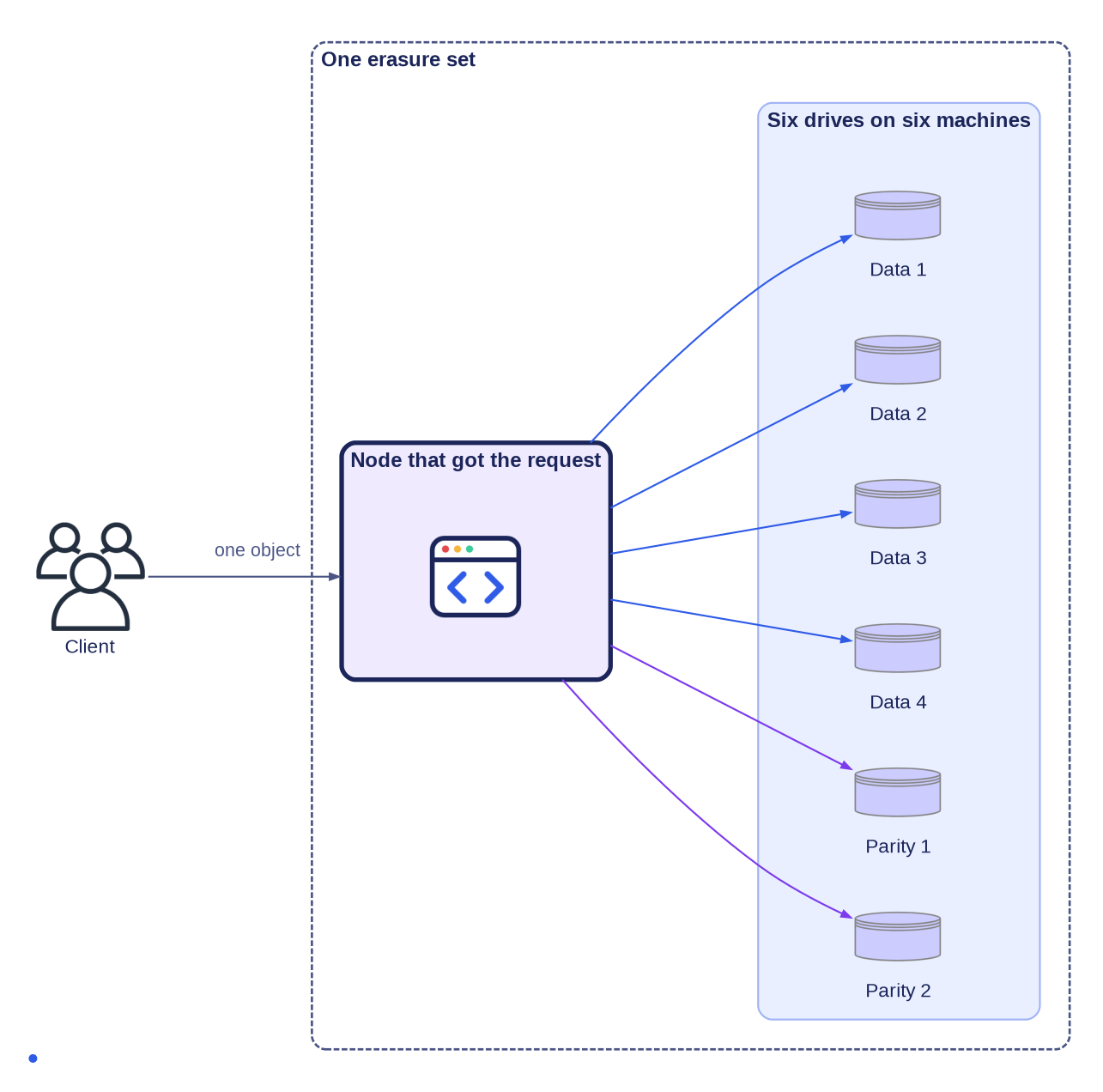
Each object is cut into data shards, and extra parity shards are computed from them. All shards go to different drives. If some are lost, the object is computed again from the rest. There is no separate metadata database: an object's metadata lies on the same drives as its shards.
The name now covers two things. The open source MinIO (GNU AGPL v3) is a finished code base that nobody maintains. MinIO AIStor is the company's commercial product, developed from the same ideas, and needs a licence, including its free tier.
Why it exists
Not every byte may or should live in a public cloud: factories without a good connection, hospitals with strict rules, companies that already own drives, and developers who need an S3 look-alike on a laptop.
Keeping three full copies costs three times the space. Erasure coding survives more failures with less. With 12 data and 4 parity shards an object takes 1.33 times its size and survives the loss of any four drives of its set.
A short history
November 2014
MinIO, Inc. is founded.
May 2021
The company announces that MinIO is now licensed under GNU AGPL v3. Earlier code was under the Apache License 2.0.
October 2025
The community edition becomes source only: no new binaries or container images. The last release on GitHub is RELEASE.2025-10-15T17-29-55Z, a security fix.
April 25, 2026
The GitHub repository is archived and read-only. Its first line says that it is no longer maintained and points to AIStor.
Words to know
- Shard
- One piece of one object, stored on one drive.
- Parity
- Shards computed from the data, which can stand in for any lost shard. Written EC:4 for four of them.
- Erasure set
- A fixed group of drives. Each object lives in one set.
- Server pool
- Nodes added together. A cluster grows by whole pools.
- Quorum
- How many drives must answer before a read or a write counts.
- Healing
- Computing lost or damaged shards again and writing them back.
- Bit rot
- Data on a drive that changes silently.
- AIStor
- The company's maintained, commercially licensed object store.
How it works
Step through the idea, or press Play.
Split. Cut the object into data shards
Understand it
Start here
Your own apple cellar
Imagine you keep your apples at home instead of renting shelf space in town. The apple box is made of slats, and slats break. How do you make sure that one broken slat never costs you the box?
Any four of the six will do, whichever they are. That is the whole idea of erasure coding.
Status
Which MinIO do you mean?
Editions
| Edition | Licence | Shape | State |
|---|---|---|---|
| Open source MinIO | GNU AGPL v3 | Single node or distributed | Archived April 2026; source only since October 2025 |
| AIStor Free | Commercial, free of charge, no redistribution | Single node | Maintained; community help only |
| AIStor Enterprise Lite | Subscription | Several nodes, below 400 TiB | Maintained; support is an option |
| AIStor Enterprise | Subscription | Several nodes | Maintained; support around the clock |
Which way from here?
AGPL in one sentence: if you change the program and let people use it over a network, you must offer them your changed source. Whether an application that only calls it is affected is a question for a lawyer, not for a design review.
The idea
What it gives a system
S3 API
Existing S3 libraries and tools work by changing the endpoint and the keys.
Your drives
Data stays where you put it: a rack, a factory, a Kubernetes cluster, a laptop.
Parity per object
Each object carries its own protection and can be repaired alone.
No metadata server
A hash of the object name gives the erasure set. There is no lookup service to lose.
Strict consistency
Read-after-write and list-after-write, if the drives use a file system that keeps its promises. The project names XFS and warns against ext4.
Replication
Copies to another site, for whole clusters or single buckets.
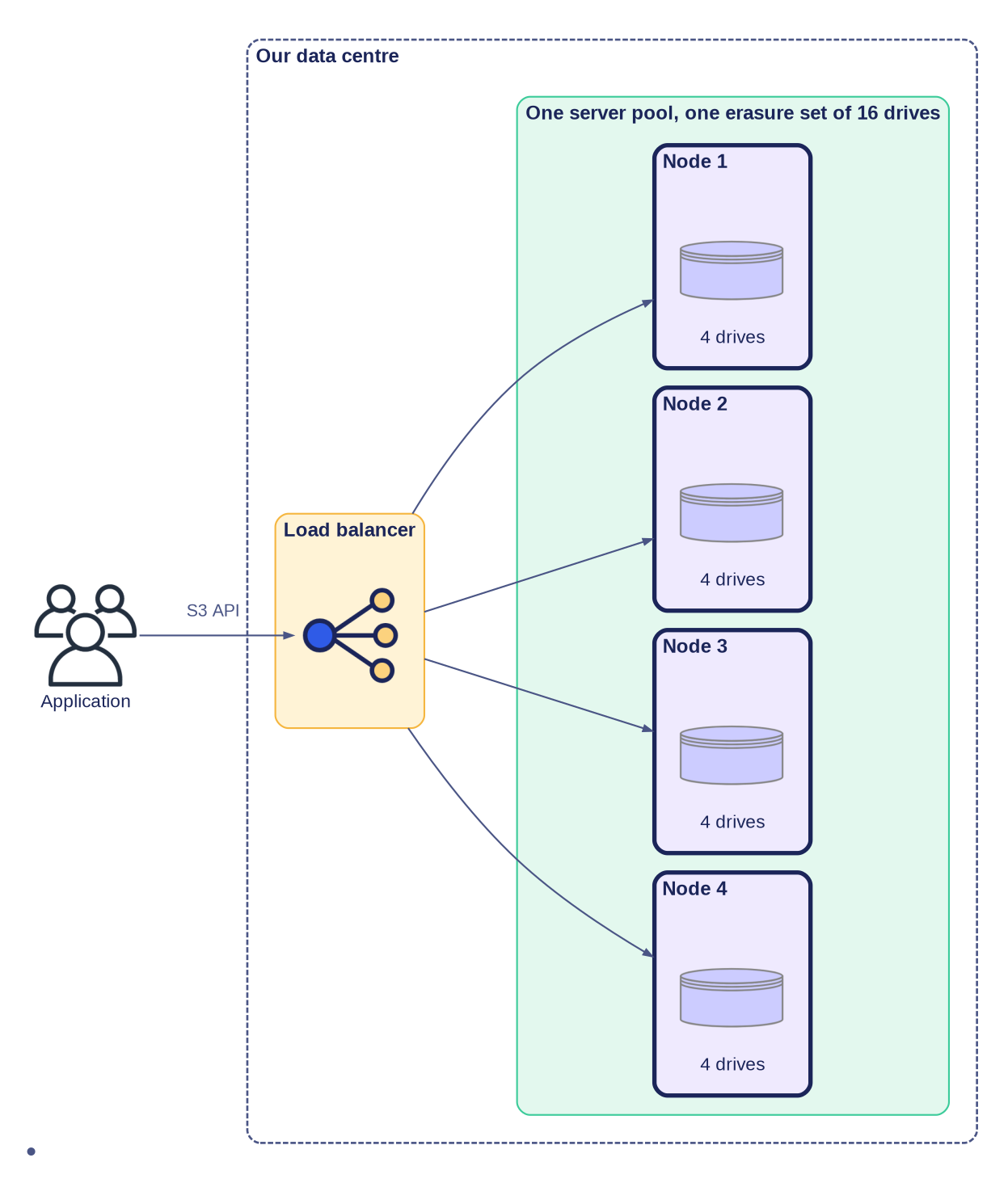
Four nodes, sixteen drives, one erasure set
Inside
Erasure sets and shards
Drives are grouped into erasure sets when a pool first starts, and this cannot be changed later. A set has 2 to 16 drives; AIStor releases since February 2026 can be set to up to 32. Sets take drives from as many nodes as possible. An object goes to one set, chosen by a hash of its name.
One object, six drives
Space and safety
A set of 16 drives
| Parity | Data shards | Space used for 100 MiB | Usable | Drives that may fail |
|---|---|---|---|---|
| EC:2 | 14 | about 114 MiB | 87.5% | 2 |
| EC:3 | 13 | about 123 MiB | 81% | 3 |
| EC:4 (default) | 12 | about 133 MiB | 75% | 4 |
| EC:6 | 10 | 160 MiB | 62.5% | 6 |
| EC:8 | 8 | 200 MiB | 50% | 8 for reads, 7 for writes |
A write
Quorum
When does a read or a write count?
For N drives and parity M
| Needs | 16 drives, EC:4 | 16 drives, EC:8 | |
|---|---|---|---|
| Read | K = N - M shards | 12 | 8 |
| Write | K drives; K + 1 if M is half of N | 12 | 9 |
| Lost for reads | More than M drives | 5 down | 9 down |
Why one more at exactly half? If the network splits 16 drives into two groups of 8, both sides could accept a different write to the same name. With 9 needed, neither can. Reads still work. This is the usual quorum argument.
If drives are offline while an object is written, its parity is raised by one for each of them. With two of 16 offline, an EC:4 object is written as EC:6, so it still survives four further losses. AIStor limits how much space such upgrades may keep.
Which machine may fail?
Repair
Healing and bit rot
- 1
On read
Every GET and HEAD checks the data shards. If one is missing or damaged, parity is used, the client gets correct data, and the shard is repaired.
- 2
In the background
A scanner walks through all objects. On each pass it checks one of every 1,024, chosen by hash, for missing shards.
- 3
After a drive comes back
In AIStor, a drive that was away for more than 48 hours, while its set kept writing, is treated as new and healed completely.
- 4
Checksums
Each shard has a HighwayHash checksum, so a silently changed shard is treated as lost. The scanner does not look for bit rot by default.
The state of one object
Growth
Pools, not single drives
You cannot add one drive to a set. You add a server pool: new nodes with their own sets. New objects go to pools in proportion to their free space; old objects stay where they are unless you rebalance. A pool can be drained and removed. Nodes of one pool should be identical.
Where does the object go?
Plan for
- Direct-attached drives, formatted with XFS
- A load balancer over all nodes
- Fast, equal network links: every write touches many nodes
- Clocks in sync; signatures and nodes need them
- The next pool before this one is full
Avoid
- RAID or a network file system under it: protection twice, promises lost
- Several shards of one set in one failure domain
- Mixed drive sizes in a pool
- Two dots instead of three in
{1...4}: the shell would expand it
Use
Talking to it
# Client commands (mc); endpoint and keys are placeholdersmc alias set lab https://store.example.internal ACCESS_KEY SECRET_KEYmc mb lab/photosmc version enable lab/photosmc cp cat.jpg lab/photos/2026/cat.jpgmc share download --expire 15m lab/photos/2026/cat.jpgmc admin info lab # nodes, drives, what is offlinemc admin object info lab/photos/2026/cat.jpg # AIStor: where are the shards?minioadmin. Give every application its own access key with a narrow policy.# How a distributed server of four nodes with four drives each is described# (open source server syntax; the same command runs on every node)export MINIO_STORAGE_CLASS_STANDARD=EC:4minio server https://node{1...4}.example.internal:9000/mnt/drive{1...4}/dataLimits listed by the project
| Thing | Limit |
|---|---|
| Object size | 50 TiB; 5 TiB for a single PUT |
| Parts in a multipart upload | 10,000 |
| Part size | 5 MiB to 5 TiB, the last may be smaller |
| Object name | 1,024 bytes, and 255 for each part between slashes |
| Versions of one object | 10,000 by default |
| Objects in a bucket | No limit |
Not every S3 feature exists: bucket ACLs, website hosting and some bucket reports are left out, and bucket policies are used instead. Test the calls you need.
Availability
More than one site
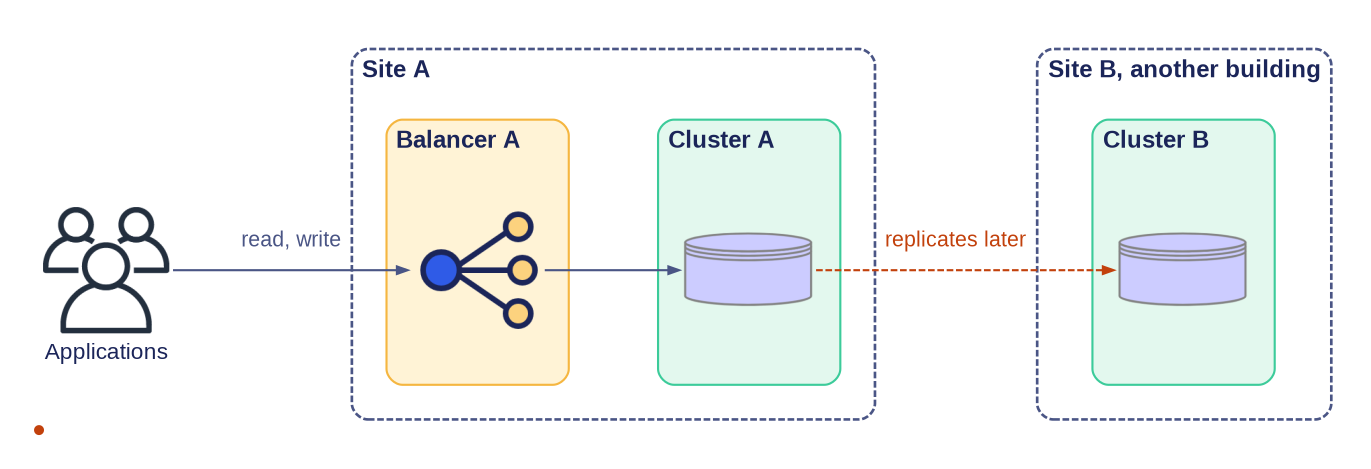
Two clusters, not one stretched cluster
| Method | Scope | When | For |
|---|---|---|---|
| Site replication | Whole cluster with users and settings | Continuous | Disaster recovery, several active sites |
| Bucket replication | One bucket | Continuous | Some data elsewhere, both ways if set up twice |
| Batch replication | Chosen objects | Once or planned | Migration |
mc mirror | A folder or bucket | When the client runs | Simple copies |
Replication between sites is asynchronous by default: the newest objects can be missing after a disaster, and two sites that write the same name can conflict. Say the recovery point you accept.
Operations
What you now own
- 1
Drives
Offline drives, healing progress, and objects below quorum. Alert on the first lost drive, not on the last.
- 2
Space
Plan the next pool at about 70% full (a rule of thumb). A full cluster refuses writes.
- 3
Network
One PUT of 12 MiB with EC:4 writes 16 MiB to drives, most of it across the network.
- 4
Patches
For the frozen edition there are none. Before a migration, at least put it behind a private network.
- 5
Exit
The S3 API is your way out: copy buckets to another store, compare counts and checksums, switch the endpoint.
Decide
When to choose it, and when not
Choose AIStor when
- Data must stay on your premises or at the edge
- Software already speaks S3
- You have people who run storage
- The subscription is cheaper than the alternative, with all work counted
Look elsewhere when
- You are in a cloud already: use its object store
- You want maintained open source: look at Ceph, SeaweedFS or Garage
- Two or three small machines are all you have
- Nobody will replace drives at night
- You would start a new system on the archived edition
Neighbours
| Product | Alike | Different |
|---|---|---|
| Amazon S3 | The API | Managed, spread over zones, nothing to repair |
| Google Cloud Storage | Objects, XML API works with S3 tools | Managed, dual-regions |
| Ceph Object Gateway | S3 API on your drives, open source | Part of a larger system with block and file storage; more to learn |
| SeaweedFS | S3 API, self-hosted | Master and volume servers; made for very many small files |
| Garage | S3 API, self-hosted | Made for small machines in several places; keeps copies, not erasure coding |
Summary
The whole topic in one minute.
MinIO spreads the shards of each object over one erasure set. With N drives and M parity shards it reads from any N minus M, writes with the same number (one more when M is half of N), and heals what is missing.
Technically it is a good model of a small object store. Practically the first question is the edition: the open source version gets no security patches, AIStor Free is a single node, and several machines need a paid subscription or another S3-compatible store.
- The open source edition is archived and unpatched; AIStor is the maintained, licensed product.
- Objects become data and parity shards on one erasure set; any K of N rebuild them.
- Read quorum K, write quorum K, or K + 1 when parity is exactly half.
- Sets are fixed forever; clusters grow by pools.
- Healing closes the dangerous gap. Versions and a second site cover the rest.
Sources
- github.com/minio/minio (archived, README)
- MinIO: subscriptions, pricing and licence questions
- AIStor documentation: erasure coding
- AIStor documentation: healing
- AIStor documentation: replication
- MinIO: distributed design document
- MinIO: storage classes and parity
- MinIO: limits
- GitHub issue 21647: source only distribution
- Ceph Object Gateway S3 API