
Google Cloud Storage
medium 27 minCloud Storage is Google Cloud's object store: buckets, immutable objects, strong consistency everywhere, and one API for hot and archived data.
Video lesson · Chapter 1 of 5
Give one generation of a photo a name
Cloud Storage in 90 seconds
1:30Reel coming soon
Theory
Read or listen first. About 2 min.
What it is
Google Cloud Storage keeps objects, which are sequences of bytes with a name and metadata, in buckets. You reach it over HTTPS, through a JSON API, an S3-compatible XML API, gRPC, or the client libraries.
An object cannot be edited in an ordinary bucket. A new upload to the same name creates a new generation and replaces the live one in a single step, so a reader sees the old bytes or the new bytes and never a mixture.
Every object has a storage class that sets what it costs to keep and to read. Unlike some other archives, all classes answer within milliseconds; the colder ones cost more to read and have a minimum storage time.
Why it exists
Files on one server are lost with that server, and a database is an expensive place for photos, videos, logs and backups. An object store spreads each object over many devices and lets any number of machines read it.
Cloud Storage adds choices that a team would find hard to build: copies in two regions behind one name, listing that is always up to date, conditional writes, and cheap classes that need no restore job.
A short history
May 2010
Google launches the service as Google Storage for Developers.
March 2015
Nearline is announced: a cheaper class that still answers online.
January 2020
The Archive class becomes available, for data read less than once a year.
March 2026
Rapid Bucket, with buckets that live in one zone and objects that can be appended to, becomes generally available. Anywhere Cache is renamed Rapid Cache in the same month.
Words to know
- Bucket
- A container with a globally unique name, a location and default settings.
- Generation
- The number of one version of an object's data. It changes on every overwrite.
- Metageneration
- The number of changes to the metadata of one generation.
- Precondition
- A condition sent with a request, such as: only if the generation is still 17.
- Storage class
- Standard, Nearline, Coldline, Archive, or Rapid in zonal buckets.
- Dual-region
- One bucket whose objects are kept in two chosen regions.
- Turbo replication
- An option of dual-regions with a target of 15 minutes for the second region.
- Soft delete
- Deleted objects stay restorable for a time, 7 days by default.
- Autoclass
- A bucket setting that moves objects between classes according to reads.
How it works
Step through the idea, or press Play.
Place. Choose a location and a class for the bucket
Understand it
Start here
The cheese cave
Imagine a cave in which a village keeps its cheese. Some wheels are wanted every day and some only once a year. Where should each wheel lie?
Cold does not mean slow here. It means cheap to keep and costly to take out.
The idea
What it gives a system
A photo service around one bucket
Strong consistency
After a successful write, every read and every listing shows it, in all locations and classes.
Durability
Designed for 11 nines a year, with erasure coding and checksums that are verified again and again.
One API, many prices
Four ordinary classes with the same calls and millisecond access.
Two regions, one name
Dual-regions and multi-regions keep serving when one region is lost.
Conditional writes
Generations make retries and read-change-write loops safe.
Scale without sizing
A bucket has no fixed size. Request capacity grows by itself, over minutes.
The general ideas have their own pages: object storage, designing a blob store, file uploads and CDNs. This page is about how this product does them. Its neighbour is Amazon S3.
Inside
Buckets, objects and generations
A bucket name is unique across all customers, and a bucket belongs to one project and one location. An ordinary bucket is flat: a name such as photos/2026/cat.jpg is just text, and the folder is an illusion made by listing with a prefix and a delimiter.
Limits worth remembering
| Thing | Limit |
|---|---|
| Object size | 5 TiB, however it is written |
| Object name in a flat bucket | 1,024 bytes of UTF-8 |
| Custom metadata per object | 8 KiB |
| Writes to the same object name | 1 per second |
| Writes in a bucket | No limit; about 1,000 per second at first |
| Reads in a bucket | No limit; about 5,000 per second at first |
| Sources in one compose request | 32 |
| Creating or deleting buckets | About one request every two seconds per project |
An overwrite is a swap
Hierarchical namespace is a different kind of bucket with real folders. Renaming a folder is one atomic step, and initial request rates are up to 8 times higher. It must be chosen when the bucket is created. It suits Spark, Hadoop and training jobs that rename directories.
Rapid Bucket puts a bucket into one zone, beside the machines that use it. Objects can be appended to by one writer at a time and read while they grow. Google states latency below a millisecond. The price of that: the data is not spread over zones and can be lost with its zone, so keep only what you can rebuild.
Location
What survives what
A dual-region bucket
Location types
| Type | Copies before success | Survives | Standard class SLA | Use it for |
|---|---|---|---|---|
| Zone (Rapid) | In one zone | Disks, hosts, racks | 99.9% | Scratch data for training and analytics |
| Region | At least two zones | One zone | 99.9% | Data used by machines in that region |
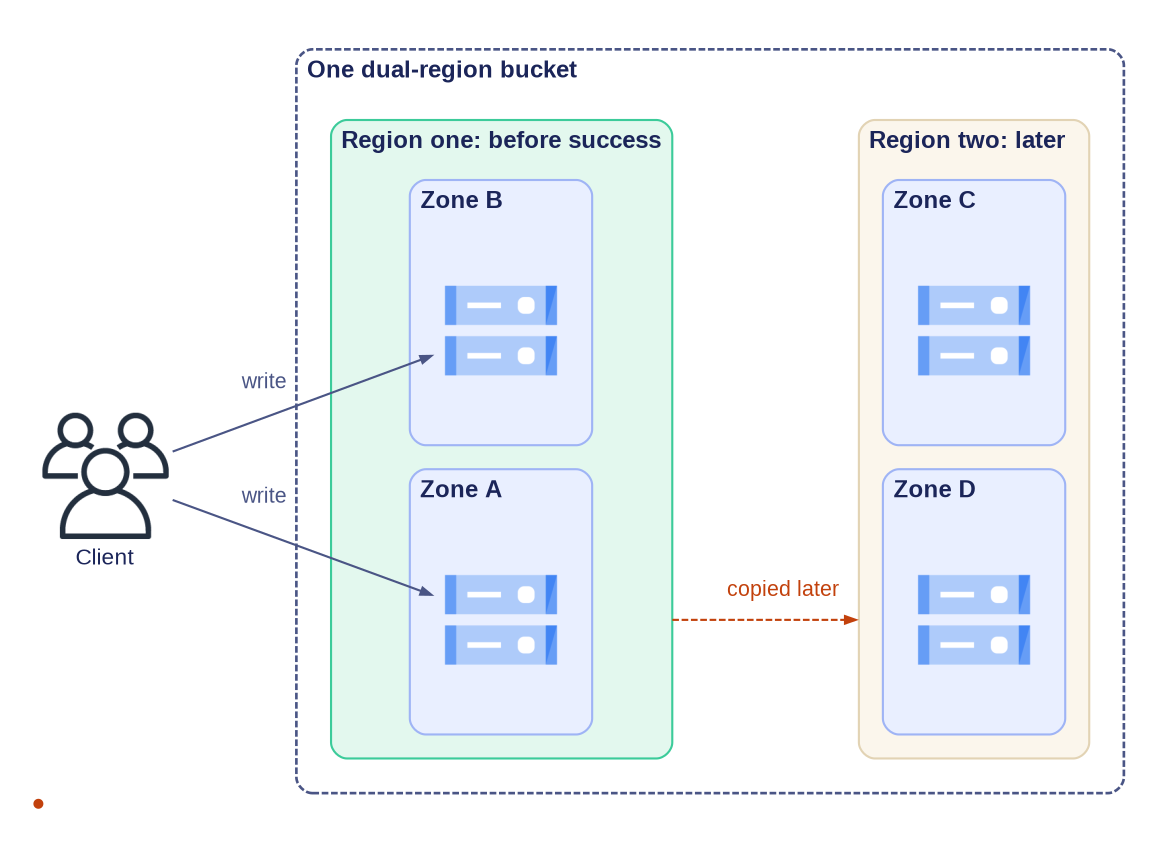
| Dual-region | Two zones of one region, then the other region | One region, except the newest writes | 99.95% | Failover between two chosen regions |
| Multi-region | The same, places chosen by Google within the area | One region, except the newest writes | 99.95% | Content read all over a continent |
Default replication aims to bring 99.9% of new objects to the second region within one hour and all within 12 hours; most take minutes. Turbo replication, for dual-regions only, has a recovery point objective of 15 minutes. Failover needs no action: the recovery time objective is zero. If a region is lost before its newest object was copied, a read of that object returns a retryable 500 error instead of an old version. That is a clear choice of consistency over availability; see CAP.
What 11 nines mean
Classes
Price of keeping, price of reading
Storage classes
| Class | Minimum time | Retrieval fee | Read it about | Typical availability in a region |
|---|---|---|---|---|
| Rapid | None | None | All the time, from one zone | Above 99.95% |
| Standard | None | None | Often | 99.99% |
| Nearline | 30 days | Yes | Once a month or less | 99.9% |
| Coldline | 90 days | Yes | Once a quarter or less | 99.9% |
| Archive | 365 days | Yes | Less than once a year | 99.9% |
Which class?
When does a colder class pay?
Early deletion. A Coldline object deleted after 20 days is billed for 90. Rewriting counts as deleting: changing a class by hand is a rewrite. Time as a noncurrent or soft-deleted object counts towards the minimum.
Autoclass starts everything in Standard, moves an object to Nearline after 30 days without a read, and, if you allow it, to Coldline after 90 and Archive after 365. A read brings it back to Standard. Objects under 128 KiB stay in Standard. There are no retrieval or early deletion fees, but there is a management fee. Background scanners that read everything defeat it.
Consistency
Strong, with three exceptions
Read-after-write, read-after-update, read-after-delete and listing are strongly consistent, for all buckets. So a job may write a marker object and list right after it. The exceptions matter in practice:
Not immediately visible
| What | How long | What to do |
|---|---|---|
| Granting or revoking access | Typically a minute, sometimes longer | Do not rely on revoking in an emergency alone |
| Public objects in caches | Until the cache lifetime ends | New name for new content, or Cache-Control: no-store |
| Bucket settings such as versioning | About 30 seconds | Wait before deleting |
| Lifecycle rules | Up to 24 hours to take effect; actions are asynchronous | Do not use them as a timer |
Concurrency
Preconditions instead of locks
There is no lock and no transaction over several objects. What you have is a compare-and-set on one object: send the generation you read, and the write fails with 412 if somebody was faster. Generation 0 means: only if no live object has this name. The idea is optimistic concurrency control.
Two workers change the same index
Preconditions also make retries safe. A repeated upload with ifGenerationMatch cannot overwrite something newer, so it is idempotent. Retry 408, 429 and 5xx with exponential backoff.
Uploads
Getting bytes in and out
| Way | Good for | Know this |
|---|---|---|
| Single request | Small files on a good network | A break means starting again |
| Resumable upload | Large files, phones | Session lives a week; chunks are multiples of 256 KiB |
| XML multipart | Parallel parts, S3 tools | Finish or abort, or the parts are billed |
| Compose | Joining up to 32 objects in one call | The result has a CRC32C but no MD5 |
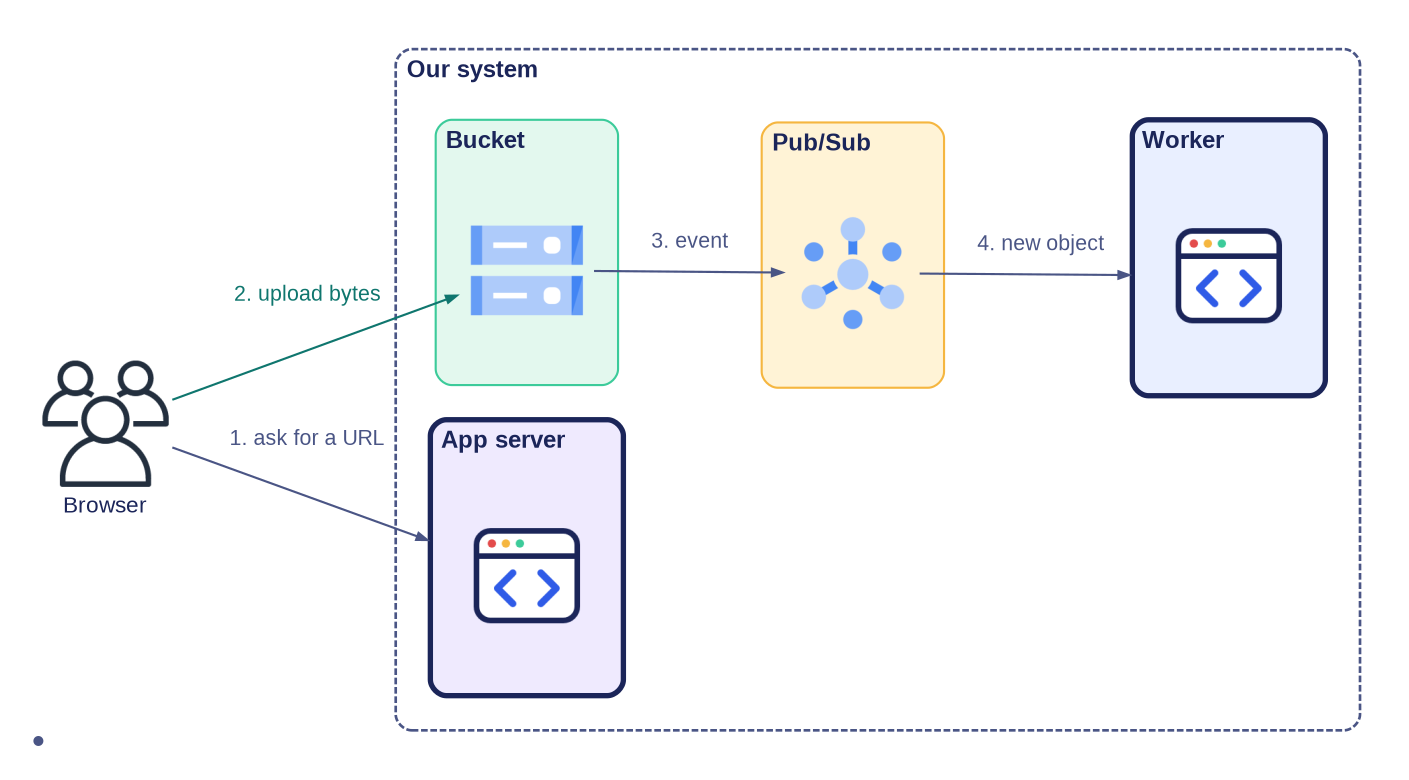
| Signed URL | Browsers and phones without an account | Anyone who has it can use it; at most 7 days |
# A bucket in two regions, with access by IAM onlygcloud storage buckets create gs://EXAMPLE-photos \ --location=EU --placement=europe-west1,europe-west4 \ --recovery-point-objective=ASYNC_TURBO \ --uniform-bucket-level-access# Upload only if the name is still freegcloud storage cp cat.jpg gs://EXAMPLE-photos/in/cat.jpg --if-generation-match=0# Keep deleted objects for 14 days; move and delete by agegcloud storage buckets update gs://EXAMPLE-photos \ --soft-delete-duration=14d --lifecycle-file=rules.json# A link for 15 minutes, signed as a service accountgcloud storage sign-url gs://EXAMPLE-photos/in/cat.jpg --duration=15m \ --impersonate-service-account=SIGNER_ACCOUNTEvents go to Pub/Sub notifications: OBJECT_FINALIZE, OBJECT_DELETE and others. Treat them as messages that can arrive twice or out of order, and use the generation to ignore old ones. See pub-sub.
Scaling
Request rates and hot ranges
Object names are kept in an index sorted by name, and ranges of that index are spread over servers. When a range gets busy, Cloud Storage splits it, which takes minutes. Names that begin with a time or a counter send every new write to the same end of the index: a hot range that keeps moving.
Names that spread
4f/2026-11-23/a.json: a hash firstusers/<random id>/a.jpg: random after a fixed prefix- One random hexadecimal character is enough for about 16,000 writes and 80,000 reads a second
Names that pile up
2026-11-23T10-00-00.jsonlog-0000001,log-0000002- A new hourly prefix: the gain is lost every hour
How long to warm up a new prefix
Safety
Access and protection from mistakes
Prefer uniform bucket-level access: only IAM decides and per-object lists are switched off. Add public access prevention for private data. Data is encrypted at rest by default; customer-managed keys are an option, and losing such a key means losing the data.
Protection tools
| Tool | Protects from | Costs |
|---|---|---|
| Soft delete (default 7 days, range 3 to 90, 0 is off) | Wrong delete or overwrite, also of a bucket | Deleted bytes are billed as stored |
| Versioning | Same, for as long as rules keep noncurrent versions | Every version is billed |
| Retention policy and bucket lock | Anybody deleting too early; a locked policy cannot be removed | You cannot delete either |
| A second bucket in another project | A lost project or stolen administrator account | A full copy |
The life of an object
Operations
What to watch
- 1
Errors by code
429 and 503 point to a hot range or a fast ramp. 412 means preconditions at work; a sudden rise means contention.
- 2
Bytes by class and state
Live, noncurrent and soft-deleted. A bill that grows without new users is often in the last two.
- 3
Replication delay
For dual-regions, how old the newest object is that exists in only one region.
- 4
Egress
Bytes that leave the region. Put computing near the data, and a CDN before public files.
- 5
A regional or global incident
In June 2025 many Google Cloud APIs failed worldwide at once. Two regions do not protect from that; see the Google Cloud outage.
Decide
When to choose it, and when not
Choose it when
- You already run on Google Cloud, or use BigQuery on the data
- Objects are written once and read many times
- One name must survive the loss of a region
- Archived data must be readable at once
- You want nothing to operate
Look elsewhere when
- Data changes in place: use a database or a disk
- You need queries or transactions over records
- One key changes many times a second
- The bytes must stay in your own building: see MinIO
Neighbours
| Product | Alike | Different |
|---|---|---|
| Amazon S3 | Objects, strong consistency, classes, conditional writes | Two regions mean two buckets with replication; its deep archive classes need a restore |
| MinIO AIStor | Object API, erasure coding | You run it, on your own drives |
| Filestore | Files over the network | A mounted file system with directories and locks |
| Persistent Disk | Durable bytes | A block device for machines, edited in place |
| Cloud Storage FUSE | Shows a bucket as a folder | Still objects: an edit rewrites, and it is not a full POSIX file system |
Summary
The whole topic in one minute.
Cloud Storage is a strongly consistent store of immutable objects. Region, dual-region or multi-region decides what survives; the class decides the price of keeping against reading; the object name decides how load spreads.
Send a generation precondition with every write that could be repeated, sign URLs instead of passing bytes through your servers, ramp up new prefixes slowly, and remember that soft-deleted and short-lived objects are still billed.
- Objects are immutable; an overwrite is a new generation, visible at once everywhere.
- Location decides what survives: the second region is always a little behind.
- Cold classes are not slow. They have fees and minimum times.
- Preconditions make retries and read-change-write safe.
- Spread names, double at most every 20 minutes, and one name takes one write a second.
- Soft delete is on by default and is billed.
Sources
- Cloud Storage: storage classes
- Cloud Storage: consistency
- Cloud Storage: availability and durability
- Cloud Storage: request rate guidelines
- Cloud Storage: quotas and limits
- Cloud Storage: request preconditions
- Cloud Storage: soft delete
- Cloud Storage: Autoclass
- Cloud Storage: release notes
- Google: a peek behind Colossus