
Design Pinterest
hard 65 minPeople save pictures on boards and find more like them.
Video lesson · Chapter 1 of 5
Publish the image once and use it on many boards
Theory
Read or listen first. About 2 min.
What it is
A service like Pinterest lets people save images, called pins, on themed boards, and shows each person a home feed of pictures they may want next. It also finds pictures that look like a given one.
One idea makes the rest simple: an image is a file, and a pin is one person's note that points at it, on one board. Millions of pins may point at one image.
Why it exists
People often know what they like when they see it and cannot say it in words. Collecting on boards says it for them, and two boards that share a picture tell us which other pictures belong together.
In an interview it brings together large files, read-heavy traffic, background work, a personal feed and nearest-neighbour search. The skill is to size each separately: image traffic is not API traffic, and images are not pins.
A short history
March 2010
Pinterest launches as a closed beta.
2014 to 2017
Its engineers describe Related Pins (2014), Similar Looks (2015), Flashlight (2016) and Lens (2017) in the paper Visual Discovery at Pinterest.
2016
Malkov and Yashunin publish HNSW, a graph for approximate nearest-neighbour search.
2018
The PinSage paper describes learning from a graph of 3 billion pins and boards joined by 18 billion edges.
2021
The CLIP paper describes a model trained on 400 million image and text pairs.
Words to know
- Image
- The picture file and its facts: size in pixels, main colour, state.
- Pin
- One save of an image on one board, with a title and a link.
- Board
- A named collection of pins. It can be private.
- Embedding
- A list of numbers for a picture, made so that similar pictures get similar numbers.
- ANN
- Approximate nearest neighbours: find most of the closest vectors without comparing all.
- Candidate
- A pin that may go into a feed, before ranking.
- Masonry grid
- Columns of pictures with one width and different heights.
Solve it like an interview
New to it? Start with Approach. Revising? Go straight to the mock.
- 1ApproachWhat this question tests, where it gets hard, and how to spend the time.
- 2ScopeAsk what changes the design, then commit to a short list.
- 3NumbersWork out a number when the answer changes what you build.
- 4API and dataThe contract first, then the data that serves it.
- 5DesignStart with the smallest system that works. Change it only when something breaks.
- 6Deep divesCompare the options before you open them, then say which you would pick.
- 7Explain your choicesAnswer first. Then compare your reasoning.
- 8By levelThe same question is judged differently for mid, senior and staff.
- 9MockAnswer against the clock, then score yourself.
How it works
Step through the idea, or press Play.
Save. One picture file, many small pins that point at it
Understand it
Scope
What are we building?
A place to save pictures on boards, a personal home feed, search by words and search by picture. This is an exercise inspired by well-known products; it does not describe a company's real system except where its own papers are linked.
Similar applications
| Service | Known for |
|---|---|
| Photo sharing and a feed | |
| Tumblr | Reblogging, close to saving |
| Flickr | Organising photographs |
| Dribbble | Design inspiration |
| Behance | Creative portfolios |
| We Heart It | Collections of images |
The hard part
Three loads that must not be mixed
| Load | Size | Where it belongs |
|---|---|---|
| Picture bytes | 29,000 views a second | Edge and object store |
| Feed and board calls | 1,200 feed pages a second | Services, cache, database |
| Picture understanding | 116 new images a second | Queue, workers, vector index |
Image and pin are two things
The finished system
Where the design ends up
This is the last version. The Design tab begins with one service and one database and shows which number forces each extra box.
The whole system
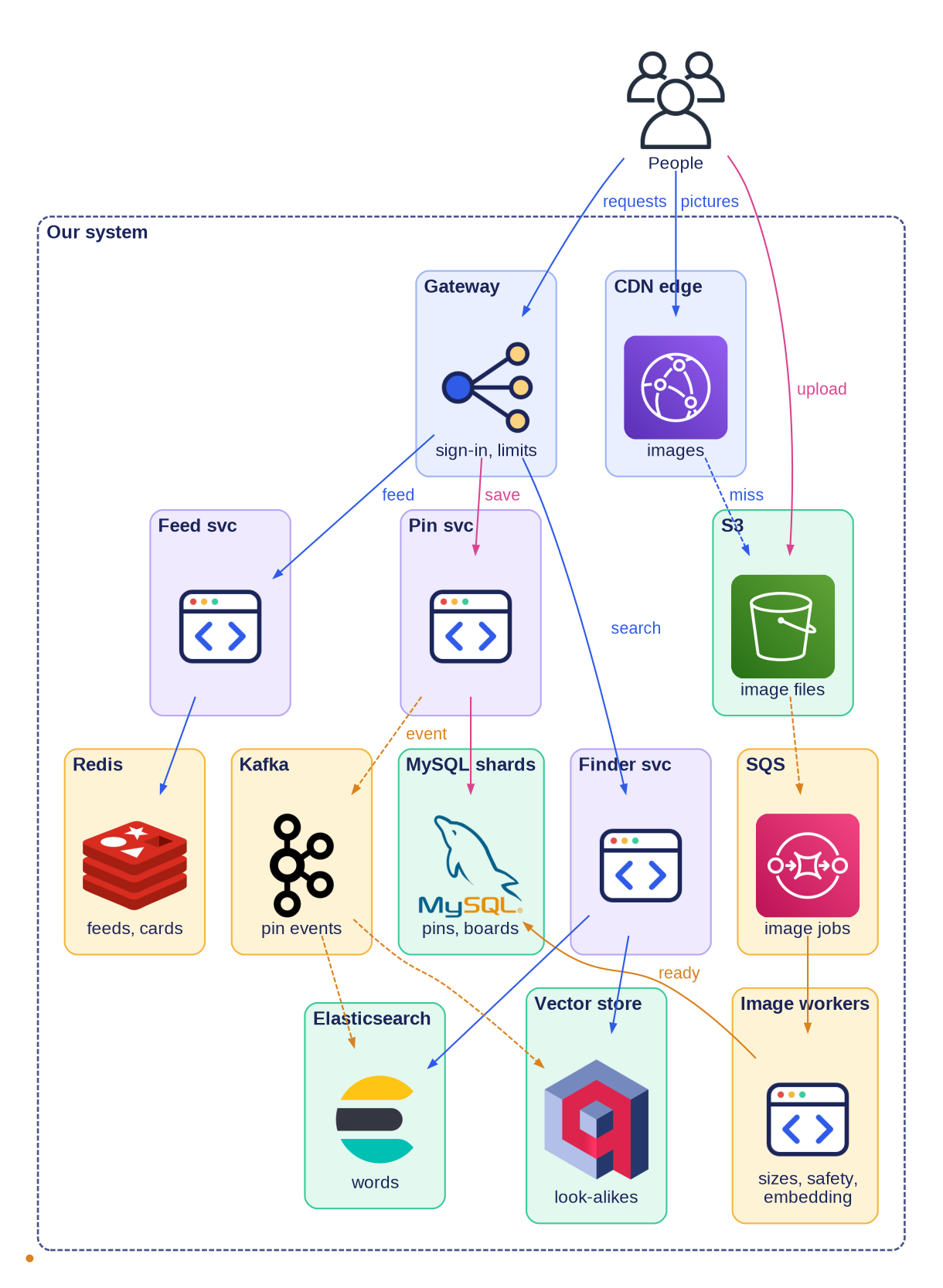
Four key ideas
Store once, save often
The content's hash names the file. A save is a 200-byte row.
Bytes go around the service
Upload straight to the object store, download from the edge.
Prepare, then rank
Candidates ahead of time; the order when the person arrives.
Index suggests, row decides
Search and vectors may lag. Check state and privacy before showing.
Where to go
The tabs and the concepts
| If you want | Open |
|---|---|
| What the interviewer looks for | Approach, By level |
| Targets and sums | Scope, Numbers |
| Endpoints and tables | API and data |
| Images, look-alikes, feed, grid | Deep dives |
| Practice against the clock | Mock |
| Direct uploads | File upload APIs, object storage |
| Edge caching | CDN, cache invalidation |
| Splitting data | Sharding, sharded counters |
| Words | Full-text search |
| Feeds and ranking | News feed, recommendation system |
Summary
The whole topic in one minute.
Store each picture once under its content, and store each save as a small row. Pictures travel by object store and CDN; the API carries ids and addresses.
Uploads finish in the background, feeds are candidates prepared ahead and ranked when a person arrives, and look-alikes come from a compressed vector index that is checked against the truth before anything is shown.
- Image views are not API calls: 29,000 a second against 1,200 feed pages.
- An image is stored and processed once; a pin only points at it.
- Uploads answer at once, and pictures become visible when ready and safe.
- Prepare candidates daily and rank per visit. Hourly feeds for all active people cost more than the visits.
- Similarity search is approximate and may lag, so the database has the last word.