
TimescaleDB
medium 25 minTimescaleDB is a PostgreSQL extension for time-series and event data.
Video lesson · Chapter 1 of 5
Where does yesterday's reading go?
TimescaleDB in 75 seconds
1:15Reel coming soon
Theory
Read or listen first. About 2 min.
What it is
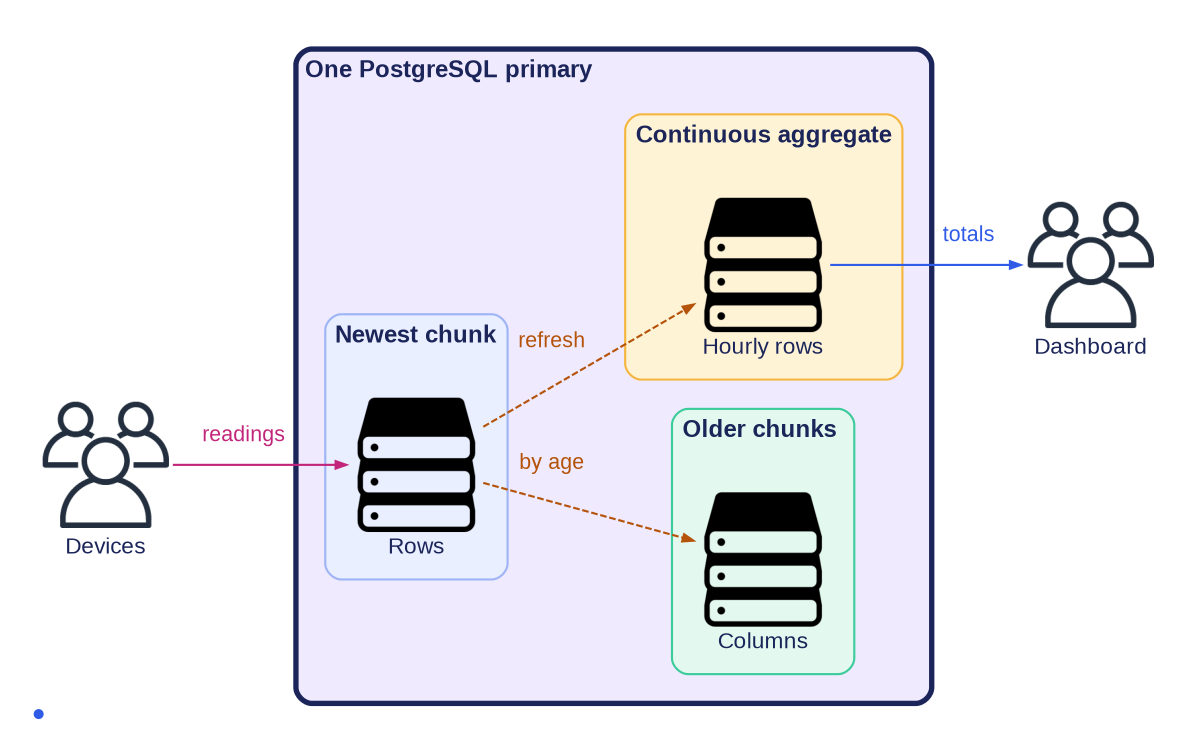
TimescaleDB adds a kind of table, the hypertable, to PostgreSQL. You insert and query it like any table. Behind it are chunks: ordinary tables that each hold one range of time, for example a week.
Around chunks it builds what time series need: a columnar format for old chunks, summaries that refresh themselves, functions such as time_bucket, and background jobs that compress and delete on a schedule.
Why it exists
Measurements arrive in time order and grow without end. Queries want recent ranges, and old data is deleted in bulk. In one huge table the indexes outgrow memory, inserts slow down and deleting a month leaves millions of dead rows.
A separate time-series product solves that and brings a second query language, a second backup and no joins with your customers. TimescaleDB keeps it in PostgreSQL. The price is that it inherits PostgreSQL's shape: one primary takes the writes.
A short history
2017
The first beta releases are published on GitHub in March.
2018
Timescale announces a source-available licence for newer features, beside the Apache 2.0 core.
2020
Version 2.0.0 is released on 18 December.
2024
Version 2.14 ends support for multi-node. Version 2.13 was the last to have it.
2025
The company Timescale renames itself Tiger Data in June. The extension keeps the name TimescaleDB. Versions 2.18 and 2.20 introduce the columnstore policy and the CREATE TABLE form of hypertables.
Words to know
- Hypertable
- A table you use as one, partitioned automatically by time.
- Chunk
- One partition: a real table with rows of one time range.
- Chunk exclusion
- Leaving out chunks whose range cannot match the query.
- Hypercore
- The storage engine that keeps recent rows as rows and older ones as compressed columns.
- Segment by
- Columns whose equal values are compressed together, such as device.
- Continuous aggregate
- A summary table refreshed in the background for changed time ranges.
- Real-time aggregate
- A continuous aggregate that adds raw rows not yet summarised.
- Retention policy
- A job that drops chunks older than an age.
How it works
Step through the idea, or press Play.
Write. Rows go to the chunk of their time, kept as rows
Understand it
Start here
The diary cut into weeks
Imagine a diary that has grown too thick to open. Its owner cuts it into one notebook per week. Today's notebook lies open, old ones are pressed flat, and very old ones are thrown away.
The summary still knows week 1, although its notebook is gone. That works only if the summary was made first and is kept.
The product
Names, editions and versions
Checked November 2026
| Topic | Fact |
|---|---|
| Company | Tiger Data, called Timescale until June 2025 |
| Managed service | Tiger Cloud, formerly Timescale Cloud |
| Extension | TimescaleDB, release 2.32 in November 2026 |
| PostgreSQL versions | 16, 17 and 18. Support for 15 ended with 2.29 |
| Multi-node | Removed in 2.14. Scale with replicas and a bigger primary |
| Check your edition | SHOW timescaledb.license answers timescale or apache |
Two editions
| Apache 2 Edition | Community Edition (default) | |
|---|---|---|
| Licence | Apache 2.0 | Tiger Data License (TSL), source available |
| Hypertables, chunks, time_bucket | Yes | Yes |
| Columnstore (Hypercore) | No | Yes |
| Continuous aggregates | No | Yes |
| Retention policies and jobs | No, but drop_chunks by hand | Yes |
| Sell it as a hosted service | Allowed | Not allowed |
Inside
Hypertables and chunks
CREATE EXTENSION IF NOT EXISTS timescaledb;CREATE TABLE readings ( time timestamptz NOT NULL, device_id bigint NOT NULL, celsius double precision) WITH ( tsdb.hypertable, tsdb.partition_column = 'time', tsdb.chunk_interval = '1 day', tsdb.segmentby = 'device_id', tsdb.orderby = 'time DESC');CREATE UNIQUE INDEX ON readings (device_id, time);create_hypertable on an existing table. From 2.23 this form also creates a columnstore policy whose age equals the chunk interval. From 2.20 to 2.22 you add the policy yourself.One server, three kinds of storage
What happens on an insert
- 1
Route
The time value decides the chunk. A missing chunk is created.
- 2
Write
The row goes to that chunk's heap and indexes, with the usual WAL and MVCC.
- 3
Late rows
A row for an old time goes to its old chunk, even if that chunk is compressed.
- 4
Uniqueness
Enforced per chunk, so unique indexes must include the partitioning column.
How long should a chunk be?
Good chunks
- Indexes of active chunks fit in shared buffers
- Hundreds of chunks, not tens of thousands
- One interval that matches common queries and retention
Trouble
- Hourly chunks kept for five years
- A space dimension added without a test: it multiplies chunks
- Expecting a new interval to resize old chunks
Reads
Filter on time, or read everything
How a query is planned
EXPLAIN (ANALYZE, BUFFERS) lists the chunks that were touched.-- Five-minute averages for one device, last daySELECT time_bucket('5 minutes', time) AS bucket, avg(celsius)FROM readingsWHERE device_id = 42 AND time > now() - INTERVAL '1 day'GROUP BY bucket ORDER BY bucket;-- Newest value per deviceSELECT device_id, last(celsius, time) AS latestFROM readingsWHERE time > now() - INTERVAL '1 hour'GROUP BY device_id;-- Fill gaps with the last known valueSELECT time_bucket_gapfill('1 hour', time) AS hour, locf(avg(celsius)) AS celsiusFROM readingsWHERE device_id = 42 AND time >= now() - INTERVAL '1 day' AND time < now()GROUP BY hour ORDER BY hour;locf carries the last observation forward.Storage
Hypercore: rows first, columns later
The newest chunks stay in the rowstore, where inserts and updates are cheap. A policy converts older chunks to the columnstore: many rows become one row of arrays, each array compressed for its type. The vendor states 90 to 98% savings. Measure yours, because it depends on the data and on the order.
Two choices that decide the result
| Setting | Good value | Bad value |
|---|---|---|
| Segment by | What you filter by with equality, many rows per value: device_id | A value nearly unique per row: request_id |
| Order by | Time, so neighbours are similar and ranges can be skipped | A random column |
| Age of conversion | When most late rows have arrived | While rows are still corrected every minute |
The life of a chunk
-- Change when chunks are convertedCALL remove_columnstore_policy('readings');CALL add_columnstore_policy('readings', after => INTERVAL '7 days');-- Keep raw rows for 90 daysSELECT add_retention_policy('readings', INTERVAL '90 days');-- Did the jobs run?SELECT job_id, last_run_status, last_successful_finish, total_failuresFROM timescaledb_information.job_stats;Summaries
Continuous aggregates
CREATE MATERIALIZED VIEW readings_hourlyWITH (timescaledb.continuous) ASSELECT time_bucket('1 hour', time) AS bucket, device_id, avg(celsius) AS avg_c, min(celsius) AS min_c, max(celsius) AS max_c, count(celsius) AS nFROM readingsGROUP BY bucket, device_idWITH NO DATA;SELECT add_continuous_aggregate_policy('readings_hourly', start_offset => INTERVAL '3 days', end_offset => INTERVAL '1 hour', schedule_interval => INTERVAL '30 minutes');-- Include raw rows that are not summarised yetALTER MATERIALIZED VIEW readings_hourlySET (timescaledb.materialized_only = false);Why dashboards get fast
How a late reading reaches the summary
Growth
Availability and scaling
The usual production shape
In this order
- 1
Batch and COPY
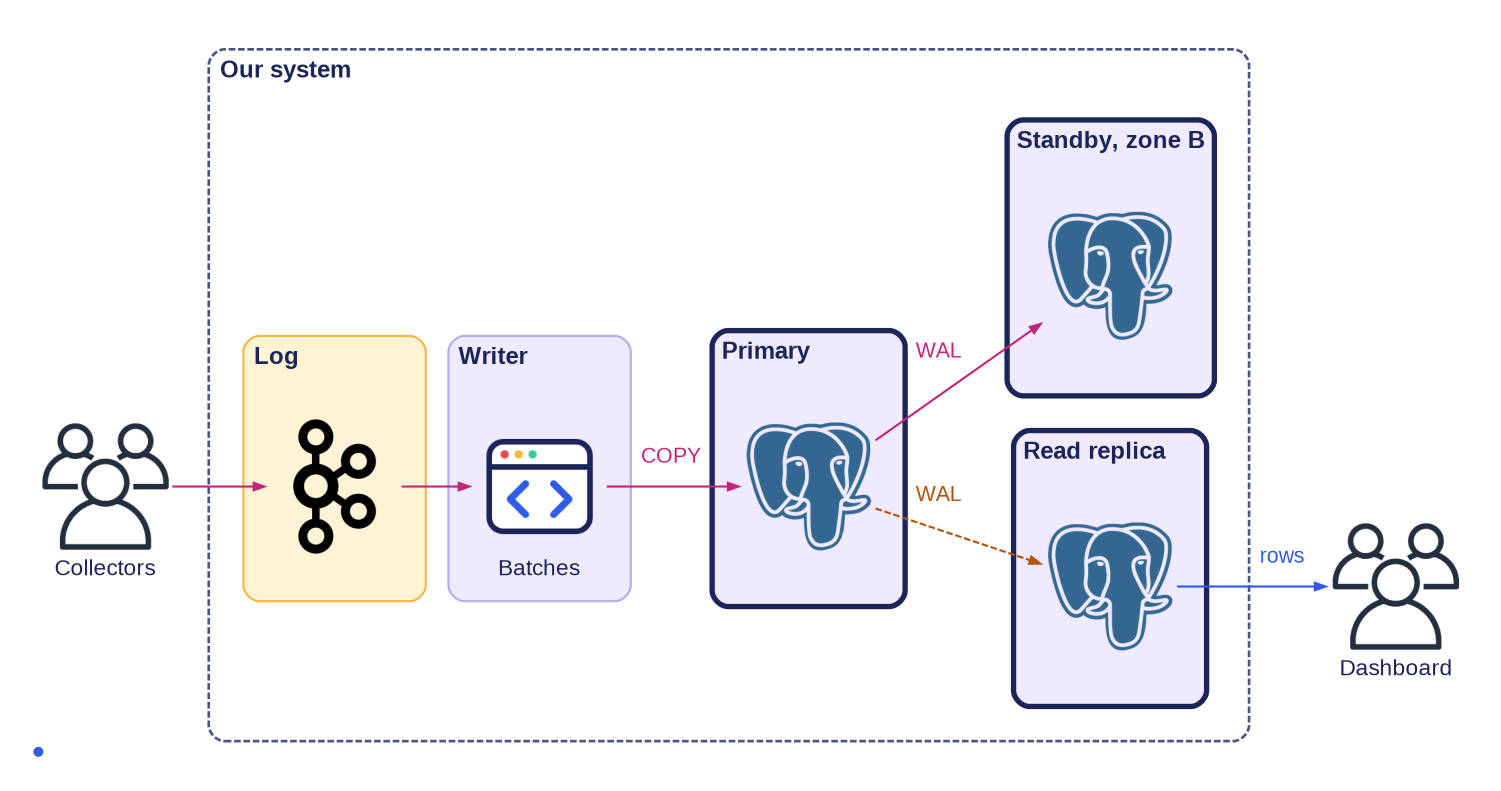
Insert hundreds or thousands of rows per statement. A log in front absorbs bursts.
- 2
Fewer indexes
Each index is written for each row. Keep device and time, and little else.
- 3
Scale up
Memory for active chunks and fast disks. See vertical scaling.
- 4
Replicas
Dashboards move to streaming replicas and accept lag, as in replication.
- 5
Split by tenant or region
Several independent databases. Queries across them are yours to combine, because multi-node is gone.
Operations
Jobs, freshness and upgrades
What to watch
Jobs
Last status and failures of columnstore, refresh and retention. A silent failure fills the disk.
Chunks
Count, size and share in columnstore.
Freshness
Age of the newest row, and how far the summary lags behind it.
PostgreSQL itself
WAL rate, replica lag, vacuum, connections and cache hits.
Upgrades have two parts: PostgreSQL and the extension, and each release supports certain pairs. Release notes matter: the notes for 2.32.1 warn that earlier patch versions break every background job on the PostgreSQL minor releases 18.7, 17.12 and 16.16, so the extension must be upgraded first. Restores need the matching extension version and the documented pre-restore and post-restore calls.
Decide
When to choose it, and when not
Choose it when
- Rows arrive roughly in time order and rarely change
- Most queries filter on time
- You need joins with relational data, constraints and transactions
- One strong primary can take the writes
Do not when
- A few million rows: a plain table or native partitions will do
- Most queries ignore time
- Writes exceed one primary
- You need scans across huge wide tables for many teams: ClickHouse
Neighbours
| Choice | Better when | Weaker when |
|---|---|---|
| PostgreSQL partitions | Few partitions, no extension allowed | You build creation, compression and rollups yourself |
| ClickHouse | Very large analytics, append only | Row updates, constraints, transactions |
| Prometheus | Metrics and alerts of servers | Business data, joins, long retention by itself |
| Cassandra | Write volume over many nodes, known queries | Ad-hoc SQL and aggregates |
Do I need it?
Cost: the server, its standby, and disk that compression reduces. Self-hosting the Community Edition is free. What you pay is operation, and the licence decides whether you may resell it.
Summary
The whole topic in one minute.
TimescaleDB cuts a table by time inside PostgreSQL. Recent chunks stay small enough for fast inserts, old chunks become compressed columns, and whole chunks are dropped when they expire.
Filter on time, size chunks by memory, include the time column in unique keys, and read dashboards from continuous aggregates. Check which edition you run: columnstore, continuous aggregates and retention policies are in the Community Edition, whose licence forbids selling it as a service.
- A hypertable is one table to you and many chunks to the planner.
- Size chunks so that active indexes fit in memory. The default is 7 days.
- Unique keys must include the time column.
- Recent rows, older columns, then drop whole chunks.
- Continuous aggregates refresh only changed buckets inside a window.
- One primary writes. Multi-node ended with 2.14.