
PostgreSQL
medium 32 minPostgreSQL is an open-source relational database that never overwrites a row: every change adds a new version, readers pick the version their snapshot may see, and vacuum clears away versions nobody needs.
Video lesson · Chapter 1 of 6
Two answers to one inventory question
PostgreSQL in 80 seconds
1:20Reel coming soon
Theory
Read or listen first. About 2 min.
What it is
PostgreSQL, or Postgres, is an object-relational database. You define tables, types and rules, ask questions in SQL, and group changes into transactions that happen completely or not at all. It is free software under the PostgreSQL License, which resembles the BSD and MIT licences, and no single company owns it.
One server has one supervisor process, one process per client connection, shared memory, and two kinds of files: data files and the write-ahead log. Almost everything people praise or curse about it follows from two choices: new row versions instead of overwriting, and one process per connection.
Why it exists
Most systems need a place where facts stay correct: orders, accounts, bookings. PostgreSQL gives transactions, foreign keys, checks and a real serializable level, and it lets the same database answer questions nobody planned for.
It is also broad. JSON documents, text search, ranges, geography through PostGIS and job queues can live in one database and one transaction, so a young system can run fewer products.
A short history
1986
Implementation of POSTGRES begins at the University of California, Berkeley.
1994
Andrew Yu and Jolly Chen add an SQL interpreter. The result is released as Postgres95.
1996
The project is renamed PostgreSQL, and the version number continues from the Berkeley releases.
June 1999
Version 6.5 replaces table locking for readers with multi-version concurrency control.
September 2010
Version 9.0 adds streaming replication and hot standby: a standby that answers read-only queries.
November 2026
Version 19 is released, with a REPACK command and a WAIT command for read-your-writes on standbys. Each major version is supported for five years.
Words to know
- Tuple
- One version of one row, stored in a page.
- MVCC
- Multi-version concurrency control: readers use old versions instead of waiting for writers.
- xmin, xmax
- Hidden fields of a tuple: the transaction that created it and the one that deleted or replaced it.
- WAL
- Write-ahead log: changes are logged, and the log is flushed, before data pages reach the disk.
- Vacuum
- Cleaning that marks the space of dead tuples as reusable and freezes old ones.
- Heap
- The table's own pages. Rows sit in no particular order, and indexes point into it.
- Backend
- The server process that serves one connection.
- Standby
- A server that replays the primary's WAL.
How it works
Step through the idea, or press Play.
Write a version. An update adds a tuple and closes the old one
Understand it
Start here
The museum that never paints over
Think of a conservator who looks after one drawing. Painting over it is forbidden. Every change is a new dated tracing, hung beside the old one.
Adding is fast and lets everyone look. Someone must do the cleaning.
The product
What you get
Transactions and rules
ACID, foreign keys, checks, exclusion constraints, and serializable transactions. Even schema changes can be rolled back.
MVCC
Reading never blocks writing and writing never blocks reading.
Many index types
B-tree, hash, GiST, SP-GiST, GIN and BRIN, plus partial, covering and expression indexes.
JSON and text
Binary JSON with indexes, and language-aware text search, next to ordinary columns.
Extensions
Types, functions, operators and index methods as add-ons: PostGIS, pg_trgm, TimescaleDB, Citus.
Free and open
The PostgreSQL License, a community project since 1996, and many managed services.
Hard limits
| What | Limit |
|---|---|
| One table, 8 kB pages | 32 TB per table or partition |
| Columns in a table | 1,600, and a row's fixed part must fit a page |
| One field | 1 GB |
| Database size | Unlimited |
| Indexes per table | Unlimited |
Inside
One server, many processes
The path of a write
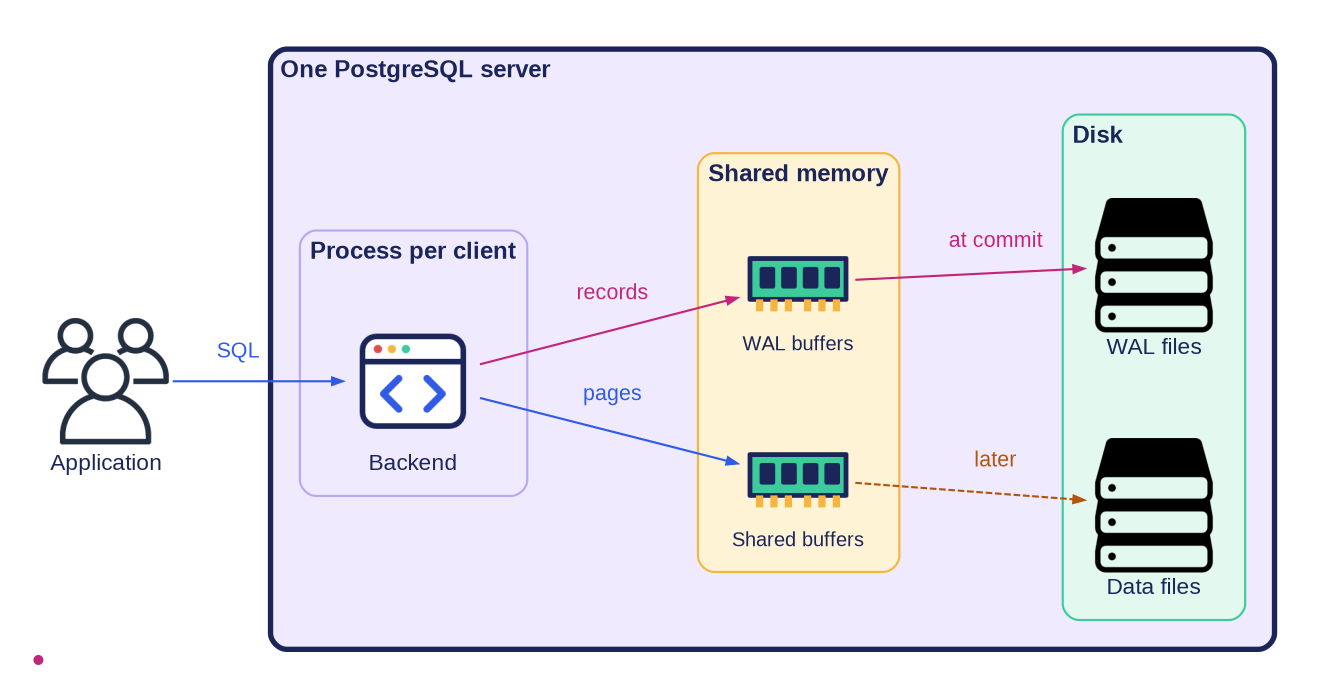
- 1
Connect
Port 5432 by default.
pg_hba.confsays who may connect from where and how. Prefer SCRAM-SHA-256 with TLS: MD5 passwords are deprecated, and version 19 warns when one is used. - 2
Fork
The supervisor, historically called the postmaster, starts a backend for the connection. A crashed backend makes the supervisor reset the others, because shared memory could be damaged.
- 3
Parse and plan
Text becomes a tree. The planner compares costs using statistics collected by ANALYZE: scan types, join order, nested loop, hash or merge join.
- 4
Execute
The executor reads 8 kB pages through shared buffers. A page in use is pinned, a changed one is dirty, and a clock sweep picks pages to evict.
- 5
Log
Each change adds a WAL record. The commit status of every transaction takes two bits in
pg_xact. - 6
Write behind
The background writer trickles dirty pages out, and the checkpointer writes the rest and marks where recovery starts. Autovacuum cleans.
The helpers and their defaults
| Process | Job | Default |
|---|---|---|
| WAL writer | Flushes WAL between commits | Every 200 ms |
| Background writer | Writes some dirty pages early | Every 200 ms, at most 100 pages |
| Checkpointer | Writes all dirty pages, spread out | 5 min or about 1 GB of WAL, target 0.9 |
| Autovacuum | Vacuum and analyze where needed | Up to 3 workers, wakes every minute |
| WAL sender | Streams WAL to a standby | One per standby |
max_wal_size is a soft limit. Watch pg_stat_bgwriter and pg_stat_checkpointer.Inside
Durability: log first
The rule of the write-ahead log is that a data page may reach the disk only after the log record that describes its change. The backend edits the page in memory and adds the record. At commit it waits until the log is flushed. After a crash the server replays the log from the last checkpoint.
One commit
synchronous_commit
| Value | The client waits for | A crash can lose |
|---|---|---|
| off | Nothing on disk | Up to about 600 ms of commits, never consistency |
| local | The local flush | Nothing here, recent commits after a failover |
| on (default) | Local flush, and the synchronous standby's flush if one is named | Nothing while one of them survives |
| remote_apply | The standby has replayed it | As above, and the standby already shows it |
wal_writer_delay. You can set this per transaction: off for a click log, on for a payment.WAL segments are 16 MB files by default. Keep them in an archive together with a base backup and you can restore to any moment in between: point-in-time recovery. pg_dump is a logical export and cannot be the base for it.
Inside
MVCC: which version do I see?
Every tuple carries xmin and xmax. A snapshot sees a tuple when the creator had committed before the snapshot and the deleter, if any, had not. Isolation levels explains the anomalies. This is how the product maps them.
The levels in PostgreSQL
| You ask for | You get | Remember |
|---|---|---|
| Read uncommitted | Read committed | Dirty reads never happen |
| Read committed (default) | A new snapshot per statement | Two reads may differ |
| Repeatable read | One snapshot, without phantoms | Retry on error 40001 |
| Serializable | Snapshot plus conflict tracking (SSI) | Retry on error 40001 |
Is this tuple visible?
Operations
Vacuum, bloat and transaction ids
- 1
Reuse space
Dead tuples no snapshot can need are removed. The file rarely shrinks, because the free space is kept for new tuples.
- 2
Update the visibility map
Pages whose tuples everyone can see let an index-only scan skip the heap.
- 3
Freeze
Transaction ids are 32 bits and circular. Old tuples are marked frozen so that they stay in the past for ever.
- 4
Analyze
A separate job, run by the same daemon, refreshes the planner's statistics.
When does autovacuum start?
How long until ids run out?
Healthy
- Autovacuum on, and tuned for hot tables
- Short transactions, with
idle_in_transaction_session_timeout - Alerts on id age and on dead tuples
max_slot_wal_keep_sizeset when slots are used
What holds cleaning back
- A transaction left open for hours
- An abandoned replication slot
- A forgotten prepared transaction
- A standby with
hot_standby_feedbackand long queries
Speed
Choosing an index
Index types
| Type | Good for | Example |
|---|---|---|
| B-tree | Equality, ranges, sorting, prefixes in C collation | ON users (email) |
| Hash | Equality only | USING hash (token) |
| GIN | Many keys per row: JSONB, arrays, text | USING gin (tags) |
| GiST | Overlap, nearest neighbour, ranges, geometry | USING gist (area) |
| SP-GiST | Unbalanced structures: points, prefixes | USING spgist (p) |
| BRIN | Huge tables in natural order, tiny size | USING brin (at) |
-- Only some rows: the query must repeat the condition.CREATE INDEX CONCURRENTLY orders_open ON orders (user_id) WHERE status = 'open';-- Extra columns allow an index-only scan.CREATE INDEX ON users (email) INCLUDE (name, status);-- Order matters: equality columns first, then the range.CREATE INDEX ON orders (user_id, created_at DESC);-- The query must use the same expression.CREATE INDEX ON users (lower(email));CONCURRENTLY does not block writes. It takes longer, cannot run inside a transaction, and can leave an invalid index if it fails. A unique constraint already has an index: do not add another.Speed
Reading a plan
EXPLAIN (ANALYZE, BUFFERS) -- ANALYZE really runs the querySELECT u.id, count(o.id) AS nFROM users u LEFT JOIN orders o ON o.user_id = u.idWHERE u.status = 'active'GROUP BY u.id ORDER BY n DESC LIMIT 10;-- Seq Scan on users (cost=0.00..1234.00 rows=5000 width=50)-- (actual time=0.010..5.230 rows=4823.00 loops=1)-- Buffers: shared hit=500 read=50hit pages were in shared buffers, read pages came from the system's cache or the disk.What to look for
| You see | Think of |
|---|---|
| Seq Scan keeping few of many rows | A missing index |
| Estimate and actual far apart | ANALYZE, or extended statistics |
| Nested Loop with many loops | A bad estimate, or no index inside |
| Sort spilled to disk | More work_mem for that query |
lower(email) ignores the index | An expression index |
random_page_cost from its default of 4. Measure before and after. JIT compilation is off by default since version 19.-- Needs shared_preload_libraries = 'pg_stat_statements' and a restart.CREATE EXTENSION IF NOT EXISTS pg_stat_statements;SELECT left(query, 80) AS q, calls, round(total_exec_time) AS total_ms, round(mean_exec_time) AS mean_msFROM pg_stat_statements ORDER BY total_exec_time DESC LIMIT 10;-- Candidates for a missing index.SELECT relname, seq_scan, seq_tup_read, idx_scan, n_live_tupFROM pg_stat_user_tables WHERE seq_scan > 100 AND n_live_tup > 10000ORDER BY seq_tup_read DESC LIMIT 20;-- Never-used indexes. Check replicas and constraints before dropping.SELECT indexrelname, pg_size_pretty(pg_relation_size(indexrelid)) AS sizeFROM pg_stat_user_indexes WHERE idx_scan = 0;-- Dead tuples and the last vacuum.SELECT relname, n_live_tup, n_dead_tup, last_autovacuumFROM pg_stat_user_tables ORDER BY n_dead_tup DESC LIMIT 10;Features
JSONB, text search and window functions
jsonb stores parsed JSON. It costs a little more to write than json, which keeps the exact text, and is much faster to query. See document database and full-text search for the ideas.
JSONB operators
| Operator | Meaning | GIN? |
|---|---|---|
-> and ->> | Field as JSON, field as text | Expression B-tree |
#> and #>> | Nested path as JSON, as text | Expression B-tree |
@> | Left contains right | Yes |
?, ?|, ?& | Key exists: one, any, all | Yes, not with jsonb_path_ops |
||, -, #- | Merge, remove key, remove path | Not searches |
jsonb_path_ops is usually smaller and faster for @>, and does not support the key-exists operators. Changing one key rewrites the whole value.CREATE TABLE products ( id bigint GENERATED ALWAYS AS IDENTITY PRIMARY KEY, name text NOT NULL, attributes jsonb NOT NULL DEFAULT '{}', search tsvector GENERATED ALWAYS AS ( setweight(to_tsvector('english', name), 'A')) STORED);CREATE INDEX ON products USING gin (attributes jsonb_path_ops);CREATE INDEX ON products USING gin (search);SELECT name, attributes->'specs'->>'ram' AS ramFROM products WHERE attributes @> '{"brand": "Acme"}';UPDATE products SET attributes = jsonb_set(attributes, '{specs,storage}', '1024')WHERE id = 1;SELECT name, ts_rank(search, q) AS rankFROM products, websearch_to_tsquery('english', 'fast laptop') AS qWHERE search @@ q ORDER BY rank DESC LIMIT 20;-- Ranking, running total, moving average and growth, without losing rows.SELECT day, amount, rank() OVER (ORDER BY amount DESC) AS place, sum(amount) OVER (ORDER BY day) AS running, avg(amount) OVER (ORDER BY day ROWS 6 PRECEDING) AS avg7, amount - lag(amount) OVER (ORDER BY day) AS changeFROM daily_sales;row_number gives 1, 2, 3, 4, rank gives 1, 2, 2, 4 and dense_rank gives 1, 2, 2, 3. pg_trgm adds typo-tolerant search.From text to a match
Patterns
Locks, queues and partitions
-- A job queue: claim one row, skipping rows other workers hold.BEGIN;SELECT id, payload FROM jobsWHERE status = 'pending' ORDER BY idLIMIT 1 FOR UPDATE SKIP LOCKED;-- ... do the work ...UPDATE jobs SET status = 'done' WHERE id = $1;COMMIT;-- Undo a part, keep the rest.BEGIN;INSERT INTO orders (user_id, total) VALUES (1, 99.99);SAVEPOINT s;INSERT INTO shipments (order_id, address) VALUES (currval('orders_id_seq'), '1 Main St');ROLLBACK TO SAVEPOINT s; -- only if the shipment failedCOMMIT;-- Application locks: one waits, one returns true or false.SELECT pg_advisory_lock(12345);SELECT pg_advisory_unlock(12345);SELECT pg_try_advisory_lock(12345);CREATE TABLE events ( id bigint GENERATED ALWAYS AS IDENTITY, user_id bigint NOT NULL, payload jsonb, created_at timestamptz NOT NULL DEFAULT now(), PRIMARY KEY (id, created_at) -- must contain the partition key) PARTITION BY RANGE (created_at);CREATE TABLE events_2026_11 PARTITION OF events FOR VALUES FROM ('2026-11-01') TO ('2026-12-01');SELECT count(*) FROM events WHERE created_at >= '2026-11-15'; -- prunesALTER TABLE events DETACH PARTITION events_2026_11 CONCURRENTLY;DROP TABLE events_2026_11; -- no row-by-row delete, no dead tuplespg_partman automates creation. The benefit starts when a table outgrows memory and queries name the key.Operations
Connections need a pool
max_connections is 100 by default, and each connection is a process with its own memory, plus work_mem (4 MB by default) per sort or hash. Serverless functions and many app servers soon ask for thousands. A pooler such as PgBouncer lets them share a few.
PgBouncer modes
| Mode | Server connection returns | Cost |
|---|---|---|
| session (default) | When the client disconnects | Little sharing |
| transaction | At the end of a transaction | No session SET, LISTEN, SQL PREPARE or session advisory locks |
| statement | After each statement | No multi-statement transactions |
max_prepared_statements is not zero. NOTIFY works, LISTEN does not.A starting pool size
# psycopg 3 with an async poolimport osfrom psycopg.types.json import Jsonbfrom psycopg_pool import AsyncConnectionPoolpool = AsyncConnectionPool(os.environ["DATABASE_URL"], min_size=5, max_size=20, open=False)async def transfer(src: int, dst: int, amount) -> None: async with pool.connection() as conn, conn.transaction(): cur = await conn.execute( "UPDATE accounts SET balance = balance - %s WHERE id = %s AND balance >= %s", (amount, src, amount)) if cur.rowcount == 0: raise ValueError("insufficient funds") # rolls back await conn.execute("UPDATE accounts SET balance = balance + %s WHERE id = %s", (amount, dst)) # a nested conn.transaction() here would be a savepointasync def save_prefs(user_id: int, prefs: dict) -> None: async with pool.connection() as conn: await conn.execute( """INSERT INTO user_settings (user_id, preferences) VALUES (%s, %s) ON CONFLICT (user_id) DO UPDATE SET preferences = user_settings.preferences || EXCLUDED.preferences""", (user_id, Jsonb(prefs)))# at startup: await pool.open(); await pool.wait() at the end: await pool.close()Growth
Replication, failover and scaling
One synchronous standby, one read replica
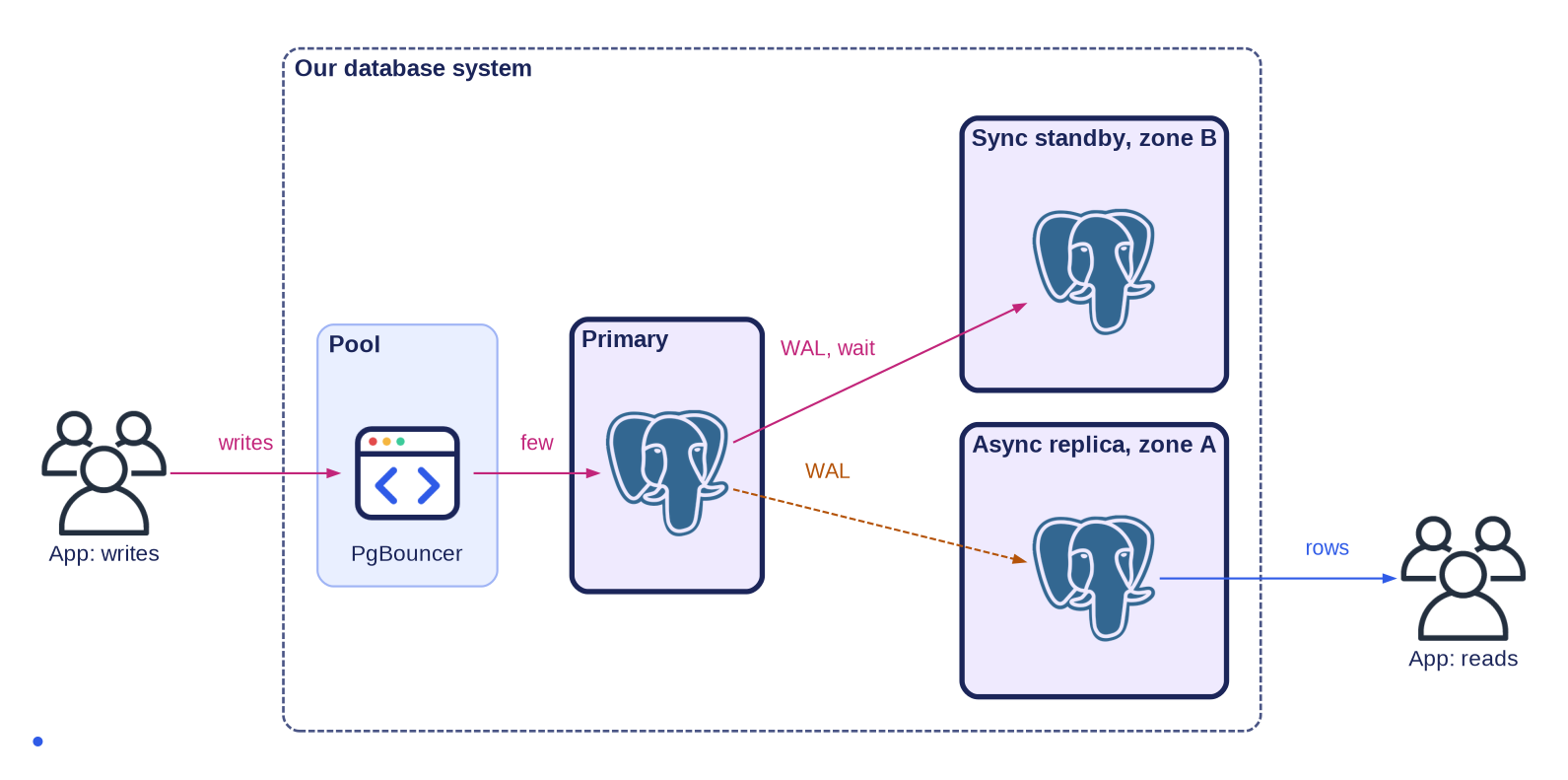
Standbys replay WAL byte for byte. Asynchronous is the default: fast, and a failover may lose the last commits. With synchronous_standby_names a commit waits for a standby, which protects those commits as long as that standby is the one promoted, and stalls writes when no such standby answers. Logical replication sends row changes instead: use it for selected tables or between versions. It does not copy schema changes.
Failover with Patroni
What to do when it is slow
Operations
Settings and commands
Memory settings
| Setting | Default | Start with |
|---|---|---|
shared_buffers | 128 MB | 25% of memory, rarely above 40% |
work_mem | 4 MB, per operation | Small globally, more per query |
maintenance_work_mem | 64 MB | More, for index builds and vacuum |
effective_cache_size | 4 GB, only a hint | 50% to 75% of memory |
wal_buffers | 1/32 of shared buffers, at most a segment | Leave it |
psql -c "SELECT pg_size_pretty(pg_database_size('myapp'));"psql -c "VACUUM (VERBOSE, ANALYZE) users;"psql -c "SELECT pid, state, now() - xact_start AS age, left(query, 60) FROM pg_stat_activity WHERE xact_start IS NOT NULL ORDER BY age DESC;"psql -c "SELECT pg_cancel_backend(12345);" # cancel the querypsql -c "SELECT pg_terminate_backend(12345);" # close the connectionpg_dump -Fc -f backup.dump myapp # logical copypg_restore -d myapp backup.dumppg_basebackup -D /backup/base -X stream -P # base for point-in-time recovery# on a standby: delay of replay (also grows when the primary is idle)psql -c "SELECT now() - pg_last_xact_replay_timestamp() AS lag;"\d+ users shows columns, indexes and size. Practise restoring: a backup that was never restored is a hope.CREATE TABLE users ( id bigint GENERATED ALWAYS AS IDENTITY PRIMARY KEY, public_id uuid NOT NULL DEFAULT uuidv7() UNIQUE, -- version 18 and later email text NOT NULL UNIQUE, status text NOT NULL DEFAULT 'active' CHECK (status IN ('active','inactive','suspended')), updated_at timestamptz NOT NULL DEFAULT now());CREATE TABLE profiles ( user_id bigint PRIMARY KEY REFERENCES users (id) ON DELETE CASCADE, bio text, metadata jsonb NOT NULL DEFAULT '{}');CREATE FUNCTION touch() RETURNS trigger LANGUAGE plpgsql AS $$BEGIN NEW.updated_at = now(); RETURN NEW;END $$;CREATE TRIGGER users_touch BEFORE UPDATE ON users FOR EACH ROW EXECUTE FUNCTION touch();numeric for money and timestamptz for moments.Decide
When to choose it, and what it costs
Choose it when
- Money, bookings or stock must be right
- Questions join many tables and keep changing
- Mostly transactions with some reporting
- Maps (PostGIS), JSON or text search beside relations
- You want rich features without licence fees
Look elsewhere when
Neighbours
| Product | Choose it over PostgreSQL for | PostgreSQL wins on |
|---|---|---|
| MySQL | Primary-key heavy loads, Vitess, team habit | Index types, JSONB, extensions, SQL breadth |
| MongoDB | Document-shaped data, built-in sharding | Joins, constraints, changing questions |
| CockroachDB | Automatic sharding over regions | Single-node speed and the ecosystem |
| TimescaleDB, Citus | They are extensions: add them instead | You keep one database |
Summary
The whole topic in one minute.
PostgreSQL adds a version for every change, so readers and writers do not block each other. The bill is paid by vacuum: if old snapshots, stuck replication slots or a lazy setting stop it, tables bloat and transaction ids run short.
Durability is the WAL, flushed at commit. The same log feeds recovery, backups to a point in time, standbys and change streams. Each connection is a process, so put a pool in front. Grow in order: queries and indexes, memory, pool, replicas, partitions, and sharding last.
- An update adds a version. Vacuum removes versions no snapshot needs.
- The WAL is flushed at commit, and data pages follow later.
- Read committed is the default; retry on 40001 at higher levels.
- Pool connections: each one is a process.
- Pick the index by the operator, and prove it with EXPLAIN.
- Failover needs a tool such as Patroni or a managed service.
- Queries, memory, pool, replicas, partitions, then shards.