
ClickHouse
medium 25 minClickHouse is a column-oriented SQL database for analytics.
Video lesson · Chapter 1 of 5
Dinner orders arrive in a batch
ClickHouse in 75 seconds
1:15Reel coming soon
Theory
Read or listen first. About 2 min.
What it is
ClickHouse stores each column of a table separately, sorted by a key you choose and compressed. A query reads only the columns it names. A small index in memory tells it which ranges of rows cannot match, so they are skipped.
It is open source under the Apache License 2.0, and also sold as a managed service, ClickHouse Cloud. You can run it as one program on a laptop or as a cluster with shards and replicas.
Why it exists
A dashboard asks for a few columns over very many rows: requests per country for the last week. A row store must read every whole row. A column store reads a fraction of the bytes, and processes them in blocks that suit the processor.
The price is in writing. Data should arrive in batches, old rows are not changed in place, and there is no index that finds one row at once. So ClickHouse sits beside the transactional database, not instead of it.
A short history
2009
Work starts inside Yandex as an experiment: can reports be computed in real time from raw data that keeps arriving?
2016
ClickHouse is released as open source.
2018
Cloudflare describes HTTP analytics for 6 million requests a second on a 36-node ClickHouse cluster.
2021
ClickHouse, Inc. is announced in September with the development team moving over from Yandex.
2024
The paper describing the system's design appears in the Proceedings of the VLDB Endowment, volume 17.
Words to know
- Part
- An immutable directory with one inserted or merged batch, sorted by the key.
- Merge
- A background job that joins several parts into one larger part.
- Granule
- The smallest range of rows that is read, 8,192 rows by default.
- Sparse primary index
- One entry per granule, kept in memory. It is not unique.
- Sorting key
- The ORDER BY of the table: the physical order of rows inside a part.
- Partition
- A group of parts, often one month, that can be dropped at once.
- Materialized view
- Here: a trigger that transforms each inserted block into another table.
- Keeper
- The coordination service that stores what replicas must agree on.
How it works
Step through the idea, or press Play.
Batch. Thousands of rows become one sorted, compressed part
Understand it
Start here
The spice stall with long drawers
Imagine a spice stall. Every order names how much pepper, cumin, paprika and salt was sold. Instead of keeping whole order slips, the trader keeps one long drawer per spice, with one card per order, always in the same sequence.
Changing one old card is slow, because the drawers are packed. Adding a new tray is quick.
The product
What you get
Facts checked November 2026
| Topic | Fact |
|---|---|
| Licence | Apache License 2.0 |
| Releases | Year and month, such as 26.10. Some are LTS, such as 26.3 and 26.8 |
| Forms | Server, command line tool, in-process library (chDB), managed cloud |
| Interfaces | HTTP on 8123, native protocol on 9000 |
| Main table engine | MergeTree and its family |
| Coordination | ClickHouse Keeper (Raft), protocol compatible with ZooKeeper |
CREATE TABLE hits( site_id UInt32, ts DateTime, country LowCardinality(String), path String, user_id UInt64, latency_ms UInt32 CODEC(T64, ZSTD(1)), INDEX idx_user user_id TYPE bloom_filter GRANULARITY 4)ENGINE = MergeTreePARTITION BY toYYYYMM(ts)ORDER BY (site_id, ts)TTL ts + INTERVAL 13 MONTH DELETE;Inside
From an insert to a part
Events on their way to a dashboard
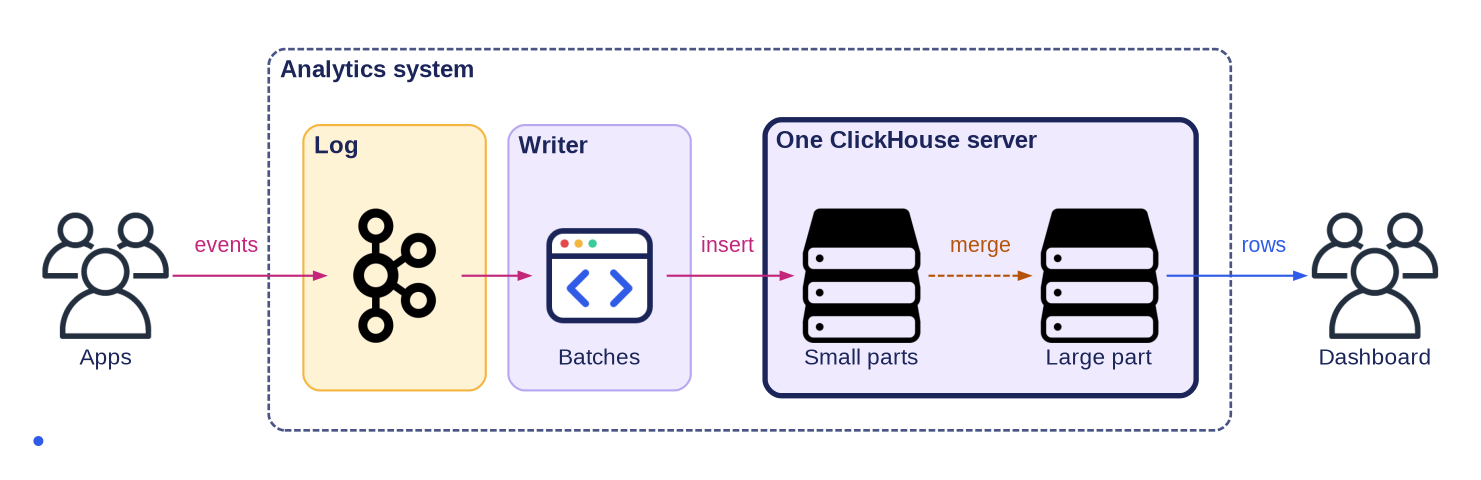
What one insert does
- 1
Split by partition
Rows for different months go to different parts. An insert that covers many partitions makes many parts and is atomic only within each.
- 2
Sort
Rows are ordered by the sorting key.
- 3
Compress by column
By default LZ4 for small parts and ZSTD(3) for parts from 100 MiB. Codecs such as Delta can be set for a column.
- 4
Write a directory
Small parts keep all columns in one file (compact). Larger ones use a file per column (wide, from 10 MiB by default).
- 5
Publish
The part becomes visible. Merges will replace it later.
The shape resembles an LSM tree: sorted runs on disk, joined in the background. One difference is that an insert writes a sorted part directly and there is no level structure to look up one key.
Why one insert per row fails
The numbers that protect merges
| Setting or advice | Value | Effect |
|---|---|---|
| Recommended batch | At least 1,000 rows, ideally 10,000 to 100,000 | Fewer, larger parts |
| Recommended rate | About one synchronous insert a second | Merges keep up |
parts_to_delay_insert | 1,000 active parts in a partition | Inserts are slowed |
parts_to_throw_insert | 3,000 active parts in a partition | "Too many parts" error |
Writes
Asynchronous inserts and safe retries
When many small clients cannot batch, the server can do it. With async_insert the server collects rows in a buffer and writes one part when the buffer is large or old enough. The current documentation lists it as on by default, with wait_for_async_insert = 1, so the answer comes after the flush. Earlier releases had it off, so check your server.
Many clients, one part
Safe pipeline
- Retry the identical batch: the same rows in the same order
- Replicated tables keep a deduplication log of recent blocks
- Plain MergeTree needs
non_replicated_deduplication_windowabove 0 - Put an event id in the row, so duplicates can be found
Not safe
- Fire and forget for data you bill from
- Retrying with a different batch boundary
- Assuming the primary key is unique
- One insert spread over 400 daily partitions
Reads
Granules and the sparse index
The index holds the key of the first row of every granule. For 100 million rows that is about 12,208 entries, small enough to stay in memory. A query that filters on the first key column finds the granules by binary search. Then whole granules are read, because there is no entry for a single row.
Entries in the index
What a query skips
EXPLAIN indexes = 1 shows how many parts and granules survive each step.ORDER BY (site_id, ts): who benefits?
| Filter | Index use | Remedy if it is common |
|---|---|---|
| site_id = 7 | Excellent | None |
| site_id = 7 and last week | Excellent | None |
| last week, all sites | Partition pruning, weak inside | A rollup by day |
| user_id = 99 | None | Skip index if values cluster, a projection, or another table in that order |
Bytes read by a total
Summaries
Materialized views and rollups
In ClickHouse an incremental materialized view is a trigger on insert. It runs its query on each new block and writes the result to a target table. It does not see rows that were there before, nor later changes to a joined table. The target uses an engine that adds partial results together during merges.
CREATE TABLE hits_per_minute( site_id UInt32, minute DateTime, hits SimpleAggregateFunction(sum, UInt64), users AggregateFunction(uniq, UInt64))ENGINE = AggregatingMergeTreeORDER BY (site_id, minute);CREATE MATERIALIZED VIEW hits_per_minute_mv TO hits_per_minute ASSELECT site_id, toStartOfMinute(ts) AS minute, count() AS hits, uniqState(user_id) AS usersFROM hits GROUP BY site_id, minute;-- Always aggregate again: partial rows may not be merged yetSELECT minute, sum(hits) AS hits, uniqMerge(users) AS usersFROM hits_per_minuteWHERE site_id = 7 AND minute >= now() - INTERVAL 1 HOURGROUP BY minute ORDER BY minute;uniq is approximate, and its state can be merged across minutes. A plain count of users per minute cannot be added up to users per hour.Four relatives of MergeTree
ReplacingMergeTree
Keeps the latest row per sorting key, when a merge happens. Use FINAL or argMax for exact answers.
SummingMergeTree
Adds numeric columns of equal keys during merges.
AggregatingMergeTree
Merges stored aggregate states, such as distinct users.
CollapsingMergeTree
A row with sign -1 cancels an earlier row with sign 1.
Changes
Updates, deletes and transactions
| You want | Tool | Know this |
|---|---|---|
| Forget old data | TTL or DROP PARTITION | Cheap: whole parts go |
| Delete some rows | DELETE FROM | By default rows are masked by a mutation, and removed by later merges |
| Update a few rows | UPDATE with patch parts | For up to about 10% of a table. Needs block number columns enabled |
| Rewrite a column | ALTER TABLE ... UPDATE | Heavy mutation that rewrites parts |
| Keep the latest state | ReplacingMergeTree with a version | Duplicates remain until a merge |
| Several tables atomically | Another database | Transactions across statements are experimental |
Why FINAL exists
Growth
Shards, replicas and Keeper
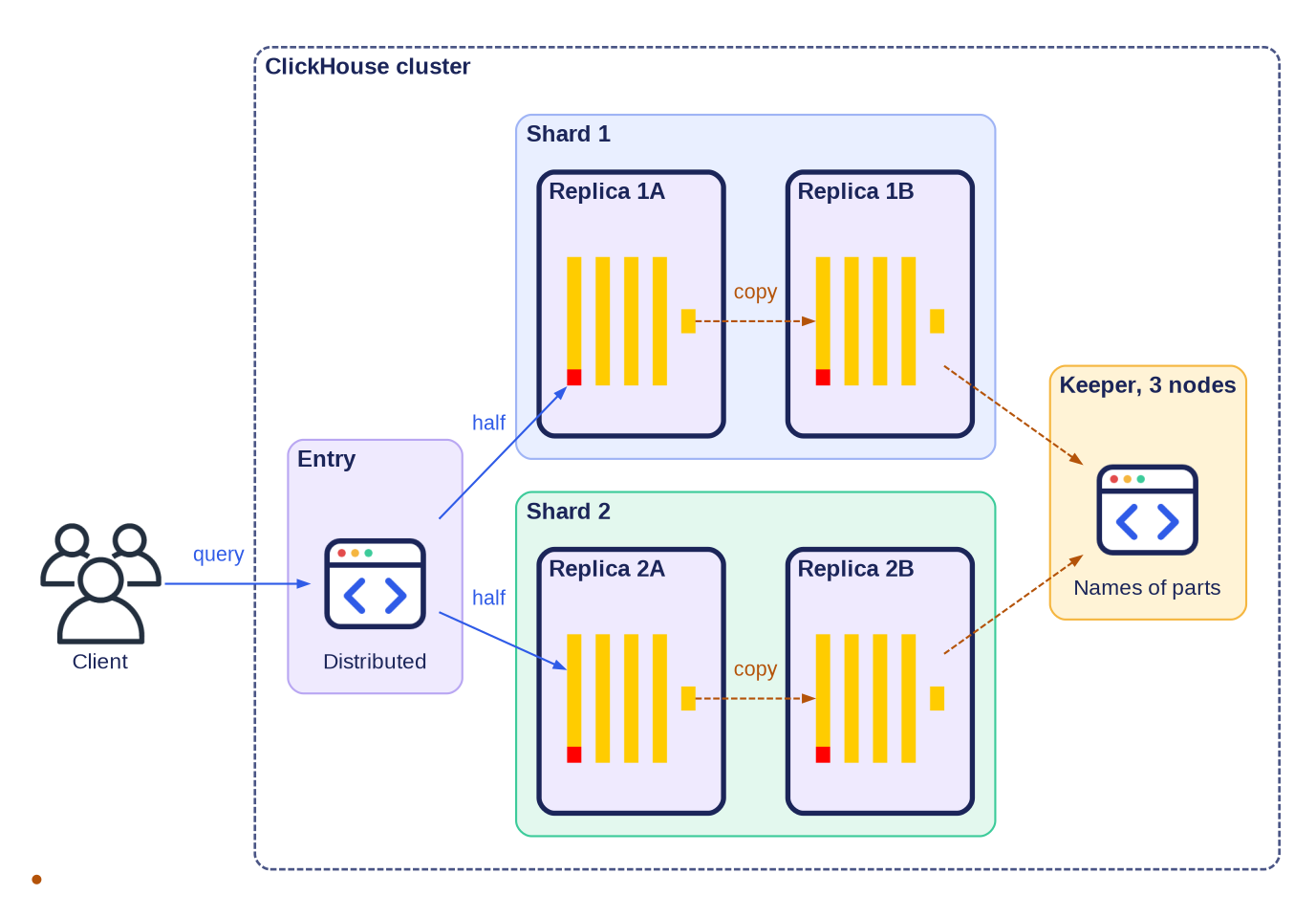
Two shards, two replicas each
- 1
Replication
Asynchronous and multi-master: an insert may go to any replica and is copied later. By default the insert waits for one replica only, so losing that server can lose the newest rows.
insert_quorumwaits for more. - 2
Sharding
A Distributed table stores nothing. It sends a query to every shard and combines partial results. With replicated tables below it, set
internal_replicationto true; the default is false. - 3
Keeper
Three nodes of ClickHouse Keeper tolerate one failure. If Keeper is unavailable, replicated tables become read-only. See consensus in practice: etcd.
- 4
Separated storage
ClickHouse Cloud uses SharedMergeTree: data in object storage, and compute that can be added without copying parts. Self-hosted clusters use ReplicatedMergeTree.
Operations
What to watch, and joins
Watch
- Active parts per partition (
system.parts) - Merges and mutations in progress
- Replication queue and read-only replicas
- Slow queries and memory (
system.query_log) - Disk space: merges need room to write
Guard
- Set memory, time and row limits for each user
- Keep dashboards on rollups, not on raw rows
- Separate ad-hoc users from the product
- Back up to object storage: replicas copy mistakes
How to bring names to facts
LowCardinality(String) makes repeated text small.Decide
When to choose it, and when not
Choose it when
- Many rows, few columns, totals and groups
- Answers in seconds or less while data keeps arriving
- Facts are appended and rarely changed
- Logs, metrics, product analytics, ad clicks
Do not when
- You fetch or update one row by id
- You need transactions over several tables
- The data fits comfortably in PostgreSQL
- Search ranking is the product: use Elasticsearch
Neighbours
| Choice | Better when | Weaker when |
|---|---|---|
| TimescaleDB | Time series beside relational data, full SQL transactions | Very large scans over many columns and teams |
| A cloud warehouse | Batch reports, many teams, no servers to run | User-facing dashboards with many small queries |
| Flink | Windows and alerts while events flow | Asking a new question about last year |
| Files with an embedded engine | One analyst, one machine | Constant ingestion and many users |
Cost is processor time for queries, disk for compressed columns and room for merges, plus the people who run Keeper, upgrades and schema changes. Managed services charge for compute and storage separately. Test with your own data: compression and speed depend on the sorting key.
Summary
The whole topic in one minute.
ClickHouse wins analytics by reading less: only the needed columns, only the granules that can match, and compressed. The sorting key is the most important choice you make.
Insert in batches or let asynchronous inserts build them, because every insert makes a part. Treat rows as facts that do not change. Retries need deduplication, replicas lag, and Replacing tables remove duplicates at an unknown time. Use rollup tables for dashboards and drop old partitions to forget.
- Columns are stored apart, sorted and compressed, so totals read few bytes.
- Every insert makes a part. Batch, or let asynchronous inserts batch.
- The sparse index has one entry per 8,192 rows and enforces no uniqueness.
- Choose ORDER BY from your filters and PARTITION BY from how you delete.
- Merges happen at an unknown time, so aggregate again or use FINAL.
- Replication is asynchronous, and Keeper is a dependency.