
Cassandra
hard 38 minApache Cassandra spreads rows around a ring of equal nodes and copies each row to several of them.
Video lesson · Chapter 1 of 5
Find a temperature reading
Cassandra in 80 seconds
1:20Reel coming soon
Theory
Read or listen first. About 2 min.
What it is
Apache Cassandra is an open-source database for a cluster of equal machines. It joins two ideas: the ring and copies of Amazon's Dynamo, and the partitioned, sorted rows of Google's Bigtable. Its language, CQL, looks like SQL without joins.
A row belongs to a partition. A hash of the partition key gives a token, and the token says which nodes keep the row. Inside a partition, rows are sorted by the clustering columns. People call this a wide-column store.
Why it exists
A database with one primary stops taking writes when that machine fails, until another takes over. It also limits writes to what one machine can do. Cassandra lets several copies accept each write, so a lost node, rack or data centre need not stop anything.
Storage fits that aim. A write is an addition to a log and to a table in memory, and files on disk are never changed, only merged later. So writes stay quick, and the cost appears in reads, in merging, and in keeping the copies equal.
A short history
July 2008
Facebook releases Cassandra as open source. It was built there for the search in the inbox.
17 February 2010
Cassandra graduates from the incubator and becomes a top-level Apache project.
27 July 2021
Version 4.0 is released, almost six years after version 3.0 of November 2015.
5 September 2024
Version 5.0 is announced, with storage-attached indexes, trie structures, a vector type and unified compaction.
Words to know
- Node
- One Cassandra machine. All nodes have the same role.
- Token
- A number from hashing the partition key. It is a place on the ring.
- Replication factor (RF)
- How many nodes keep each row in one data centre.
- Consistency level (CL)
- How many copies must answer one query.
- Coordinator
- The node that received the request and asks the copies.
- SSTable
- A sorted file on disk that is never changed.
- Tombstone
- A mark that says a value was deleted.
- Repair
- Comparing copies and sending what is missing.
How it works
Step through the idea, or press Play.
Model by query. One table for each question, keyed by what it gives
Understand it
Start here
The ring of beach huts
Six beach huts stand in a ring around a bay. Each hut keeps the tide notes of its own stretch of beach, and copies for the huts before it. Nobody is in charge. Imagine handing in a note at any hut.
The ideas behind it have their own pages: consistent hashing, LSM trees, consistency models. This page is about the product.
Fit
When to choose it
Heavy writes
A write is an append and a change in memory. Adding nodes adds write capacity, when keys spread well.
No primary to lose
With RF 3 and quorums, one lost copy is not noticed by clients.
Several data centres
Each can serve reads and writes near its users, with its own number of copies.
Growth without a pause
A new node takes ranges from others while the cluster works.
Choose it when
- Writes are many and steady: events, readings, messages
- Queries are known and start from a key
- Data is ordered by time and can expire
- Several regions must accept writes
- You want to run it anywhere
Look elsewhere when
- You need joins or free questions
- Most writes need a check across partitions
- The data fits one server
- Rows are deleted all the time, as in a queue
- Nobody will operate repairs and compaction
Architecture
The ring and the copies
Coordinator, three copies, a second data centre
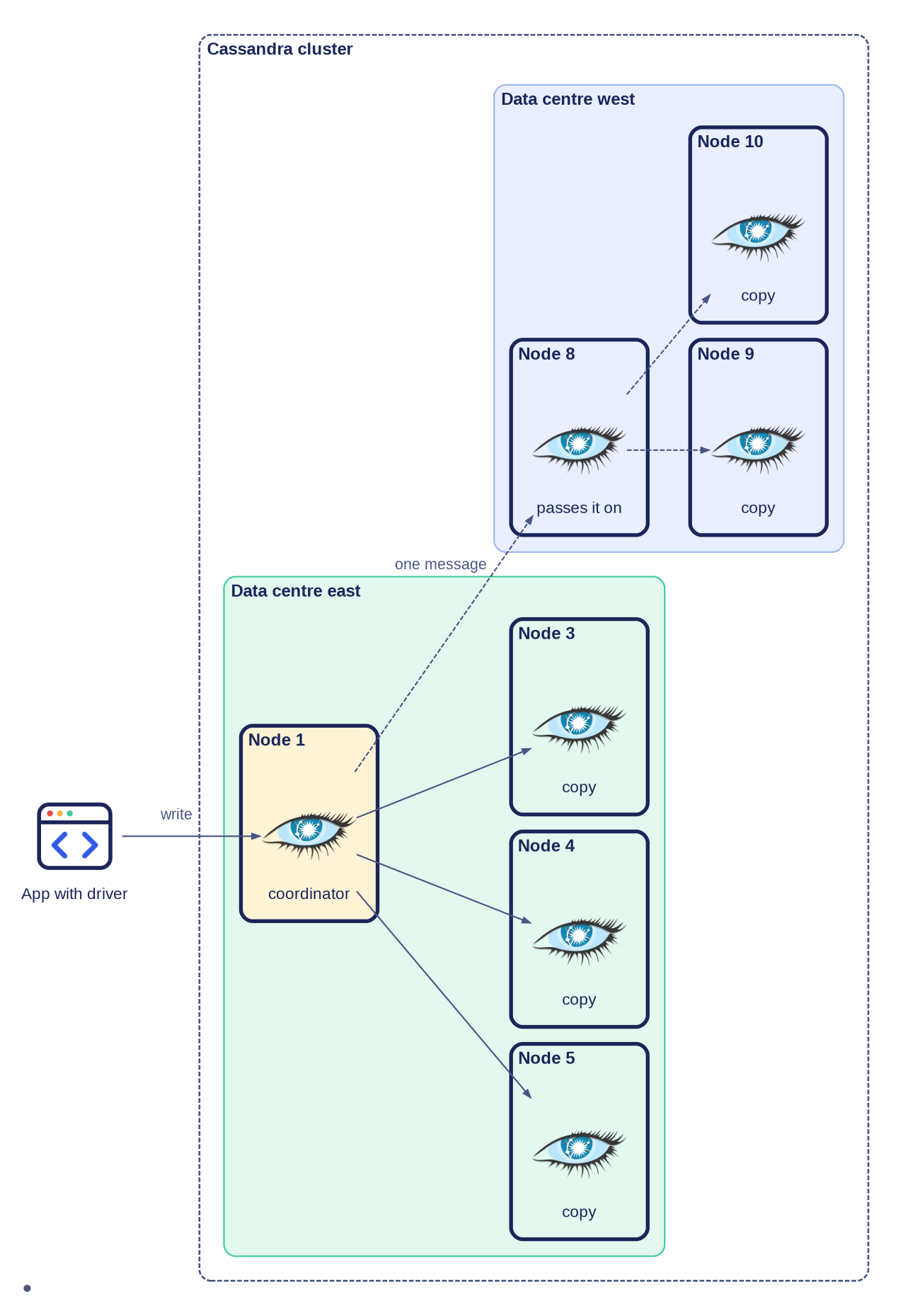
Cassandra's partitioner hashes the key to a signed 64-bit token, from to . Each node has several tokens, so its share is many small ranges. These are virtual nodes, and the default is 16 for each node since 4.0. A joining node then takes a little from many others. More tokens spread work better but give every node more partners, so more pairs of failures matter.
- 1
The client asks
A driver keeps connections to many nodes. A token-aware driver hashes the key itself and goes straight to a copy.
- 2
The coordinator routes
It finds the copies of that token and sends them the request. It waits for as many as the level says.
- 3
A copy writes
It adds to the commit log and to the memtable, and answers.
- 4
A flush
A full memtable becomes an SSTable on disk, with an index and a Bloom filter.
- 5
Compaction
Files are merged in the background, and old versions and expired tombstones go.
- 6
Other data centres
The coordinator sends one copy of the write to each other data centre, and a node there passes it on.
A write with LOCAL_QUORUM
Gossip tells nodes about each other. Every second a node exchanges state with a few others: who is up, which tokens they have, which schema version. Silence raises suspicion, described in failure detection.
Consistency
Choose a level for each query
Levels, with RF 3 in each of two data centres
| Level | Answers needed | Use |
|---|---|---|
| ANY | One node, a hint counts (writes only) | Rarely |
| ONE, TWO, THREE | 1, 2, 3 | Data that may be stale |
| LOCAL_ONE | 1 in this data centre | Quick local reads |
| QUORUM | 4 of 6 over both | Strong across both, pays the distance |
| LOCAL_QUORUM | 2 of 3 here | The usual choice |
| EACH_QUORUM | 2 of 3 in each | Writes that must be in both |
| ALL | All 6 | One lost node fails it |
| SERIAL, LOCAL_SERIAL | Majority with Paxos | Conditional writes |
When a read sees the last write
Last write wins. Each value has a timestamp, usually from the client or coordinator clock, and the newest stays. Two people who change the same column at the same time lose one change silently, and a machine with a fast clock wins too often. Keep clocks in step.
Which level?
Storage
Inside one node: the write path
Commit log, memtable, SSTables
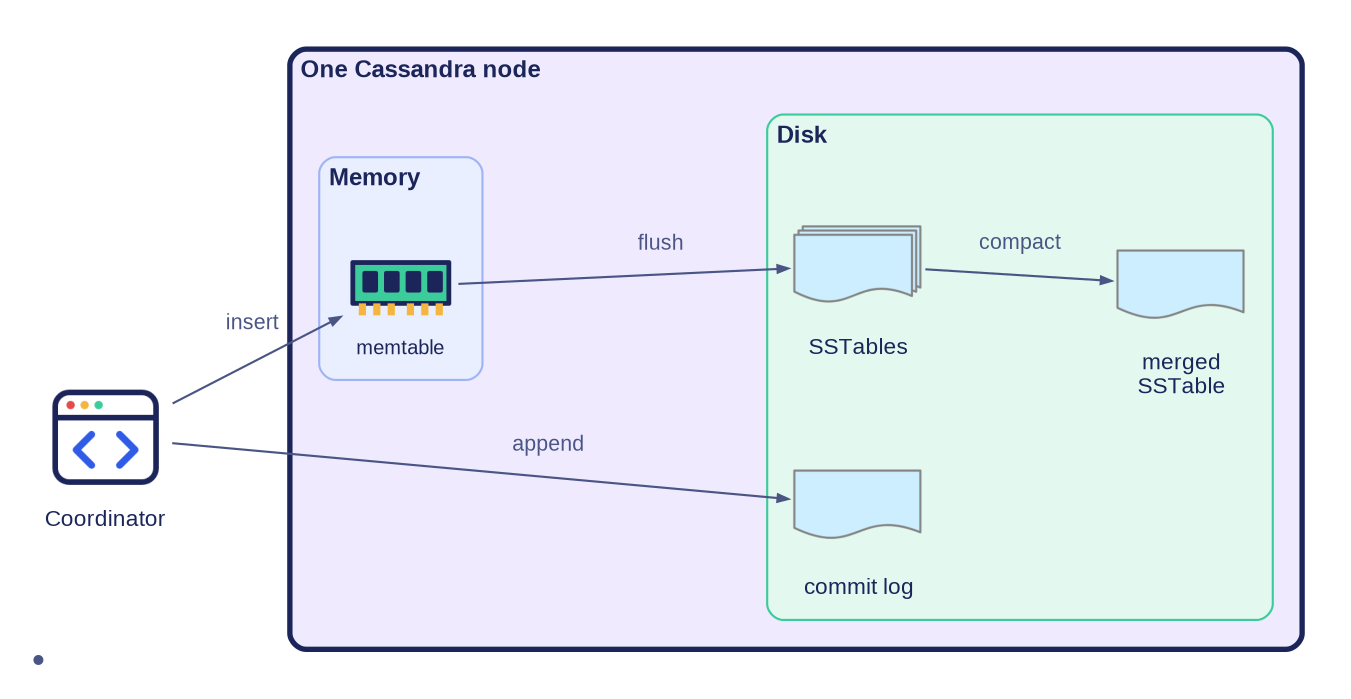
- 1
Commit log
An append. By default (
periodic) the write is acknowledged at once and the log is forced to disk every 10 seconds, so a single machine that loses power can lose the last seconds. Copies on other machines cover that.batchmode waits for the disk. - 2
Memtable
A sorted structure in memory, one for each table.
- 3
Flush
When memtables use too much memory, or the commit log is near its maximum size, the memtable becomes an SSTable.
- 4
SSTable
Sorted by token and then by clustering columns. With it: a partition index, a summary, a Bloom filter, statistics.
So a write costs an append and an insertion into a sorted structure, in memory. It does not read from disk, unless it is conditional, a counter, or has an index to maintain.
Storage
The read path
- 1
Row cache, if switched on
Off by default. Useful only for a few hot rows.
- 2
Memtables
The active one and any that are being flushed.
- 3
Bloom filters
For each SSTable: the partition is certainly not here, or perhaps it is. A false positive costs a look, a false negative never happens.
- 4
Index
Find the place of the partition in the file.
- 5
Merge
Combine all versions, newest timestamp for each column, with tombstones applied.
Wasted looks with n files
A read may have to open several files, so reads are usually dearer than writes. Merging files is what keeps that number small.
Storage
Compaction strategies
| Strategy | Idea | Good for | Cost |
|---|---|---|---|
| Size-tiered (STCS) | Merge 4 or more files of similar size | Many writes | Extra disk while merging; a row may be in many files |
| Leveled (LCS) | Levels of files that do not overlap, each 10 times the last | Many reads and updates | Much more writing |
| Time-window (TWCS) | One set of files for each time window | Time series with TTL | Bad with late data, updates or deletes |
| Unified (UCS), from 5.0 | One strategy with settings that act like the others | Recommended for most new tables | Needs 5.0 |
With TWCS and one TTL for all rows, a whole file becomes old at the same time and is simply deleted. For data kept 30 days use windows of one day; for 90 days, three days.
Modelling
One table for each query
Write the questions first. If orders are asked for by customer and by status, make two tables and write both. Storage is cheap here, joins do not exist.
CREATE KEYSPACE shop WITH replication = { 'class': 'NetworkTopologyStrategy', 'dc_east': 3, 'dc_west': 3 };CREATE TABLE shop.orders_by_customer ( customer_id uuid, order_date date, order_id timeuuid, status text, cents bigint, items list<text>, PRIMARY KEY ((customer_id, order_date), order_id)) WITH CLUSTERING ORDER BY (order_id DESC);-- Allowed: both parts of the partition key, then clustering columns from the left.SELECT * FROM shop.orders_by_customer WHERE customer_id = 123e4567-e89b-12d3-a456-426614174000 AND order_date = '2026-01-15' LIMIT 5;Rules for WHERE
| Rule | Example |
|---|---|
| All of the partition key, with equality | customer and date |
| Clustering columns from left to right, none skipped | year, then month |
| A range only on the last one used | month > 3 |
| Order is fixed by the table | Another order: another table |
| Page by the last key seen | There is no OFFSET |
| ALLOW FILTERING is a warning | It may read the whole cluster |
Good partition keys
- Many values, evenly used:
user_id - With a bucket:
(sensor_id, day) - Partition stays small for its whole life
- Every query gives it
Bad partition keys
- Few values:
country,status - Grows for ever:
sensor_idalone - One value for now:
today - So fine that a page needs thousands
How big is a partition?
For a secondary question, storage-attached indexes (5.0) index columns of a table. They work best when the query also gives the partition key. Without it, many nodes must answer, so a second table is still the safe choice for a busy query.
Time series
Readings with a bucket and a TTL
CREATE TABLE iot.readings ( sensor_id text, bucket text, -- '2026-01-15-14': one hour reading_id timeuuid, temperature double, humidity double, PRIMARY KEY ((sensor_id, bucket), reading_id)) WITH CLUSTERING ORDER BY (reading_id DESC) AND compaction = { 'class': 'TimeWindowCompactionStrategy', 'compaction_window_unit': 'DAYS', 'compaction_window_size': 1 } AND default_time_to_live = 2592000; -- 30 daysINSERT INTO iot.readings (sensor_id, bucket, reading_id, temperature, humidity)VALUES ('s-1', '2026-01-15-14', now(), 23.5, 65.2);SELECT * FROM iot.readings WHERE sensor_id = 's-1' AND bucket = '2026-01-15-14' AND reading_id >= minTimeuuid('2026-01-15 14:30:00+0000') AND reading_id <= maxTimeuuid('2026-01-15 14:45:00+0000');SELECT TTL(temperature), WRITETIME(temperature) FROM iot.readings WHERE sensor_id = 's-1' AND bucket = '2026-01-15-14' LIMIT 1;Staying equal
Hints, read repair, repair
| Mechanism | When | Limit |
|---|---|---|
| Hinted handoff | A copy was down during a write | Hints are kept for up to 3 hours of downtime |
| Read repair | A read finds copies that differ | Only for rows that are read |
| Repair | You run it, or a scheduler does | Must finish within gc_grace_seconds |
A hint, then read repair
Repair builds a tree of hashes, a Merkle tree, for each range on each copy, compares them, and sends only the ranges that differ. Incremental repair is the default type and looks at data written since the last one. Full repair looks at everything. The documentation offers a starting point: incremental every 1 to 3 days and full every 1 to 3 weeks.
nodetool status # up or down, load, owned sharenodetool repair shop # incrementalnodetool repair --full -pr shop # full, only this node's primary rangesnodetool tablestats shop.orders_by_customernodetool compactionstatsnodetool tpstats # dropped messages are a warningDeletes
Tombstones and zombies
A delete cannot simply remove a value: a copy that missed the delete would bring it back. So a delete is a write, a tombstone with a timestamp. It is kept for gc_grace_seconds, 864,000 seconds or 10 days by default, and then compaction may drop it.
How a zombie is made
Reads must step over tombstones. By default a query warns at 1,000 and fails at 100,000 of them. So do not build a queue with deletes. Prefer TTL with TWCS, or drop whole partitions.
Correct writes
Batches and lightweight transactions
| Tool | Gives | Does not give |
|---|---|---|
| One statement in one partition | Atomic and isolated | A check of the old value |
| Logged batch, one partition | Atomic and isolated; runs as unlogged | Speed for bulk loading |
| Logged batch, several partitions | All will be applied in the end, or none | Isolation: others see it half done |
| Unlogged batch | Fewer round trips to one partition | All or nothing |
| Counter batch | Several counters in one request | Safe retries |
| Lightweight transaction (LWT) | Compare and set in one partition | Low cost |
An LWT uses Paxos: prepare, propose, commit, with a read between. The default variant (v1) needs four round trips for a write. paxos_variant: v2, available since 4.1, needs two and is the recommended one. It must be switched on as the documentation describes.
-- Unique e-mail: make it the key. (A condition on user_id would not check the e-mail.)INSERT INTO shop.users_by_email (email, user_id) VALUES ('sam@example.com', uuid()) IF NOT EXISTS;-- Compare and set. Read the stock first, then:UPDATE shop.inventory SET stock = 95 WHERE product_id = 'p-1' IF stock = 100;-- [applied] = False gives the current value: read again and retry.-- A lock that frees itself after 30 seconds.INSERT INTO shop.locks (name, holder) VALUES ('report', 'w-1') IF NOT EXISTS USING TTL 30;UPDATE shop.locks USING TTL 30 SET holder = 'w-1' WHERE name = 'report' IF holder = 'w-1';DELETE FROM shop.locks WHERE name = 'report' IF holder = 'w-1';Regions
Several data centres
NetworkTopologyStrategy gives each data centre its own number of copies and puts them on different racks where it can. With LOCAL_QUORUM a write waits for two local copies and the other data centre catches up afterwards. If a whole data centre is lost, the others go on, and writes that had not crossed yet are missing until it returns.
Local and each quorum
Operations
Defaults and daily care
| Setting | Default | Remember |
|---|---|---|
| num_tokens | 16 | It was 256 before 4.0 |
| commitlog_sync_period | 10 s, periodic mode | Not forced to disk for each write |
| max_hint_window | 3 hours | Longer away: repair |
| gc_grace_seconds | 10 days | Repair more often than this |
| read_request_timeout | 5 s | On the server side |
| write_request_timeout | 2 s | A timeout does not mean not written |
| Multi-partition batch | Fails above 50 KiB | Keep batches small |
- 1
Watch
Latency at the 99th percentile, dropped messages, pending compactions, hints, tombstones read, largest partition.
- 2
Keep disk room
Size-tiered compaction may need about as much free space as the files it merges.
- 3
Add and remove one node at a time
Let streaming finish, then run cleanup on the others.
- 4
Back up with snapshots
A snapshot links the files that never change. A wrong delete is copied to all replicas, so copies are not a backup.
- 5
Upgrade in a rolling way
One node after another, and no schema changes while versions are mixed.
Decide
Trade-offs and neighbours
What you gain
- Scale: add nodes for data and writes.
- No single point of failure in the cluster.
- Writes: appends and memory.
- Data centres: active in several at once.
- Choice: a consistency level for each query.
What you pay
- No joins: data is copied into several tables.
- No free questions: a table for each query.
- Reads: several files, merged.
- Operations: repair, compaction, tombstones.
- Learning: query-first modelling is unusual.
Compared with neighbours
| Alike | Different | Choose the other for | |
|---|---|---|---|
| PostgreSQL | Tables, a query language, types | Joins, transactions, one primary | Relations, money, smaller data |
| MongoDB | Horizontal scale, replication | Documents, free queries, one primary for each shard | Changing questions |
| DynamoDB | Partition and sort keys, high write rate | Managed, leader for each partition, AWS only | No servers to run |
Summary
The whole topic in one minute.
Cassandra is a ring of equal nodes. The partition key chooses the nodes, the clustering columns choose the order, and each query chooses how many copies must answer. If read copies plus write copies are more than the replication factor, a read sees the last confirmed write.
The price is paid in modelling and care: one table for each query, partitions kept small, deletes handled with respect, and repair finished before tombstones are dropped.
- Equal nodes on a token ring; the partition key picks the copies.
- R + W > RF gives reads that see the last write; LOCAL_QUORUM is the usual level.
- Writes are appends; reads merge files; compaction keeps the files few.
- One table for each query, with bounded partitions.
- Deletes are tombstones: repair within 10 days or old data returns.
- LWT is compare and set in one partition, and it is dear.