
Amazon ElastiCache
medium 28 minAmazon ElastiCache is AWS's managed in-memory store.
Video lesson · Chapter 1 of 5
A price lookup misses the cache
ElastiCache in 90 seconds
1:30Reel coming soon
Theory
Read or listen first. About 2 min.
What it is
Amazon ElastiCache is a service that runs an in-memory data store for you inside your AWS network. You choose one of three engines: Valkey, Redis OSS or Memcached. Your application talks to it with an ordinary client for that engine.
There are two ways to rent it. A node-based cluster is a number of machines whose type and count you choose. A serverless cache has no nodes to choose: it grows and shrinks, and you pay for the stored data and for the work your requests cause.
It is most often used as a cache beside a database. With replicas, backups and, for newer Valkey versions, a durable log, it can also hold data that lives only there.
Why it exists
Reading a value from memory on another machine takes well under a millisecond plus the network. A database query often takes tens of milliseconds and uses resources that are hard to add.
Running such a store yourself means replacing broken machines, promoting replicas, patching, resizing without losing data, and watching all of it at night. ElastiCache takes that work. What it cannot take is the design of the cache: see cache-aside and choosing a cache pattern.
It is the usual answer in designs on AWS when you say the words "in-memory cache". Knowing what is inside, and what is lost in a failover, makes the answer strong.
A short history
22 August 2011
AWS announces ElastiCache, at first with Memcached only.
4 September 2013
Redis is added as a second engine.
27 November 2023
Serverless caches for Redis OSS and Memcached.
28 March 2024
After a licence change of Redis, the Linux Foundation announces Valkey, a fork of Redis 7.2.4 that stays open source.
8 October 2024
ElastiCache supports Valkey, starting with 7.2. For Redis OSS it offers versions up to 7.1.
2026
Valkey 9.0 and 9.1 arrive in ElastiCache. Since 9.0 a node-based cluster can write to a durable log in several zones, and serverless caches can have a public endpoint.
Words to know
- Engine
- The software inside: Valkey, Redis OSS or Memcached.
- Node
- One cache machine of a chosen type.
- Shard
- A primary node and up to five replicas that hold the same part of the data.
- Cluster mode
- Enabled: the data is split over several shards. Disabled: one shard holds everything.
- Hash slot
- One of 16,384 groups of keys. Each shard owns some of them.
- Multi-AZ
- Replicas stand in other availability zones, and one is promoted if the primary fails.
- ECPU
- The unit of work in serverless billing. Simple reads and writes cost one per kilobyte transferred.
- Endpoint
- The DNS name your client connects to: primary, reader or configuration endpoint.
How it works
Step through the idea, or press Play.
Ask. The client finds the shard that owns the key
Understand it
Start here
The rented pantry
Imagine a kitchen that fetches every jar from a market twenty minutes away. The cook could build a pantry. Instead the kitchen rents a walk-in pantry next door, and the rent includes a keeper.
The keeper replaces broken shelves and minds the spare. Which jars to keep is still the cook's decision.
Engines
Valkey, Redis OSS or Memcached
The three engines, November 2026
| Valkey | Redis OSS | Memcached | |
|---|---|---|---|
| Versions offered | 7.2 to 9.1 | 4.0 to 7.1 | 1.4 to 1.6.22 |
| Data types | Strings, hashes, lists, sets, sorted sets, streams and more | The same family | Strings only |
| Replicas and failover | Yes | Yes | No on node-based clusters |
| Shards | Yes, with cluster mode | Yes, with cluster mode | Yes, the client spreads keys over nodes |
| Backups | Yes | Yes | Serverless only |
| Durable log, search, vectors | Yes, in newer versions | No | No |
| Threads | One thread for commands, others for network work | The same | Many threads |
Valkey
The default choice for something new. AWS puts new features here, and it accepts the commands of Redis OSS 7.2.
Redis OSS
For existing clusters. You can upgrade to Valkey in place, and you cannot go back without a new cluster.
Memcached
The simplest model: a big, multi-threaded hash table. Losing a node loses its share of the cache.
The word OSS matters. Redis changed its licence in 2024, and current Redis versions from Redis Ltd. are not what ElastiCache runs. The engines have their own pages: Redis, Memcached and the comparison Memcached and Redis.
The shape
Shards, replicas and zones
Two shards, one replica each
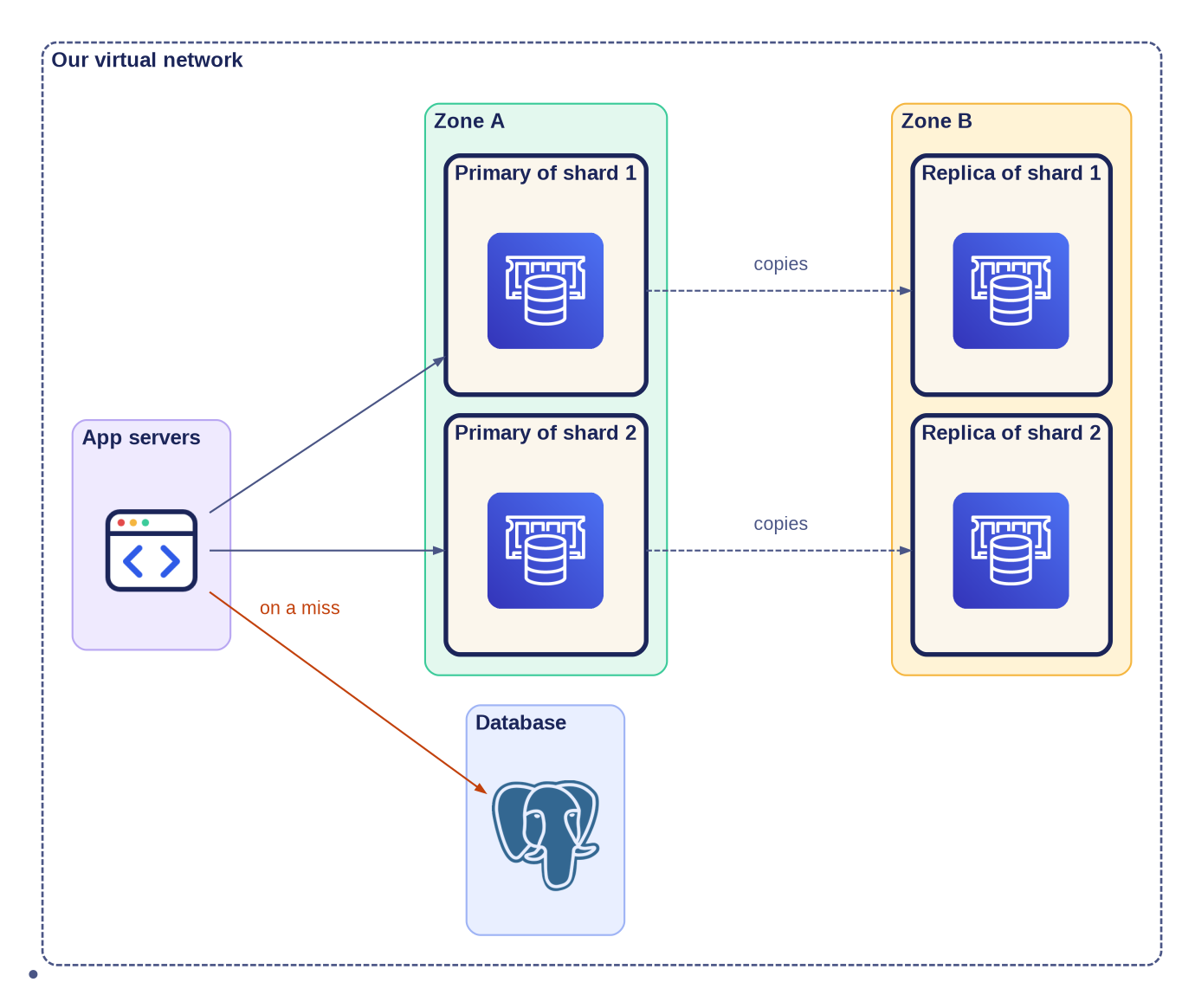
| Cluster mode disabled | Cluster mode enabled | |
|---|---|---|
| Shards | 1 | 1 to 500 |
| Replicas per shard | 0 to 5 | 0 to 5 |
| Grow for reads | Add replicas | Add replicas |
| Grow for writes or size | A larger node type | More shards, online |
| Client connects to | Primary and reader endpoint | Configuration endpoint, with a cluster client |
| Automatic failover | Optional, recommended | Always on |
A key belongs to a slot: CRC16 of the key, modulo 16,384. Commands on several keys work only if the keys are in the same slot. Put the common part in braces, as in cart:{42}:items and cart:{42}:total, and only the part in braces is hashed. The general idea is data partitioning.
From key to node
Sizing
How much memory, how many nodes
Usable memory and shards
- 1
Reserve
The reserve is for copy-on-write, output buffers and fragmentation. AWS advises against lowering it, and recommends 30 percent on small and 50 percent on micro nodes.
- 2
Overhead
Each key costs some bytes on top of its value. Load a sample and measure instead of adding up sizes.
- 3
Eviction
The default policy is
volatile-lru: only keys with a lifetime may be thrown out. If nothing has a lifetime, writes fail when memory is full. For a pure cache chooseallkeys-lru. - 4
One hot key
More shards do not help a single key. Cache it in the application, or read it from replicas. See high-concurrency caching.
Failure
What happens when a node dies
A failover, step by step
| Setup | A primary fails | A zone fails | AWS uptime commitment |
|---|---|---|---|
| No replica | Data of that shard is lost, a new empty node comes | The same | Lower (single-AZ) |
| Replica, Multi-AZ | Replica with the least lag is promoted, writes resume in seconds | Survives | 99.99% |
| Serverless | Hidden from you, data in three zones | Survives | 99.99% |
| Memcached over several zones | The node's share of keys is lost | The share in that zone is lost | 99.9% |
How much can a failover lose?
Durability
From cache to data store
With Valkey 9.0 and later on node-based clusters you can switch on durability. Every write also goes to a log that is spread over several zones. There are two modes, and the mode can be changed on a running cluster.
| Mode | The client gets OK | Write latency | Can be lost |
|---|---|---|---|
| Off | When the primary has it in memory | Microseconds | What was not yet replicated |
| Asynchronous log | Before the log has it | Microseconds | Up to 10 seconds of writes |
| Synchronous log | After at least two zones have it | Single-digit milliseconds | Designed for nothing |
Backups are something else: a snapshot once a day or on demand, kept for at most 35 days. They warm a new cluster or undo a mistake, and a restore is as old as the snapshot. AWS's other service in this area, MemoryDB, was built as a durable database from the start.
Serverless
Without choosing nodes
One endpoint, many hidden nodes
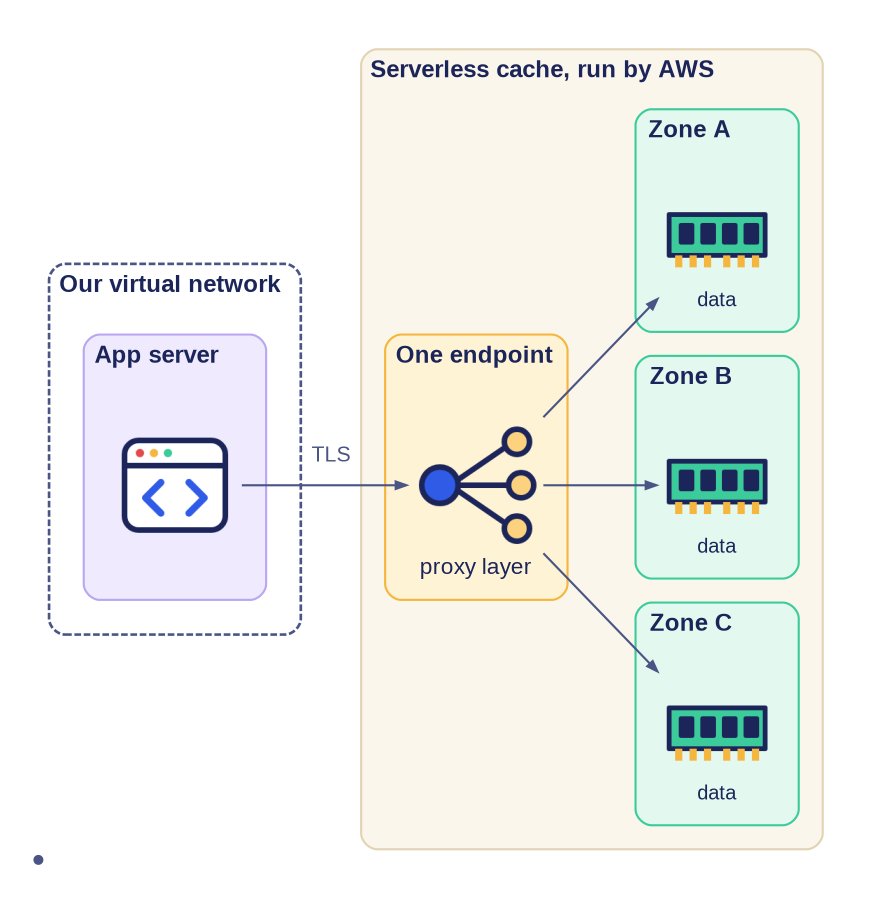
What serverless traffic costs in units
Serverless limits (Valkey and Redis OSS)
| Limit | Value |
|---|---|
| Data per cache | 5,000 GiB |
| Data per slot | 32 GiB |
| Work per cache | 15 million ECPU a second |
| Work per slot | 30,000 ECPU a second, up to 90,000 with reads from replicas |
| Caches per region | 40 (default quota) |
| Encryption in transit | Always on |
| Eviction | volatile-lru, not changeable |
It scales fast and not instantly. For Valkey 8.0 AWS states that the supported request rate can double every 2 to 3 minutes. A launch that multiplies traffic tenfold in one minute needs a minimum set beforehand. AWS says a new minimum is in place within 60 minutes, and you pay for it from then on, used or not. A maximum protects the bill, and it also means throttled requests.
Serverless fits
- New products and unknown traffic
- Spiky or often idle use
- Small teams
- A cache reachable from outside the network (Valkey 9.0 and later)
Nodes fit better
- Steady, predictable load, where you can plan nodes and commit to them
- Durable log or copies in other regions
- Clients that do not speak cluster mode
- Own parameters, such as the eviction policy
Using it
Patterns in the application
Cache-aside, the usual pattern
Average read time
| Use | Engine feature | Mind |
|---|---|---|
| Database results | Strings with a lifetime | Invalidate or accept the age: cache consistency |
| Sessions | Hashes with a lifetime | Replicas, because a lost session logs somebody out |
| Leaderboard | Sorted sets | One board is one key, so one shard |
| Rate limits | Counters with a lifetime | Decide what happens if the cache is down |
| Vector and text search | Valkey 8.2 and 9.0 | Memory for the index |
Operate
Network, security and what to watch
- 1
Network
Caches live in your VPC. Allow the port only from the security group of the application. Only serverless Valkey caches can have a public endpoint, and that demands IAM authentication and TLS 1.3.
- 2
Encryption and users
Switch on encryption in transit and at rest when you create a node-based cluster, and use role-based access control with one user per application.
- 3
Maintenance
Each cluster has a weekly window of 60 minutes. Planned replacements are a failover, so replicas matter on quiet days too.
- 4
Other regions
A global datastore copies a node-based Valkey or Redis OSS cluster to other regions asynchronously. The copies are read-only until you promote one by hand.
- 5
Version changes
You can upgrade, not downgrade. Try the new version on a copy restored from a backup.
Alarms worth having
| Metric | Meaning | Act |
|---|---|---|
| EngineCPUUtilization | The thread that runs commands | Near 90%: more shards for writes, replicas for reads. Plain CPU misleads on big nodes |
| DatabaseMemoryUsagePercentage, Evictions | Memory is short | More shards, shorter lifetimes |
| CacheHitRate | Is it useful at all? | A drop means the database is getting the traffic |
| ReplicationLag | How far replicas are behind | It is what a failover can lose |
| CurrConnections, NewConnections | Connection leaks and storms | Pool connections, especially from functions |
# Node-based: 2 shards, 1 replica each, over two zones, encryptedaws elasticache create-replication-group \ --replication-group-id shop \ --replication-group-description "product cache" \ --engine valkey --cache-node-type cache.r7g.large \ --cluster-mode enabled \ --num-node-groups 2 --replicas-per-node-group 1 \ --automatic-failover-enabled --multi-az-enabled \ --transit-encryption-enabled --at-rest-encryption-enabled# Serverless, with an upper bound for data and workaws elasticache create-serverless-cache \ --serverless-cache-name shop-sls --engine valkey \ --cache-usage-limits 'DataStorage={Maximum=10,Unit=GB},ECPUPerSecond={Maximum=50000}'# Rehearse a failover of shard 1aws elasticache test-failover --replication-group-id shop --node-group-id 0001Decide
When to choose it, and when not
Which form?
Neighbours
| Option | Alike | Different | Choose it for |
|---|---|---|---|
| Valkey or Redis on your own servers | Same engine | You operate it; every module and setting is open | Other clouds, special needs |
| MemoryDB | Valkey and Redis OSS commands, managed | Built as a durable database from the start | Primary data in memory |
| DynamoDB, with DAX | Managed, fast | A database; DAX caches only DynamoDB calls | Durable key-value data |
| CloudFront | A managed cache | HTTP responses near the user | Pages, files, public APIs |
| Memory in the app process | Fastest | Per process, small, no sharing | A few hot values, in front of ElastiCache |
Strengths
- Failed nodes are replaced and replicas promoted for you
- Standard clients and commands
- Online resharding, backups, metrics
- A serverless form without sizing
Costs
- Only inside AWS
- Some commands and settings are restricted
- Failover can lose recent writes by default
- Memory is expensive, and replicas multiply it
Summary
The whole topic in one minute.
ElastiCache rents you Valkey, Redis OSS or Memcached. Valkey is the engine that new features arrive in, Redis OSS stops at 7.1, and Memcached is the simple one without replicas.
Split data over shards for size and writes, add replicas in other zones for failures and reads, and leave a quarter of the memory free. Failover takes seconds and can lose the newest writes unless you turn on the durable log with synchronous writes. Serverless removes the sizing, and the limits that remain are per cache and per slot.
- Three engines: Valkey for new work, Redis OSS up to 7.1, Memcached for the simplest case.
- Shards for size and writes, replicas for failures and reads, up to five per shard.
- A quarter of node memory is reserved;
volatile-lruis the default policy. - Failover takes seconds and may lose the newest writes, unless the synchronous log is on.
- Serverless: pay per stored data and ECPU, limits per cache and per slot.
- The database must survive an empty cache.
Sources
- AWS: What is Amazon ElastiCache?
- AWS: serverless or node-based
- AWS: comparing the engines
- AWS: engine versions and end of life
- AWS: Multi-AZ and automatic failover
- AWS: durability
- AWS: configuration and limits
- AWS: quotas
- AWS: reserved memory
- AWS: which metrics to monitor
- AWS: service level agreement
- Linux Foundation: Valkey
- AWS blog: ElastiCache, 2011