
DynamoDB
medium 36 minAmazon DynamoDB is a managed key-value and document database.
Video lesson · Chapter 1 of 5
Find a customer's last order
DynamoDB in 80 seconds
1:20Reel coming soon
Theory
Read or listen first. About 2 min.
What it is
DynamoDB is a database service of AWS. A table holds items, an item holds named attributes, and the only thing all items of a table must share is the primary key. There are no servers to choose: AWS places the data, copies it and moves it.
The primary key is a partition key alone, or a partition key with a sort key. A hash of the partition key says where an item lives. Items with the same partition key form an item collection and are kept in the order of their sort key.
Why it exists
Many requests are simple: this cart, this session, the last ten orders of this customer. A relational database answers them well until the data grows, and then plans, locks and joins make the time uncertain. DynamoDB gives up joins and free queries so that the time of a request does not depend on the size of the table.
The other reason is operations. Copies in several Availability Zones, splitting, patching and recovery are the service's work, and capacity can follow the traffic.
A short history
October 2007
Amazon presents the Dynamo paper: a leaderless key-value store for the shopping cart. DynamoDB later takes its name and its goals from it, with a different design.
18 January 2012
AWS launches DynamoDB as a managed service.
29 November 2017
Global tables are announced: one table with writable copies in several Regions.
27 November 2018
Transactions over several items and tables are announced.
July 2022
The team describes the inside of the service in a paper at USENIX ATC: replication groups, Multi-Paxos, log replicas and splitting by heat.
Words to know
- Partition key
- The attribute that is hashed to find the partition. It must be given exactly.
- Sort key
- The attribute that orders items with the same partition key and allows ranges.
- Item collection
- All items with one partition key value.
- GSI
- Global secondary index: a copy of chosen attributes under another key.
- RCU, WCU
- Read and write capacity units, the currency of throughput.
- Conditional write
- A write that happens only if a condition about the item is true.
- Throttling
- The service refuses a request because a limit on throughput is reached.
How it works
Step through the idea, or press Play.
List the questions. Write each access pattern with how often it happens
Understand it
Start here
The key-cutting wall
A key-cutting shop keeps a copy of every key it has cut. The wall has one row for each owner, and each row hangs its keys from the oldest to the newest. Imagine asking the shopkeeper for a key.
The general ideas are on other pages: key-value databases, partitioning, and how such a store is built in key-value store design.
Fit
When to choose it
Predictable time
A lookup by key takes about the same time on a kilobyte and on a petabyte.
Grows by itself
Partitions are added and split by the service. You do not plan shards, but you do plan keys.
Little to operate
No servers, patches or replication to set up. Backups exist, and you must switch on point-in-time recovery.
Pay for use
On-demand mode charges for each request. Storage, indexes, streams and copies in other Regions are charged as well.
Choose it when
- The questions are known: carts, sessions, orders of a customer
- Very many requests with a steady time
- The team wants no database servers
- The system already lives in AWS with events and functions
- Data is simple or forms a small hierarchy
Look elsewhere when
- People will ask new questions every week
- Joins and reports are the main work
- Lookups by another attribute must always be fresh
- The data is small and PostgreSQL would be simpler
- You must run outside AWS
Keys
Partition key and sort key
One table of orders
| PK | SK | Attributes |
|---|---|---|
USER#123 | PROFILE | name, email |
USER#123 | ORDER#2026-01-15#001 | total, status |
USER#123 | ORDER#2026-02-02#002 | total, status |
ORDER#001 | ITEM#A | quantity, price |
ORDER#001 | ITEM#B | quantity, price |
What a query may say
| Question | Key condition | Reads |
|---|---|---|
| One profile | PK = USER#123, SK = PROFILE | 1 item |
| Profile and all orders | PK = USER#123 | The collection |
| Orders, newest first | PK = USER#123, SK begins with ORDER#, backwards | As many as the limit |
| Orders of January 2026 | PK, SK between two dates | That slice |
| Items of an order | PK = ORDER#001 | 2 items |
| All paid orders of everybody | Not possible on this key | Needs an index |
A good partition key has many values used about equally often. A key such as status, with two values, puts everything in two places.
Query returns at most 1 MB for one call and a LastEvaluatedKey to continue. An item may have at most 400 KB, names included.
Inside
How a request travels
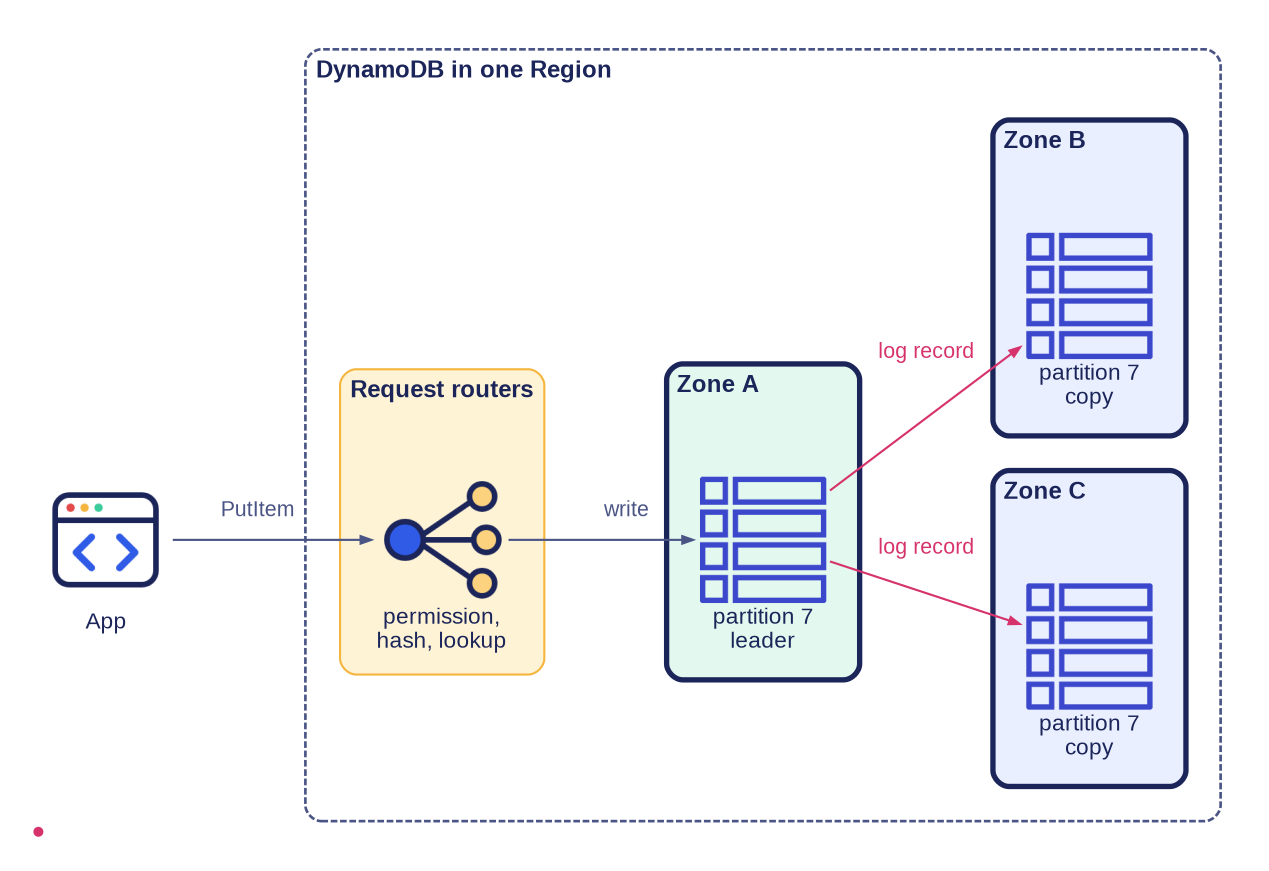
Router, partition, three copies
- 1
The request arrives
Signed with AWS credentials, sent straight to the service, or through DAX if a cache is used.
- 2
The router dispatches
Request routers check permission, hash the partition key, and look up the partition in metadata, most of it cached.
- 3
The leader takes the write
It writes a log record and sends it to its peers. Two of three must have it on disk before success.
- 4
The B-tree follows
A storage replica keeps a write-ahead log and a B-tree. The log makes the write safe, the tree makes it findable.
- 5
Reads choose
A strongly consistent read goes to the leader. An eventually consistent read may use any copy.
- 6
Heat is watched
Busy partitions are split, and busy items are kept apart from each other.
A write and its quorum
If a storage copy is lost, a log replica that holds only recent log records can be added in seconds to make the quorum whole, and the full copy is built afterwards.
Guarantees
Consistency
| Read | Cost for 4 KB | Sees | Available on |
|---|---|---|---|
| Eventually consistent | 0.5 unit | Perhaps not the newest write | Tables, LSI, GSI, streams |
| Strongly consistent | 1 unit | Every write confirmed before it, in this Region | Tables and LSI only |
| Transactional | 2 units | Several items as one snapshot | Tables |
Capacity
Read and write units
Units for one item of size s
A worked estimate
Two modes
| On-demand | Provisioned | |
|---|---|---|
| You pay for | Each request unit | Units reserved for each hour |
| Good for | New, spiky or unknown traffic | Steady traffic you can forecast |
| Growth | Up to twice the previous peak at once | Auto scaling follows a target with a delay |
| New table | 4,000 writes and 12,000 reads a second | What you set |
| Risk | A bill that follows a bug | Throttling, or paying for idle units |
Which mode?
The common failure
Hot partitions
One partition gives at most 3,000 read units and 1,000 write units a second. Adding capacity to the table does not change this for one key.
- 1
Burst capacity
Up to 300 seconds of unused throughput is kept for short peaks.
- 2
Adaptive capacity
A partition may use more than its even share while the table as a whole has room. It works at once and needs no setting.
- 3
Isolation of busy items
Busy items are moved so that they do not share a partition. One item can then have the whole 3,000 and 1,000.
- 4
Write sharding
For a single key that needs more, add a number:
item_123#0toitem_123#9. This is your work, not the service's.
How many parts?
Scatter the writes, gather the reads
Indexes
GSI, LSI and index overloading
| Global (GSI) | Local (LSI) | |
|---|---|---|
| Key | Any partition and sort key | Same partition key, other sort key |
| Consistency | Eventual only | Eventual or strong |
| How many | 20 by default, can be raised | 5 |
| Created | Any time | Only with the table |
| Limit | Own throughput | 10 GB for one partition key value |
Sparse index: only items that have the index attributes appear in it, so an index on openSince holds only open tickets. Inverted index: swap PK and SK to look up the other way. Overloading: one index serves several questions when its keys have neutral names and prefixes.
One overloaded index
| Item | GSI1PK | GSI1SK | Answers |
|---|---|---|---|
| Profile of 123 | EMAIL#sam@example.com | USER#123 | User by email |
| Order 001 | STATUS#PENDING | 2026-01-15 | Pending orders by date |
| Order 002 | STATUS#SHIPPED | 2026-01-16 | Shipped orders by date |
Modelling
One table or several
With single-table design, kinds of item that are read together share a partition key, so one query brings a user and the orders. It saves round trips, because there is no join. It costs clarity: keys are strings with prefixes, and a new question may need a new index and a backfill.
Design steps
Correct writes
Conditions first, transactions second
A conditional write checks and changes one item in one step. It needs no transaction: attribute_not_exists(PK) prevents duplicates, a version number prevents lost updates, and a status check allows only legal steps. A failed condition still uses write units.
# Claim a short link: only one of two simultaneous callers succeeds.table.put_item( Item={"PK": "LINK#my-link", "SK": "META", "target": "https://example.com"}, ConditionExpression="attribute_not_exists(PK)",)# Optimistic locking.table.update_item( Key={"PK": "USER#123", "SK": "PROFILE"}, UpdateExpression="SET #n = :new, version = version + :one", ConditionExpression="version = :seen", ExpressionAttributeNames={"#n": "name"}, # name is a reserved word ExpressionAttributeValues={":new": "Noor", ":seen": 1, ":one": 1},)# A counter without reading first. Only a pending order may be shipped.table.update_item( Key={"PK": "PRODUCT#456", "SK": "META"}, UpdateExpression="SET viewCount = if_not_exists(viewCount, :zero) + :one", ExpressionAttributeValues={":zero": 0, ":one": 1},)table.update_item( Key={"PK": "ORDER#789", "SK": "META"}, UpdateExpression="SET #s = :shipped", ConditionExpression="#s = :pending", ExpressionAttributeNames={"#s": "status"}, ExpressionAttributeValues={":shipped": "SHIPPED", ":pending": "PENDING"},)A transaction (TransactWriteItems, TransactGetItems) covers up to 100 items and 4 MB, in one or several tables of one account and Region. It costs twice the units, because each item is prepared and then committed.
Prepare, then commit
Transactions are serializable against each other and against single-item reads and writes. A Query, Scan or BatchGetItem as a whole is only read-committed: it may see one item before and another after a transaction.
Time
TTL and streams
TTL deletes items whose timestamp, in Unix seconds, has passed. It uses no write units, but it is not prompt: deletion happens typically within a few days. Until then reads return the item, so filter by time or check it in code.
DynamoDB Streams is an ordered log of item changes, kept for 24 hours. Each record appears once in the stream and changes to one item stay in order. A record can hold the keys, the new image, the old image, or both. A Lambda function reads the stream, and Lambda may process a record more than once, so make the handler idempotent.
Outbox without a dual write
The general pattern is change data capture. A removal by TTL can be recognised by the user identity of the service in the record.
Speed and distance
DAX and global tables
A cache in one Region, a copy in another
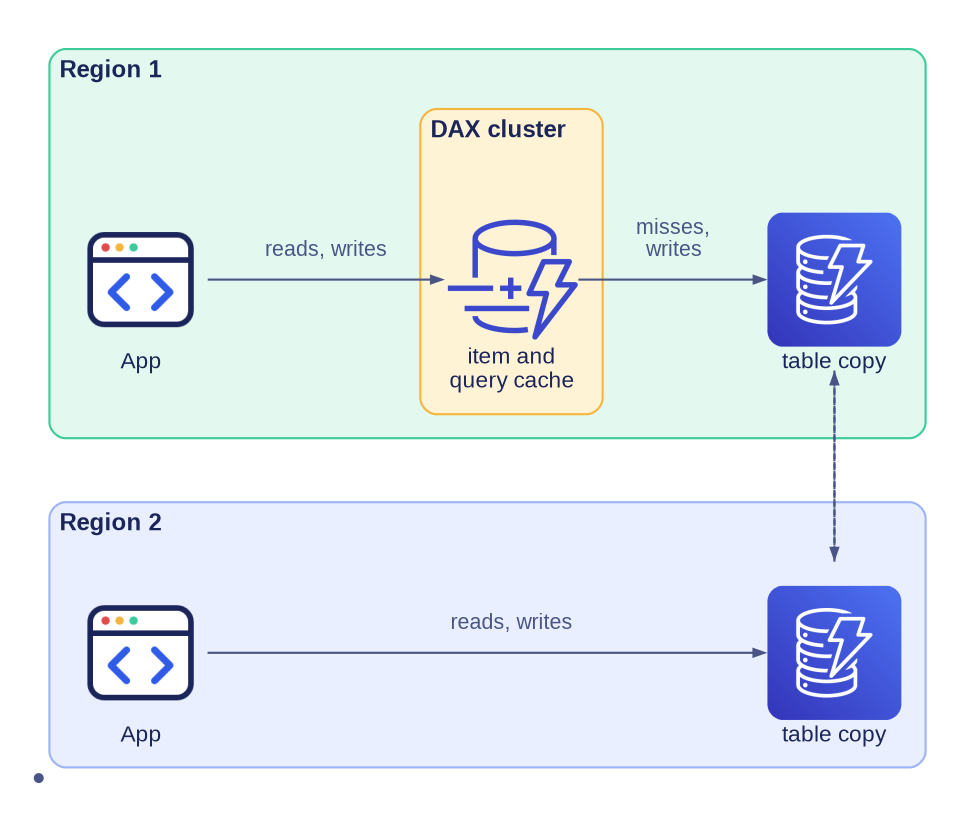
DAX is an in-memory cache in front of DynamoDB that speaks the same API and answers in microseconds. It has an item cache and a query cache, and writes pass through it. It helps with many repeated eventually consistent reads. Strongly consistent reads are passed on and not cached, so it gives nothing there. You pay for its nodes.
Global tables: two consistency modes
| Eventual (MREC, default) | Strong (MRSC) | |
|---|---|---|
| Copies between Regions | Afterwards, typically within a second | Before the write succeeds |
| Two Regions write one item | Last writer wins | Conflict is refused |
| Regions | As many as you add | Exactly three: three copies, or two and a witness |
| Transactions | Atomic only in the Region of the call | Not supported |
| TTL, LSI | Supported | Not supported |
Operations
Running it
| Watch | Why | Do |
|---|---|---|
| Throttled requests | A key, an index or a quota is full | Find the key with Contributor Insights |
| Consumed units | The bill and the headroom | Alarm, and a maximum for on-demand |
| Latency by operation | A slow client or large items | Smaller items, projections |
| Iterator age of the function | The stream is read too slowly | Fix errors before 24 hours pass |
| Recovery | A bad deploy deletes data | Point-in-time recovery, up to 35 days |
Decide
Trade-offs and neighbours
What you gain
- Scale: one design for ten requests a second and millions.
- Steady time: table size does not matter.
- No servers: patches and copies are not your work.
- Availability: three zones without setting anything.
- Pay by request if you like.
What you pay
- Known questions: a new one may need an index and a backfill.
- No joins: copy data or ask twice.
- Stale indexes: GSI reads are eventual.
- Hard modelling: single-table keys take practice.
- Lock-in: the API and the key design are AWS only.
Compared with neighbours
| Alike | Different | Choose the other for | |
|---|---|---|---|
| Cassandra | Partition and sort keys, high write rate | No leader, CQL, you run the nodes | Other clouds, own hardware, tuning |
| MongoDB | Documents, horizontal scale | Free queries, pipelines, runs anywhere | Questions still changing |
| PostgreSQL | Structured data, transactions | Joins, a planner, strong reads by default | Reports, relations, smaller data |
| Redis | Keys, expiry, quick | In memory, rich structures such as sorted sets | Cache, ranking, short-lived data |
Summary
The whole topic in one minute.
DynamoDB is a wall of hooks: the partition key picks the row, the sort key orders the hooks, and a request that names both is quick however long the wall is. So list the questions first and shape the keys for them.
Reads are eventually consistent unless you ask, indexes always are, and one partition gives at most 3,000 read and 1,000 write units a second. Most production trouble is a hot key, a scan or a filter mistaken for an index.
- Design from the questions: every one a Get or a Query.
- A partition gives 3,000 read and 1,000 write units; split hot keys yourself.
- 4 KB for a read unit, 1 KB for a write unit; eventual is half, transactions are double.
- GSI reads are always eventual, and a filter saves no units.
- Use a condition for one item, a transaction for several.
- TTL takes days, streams keep 24 hours, handlers must be idempotent.