
Amazon SQS
easy 25 minAmazon SQS is a managed queue: producers send messages over HTTPS, consumers poll for them, and a message is hidden, not removed, while somebody works on it.
Video lesson · Chapter 1 of 5
Receiving a job does not remove it
Visibility timeout in 75 seconds
1:15Reel coming soon
Theory
Read or listen first. About 2 min.
What it is
Amazon Simple Queue Service (SQS) is a managed message queue on AWS. One program puts a message in, another takes it out later. There are no servers, disks or partitions for you to size, and no limit on how many messages may wait.
Consumers pull. They call ReceiveMessage, do the work, and call DeleteMessage. Between those two calls the message stays in the queue but is invisible to everybody else. That hidden period is the visibility timeout, and most SQS bugs are a misunderstanding of it.
There are two kinds of queue. A standard queue has nearly unlimited throughput, may deliver a message more than once and may change the order. A FIFO queue keeps order inside a message group and removes duplicate sends, with a throughput quota.
Why it exists
A web request should not wait for a slow job, and a burst should not knock over the service behind it. A queue stores the work until somebody has time. The general ideas (decoupling, competing consumers, at-least-once) belong to queues. This page is about the product.
The reason to choose SQS is mostly what you do not do: no cluster, no replication settings, no disk alarms at night. AWS stores the messages redundantly across Availability Zones. You pay per request instead.
The price of that simplicity is a small feature set. There is no replay, no broadcast and no routing inside the queue. If you need those, you combine SQS with another service or choose another product.
A short history
Late 2004
AWS announces the first beta of SQS as a hosted queue for buffering messages.
July 2006
SQS reaches production, with items up to 8 KB.
2012 to 2014
Long polling (2012), payloads up to 256 KB (2013) and dead-letter queues (2014) are added.
November 2016
FIFO queues arrive, with 300 calls per second per action, or 3,000 messages with batches of ten.
2018
SQS can invoke AWS Lambda functions.
August 2025
The largest message grows from 256 KiB to 1 MiB for both queue types.
Words to know
- Visibility timeout
- How long a received message stays hidden from other consumers. 30 seconds by default, 12 hours at most.
- Receipt handle
- The ticket you get with one receive. You need it to delete the message or to change its timeout.
- In flight
- Received but not deleted yet.
- Dead-letter queue
- Another queue that gets messages which were received too often without being deleted.
- Message group
- In a FIFO queue, the label inside which order is kept. In a standard queue, only a tenant label for fairness.
- Long polling
- A receive call that waits up to 20 seconds for a message instead of answering empty.
- Redrive
- Moving messages from a dead-letter queue back to work.
How it works
Step through the idea, or press Play.
Send. A producer stores a message, SQS keeps copies in several zones
Understand it
Start here
The shoe-shine stall
Imagine a stall where people leave their shoes and put a numbered token on the counter. A helper who takes a pair puts a cup over the token, so nobody else starts on the same shoes. The token is still on the counter. It is only hidden. When the shoes shine, the token goes into the box marked Done.
Hidden is not gone. Only the Done box ends a token.
What you get
Why teams choose it
Nothing to run
No brokers, disks or upgrades. A queue is one API call.
Durable
Copies are kept across several servers and Availability Zones.
No backlog limit
The number of waiting messages is unlimited, for up to 14 days each.
Safe retries
A dead worker needs no detection. The timeout brings the work back.
Fits AWS
Lambda, SNS, S3 events, IAM policies and CloudWatch connect without glue code.
Pay per request
An idle queue costs little. Batches and long polling lower the bill.
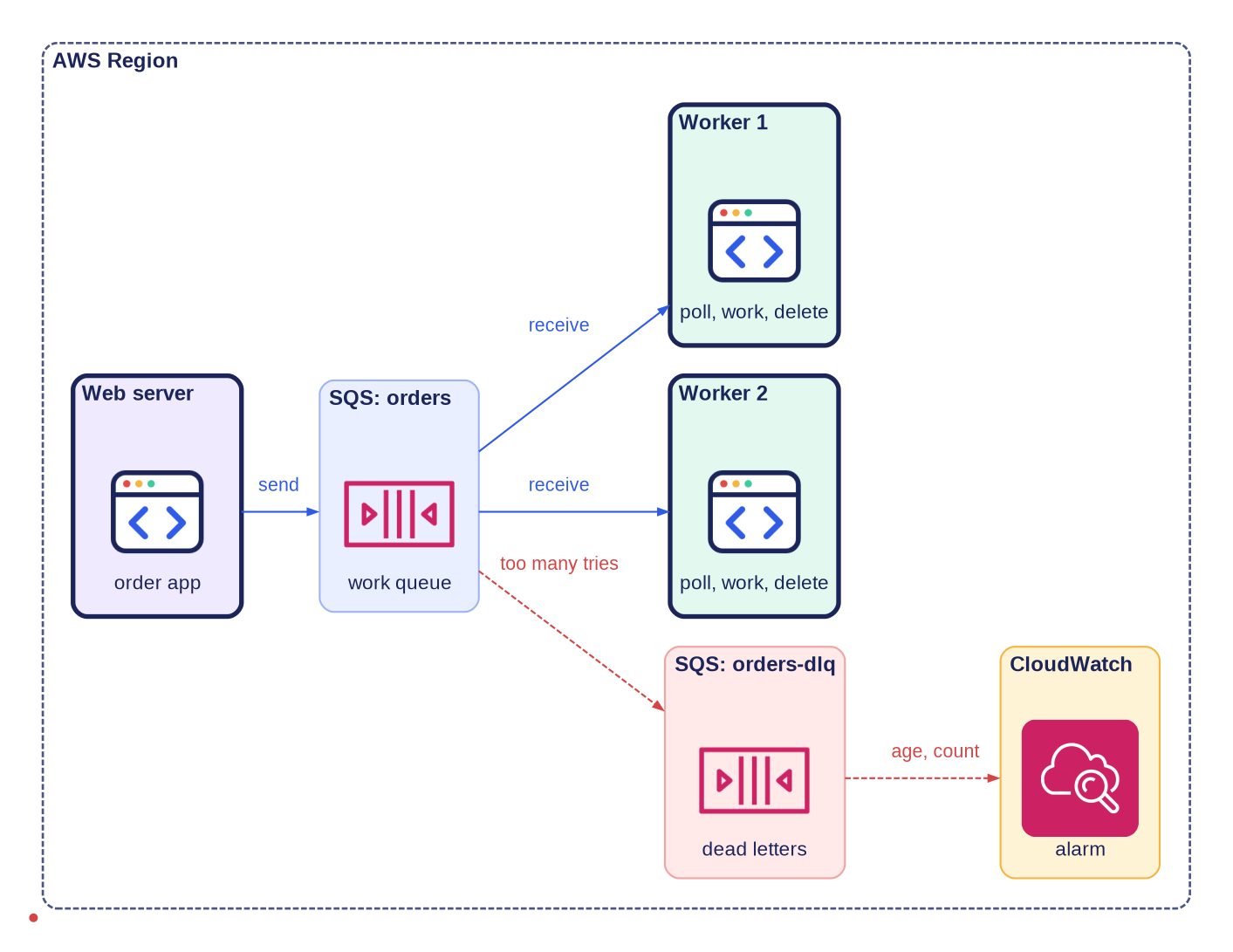
A work queue
Inside
The life of one message
Send, hide, delete
States of a message
The numbers
| Setting | Default | Range |
|---|---|---|
| Visibility timeout | 30 seconds | 0 seconds to 12 hours |
| Retention | 4 days | 1 minute to 14 days |
| Message size | 1 MiB at most | from 1 byte |
| Receive wait time | 0 (short polling) | up to 20 seconds |
| Messages per call | 1 to 10 | batches of at most 10 |
| Delivery delay | 0 | up to 15 minutes |
| In flight, standard | about 120,000 | can be raised on request |
| In flight, FIFO | 120,000 | can be raised on request |
The key idea
Choosing the visibility timeout
Too short, and a second worker starts while the first is still busy. Too long, and a crashed worker's message stays hidden for that whole time. Two good answers exist.
- 1
You know the time
Set the timeout to the longest time that processing and deleting can take, with some margin.
- 2
You do not know it
Start with a short timeout, for example 2 minutes, and let the worker extend it by 2 minutes every minute while it is alive. This is a heartbeat with ChangeMessageVisibility.
- 3
You failed and you know it
Set the remaining timeout to 0 and the message is visible at once. Set it to a larger number to wait before the retry.
How many messages are in flight?
Delivery
At least once, so make it idempotent
SQS stores copies on several servers. Rarely, a server that holds a copy is unavailable while you receive or delete, and you may get that message again later. Also, a worker can finish the work and die before the delete. Both end the same way: the work runs twice.
Safe to repeat
- Use a business id as the key, for example order 42
- Insert with a unique constraint, or an upsert
- Commit the result first, delete the message last
- Keep the seen ids at least as long as retries can happen
Looks safe, is not
- Delete first, then work: a crash loses the job
- Use the SQS message id: a producer retry makes a new id
- Trust the visibility timeout as a lock
- Assume FIFO means the side effect happens once
The pattern itself has its own page: idempotency.
Two kinds
Standard or FIFO
| Standard | FIFO | |
|---|---|---|
| Order | Best effort | Strict inside a message group |
| Duplicates | Possible | Duplicate sends removed for 5 minutes |
| Throughput | Nearly unlimited | 300 calls per second per action, 3,000 messages with batches |
| High throughput mode | Not needed | 2,400 to 70,000 calls per second, by Region |
| Name | Any | Ends in .fifo |
| Message group | Optional, for fairness | Required, for order |
| Type can change later | No | No |
A group is served in order, groups in parallel
One receive may return several messages of the same group, in order, up to ten. After that the group waits until they are deleted or visible again. A single failing message therefore blocks its group, which is what order means.
Polling
Short, long and batched
Long polling
- Asks all servers
- Answers when a message is there, or after up to 20 s
- Few empty answers
- Set ReceiveMessageWaitTimeSeconds to 20 on the queue
Short polling (the default)
- Asks a sample of the servers
- Answers at once, often empty
- May miss messages that exist
- Every empty answer is a request you pay for
What idle polling costs
Batch calls send or delete up to ten messages in one request. Requests are also billed by size: each 64 KB of payload counts as one request, so one 1 MiB message counts as 16.
Failure
Dead-letter queues
A poison message fails every time. Without a limit it is tried until its retention ends. A redrive policy names another queue and a maxReceiveCount.
What happens to a failing message
Rules that save you later
- 1
Same kind, same place
A dead-letter queue of a FIFO queue is FIFO too. It lives in the same account and Region as its source.
- 2
Longer retention
For standard queues the age keeps counting from the first send. If the source keeps messages 4 days and the dead-letter queue also 4 days, a message that arrives after 1 day is deleted 3 days later. Use 14 days.
- 3
An alarm on more than zero
A dead-letter queue nobody watches is a slow way to lose data.
- 4
Fix first, then redrive
StartMessageMoveTask moves messages back to the source, or to a queue you choose.
- 5
Think about order
Moving one message aside breaks the order of a FIFO group. If later steps depend on it, stop the group instead.
Consumers
Lambda and your own workers
With an event source mapping, AWS polls for you and calls your function with a batch. When the function succeeds, the batch is deleted. By default one failure makes the whole batch visible again.
| Topic | AWS Lambda | Your own workers |
|---|---|---|
| Polling | Done for you | You write the loop |
| Scaling | Starts with 5 concurrent batches, adds up to 300 per minute, up to 1,250 | You scale on backlog per worker |
| Protecting a database | Maximum concurrency on the mapping | A fixed number of workers |
| Partial failure | Return batchItemFailures | Delete what worked |
| Long work | Limited by the function timeout | Up to 12 hours with heartbeats |
Time to drain a backlog
Combine
Broadcast, fairness and other add-ons
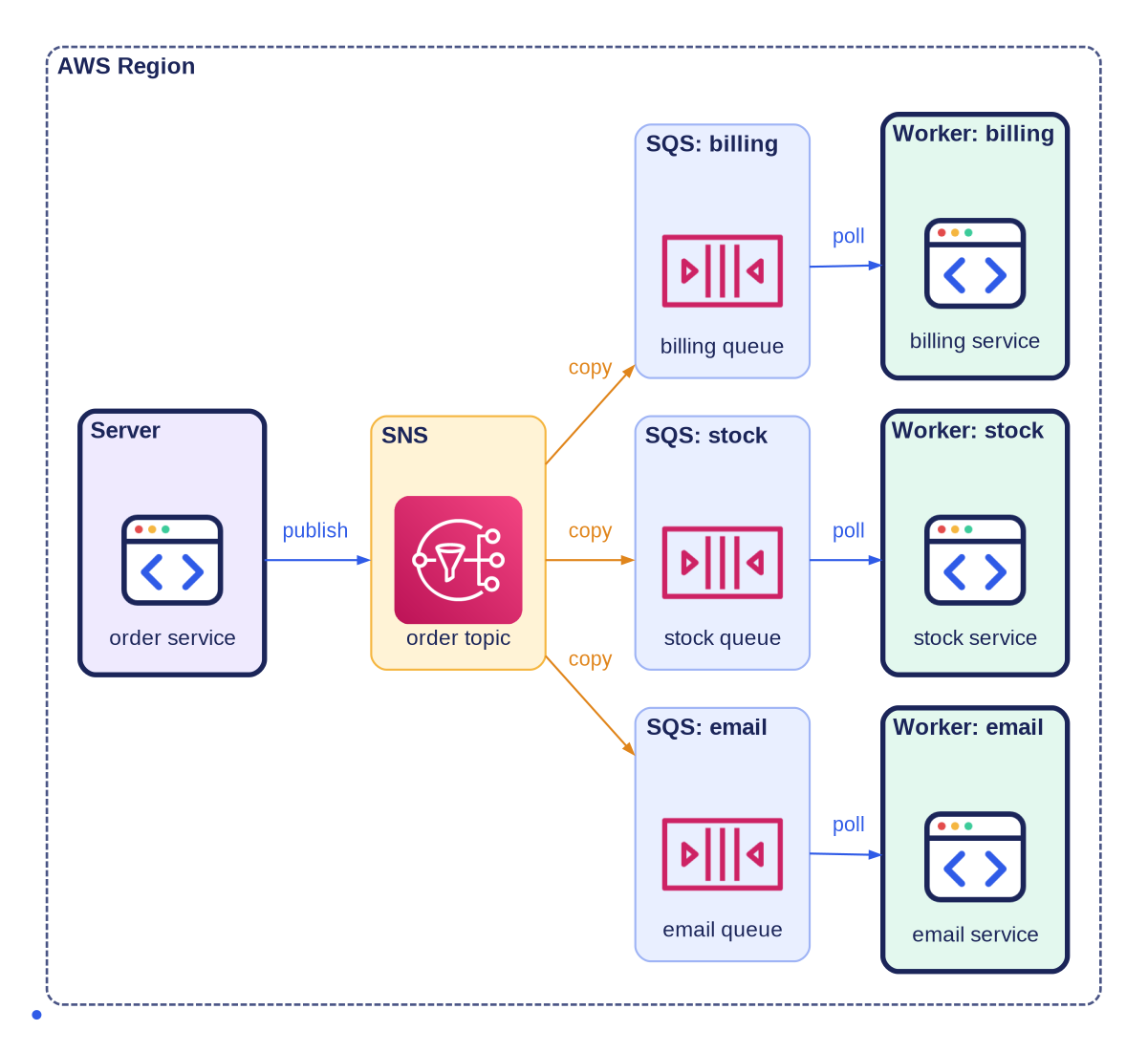
One message goes to one consumer group. To give the same event to several teams, put an SNS topic in front and give each team a queue.
One event, three queues
- 1
Fair queues
In a standard queue, set the message group to a tenant id. When one tenant has far more messages in flight than others, SQS gives the others priority. It keeps no order, has no throughput limit and needs no change in consumers. It also does not cap the noisy tenant.
- 2
Delay
A queue-wide delay or a timer per message, up to 15 minutes. Timers on single messages are for standard queues. For later dates use EventBridge Scheduler or a task scheduler.
- 3
Encryption and access
Encryption at rest uses keys owned by SQS or by KMS. IAM and queue policies decide who may send, receive and delete.
- 4
The dual write problem
Saving to a database and sending a message are two actions. Use an outbox table or change data capture.
Operations
Running it
# a dead-letter queue that keeps messages for 14 daysaws sqs create-queue --queue-name orders-dlq \ --attributes MessageRetentionPeriod=1209600# the work queue: long polling, 2 minutes hidden, 5 triescat > attributes.json <<'JSON'{ "VisibilityTimeout": "120", "ReceiveMessageWaitTimeSeconds": "20", "RedrivePolicy": "{\"deadLetterTargetArn\":\"$DLQ_ARN\",\"maxReceiveCount\":\"5\"}"}JSON# replace $DLQ_ARN in the file, thenaws sqs create-queue --queue-name orders --attributes file://attributes.jsonaws sqs send-message --queue-url "$URL" --message-body '{"order": 42}'aws sqs receive-message --queue-url "$URL" --max-number-of-messages 10aws sqs delete-message --queue-url "$URL" --receipt-handle "$HANDLE"# after the fix: move the dead letters backaws sqs start-message-move-task --source-arn "$DLQ_ARN"What to watch in CloudWatch
| Metric | Tells you | Act when |
|---|---|---|
| Age of the oldest message | How late the work is | It passes your promise to users |
| Messages visible | The backlog | It grows and does not shrink |
| Messages not visible | In flight | It nears 120,000 |
| Visible in the dead-letter queue | Failed work | Above zero |
| Number of empty receives | Wasted polling | High: turn on long polling |
| Noisy groups and quiet-group metrics | Fairness between tenants | Quiet groups get old too |
Choose
When SQS, and when not
Choose SQS
- Background jobs and buffering between services
- You are on AWS and want nothing to operate
- Spiky load in front of a slow or fragile system
- One logical consumer per message
- Order only inside small groups
Choose something else
- Replay of old events: a log such as Kafka or Kinesis
- Many independent readers: a topic, or a log
- Routing rules, priorities, very low latency push: RabbitMQ
- Work that must run on several clouds or on your own machines
- Stateful stream computation: Flink or Spark
Neighbours
| Product | Shape | Pick it over SQS when |
|---|---|---|
| Kinesis | Managed sharded log | Several readers need the same ordered records, or a replay |
| Kafka | Log you run or rent | Event history is a product of its own |
| RabbitMQ | Broker with exchanges | You need routing, priorities or push |
| Pulsar | Topic with queue and stream readers | You want both models and can operate it |
| SNS | Push topic | Broadcast. Usually together with SQS |
Summary
The whole topic in one minute.
A consumer receives a message, which hides it, works, and deletes it. If the delete does not come in time, the message becomes visible and somebody else gets it. So SQS does not lose work when a worker dies, and the same work may be done twice. The consumer must be idempotent.
Choose standard unless order inside a group really matters. Set the visibility timeout longer than the work (or extend it with a heartbeat), use long polling and batches, add a dead-letter queue with an alarm, and watch the age of the oldest message. For replay or many independent readers, use a log or put a topic in front.
- Receive hides, delete removes, silence returns.
- Set the visibility timeout above the work, or extend it with a heartbeat.
- Standard is at-least-once and unordered, so consumers must be idempotent.
- FIFO orders inside a group and removes duplicate sends for 5 minutes.
- Long polling and batches of ten cut requests.
- A dead-letter queue needs longer retention and an alarm.
- Watch the age of the oldest message.
Sources
- SQS Developer Guide: message quotas
- SQS Developer Guide: visibility timeout
- SQS Developer Guide: FIFO delivery logic
- SQS Developer Guide: dead-letter queues
- SQS Developer Guide: fair queues
- AWS Lambda: using SQS
- AWS News Blog: SQS, 15 years and still queueing (2021)
- AWS: maximum message payload 1 MiB (August 2025)