
MongoDB
medium 34 minMongoDB is a document database: it stores whole JSON-like records, keeps them on a replica set with one primary, and splits big collections over shards by a shard key.
Video lesson · Chapter 1 of 5
Can the shop confirm an order?
MongoDB in 80 seconds
1:20Reel coming soon
Theory
Read or listen first. About 2 min.
What it is
MongoDB stores data as documents. A document is a record made of named fields, and a field may hold a list or another document. The format on disk and on the wire is BSON, a binary form of JSON with extra types such as dates and 64-bit integers.
Documents live in collections. Two documents in one collection may have different fields. A server process is called mongod. Several of them hold copies of the same data and form a replica set, and several replica sets behind a router form a sharded cluster.
Why it exists
A program usually wants one whole thing: a product with its sizes, pictures and prices. Tables spread that thing over many rows and join it again on each read. A document keeps it together, so one read fetches it and one write changes it as a unit.
The other reason is growth. Replication, failover, routing and moving data between machines are part of the product, so a team does not have to build them around the database.
A short history
2007
The company 10gen starts building MongoDB as one part of a planned hosting platform.
February 2009
The first public release. The database becomes the product, with open source code.
June 2018
Version 4.0 adds transactions over several documents in a replica set. Version 4.2 extends them to sharded clusters.
October 2018
New Community Server releases move from the AGPL licence to the Server Side Public License (SSPL), which the Open Source Initiative has not approved.
Words to know
- Document
- One record of fields, lists and nested records. At most 16 MiB.
- Collection
- A group of documents, like a table without a fixed set of columns.
- Replica set
- Servers with the same data: one primary takes writes, the secondaries copy it.
- Oplog
- The primary's list of changes. Secondaries read it and repeat each change.
- Shard key
- The field or fields that decide which shard holds a document.
- mongos
- The router of a sharded cluster. It stores no data.
- Write concern
- How many members must confirm a write before the client hears success.
How it works
Step through the idea, or press Play.
Model. Put what is read together into one document
Understand it
Start here
The lunch box story
A school kitchen packs one lunch box for each child. Everything that child eats is inside, so handing it over takes one move. Imagine what happens when the kitchen must not lose a box, and when more children arrive than one table can serve.
Why documents are useful in general, and when they are not, belongs to document databases. This page is about the product: its parts, defaults, limits and operations.
Why people choose it
Four reasons, with their limit
Flexible documents
Products, articles and profiles whose fields vary need no table change. You can still enforce rules with a JSON Schema validator.
Close to the code
A document maps to an object in the program, so less translation is needed between the two.
Grows sideways
Secondaries can serve reads. Shards split writes and storage. Both are built in.
Rich queries
Nested fields, arrays, places on a map, text search and an aggregation pipeline. Each needs the right index.
Choose it when
- The shape of records varies or changes often
- Data is nested and read as a whole
- Write volume will need more than one machine
- The product is still changing every week
- You need geospatial queries or simple text search
Look elsewhere when
- Many requests change several documents together
- Reports join many kinds of record
- Every field is regular and strongly related
- The team only needs SQL tools
- Each request needs a transaction across shards
Modelling
Embed or reference
The first design question is whether related data lives inside the document or in another collection with an id. Embed when it is read together and stays small. Reference when it grows without end, is shared, or is read on its own.
// Embedded: the address and the order lines are read with the order.db.orders.insertOne({ _id: "o-1001", customerId: "c-42", // a reference: customers live on their own shipTo: { street: "1 Harbour Road", city: "Cork" }, lines: [ { sku: "pen", qty: 2, cents: 150 }, { sku: "book", qty: 1, cents: 1200 } ], status: "paid"})Which one?
| Relation | Usual choice | Reason |
|---|---|---|
| One to one | Embed | Always read together |
| One to few | Embed | The list stays short |
| One to many, growing | Reference | A document stops at 16 MiB, and large ones are slow to move |
| Many to many | Reference | Copies would have to be kept equal |
| Mostly read, rarely changed | Copy a few fields | The name on an old order should not change anyway |
Architecture
The parts of a sharded cluster
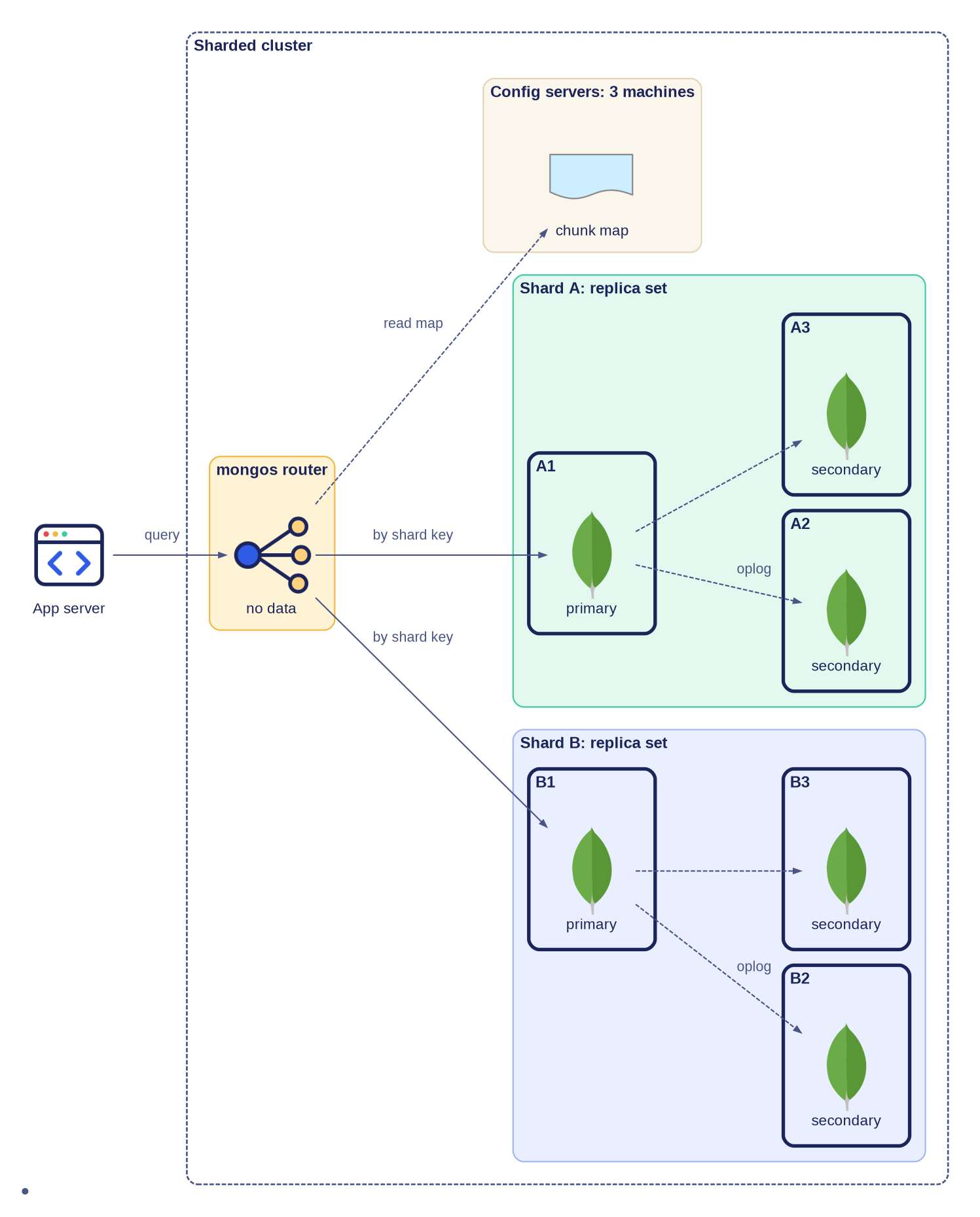
App, router, config servers and two shards
- 1
The client connects
A driver keeps a pool of connections. For a replica set the connection string lists several members, such as
mongodb://host1,host2,host3/db?replicaSet=rs0. In a sharded cluster the client talks tomongos. - 2
mongos routes
It compares the query with the shard key. A query with the key goes to one shard. A query without it goes to every shard and the answers are merged. Routers keep no data, so you can run many.
- 3
Config servers know the map
A replica set that stores which key range is on which shard. Routers cache the map. If config servers have no primary, data can still be read and written but no range moves.
- 4
A shard answers
Each shard is a replica set with its own primary.
- 5
The primary writes
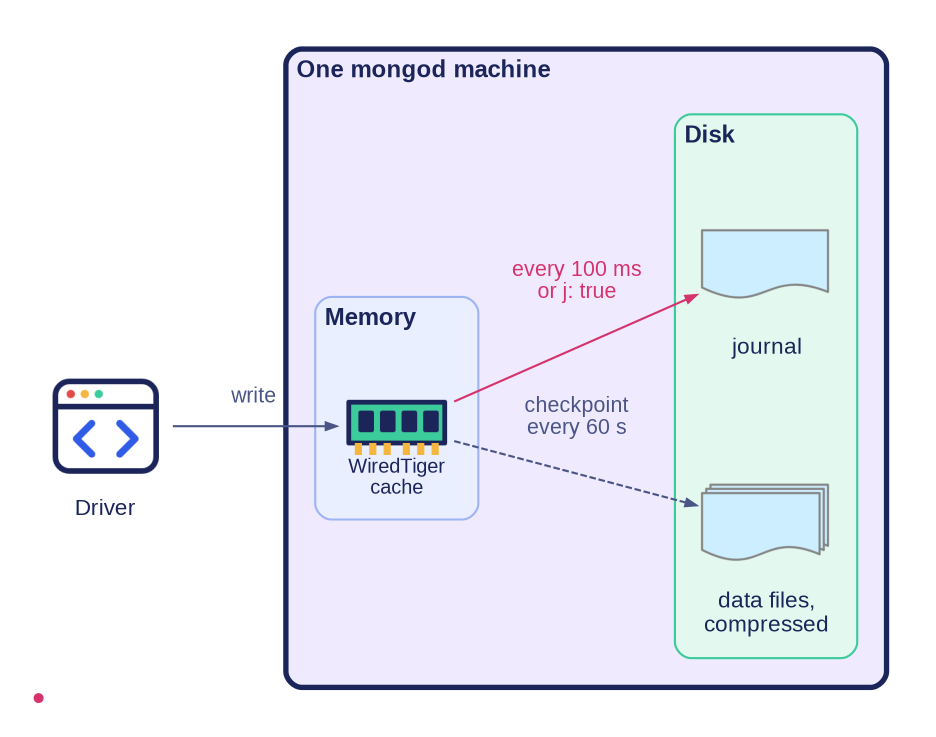
WiredTiger changes pages in its cache and adds the change to the journal, a write-ahead log. The write concern decides when the client hears success.
- 6
Secondaries copy
They read the oplog, a capped collection, and repeat each change. The default oplog is 5% of free disk space, between 990 MB and 50 GB.
- 7
WiredTiger stores
Compressed pages in data files, with a checkpoint every 60 seconds.
One write, end to end
Storage
WiredTiger inside one server
Where a write goes inside one mongod
Defaults worth knowing
| Setting | Default | What it means |
|---|---|---|
| Engine | WiredTiger, since 3.2 | Document-level concurrency and multi-version reads |
| Cache | Larger of 50% of (RAM − 1 GB) and 0.256 GB | The working set should fit in it |
| Journal flush | Every 100 ms | And earlier when a write asks for j: true |
| Checkpoint | Every 60 seconds | Recovery starts here, then replays the journal |
| Compression | snappy for data, prefix for indexes | zlib and zstd cost more CPU and save more space |
How much cache a server gives WiredTiger
Multi-version concurrency control lets a reader see a stable snapshot while a writer makes a new version, so readers do not block writers. Indexes are B-trees. Two writers of different documents do not block each other. Two writers of the same document conflict, and one is retried.
Replica sets
Elections and failover
Members send each other a heartbeat every 2 seconds. If secondaries lose the primary for longer than the election timeout, 10 seconds by default, one asks for votes. A majority of the voting members must agree. MongoDB states that the median time to a new primary should not exceed 12 seconds with default settings.
The primary disappears
Majority of voting members
Kinds of member
| Member | Holds data | Votes | Can be primary |
|---|---|---|---|
| Ordinary secondary | Yes | Yes | Yes, by priority |
| Priority 0 | Yes | Yes | No |
| Hidden | Yes, invisible to clients | If votes is 1 | No |
| Delayed | Yes, some time behind | If votes is 1 | No |
| Arbiter | No | Yes | No |
Guarantees
Write concern, read concern, read preference
Three settings answer three questions. Write concern: how safe must my write be? Read concern: what may I see? Read preference: who may answer?
| Write concern | Client hears success when | Use |
|---|---|---|
w: 0 | The request is sent | Data you can lose |
w: 1 | The primary has applied it | Speed first, rollback possible |
w: "majority" | A majority has it | The default since 5.0 |
j: true | It is in the journal on disk | Majority usually implies it already |
wtimeout | Stops waiting after a time | The write may still happen later |
| Read preference | Goes to | Note |
|---|---|---|
| primary | Only the primary | Default |
| primaryPreferred | Primary, else a secondary | Stale during failover |
| secondary | Only secondaries | Reports, may be stale |
| secondaryPreferred | Secondary, else the primary | Stale too |
| nearest | The lowest network delay | Stale, good for far regions |
Pick the settings
Queries
Indexes and the ESR guideline
Without an index MongoDB reads the whole collection (COLLSCAN). With one it reads a part of an ordered tree (IXSCAN). A collection can have up to 64 indexes, and every one of them makes each write slower and uses memory.
Index types
| Index | Good for | Remember |
|---|---|---|
| Single field | One field | _id always has one |
| Compound | Several fields together | Order matters; up to 32 fields |
| Multikey | Elements of an array | One entry for each element |
| Text | Words, with stemming | One text index for each collection |
| 2dsphere, 2d | Places and distances | Nearby searches |
| Hashed | Even sharding | No range queries |
| Partial | Only documents that match a filter | Smaller and cheaper |
| TTL | Delete after a time | A job runs every 60 seconds |
| Covering | A query answered from the index alone | Project only indexed fields |
For a compound index, the ESR guideline gives the order: Equality fields first, then Sort fields, then Range fields. A search for paid orders, newest first, above ten euros wants { status: 1, createdAt: -1, cents: 1 }.
db.orders.createIndex({ status: 1, createdAt: -1, cents: 1 })db.orders.createIndex({ customerId: 1 }, { partialFilterExpression: { status: "active" } })db.sessions.createIndex({ createdAt: 1 }, { expireAfterSeconds: 2592000 }) // 30 daysdb.products.createIndex({ description: "text" })db.orders.find({ status: "paid", cents: { $gt: 1000 } }) .sort({ createdAt: -1 }) .explain("executionStats")// Compare totalDocsExamined with nReturned. Look for IXSCAN, not COLLSCAN.db.orders.getIndexes()db.orders.dropIndex("old_index_name")Queries
The aggregation pipeline
A pipeline is a list of stages. Documents flow through them: filter, group, sort, reshape. Put $match first so that later stages see fewer documents and the filter can use an index.
From a million documents to ten
db.orders.aggregate([ { $match: { status: "completed" } }, { $group: { _id: "$category", total: { $sum: "$cents" }, average: { $avg: "$cents" }, orders: { $sum: 1 } } }, { $sort: { total: -1 } }, { $limit: 10 }, { $project: { _id: 0, category: "$_id", total: 1, average: 1, orders: 1 } }])// A join: like a LEFT OUTER JOIN. Index the field on the other side.db.orders.aggregate([ { $match: { customerId: "c-42" } }, { $lookup: { from: "customers", localField: "customerId", foreignField: "_id", as: "customer" } }, { $unwind: "$customer" }, { $project: { cents: 1, status: 1, name: "$customer.name" } }])A stage that needs more than 100 MB of memory writes temporary files, because allowDiskUseByDefault is on since version 6.0. $lookup can join sharded collections since 5.1, but a join on every request is a sign that the model is wrong.
Scale
Sharding and the shard key
Shard when data, writes or the working set no longer fit one replica set. Most applications never need to. The general theory is in sharding and partitioning strategies.
The key space is cut into ranges, also called chunks. The default range size is 128 MB. A balancer moves ranges when one shard holds much more data than another: three times the range size, so 384 MB, by default.
Judging a key
| Key for orders | Cardinality | Writes | Queries |
|---|---|---|---|
| status | Very low | A few huge ranges | Poor |
| createdAt | High | All new writes hit the last range | Good for dates, bad for load |
| hashed _id | High | Even | Only by exact id |
| customerId | High | Even unless one customer is huge | One shard for each customer |
| customerId, createdAt | Higher still | Even, splits a big customer | One shard, ordered by date |
Targeted or scattered?
sh.enableSharding("shop")sh.shardCollection("shop.orders", { customerId: 1, createdAt: 1 })// Later, if the key was wrong (the longer key needs an index first):db.orders.createIndex({ customerId: 1, createdAt: 1, _id: 1 })db.adminCommand({ refineCollectionShardKey: "shop.orders", key: { customerId: 1, createdAt: 1, _id: 1 } })sh.reshardCollection("shop.orders", { customerId: "hashed" })sh.status()Correctness
Transactions and change streams
A change to one document is always atomic, however many fields it touches. Transactions over several documents exist too: on replica sets since 4.0 and sharded clusters since 4.2. They must finish within 60 seconds by default and they hold resources until then. Levels of isolation are explained in isolation levels.
Move money between two documents
A change stream lets a program watch inserts, updates and deletes of a collection, a database or a cluster. It needs a replica set, can filter with $match, and gives a resume token so that a restarted reader continues where it stopped. Uses: feeding a search index, notifications, an audit log, cache invalidation. If the reader is away longer than the oplog reaches back, it cannot resume. The pattern is change data capture.
A change stream feeds a search index
Operations
Running it
| Task | Command | Look at |
|---|---|---|
| State of the set | rs.status() | Who is primary, lag of each member |
| Oplog window | rs.printReplicationInfo() | Hours a member may be away |
| Connections of a server | db.serverStatus() | The connections field |
| Pools in the cluster | connPoolStats | Run with db.adminCommand |
| Slow queries | db.setProfilingLevel(1) | The system.profile collection |
| Balance | sh.status() | Data for each shard |
- 1
Use at least three data members
On different machines and in different zones. Two members cannot lose one.
- 2
Size memory for the working set
Indexes plus hot documents in cache. Watch pages read into cache.
- 3
Size the pool
Drivers commonly allow up to 100 connections in a pool. Count application instances before raising it.
- 4
Back up and practise restoring
A replica copies a wrong delete within seconds. It is not a backup.
- 5
Upgrade one member at a time
Secondaries first, step the primary down, then raise the feature compatibility version.
Decide
Costs, and the alternatives
What you gain
- Flexible schema: add a field without a migration.
- Productivity: records look like objects in the program.
- Horizontal scale: shards split writes and storage.
- Queries: nested fields, arrays, places, pipelines.
- Availability: failover is built in.
What you pay
- Joins:
$lookupexists, and is slower than a good relational plan. - Memory: cost rises with the working set.
- Transactions: slower than one-document writes.
- Shard key: changing it means copying the data.
- Stale reads: secondaries lag behind.
Compared with neighbours
| Alike | Different | Choose the other for | |
|---|---|---|---|
| PostgreSQL | Transactions, indexes, replication, aggregation | Fixed tables and joins; JSONB for documents; sharding through extensions | Joins, strict schemas, SQL |
| DynamoDB | Documents and keys, horizontal scale, managed | Key access only, AWS only, few kinds of index | Known access patterns, no servers to run |
| Cassandra | Partitioned, replicated, high write rate | Wide rows, no primary, consistency chosen for each query | Extreme writes, several active regions |
Summary
The whole topic in one minute.
MongoDB keeps together what is read together. One document is always changed atomically, so a good model rarely needs a transaction over several documents.
A replica set gives safety and failover: writes go to the primary, a majority confirms them, and a majority elects a new primary. A sharded cluster gives size, and its shard key decides whether a query reaches one shard or all of them.
- Embed what is read together and stays small; reference what grows or is shared.
- One primary takes writes. A majority confirms them (the default) and elects the next primary.
- A document is at most 16 MiB and changes to it are atomic.
- Index for the query: equality, sort, range. Check with explain.
- The shard key decides everything in a cluster: many values, even writes, present in queries.
- Replicate early, shard late, and back up separately.