
NGINX
medium 28 minNGINX (say "engine x") is a web server, reverse proxy, load balancer and response cache.
Video lesson · Chapter 1 of 5
A browser reaches the shop
NGINX in 90 seconds
1:30Reel coming soon
Theory
Read or listen first. About 2 min.
What it is
NGINX is a program that listens for network connections, usually on ports 80 and 443, and decides what to do with each HTTP request: answer it with a file, answer it from a cache, or pass it on to an application server.
One installation often does several of these jobs at once. It ends the encrypted connection, checks limits, looks in its cache, chooses a healthy server, and sends the answer back to the client at whatever speed the client can take it. The same program can also forward plain TCP and UDP through its stream module.
It does not run your business logic. It stands in front of the programs that do.
Why it exists
A server that gives every connection its own thread or process pays for each one, even when the client is slow or silent. With ten thousand open connections most of those threads only wait. This is the problem known as C10K.
NGINX was built so that waiting costs almost nothing. The operating system tells a worker which connections are ready, the worker does a little work on each, and goes on. So a small machine can shield application servers from slow networks, encryption work and repeated questions.
A short history
2002
Igor Sysoev begins to write NGINX.
October 2004
The first public release, aimed at many simultaneous connections.
July 2011
A company, Nginx, Inc., is founded to support the software and later sells NGINX Plus.
March 2019
F5 acquires the company.
May 2023
Version 1.25.0 adds experimental support for HTTP/3 over QUIC.
February 2024
Maxim Dounin, a core developer, starts the freenginx fork.
2025 and 2026
Features that were commercial move to the open source version: name resolution of upstream servers in 1.27.3, sticky sessions in 1.29.6 and the
least_timemethod in 1.31.0.
Words to know
- Master process
- Reads the configuration, opens the ports and starts the workers. It serves no requests.
- Worker process
- Handles connections. Usually one per CPU core.
- Event loop
- Ask which connections are ready, do a little for each, ask again.
- Reverse proxy
- A server that answers on behalf of servers behind it.
- Upstream
- A named group of servers that requests are passed to.
- Location
- A block of settings for the URLs that match a pattern.
- Shared memory zone
- Memory that all workers of one machine can read: cache keys, limits, server states.
- Micro-caching
- Caching a response for about a second to absorb a burst.
How it works
Step through the idea, or press Play.
Accept. A worker accepts the connection, ends TLS and reads the headers
Understand it
Start here
The hotel porter
Imagine a hotel corridor with three rooms and one porter. Some guests need a minute before they can open the door. What should the porter do in that minute?
The trick is not being faster. It is never waiting at one door.
The idea
What it does for a system
One front door
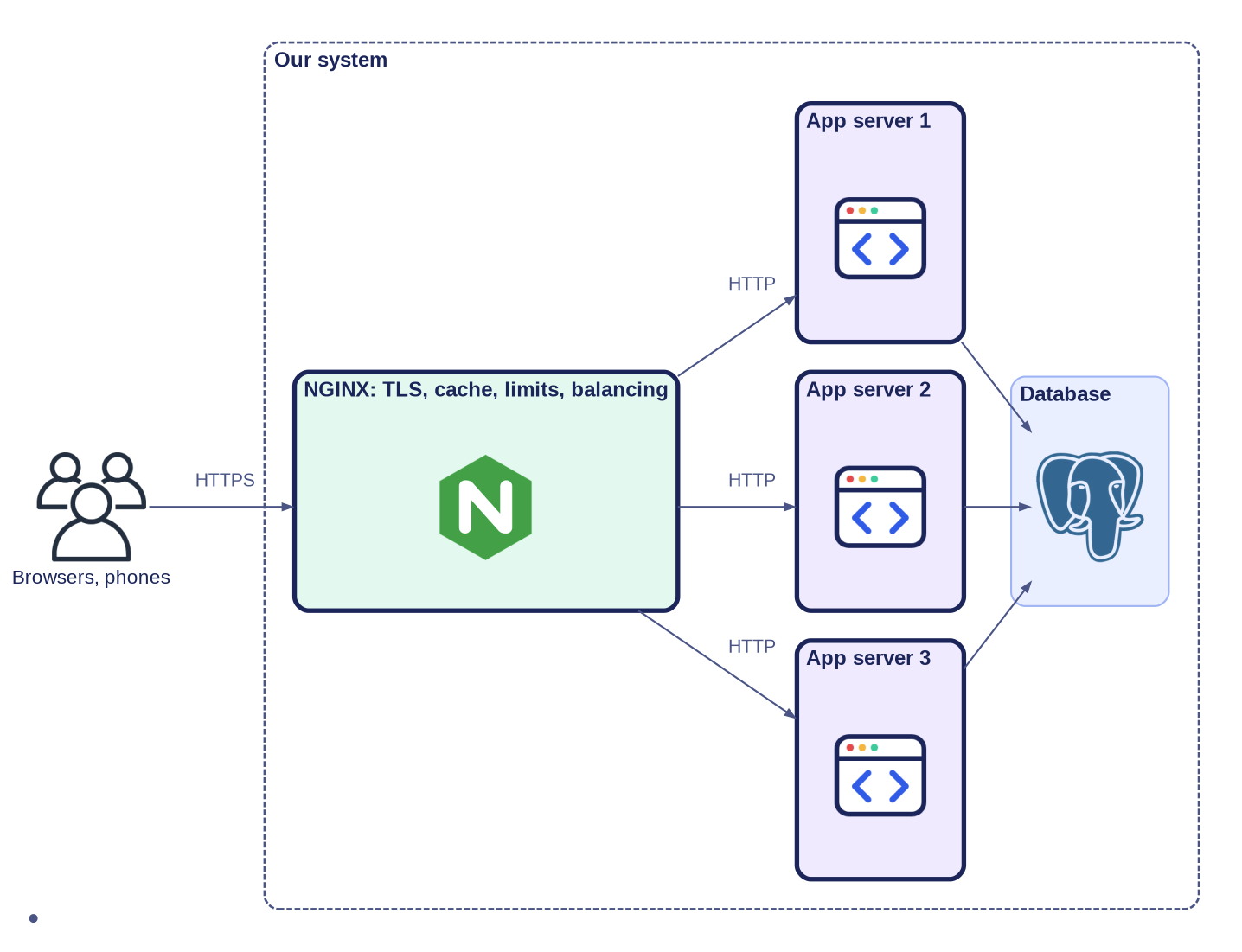
High concurrency
The project's own figure: 10,000 inactive keep-alive connections take about 2.5 MB of memory.
Load balancing
Round robin, least connections, hashes, random of two, and passive failure checks.
TLS termination
Certificates live in one place. Behind it, HTTP or a fresh TLS connection.
Response cache
Answers kept on disk, keys in shared memory. Even one second helps in a burst.
Limits
Requests per second, connections, and bandwidth per client.
Reloads without a gap
New workers take new connections while old ones finish theirs.
The ideas behind these jobs have their own pages: load balancing, L4 and L7 balancers, API gateway, caching and rate limiting. This page is about how the product does them.
Inside
Master, workers and the event loop
One machine, several workers
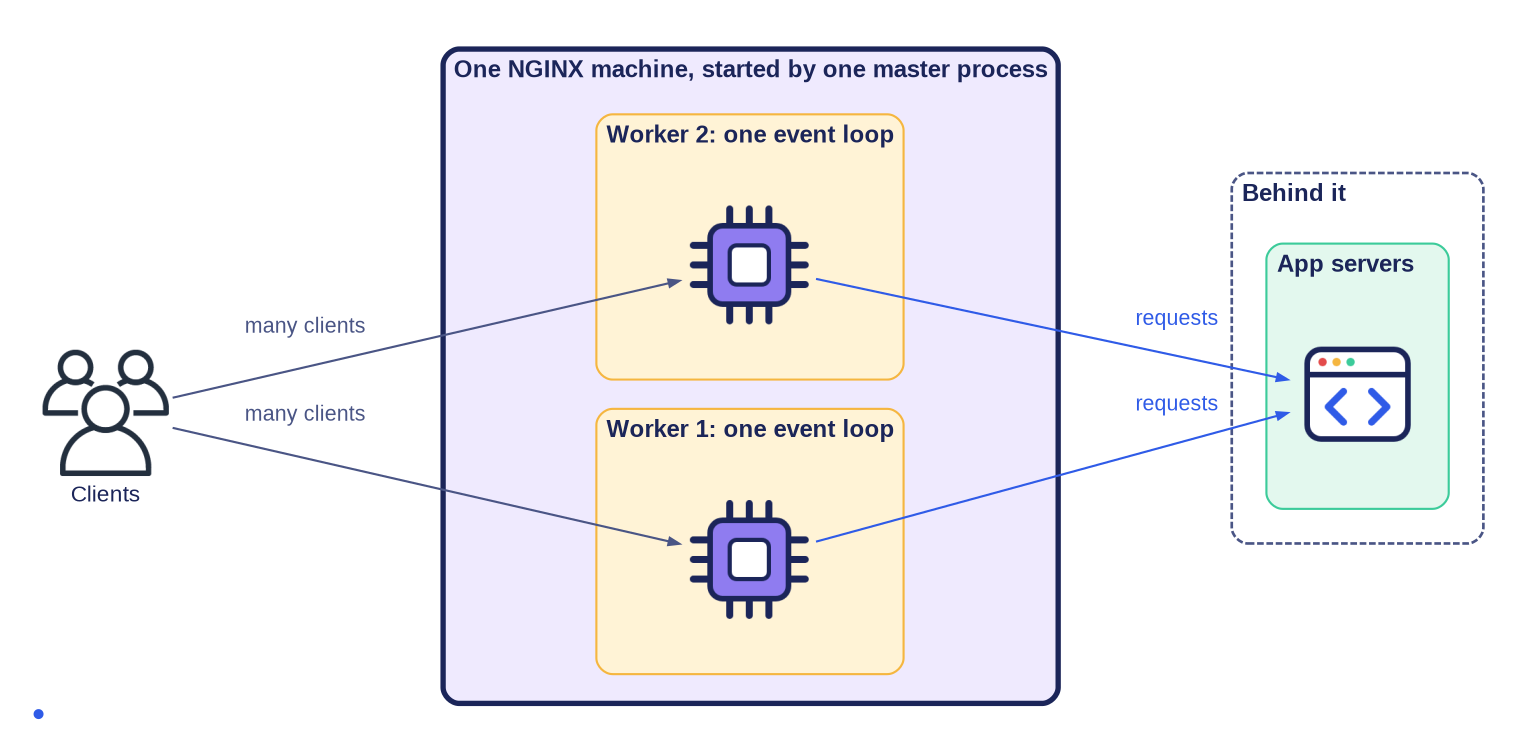
Who does what
| Process | Runs as | Work |
|---|---|---|
| Master | Usually root | Reads configuration, binds ports such as 443, starts and replaces workers |
| Worker | The user in the configuration, such as www-data or nginx | All network and disk work for its connections |
| Cache manager and loader | Like a worker | Remove old cache files; read existing ones after a start |
One turn of the event loop
aio threads.How many clients can one proxy hold?
Configuration
Contexts: http, server, location
Settings are nested. http holds everything about HTTP, a server block is one site on one address and port, and a location block holds the rules for some URLs. Modules supply the directives: gzip, TLS, proxying, limits and the rest.
worker_processes auto;worker_rlimit_nofile 16384;events { worker_connections 4096;}http { include mime.types; sendfile on; tcp_nopush on; keepalive_timeout 65s; gzip on; gzip_types text/plain application/json text/css; server { listen 80; server_name shop.example; root /var/www/shop; location /images/ { expires 1h; } location /api/ { proxy_pass http://127.0.0.1:8080; } }}worker_connections belongs inside events; at the top level the file is rejected.Which block answers?
Request
The life of one request
A proxied request with a cache miss
- 1
Connection
A worker accepts it. With HTTPS the TLS handshake follows; returning clients can resume a session.
- 2
Matching and checks
Server block by host and port, location by URL. Rewrites, access rules and limits apply.
- 3
Cache check
The key is, by default, the scheme, the proxied host and the request URI. A hit ends here.
- 4
Upstream
A server is chosen, an idle connection reused if there is one, and the request sent with the headers you set.
- 5
Response
Filters such as gzip run, the answer is stored if it may be, and the client gets it. A slow client is now NGINX's problem, not the app's.
Upstreams
Choosing a server
Balancing methods in the open source version
| Method | Rule | Use it when |
|---|---|---|
| Round robin (default) | In turn, by weight | Servers and requests are alike |
least_conn | Fewest active connections, by weight | Some requests take much longer than others |
ip_hash | Hash of the first three parts of an IPv4 address, or the whole IPv6 address | Simple stickiness; unfair when many users share an address |
hash key consistent | Ketama consistent hashing of any variable | Cache servers, or a cookie |
random two | Pick two at random, take the one with fewer connections | Several NGINX machines balance the same group |
sticky cookie | A cookie names the server (open source since 1.29.6) | Sticky sessions you cannot avoid |
least_time | Lowest average response time (open source since 1.31.0) | Servers differ in speed |
Which method?
upstream backend { least_conn; zone backend 64k; # shared by all workers server 10.0.0.1:8080 weight=5; server 10.0.0.2:8080 weight=3 max_fails=3 fail_timeout=10s; server 10.0.0.3:8080 backup; # only when the others are down keepalive 32; # idle connections kept, per worker}server { listen 80; location / { proxy_pass http://backend; proxy_http_version 1.1; # default since 1.29.7 proxy_set_header Connection ""; # needed before 1.29.7 proxy_set_header Host $host; proxy_set_header X-Real-IP $remote_addr; proxy_set_header X-Forwarded-For $proxy_add_x_forwarded_for; proxy_set_header X-Forwarded-Proto $scheme; proxy_connect_timeout 5s; proxy_read_timeout 30s; }}zone, every worker counts connections and failures on its own.Health checks. The open source version checks passively: after max_fails failed tries within fail_timeout (defaults 1 and 10 seconds) a server is left out for that time. Checks that probe servers on a timer are part of the commercial version. A failed try is passed to the next server for errors and timeouts; non-idempotent requests such as POST are not repeated once sent, unless you allow it. See retries.
Buffering
Shielding servers from slow clients
With proxy_buffering on, the default, NGINX reads the answer from the app at full speed into memory, and to a temporary file if it is large. The app's worker is free at once. Without it, a phone on a weak network holds that worker for the whole download.
What one slow client costs
Turn buffering off, or send X-Accel-Buffering: no, for answers that must arrive piece by piece, such as server-sent events. WebSockets need the Upgrade and Connection headers passed on.
Cache
Caching and micro-caching
proxy_cache_path /var/cache/nginx levels=1:2 keys_zone=pages:10m max_size=10g inactive=60m use_temp_path=off;server { listen 80; location /api/ { proxy_pass http://backend; proxy_cache pages; proxy_cache_valid 200 1s; proxy_cache_lock on; proxy_cache_use_stale updating error timeout; proxy_cache_background_update on; proxy_cache_bypass $http_authorization; proxy_no_cache $http_authorization; add_header X-Cache-Status $upstream_cache_status always; }}Cache status
| Value | Meaning |
|---|---|
| HIT | Served from the cache; no backend contact |
| MISS | Not in the cache; fetched from the backend |
| EXPIRED | It was there but too old; fetched again |
| STALE | An old copy was served because the backend failed |
| UPDATING | An old copy was served while another request refreshes it |
| REVALIDATED | The backend confirmed that the old copy is still good |
| BYPASS | The cache was skipped on purpose, for example for a login |
Example: 10,000 requests a second for one page and a lifetime of one second. With the lock, about 1 request a second reaches the backend, and 9,999 do not. That holds per key and per NGINX machine. proxy_cache_lock is off by default, and waiting requests give up after 5 seconds and go to the backend. See thundering herd.
Limits
Rate limiting
limit_req uses the leaky bucket method: requests of one key leave at a fixed rate. burst says how many may wait above it, and nodelay lets that burst through at once while still counting it. Other methods are compared in rate limiter algorithms.
limit_req_zone $binary_remote_addr zone=api:10m rate=10r/s;limit_req_status 429; # the default is 503server { listen 80; location /api/ { limit_req zone=api burst=20 nodelay; proxy_pass http://backend; }}30 requests from one address in the same instant, rate 10 per second
| Setting | Passed at once | Delayed | Refused |
|---|---|---|---|
| no burst | 1 | 0 | 29 |
burst=20 | 1 | 20, one every 100 ms | 9 |
burst=20 nodelay | 21 | 0 | 9 |
Limits live in the memory of one machine. Five NGINX machines can let through five times the rate. For one exact total, keep the counter in a shared store; see rate limiter. Login pages deserve a strict limit, read-heavy public pages a loose one.
TLS
Ending encryption at the edge
Where the encryption ends
server { listen 443 ssl; http2 on; # replaces "listen ... http2" server_name shop.example; ssl_certificate /etc/ssl/shop.pem; ssl_certificate_key /etc/ssl/shop.key; ssl_protocols TLSv1.2 TLSv1.3; # already the default ssl_session_cache shared:SSL:10m; # about 40,000 sessions}One place to renew certificates, and no encryption work in the apps. The cost is that traffic behind NGINX is readable unless you encrypt again with proxy_pass https:// and proxy_ssl_verify on. Some rules demand that. X-Forwarded-Proto tells the app what the client used.
Availability
Two of them, and reloads
Surviving the loss of one NGINX
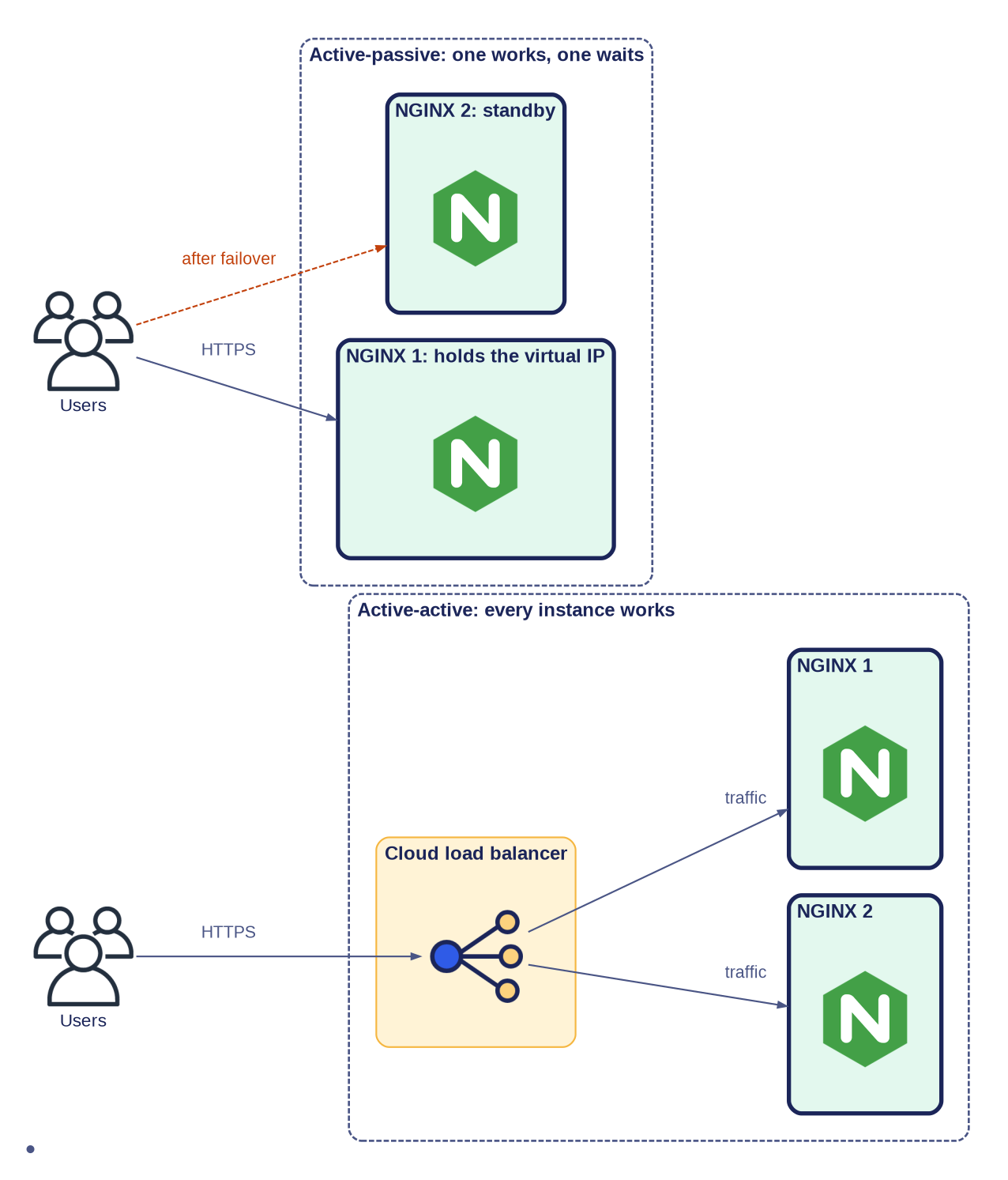
| Active-passive (keepalived) | Active-active (balancer in front) | |
|---|---|---|
| How | VRRP heartbeats decide who holds the virtual IP; a check script watches NGINX | A cloud balancer or DNS spreads traffic over all |
| Hardware in use | Half | All, but keep room to lose one |
| Cache and limits | One set, empty after a failover | One per machine |
| Needs | A shared network segment | Something in front |
nginx -t # test the files firstnginx -s reload # new workers start, old ones finish their requestsnginx -s quit # graceful stop; "stop" drops connectionsnginx -T | less # print the configuration that is really in useworker_shutdown_timeout puts an end to that.Decide
When to choose it, and when not
Choose NGINX when
- You serve many connections or static files
- You want a reverse proxy or balancer you control
- TLS should end in one place
- A response cache near the app helps
- You need limits and traffic protection
- Reloads must not drop requests
Look elsewhere when
- You need application logic: put it in an app server behind
- One small server with modest traffic is enough
- Nobody should operate it: use a cloud balancer
- You want a service mesh or constant changes by API: consider Envoy
Neighbours
| Product | Alike | Different | Choose it for |
|---|---|---|---|
| Apache HTTP Server | Files, proxying, TLS, many modules | Per-directory .htaccess, embedded languages; its event MPM also frees threads from idle connections | Existing sites that rely on those |
| HAProxy | Event driven, balancing, health checks | Dedicated balancer: active checks and a stats page built in; not a file server, and its cache is small | Pure TCP and HTTP balancing |
| Envoy | HTTP/2, gRPC, edge or service proxy | Configured live by xDS APIs, tracing built in, common in service meshes | Meshes and dynamic discovery |
| AWS ALB or NLB | Balancing, checks, TLS | Managed and scaled for you, fewer settings, no response cache | Little operation work; see cloud load balancing |
Strengths
- Many connections, little memory
- Several jobs in one program
- Changes without dropping connections
- Long production history, 2-clause BSD licence
Costs
- Changes are files and reloads; live APIs are limited in open source
- Cache and limits per machine, idle upstream connections per worker
- No business logic
- Small configuration mistakes have large effects: matching, caching, limits
Summary
The whole topic in one minute.
NGINX is a small set of worker processes that each watch thousands of connections and only touch the ones that are ready. That makes it good at everything that is mostly waiting: serving files, ending TLS, buffering slow clients, and passing requests on.
Use it as the front door with an upstream group, buffering, a cache with a lock, and limits. Remember what is per machine (limits, cache) and per worker (idle upstream connections), run two of them, and test the configuration before every reload.
- One master, a few workers, each with an event loop that never waits for one client.
- Server block by host, location by URL; a regex beats a plain prefix.
- Buffering frees the app; a one-second cache with a lock absorbs bursts.
- Limits and cache are per machine; idle upstream connections are per worker.
- Run two, test with
nginx -t, reload instead of restart.
Sources
- nginx.org: about nginx (features, memory figure)
- nginx.org: core module defaults
- nginx.org: proxy module
- nginx.org: upstream module
- nginx.org: limit_req module
- The Architecture of Open Source Applications: nginx
- Cloudflare: how we built Pingora
- Dropbox: from Nginx to Envoy
- Kubernetes: Ingress NGINX retirement
- Netflix Open Connect appliances