
Kong
medium 27 minKong Gateway is an API gateway built on NGINX and Lua.
Video lesson · Chapter 1 of 5
One order crosses the gateway
Kong in 90 seconds
1:30Reel coming soon
Theory
Read or listen first. About 2 min.
What it is
Kong Gateway is a proxy for APIs. It matches each request to a route, runs the plugins attached to it, and passes it to a service. The documentation calls it a Lua application that loads and runs modules; underneath are NGINX and OpenResty, which add Lua to NGINX.
The difference from a plain proxy is the model. Kong knows consumers (who is calling), credentials, permissions and limits per consumer, and all of it can be changed through an API or a declarative file while it runs.
Kong Inc. sells an Enterprise edition of the gateway and Konnect, a hosted control plane. This page says which parts belong to which.
Why it exists
Ten services that each check keys, count requests, log, and answer browsers' CORS questions contain the same code ten times, in several languages and with ten different mistakes.
An API gateway does this once at the door. Kong's answer to "but every company needs something different" is the plugin: a small module with hooks at fixed moments of a request, switched on per route, service or consumer.
A short history
April 2015
Version 0.2.0-2 is listed in the change log. The GitHub repository dates from November 2014.
December 2018
Version 1.0.0.
March 2019
Version 1.1.0 adds declarative configuration and DB-less mode.
January 2020
Version 2.0.0 adds hybrid mode and Go plugins, and removes its service mesh feature in favour of Kuma.
September 2022
Version 3.0.0 brings a new router written in Rust and tracing for OpenTelemetry.
March 2025
Enterprise 3.10: free mode ends. Without a licence it behaves like an expired one.
November 2026
Version 3.9.5 patches the open source line, which stays at 3.9. Enterprise is at 3.16.
Words to know
- Service
- One API behind the gateway: an address plus timeouts and retries.
- Route
- A rule (host, path, method, header) that sends requests to a service.
- Consumer
- A user or application that calls the APIs. Credentials belong to it.
- Plugin
- A module that runs at fixed phases of a request.
- Upstream and target
- A virtual host with several addresses to balance over.
- Data plane
- Kong nodes that carry traffic.
- Control plane
- Kong nodes that hold the configuration and the Admin API.
- decK
- Kong's command line tool that compares a file with a running gateway and applies the difference.
How it works
Step through the idea, or press Play.
Match. The router finds the route with the highest priority
Understand it
Start here
The gangway of inspectors
Imagine a ship. Everybody who wants to come on board walks over one gangway, and the gangway has places where inspectors can stand.
The ship does not know how many inspectors there are.
The idea
One door for many APIs
Kong in front of two services
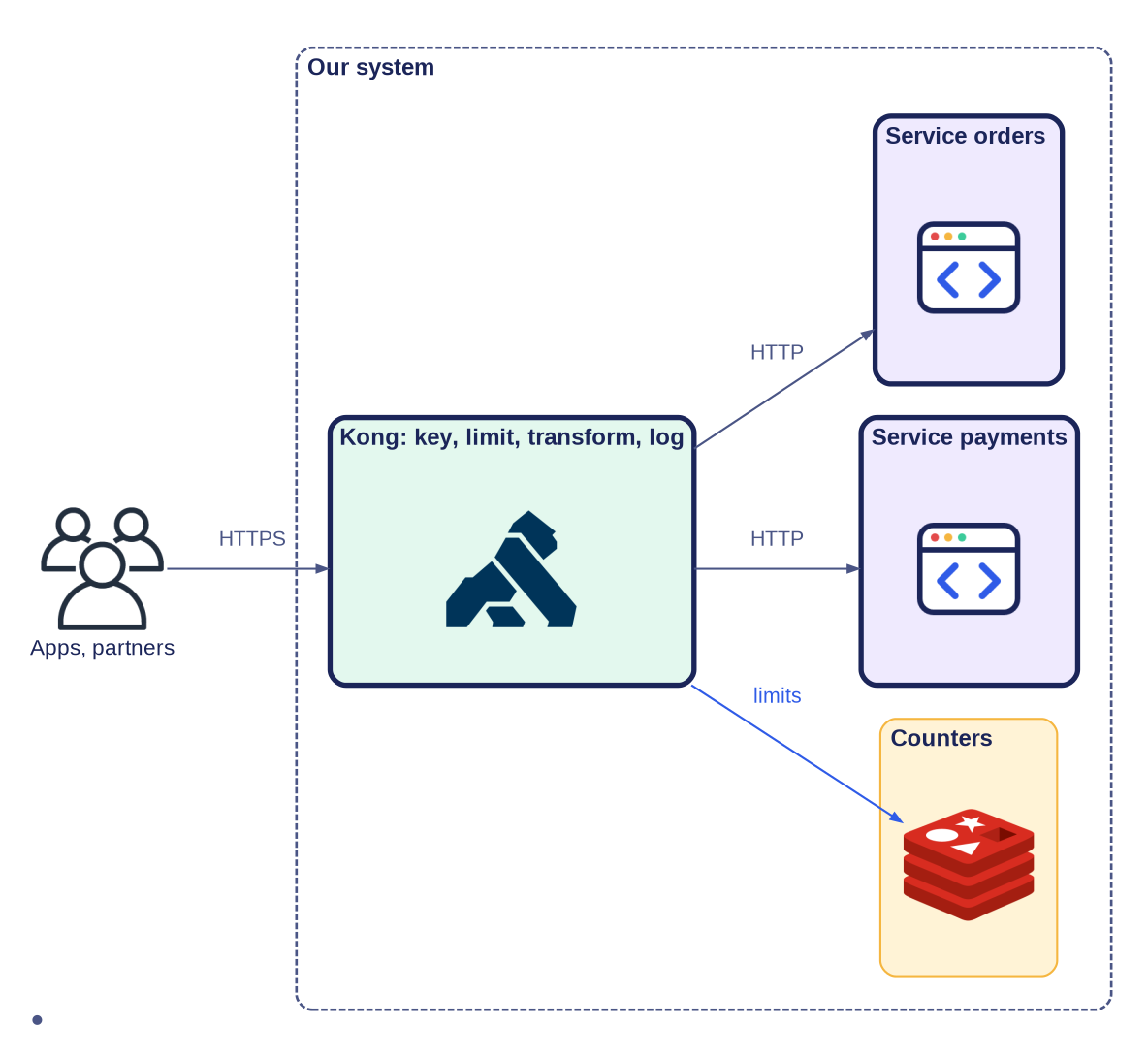
Identity
key-auth, JWT, basic auth, HMAC, OAuth 2.0 and LDAP. OpenID Connect is Enterprise.
Permission
ACL groups per consumer, IP allow and deny lists.
Limits
Requests per second up to per year, size limits, response based limits.
Change
Rewrite headers, bodies and paths; gRPC to JSON; end a request early.
Record
Prometheus, OpenTelemetry, Zipkin, Datadog, HTTP and file logs.
AI traffic
Plugins that route to language model providers and guard prompts.
Why gateways exist and when not to have one is on the API gateway page. API authentication, rate limiting and idempotency have pages too. Here is how the product does it.
Model
Service, route, consumer, plugin
How the objects hang together
_format_version: "3.0"services: - name: orders url: http://orders.internal:8080 connect_timeout: 1000 # milliseconds; the default is 60000 read_timeout: 5000 retries: 2 # the default is 5 routes: - name: orders paths: ["/orders"] strip_path: false # the default true removes /orders plugins: - name: key-auth config: key_names: ["apikey"] key_in_query: false hide_credentials: true - name: rate-limiting config: minute: 100 limit_by: consumer policy: localconsumers: - username: acme keyauth_credentials: - key: replace-meRouting
Which route answers?
The router sorts routes by priority and takes the first that matches. With the traditional JSON fields, a route with more kinds of conditions (host, path, method, headers) is more specific, and longer paths beat shorter ones. The expressions router lets you write the condition and its priority yourself. The documentation recommends it for 3.4 and later; router_flavor is traditional_compatible by default.
From request to route
Plugins
Phases and order
When plugin code runs
| Phase | Moment | Example |
|---|---|---|
| certificate | During the TLS handshake | Choose a certificate |
| rewrite | Before a route is known, so only for global plugins | Correlation ID |
| access | After routing, before the service is called | Keys, limits, transformation |
| header_filter, body_filter | While the response passes | Change headers or body |
| log | After the client has the answer | Metrics, logs |
Priority of some bundled plugins (higher runs first)
| Plugin | Priority | So that |
|---|---|---|
| correlation-id | 100001 | Every later step can log the ID |
| cors | 2000 | Browser checks need no login |
| jwt | 1450 | The consumer is known |
| key-auth | 1250 | The consumer is known |
| ip-restriction | 990 | Runs after authentication |
| acl | 950 | Groups of the consumer are checked |
| rate-limiting | 910 | Counts per consumer |
| request-transformer | 801 | Changes what the service will see |
| proxy-cache | 100 | Only allowed requests reach the cache |
| prometheus | 13 | Counts at the end |
One request with a key and a limit
The most specific configuration wins
- 1
Once per request
A plugin may be attached many times, but one request runs it once, with one configuration.
- 2
More parts beat fewer
Consumer, route and service together are the strongest match.
- 3
Then the kind
With one part each: consumer, then consumer group, then route, then service.
- 4
Global is last
It applies when nothing else fits.
Own plugins are written in Lua, or in Go, Python or JavaScript, which run in a separate plugin server process and cost a hop between processes for each call.
Limits
What a rate limit counts
Three places for the counter of the Rate Limiting plugin
| Policy | Counter | Good for | Price |
|---|---|---|---|
local (default) | Memory of each node | Protecting a backend | Nodes do not know each other |
cluster | Kong's database | Exact, nothing extra to run | A read and a write per request. Not in hybrid mode or Konnect |
redis | A Redis server | Exact with less cost than cluster | One more system. Exact only with synchronous counting |
A local limit on several nodes
The plugin uses calendar windows: minute 1 starts with a fresh counter. So a client can send 100 requests at the end of one minute and 100 at the start of the next. Set a limit per second as well, or use Rate Limiting Advanced (Enterprise), which has sliding windows. The ideas are compared in rate limiter algorithms.
Storage
Three ways to run it
| Mode | Configuration lives in | Change it by | Keep in mind |
|---|---|---|---|
| Traditional | PostgreSQL, read by all nodes | Admin API, Kong Manager, decK | Every node can change everything; other nodes notice by polling, every 5 seconds by default |
| DB-less | A YAML or JSON file in memory | A new file or POST to /config, on each node | Admin API is read-only otherwise (405); plugins that need a database do not work |
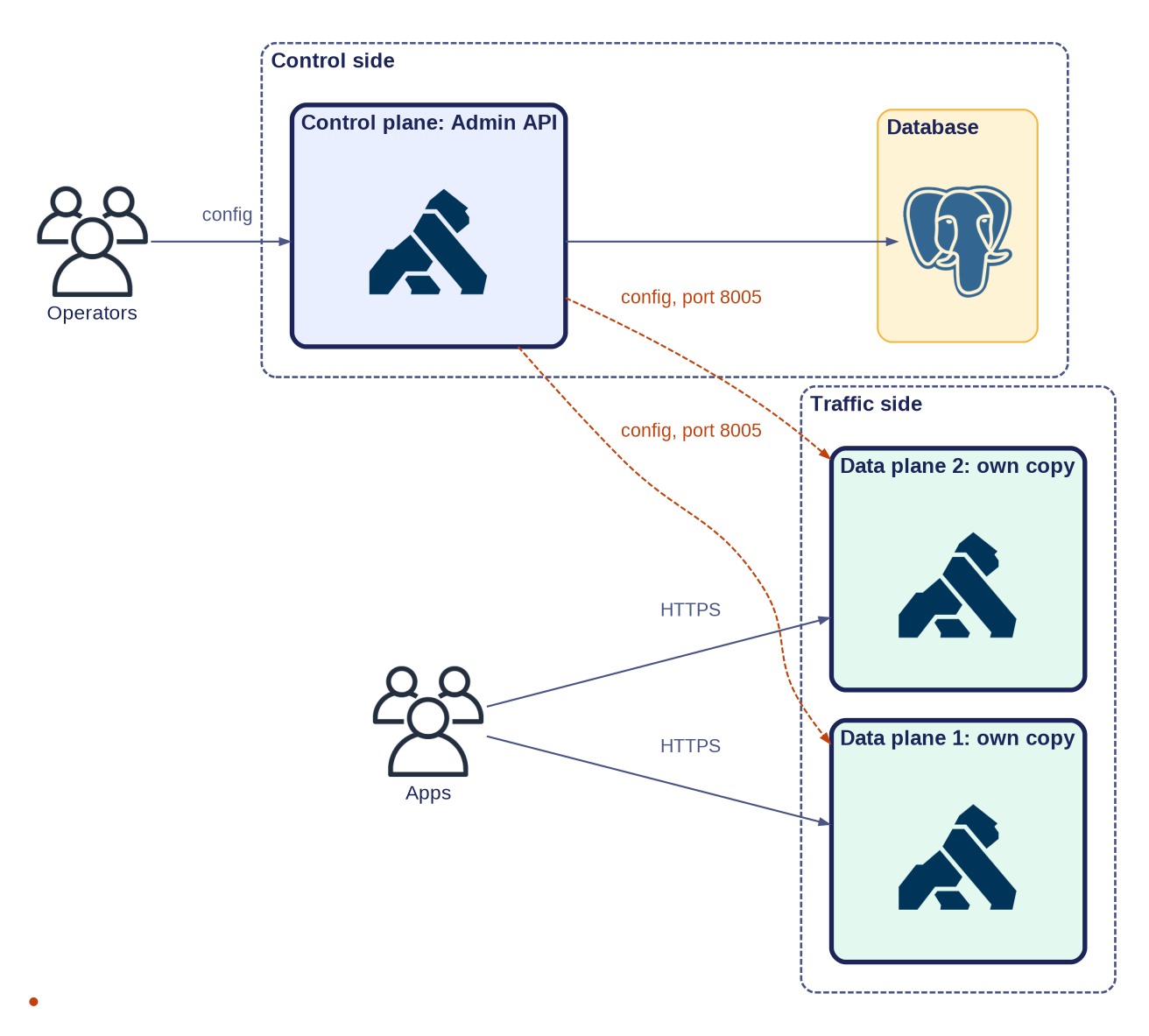
| Hybrid | Database at the control plane, a copy on each data plane | Admin API at the control plane, or Konnect | Mutual TLS certificates between the planes |
Hybrid mode
Which mode?
When the control plane is gone, data planes go on with their last copy from disk, also after a restart. A completely new data plane needs the resilience feature, which keeps a copy in object storage. The local copy is an LMDB file; it is not encrypted unless you switch that on.
On Kubernetes the Kong Ingress Controller, and newer Kong Operator, translate Gateway API and Ingress resources into this configuration. New features go into the operator.
Upstreams
Balancing and health
| Algorithm | Rule | Use it when |
|---|---|---|
round-robin (default) | In turn, by weight | Targets are alike |
least-connections | Fewest requests in flight | Request times differ |
consistent-hashing | Hash of consumer, IP, header, cookie and others | Caches in the targets |
latency | Peak EWMA: lately fastest, without weights | Similar requests, targets near and far |
sticky-sessions | A cookie names the target (newer Enterprise versions) | Sticky sessions you cannot avoid |
Active checks
- Probe a path on a timer
- Can bring a target back
- Off by default: interval 0
Passive checks alone
- Watch real answers
- Cannot bring a target back by themselves
- Off by default: all counters 0
The documentation calls passive checks circuit breakers. Per target, they work like the open state of a circuit breaker; the way back needs an active probe or an operator.
Safety
Keep the door closed
| Port | Purpose | Who may reach it |
|---|---|---|
| 8000, 8443 | Proxy: HTTP and HTTPS | Clients, through a load balancer |
| 8001, 8444 | Admin API; listens on 127.0.0.1 by default | Operators on a private network |
| 8002, 8445 | Kong Manager, the web page | Operators |
| 8005 | Configuration for data planes | Data planes, with mutual TLS |
| 8007 | Status: health and metrics | Monitoring |
- 1
No way around
Services accept calls from Kong only: network rules or mutual TLS. They still check what the consumer may do with a single record.
- 2
Trust the right address
Set
trusted_ipsandreal_ip_header, or all clients share the address of the balancer. - 3
Configuration from Git
deck gateway diffin the review,deck gateway syncafter it. Nobody edits by hand. - 4
Global plugins first
Correlation ID, logging and a generous limit for everything; strict limits per route.
Operations
Running and paying for it
What the gateway may cost in time
Scale
Data planes hold no request state. Add nodes behind a balancer; then look at local limits again.
Watch
Kong's own latency against the latency of the service, 4xx and 5xx per route, certificate expiry between the planes.
Change
Routes and plugins without a restart. Version upgrades are rolling; control planes first.
Fail
It is on every path: at least two nodes in two zones, and a decision for each plugin that depends on a store.
Editions in November 2026
| Open source | Enterprise and Konnect | |
|---|---|---|
| Licence | Apache 2.0 | Commercial |
| Newest version | 3.9.5, patches of the 3.9 line | 3.16; long-term support 3.14 and 3.10 |
| Image | kong | kong/kong-gateway |
| Plugins | About 45 bundled | Also OpenID Connect, advanced limits and caching, and others |
| Without a licence | Not needed | Since 3.10 like an expired licence: traffic flows, configuration is read-only |
Decide
Kong or something else
| Product | Strong at | Choose it instead when |
|---|---|---|
| AWS API Gateway | Nothing to run | You are on AWS and the managed limits fit |
| NGINX | A proxy and a cache | No consumers, few rules |
| Envoy with Envoy Gateway | Dynamic proxy, Gateway API | You want an open project on Kubernetes |
| Traefik | Finds containers, gets certificates | Routing is the job, not API products |
| A mesh such as Istio | Calls between services | The problem is inside, not at the door |
Strengths
- Clear model with consumers
- Many plugins, own ones in four languages
- Change by API, file or Git
- Traffic survives a lost control plane
Costs
- One more system on every request
- Useful features sit in Enterprise
- Business logic creeps into plugins
- Local counters surprise people
Summary
The whole topic in one minute.
Kong is an NGINX based gateway whose behaviour comes from plugins. Services, routes, consumers and plugins are the whole model; the most specific plugin configuration wins and the plugin with the highest priority runs first.
Choose how it stores configuration (database, file, or hybrid with a control plane), where limits are counted, and what happens when that store fails. Keep the Admin API private, block every way around the gateway, and check the edition: the open source line stays at 3.9.
- Service, route, consumer, plugin. The most specific plugin configuration wins.
- The highest priority runs first: identity, then permission, then limits, logs last.
- Limits are local by default and open when the store is down.
- DB-less, traditional or hybrid. In hybrid mode traffic needs no database.
- Admin API private, no way around the gateway, and check the edition.
Sources
- Kong: plugins, phases, precedence and priority
- Kong: routes
- Kong: gateway services, timeouts and retries
- Kong: upstreams, algorithms and health checks
- Kong: Rate Limiting plugin
- Kong: hybrid mode
- Kong: DB-less mode
- Kong: licence expiration
- Kong: version support
- Kong: change log of the open source gateway (early versions)
- Kong 3.9.5: default configuration file
- Kong: securing the Admin API