
HAProxy
medium 28 minHAProxy is a load balancer and reverse proxy for TCP and HTTP.
Video lesson · Chapter 1 of 5
Pick a backend for a checkout
HAProxy in 90 seconds
1:30Reel coming soon
Theory
Read or listen first. About 2 min.
What it is
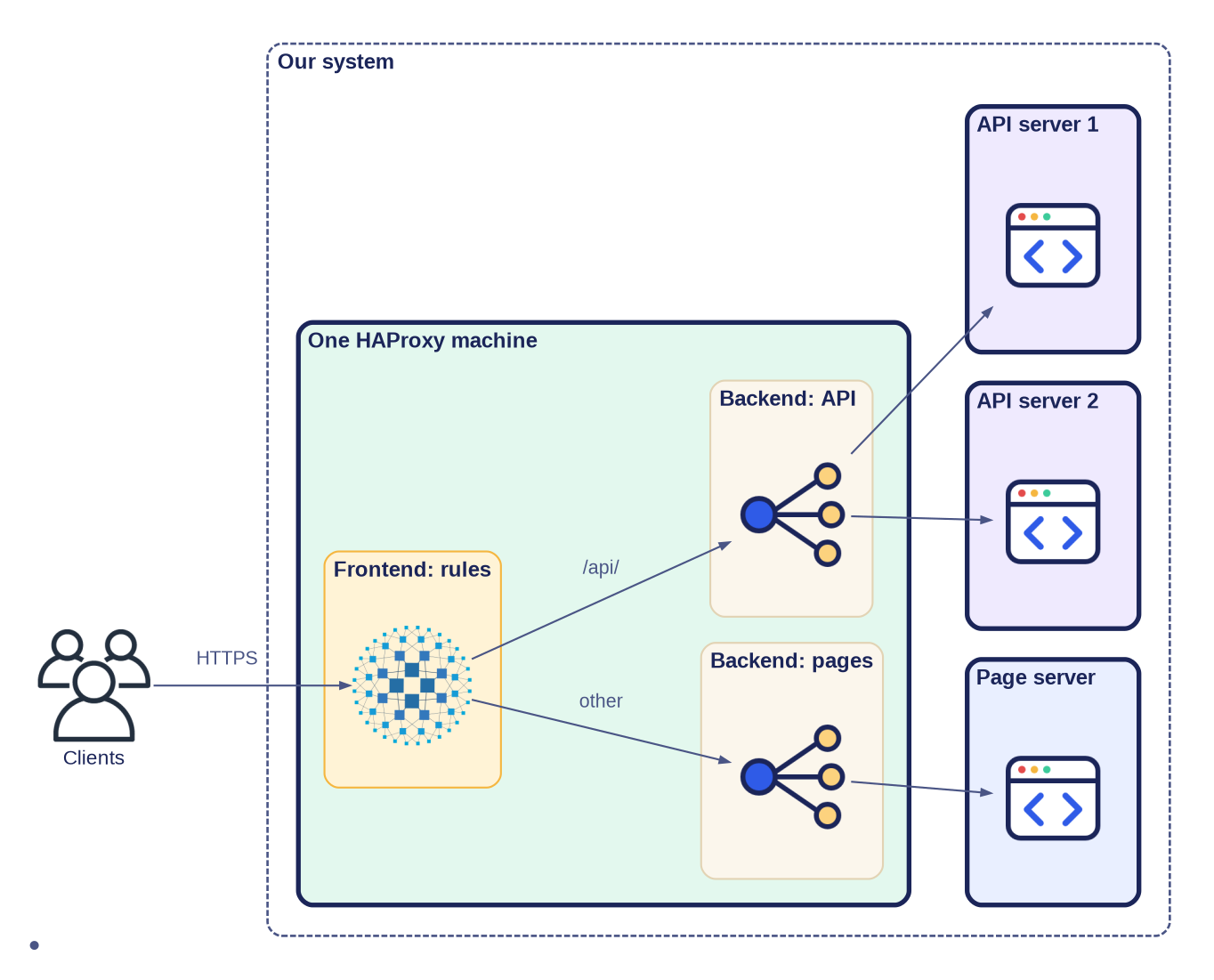
HAProxy accepts connections from clients and opens its own connections to your servers. In between it reads the traffic, follows rules, and chooses where each connection or request goes.
It works at two levels. In TCP mode it forwards bytes and needs to understand nothing, which fits databases, mail or any protocol over TCP. In HTTP mode it sees each request: host, path, headers and cookies, over HTTP/1, HTTP/2 and HTTP/3.
It is not a web server: after the start it reads no files from disk for clients. It is not a packet balancer either: it handles TCP, TLS, HTTP and QUIC, not general UDP.
Why it exists
As soon as there are two servers, somebody must decide who gets which request, notice when one fails, and take servers out for a deployment. Doing this in clients means changing every client. Doing it in one place in front is simpler.
A server that gets too many requests at once becomes slow for all of them. HAProxy can hold the surplus in a queue, so that each server works on as many as it can do well. This is the feature its users often value most.
The general ideas have their own pages: load balancing, L4 and L7 balancers and load balancing patterns. This page is about the product.
A short history
December 2001
Willy Tarreau publishes version 1.0, with health checks and cookies that tie a client to a server already in the early versions.
June 2014
Version 1.5 brings TLS, IPv6 and kept-open connections to servers.
November 2017
Version 1.8: several threads, HTTP/2, a small cache, and reloads without refused connections.
June 2019
Version 2.0: gRPC, repeating failed requests, and limits chosen automatically.
November 2025
Version 3.3 changes the default balancing algorithm from round robin to random with two draws.
June 2026
Version 3.4, a long-term version: backends can be created and deleted at run time, without a reload.
Words to know
- Frontend
- Where clients connect: addresses, certificates and rules.
- Backend
- A group of servers with an algorithm and health checks.
- ACL
- A named test, such as: the path begins with /api/.
- Health check
- A connection or request sent on a timer to see whether a server works.
- maxconn
- The most connections or requests handed to one server at a time. The rest wait in a queue.
- Stick table
- A table in memory that remembers something per key, such as requests per address.
- Runtime API
- A socket that accepts commands while HAProxy runs.
- PROXY protocol
- A short header in front of a connection that carries the real client address.
How it works
Step through the idea, or press Play.
Accept. A frontend takes the connection, ends TLS, reads the request
Understand it
Start here
The rowing club marshal
Imagine a rowing club on a busy morning. Crews arrive by boat and want a jetty. A marshal on the shore reads a card with rules and sends each crew somewhere.
The marshal never rows. All the skill is in deciding where the next boat goes.
The idea
Frontends, rules, backends
One proxy, two groups of servers
Balancing
Random of two, round robin, fewest connections, hashes of address, URL or any value.
Active checks
Connections or HTTP requests on a timer, with a slow start after recovery. In the open source version.
Queues
A limit per server and a place to wait, so overload is a delay and not a collapse.
Rules
Match on almost anything in the request, then deny, redirect, rewrite or route.
Counters per client
Stick tables count rates per address or key, shared between machines if you want.
Insight
A statistics page, Prometheus output, and a log line that says where the time went.
global log stdout format raw local0 maxconn 20000 stats socket /run/haproxy/admin.sock mode 660 level admin hard-stop-after 5mdefaults mode http log global option httplog option redispatch retries 2 timeout http-request 5s timeout connect 3s timeout client 30s timeout server 30s timeout queue 5s timeout tunnel 1hfrontend web bind :80 bind :443 ssl crt /etc/haproxy/certs/ alpn h2,http/1.1 http-request redirect scheme https unless { ssl_fc } http-request set-header X-Forwarded-For %[src] http-request set-header X-Forwarded-Proto https http-request track-sc0 src table per_ip http-request deny deny_status 429 if { sc_http_req_rate(0) gt 200 } use_backend api if { path_beg /api/ } default_backend pagesbackend per_ip stick-table type ipv6 size 100k expire 1m store http_req_rate(10s)backend api balance random(2) option httpchk http-check send meth GET uri /health ver HTTP/1.1 hdr Host shop.example http-check expect status 200 default-server check inter 2s fall 3 rise 2 slowstart 20s maxconn 100 server api1 10.0.0.11:8080 server api2 10.0.0.12:8080backend pages balance roundrobin cookie SRV insert indirect nocache httponly secure default-server check maxconn 50 server page1 10.0.0.21:8080 cookie page1Inside
One process, several threads
HAProxy is event driven. A thread never sleeps for one connection; it handles whatever is ready and goes on, as described for NGINX. One process runs one thread per available CPU by default, and the threads share everything: idle connections to servers, stick tables and counters.
What happens to one request
Memory for connections
Speed is rarely the limit. The project reports 2 million HTTPS requests a second on one 64-core machine with version 2.4, with kept-open connections. New TLS handshakes are what costs: the manual's rule of thumb is a factor of ten between reused TLS connections and resumed ones, and ten again to full handshakes.
Choosing
Balancing algorithms
balance | Rule | Use it when |
|---|---|---|
random(2) (default since 3.3) | Draw two servers by weight, take the less loaded | The normal case, many servers, several balancers |
roundrobin | In turn, by weight | Few equal servers and similar requests |
leastconn | Fewest connections, counting queued ones | Long sessions: databases, WebSockets |
source | Hash of the client address | Stickiness without cookies, in TCP mode |
uri or hash expr | Hash of the URL or any value | Cache servers: each URL has one home |
first | Fill one server up to maxconn, then the next | Switching spare servers off |
Which algorithm?
Why two draws? Choosing one server at random sometimes hits the busiest. Looking at two and taking the less loaded never picks the busiest of all, and needs no exact common count between several balancers. With hashes, set hash-type consistent, or most keys move when a server comes or goes; see consistent hashing.
Failure
Health checks, retries and redispatch
The states of a server
How long does a dead server get traffic?
| Setting | What it does | Mind |
|---|---|---|
check alone | Opens a TCP connection | A frozen app still accepts connections. Use an HTTP check |
retries and option redispatch | Try again, the last time on another server | By default only if the connection failed, so nothing was sent |
retry-on 503 empty-response | Also repeat after these results | Only for requests that may run twice: idempotency |
slowstart 20s | Raises weight and maxconn step by step | Cold caches after a restart |
backup | A server used only when the others are gone | An error page or a smaller site |
Overload
maxconn and the queue
The surplus waits in the proxy
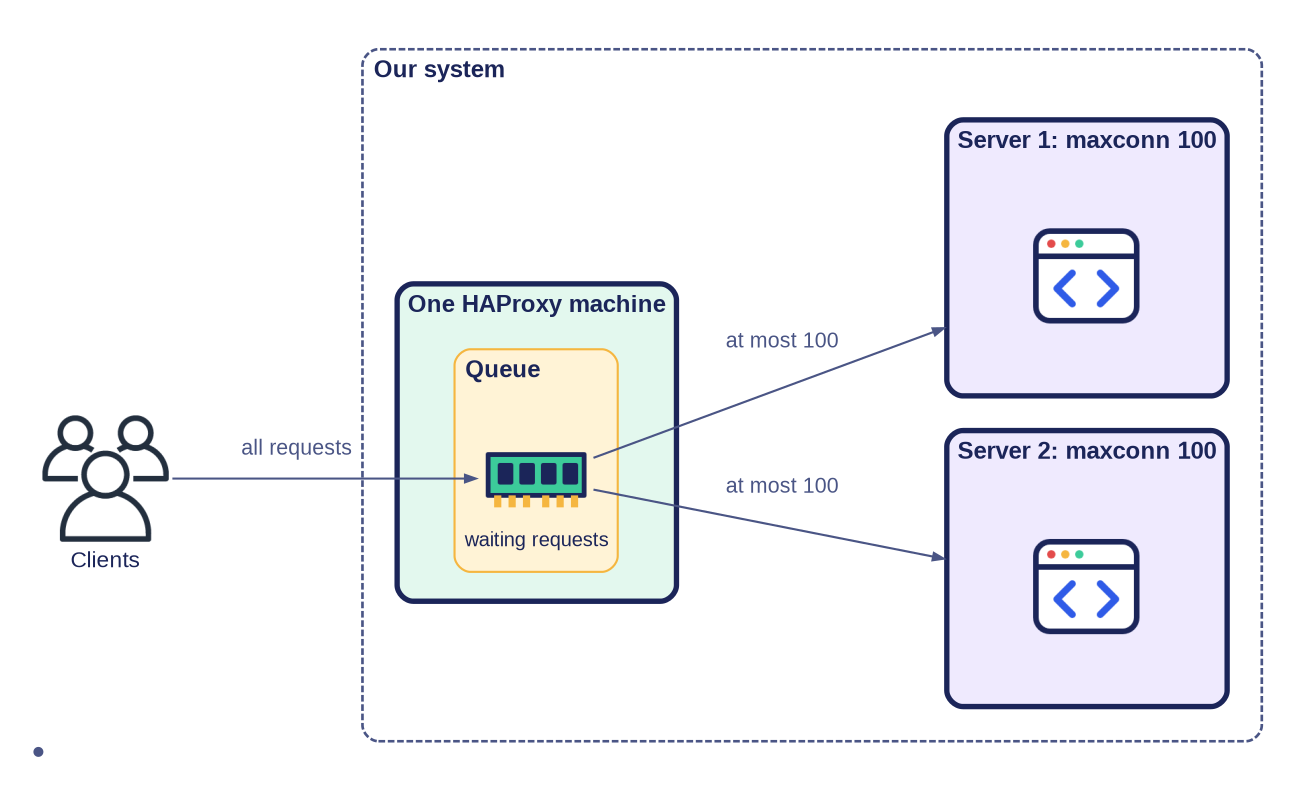
Little's law for a backend
With maxconn
- Servers work at their best load
- The queue is visible as a number
- Rules can refuse or prefer requests while they wait
- Recovery is immediate after the peak
Without
- Default is 0: no limit
- Every server gets slower for everyone
- Timeouts, retries and more load
- It may not recover when the peak is over
In HTTP mode the limit counts requests being worked on, not connections. With http-request set-priority-class you can let the checkout wait less than the search. If timeout queue is not set, timeout connect is used for waiting.
Memory
Stickiness and stick tables
| Way | Where the memory is | Survives |
|---|---|---|
cookie SRV insert indirect | In the browser | Restarts of HAProxy, several HAProxy machines |
balance source or a hash | Nowhere, it is computed | Restarts; changes when servers change |
stick on src | A stick table | Reloads and other machines, if peers are set up |
Stick tables also count. http_req_rate(10s) per address is a rate limit, as in the file above, and the tables can hold error rates or bytes. The peers protocol copies entries between HAProxy machines. Each machine still counts its own part by default, so an exact total over several needs a different design: rate limiter. If you can avoid sticky sessions, do.
Edge
TLS, real addresses and the small cache
- 1
TLS
bind ... ssl crtends it. Certificates can be replaced through the runtime API. To keep traffic encrypted inside, addssl verify required ca-file ...to the server line. - 2
HTTP/3
bind quic4@:443 ssl crt ... alpn h3adds QUIC, called ready for production since version 2.8. Keep the TCP bind: some networks block UDP. - 3
Client address
Set
X-Forwarded-Foryourself instead of adding to what the client sent. In TCP mode use the PROXY protocol (send-proxy-v2), and accept it (accept-proxy) only from balancers you trust. - 4
Cache
A small memory cache for things like icons. The manual calls it minimalist, and recommends Varnish for more.
HTTP mode or TCP mode
Operate
Two machines, reloads and draining
The balancer needs a partner too
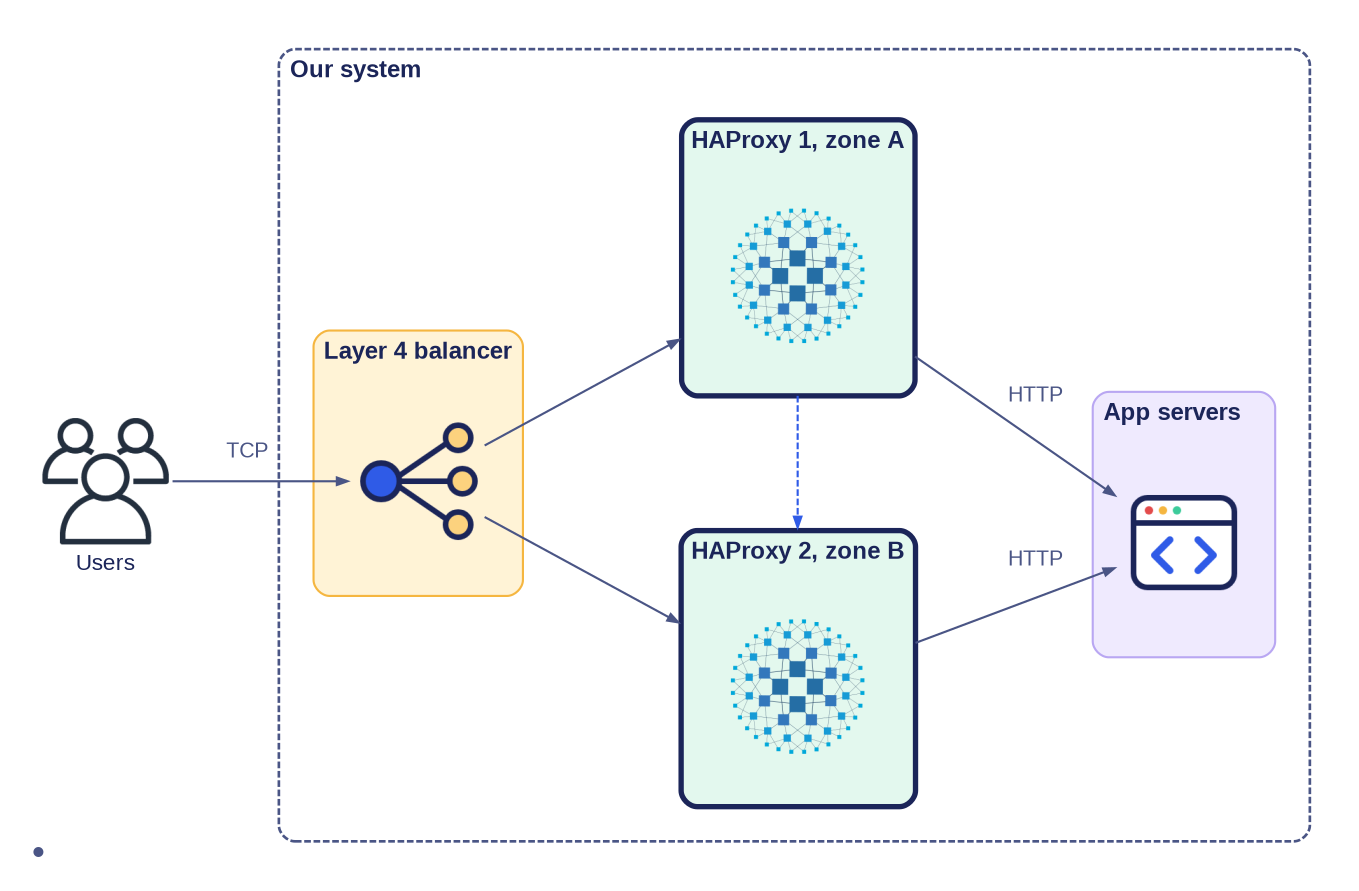
Ways to change something
| Change | How | Connections |
|---|---|---|
| Take a server out for a deployment | Runtime API: state drain, then ready | Existing ones finish |
| Weight, address, map entries, certificates | Runtime API | Untouched. Lost at the next reload unless the files agree |
| Add servers | Runtime API since 2.5, or DNS with server-template | Untouched |
| Add or delete a whole backend | Runtime API since 3.4 | Untouched |
| Everything else | Reload: a new process with new files | The old process finishes its own, until hard-stop-after |
haproxy -c -f /etc/haproxy/haproxy.cfg && systemctl reload haproxyS=/run/haproxy/admin.sockecho "set server api/api1 state drain" | socat stdio $S # before a deploymentecho "show servers conn api" | socat stdio $S # wait until it is emptyecho "set server api/api1 state ready" | socat stdio $Secho "show table per_ip" | socat stdio $S # who is counted?echo "show stat" | socat stdio $S # CSV: queue, sessions, errorsInsight
Reading the log line
With option httplog every request leaves one line with five times in it, and letters that say who ended it. That answers the usual question, is it the network, the queue or the app.
| Part | Meaning | If it is large |
|---|---|---|
| TR | Time to receive the request from the client | Slow client or network |
| Tw | Time in queues | maxconn reached: too little capacity |
| Tc | Time to connect to the server | Network, or a server that cannot accept |
| Tr | Time until the server's answer began | The app is slow |
| Ta | Total active time | The sum, with the transfer |
Flags such as sH or sQ | Server timeout while waiting for headers; timeout in the queue | Look at the app; look at capacity |
Decide
When to choose it, and when not
Choose it when
- Balancing is the main job, for HTTP or plain TCP
- Servers must be protected from overload by a queue
- You need active checks and detailed insight in open source
- Two database replicas need one address
- You run your own machines or several clouds
Look elsewhere when
- You need a web server: NGINX
- A real HTTP cache: Varnish
- A service mesh steered by an API: Envoy
- Nobody should operate it: cloud load balancing
- General UDP or packet balancing: IPVS or a network balancer
Neighbours
| Product | Alike | Different | Choose it for |
|---|---|---|---|
| NGINX | Event-driven proxy and balancer | Serves files, caches on disk; active checks only in the paid edition | One program for web and proxy |
| Envoy | L4 and L7, modern protocols | Built around live configuration by API and used in meshes | Many moving services |
| Traefik | Reverse proxy | Finds services in containers by itself | Small container platforms |
| AWS ALB and NLB | Balancing, checks, TLS | Managed, fewer controls, no queue per target | Little operation work |
| IPVS, or a cloud L4 balancer | Spreads connections | Sees packets, not requests | The layer in front of several HAProxy machines |
Strengths
- Very stable and careful with resources
- Queues and checks that work in detail
- Excellent logs and runtime control
- Long support per version
Costs
- Own language to learn
- No files, small cache, no general UDP
- You run two of them, and the certificates
- Discovery is less automatic than in newer proxies
Summary
The whole topic in one minute.
HAProxy has frontends that take connections, rules that choose a backend, and backends that choose a server. Health checks, retries on another server, a limit per server and a queue keep a group working when one member does not.
Set every timeout, set maxconn per server, check real health, and watch the queue. Reload for new files, use the runtime API for draining a server, and run two HAProxy machines, because the balancer itself can fail.
- Frontend, rules, backend, server: four steps for each request.
- Default algorithm is random of two since 3.3. Use leastconn for long sessions.
- Checks every 2 s, down after 3, up after 2.
- maxconn per server plus a queue turns overload into a wait.
- Every timeout must be set by you.
- Drain by runtime API, reload for files, run two.
Sources
- HAProxy: versions, history, performance
- HAProxy 3.4: introduction
- HAProxy 3.4: configuration manual
- HAProxy 3.4: management guide
- HAProxy: licence
- HAProxy Technologies: announcing 3.4
- HAProxy Technologies: 2 million requests a second
- Stack Overflow: the architecture, 2016
- GitHub: introducing GLB
- HAProxy: they use it
- Wikimedia: Varnish (mentions HAProxy)